rustfmt
rustfmt: A focused Rust formatter with Cargo, CI, configuration, and editor support. Ranked #13 of 34 in Code Formatting Tools by our editors (6.0/10); pricing: Open source; best for rust projects using Cargo.
At a glance
- Editor score6.0 / 10
- PricingOpen source
- Best forRust projects using Cargo
- Paid fromNone
- Supported languagesRust
- Facts checked21 Sep 2026
Where it wins
- Formats individual Rust files, Cargo crates, and workspaces
- Supports CI verification with the --check option
- Integrates with major editors and exposes a programmatic API
Where it doesn't
- Supports Rust rather than multiple programming languages
- Changed-lines-only formatting is not supported
- Some configuration options require nightly Rust
Our verdict on rustfmt
For Rust teams, individual developers, and tooling authors, rustfmt provides automated formatting for Rust source files and modules. It also works through Cargo, including the cargo fmt command for crates and workspaces. The tool can read source code from standard input, write formatted output, and expose a programmatic API for developers building formatting-related tools. Its focus is narrow by design: keeping Rust code aligned with Rust style guidelines rather than covering multiple languages.
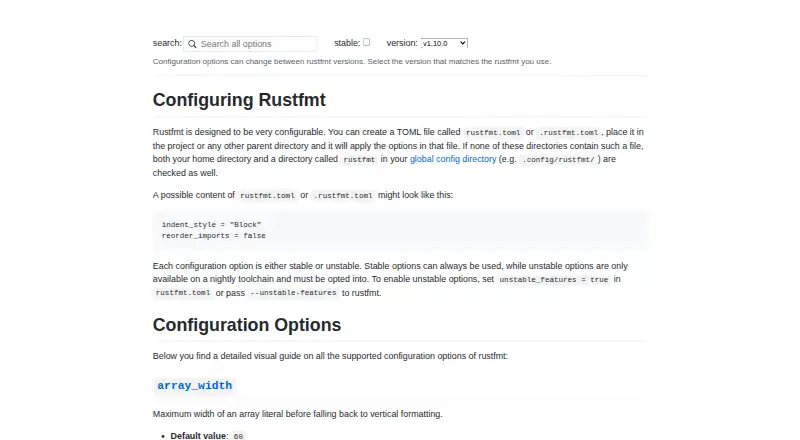
Configuration and workflow support are central to rustfmt's fit. Teams can define formatting behavior through rustfmt.toml or .rustfmt.toml files, use ignore patterns for files and directories, and select configurable formatting and output modes. For continuous integration, the --check option verifies whether files need formatting without changing them. This makes rustfmt suitable for projects that want formatting checks as part of their development workflow. It also integrates with Vim, Emacs, Sublime Text, Atom, Visual Studio Code, IntelliJ, and CLion, while running across Windows, macOS, and Linux.
rustfmt is distributed with the Rust toolchain rather than through a vendor pricing plan, and its code is open source. The main trade-off is scope: projects working across several programming languages will need additional formatters, and workflows requiring changed-lines-only formatting will not find that mode here. Some configuration options are unstable and require nightly Rust, which may affect teams standardizing on stable tooling. Choose rustfmt when Cargo, Rust-native formatting, CI checks, and editor integration are the priorities. Choose an alternative when you need multi-language formatting or changed-lines-only support.
rustfmt pricing
rustfmt fact sheet
| Free plan | Not verified |
|---|---|
| Paid from | None |
| Supported languages | Rust |
| Supported platforms | Windows, macOS, Linux, API |
| Editor integration | Yes |
| Ignore files | Yes |
| Changed-lines formatting | No |
| Library API | Yes |
| License model | Mixed |
| Deployment | Self-hosted |
| Platforms | Windows, macOS, Linux |
| Support | Community, Docs |
| Built for | Solo, Small business, Mid-market, Enterprise (editorial estimate) |
| Integrations | 7 integrations: Vim, Emacs, Sublime Text, Atom, Visual Studio Code, IntelliJ … |
| Pricing | Open source |
| Website | rust-lang.github.io |
| Facts checked | 21 Sep 2026 |
rustfmt integrations
rustfmt lists 7 integrations on its own site.
- Vim
- Emacs
- Sublime Text
- Atom
- Visual Studio Code
- IntelliJ
- CLion
Alternatives to rustfmt
- dprintA broad, editor-friendly formatter for multilingual repositories and changed-file workflows.9.0
- PrettierA broad, open-source formatter for web-language teams across editors and workflows.8.2
- SpotlessA build-focused formatter for JVM projects that need broad language coverage and automation.7.7

See all rustfmt alternatives →
Used rustfmt? Be the first to review it
The editor score above is our own research. What this page doesn't have yet is a reader's view — what you used rustfmt for, what worked and what didn't. No stars are seeded and no review is paid for; an editor reads every one before it appears.
Write a reviewTwo minutes · verified accounts only · read by an editor before it appears
Featured on iTechGuides

rustfmt is listed in our Code Formatting Tools directory. Add the badge to your site — it links back to this page.
<a href="https://www.itechguides.com/products/rustfmt/"><img src="https://www.itechguides.com/best/badge/rustfmt.svg" alt="Featured on iTechGuides" width="230" height="46"></a>
Reviewed by iTechGuides Editors · Editorial team · Updated Sep 2026
Advertiser disclosure: iTechGuides is reader-supported. We may earn a commission when you click some links. It never changes a score or a verdict. How we rank.
Last updated · How we research and update