
Open Planner Studio
Open Planner Studio: A capable free scheduler for construction teams needing CPM, resources, and open file exchange. Ranked #1 of 26 in Construction Scheduling Software by our editors (9.4/10); pricing: Free plan; best for teams needing free construction scheduling software.
At a glance
- Editor score9.4 / 10
- PricingFree plan
- Best forTeams needing free construction scheduling software
- Free planYes
- Paid fromFree
- Critical pathYes
- Facts checked22 Sep 2026
Where it wins
- Free, open-source package with no subscription or per-seat licence fees
- CPM, float, deadlines, resources, histograms, levelling, and baselines
- IFC, CSV, MS Project, and Primavera P6 interoperability
Where it doesn't
- No mobile apps; access is through the browser or desktop platforms
- The only named plan is the free, open-source package
- The built-in AI assistant is described for reading and editing schedules
Our verdict on Open Planner Studio
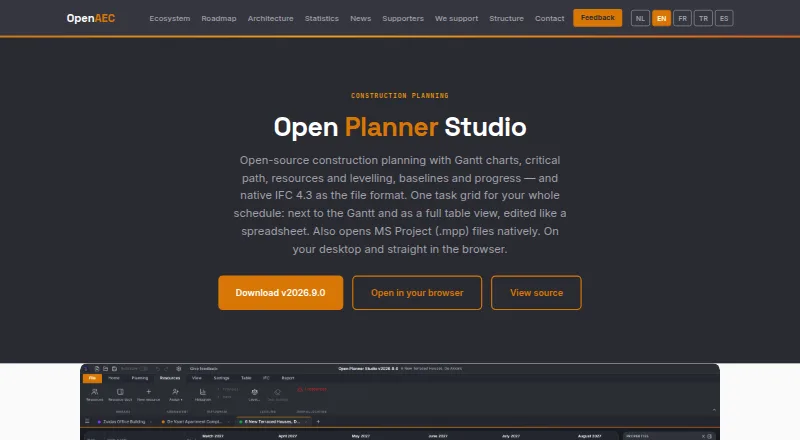
Open Planner Studio is an open-source construction planning application for building, infrastructure, and civil-engineering projects. It is aimed at teams that need structured scheduling rather than a basic task list, with interactive Gantt charts, automatic critical-path calculation, resource planning, progress tracking, and construction-specific calendars. The application runs in a browser and on Windows, macOS, and Linux, giving teams several desktop and web access options.
Its strongest fit is interoperability across established planning workflows. IFC 4.3 is the native schedule format, while import and export support covers IFC, CSV, MS Project XML, and Primavera P6 XML. Native MS Project MPP import is also available. That combination makes the product relevant to contractors, planners, and project teams exchanging schedules between construction, project-management, and open-model environments. Resource features extend beyond task dates: the software covers labour, equipment, and subcontractors, with resource histograms and automatic levelling for capacity planning.
The published plan is free and open source, with no subscription or per-seat licence fees. Its feature set includes baselines, progress tracking, hourly planning, and a built-in MCP AI assistant for reading and editing schedules. Teams choosing Open Planner Studio should be comfortable with an open-source product and should value construction-focused planning, critical-path analysis, and file compatibility. It is less suitable for organizations specifically seeking mobile apps or a range of paid service tiers.
Your product? Our editors can test Open Planner Studio in depth and publish a review, labelled as paid · from $149/mo →
Open Planner Studio pricing
All 1 Open Planner Studio plans and prices →
Open Planner Studio fact sheet
| Free plan | Yes |
|---|---|
| Paid from | Free |
| Critical path | Yes |
| Gantt charts | Yes |
| Resource planning | Yes |
| Schedule templates | Not verified |
| Mobile apps | None |
| Project limit | Not verified |
| Deployment | Desktop |
| Platforms | Web, Windows, macOS, Linux |
| Support | Docs |
| Built for | Solo, Small business, Mid-market, Enterprise (editorial estimate) |
| Integrations | 4 integrations: IFC, CSV, Microsoft Project, Primavera P6 |
| Pricing | Free plan (source) |
| Website | open-aec.com |
| Facts checked | 22 Sep 2026 |
Open Planner Studio integrations
Open Planner Studio lists 4 integrations on its own site.
- IFC
- CSV
- Microsoft Project
- Primavera P6
Alternatives to Open Planner Studio
- FinitePathAdvanced browser-based scheduling with CPM, resources, cost mapping, and AI insights.9.1
- Asta PowerprojectA deep construction scheduler for teams that need critical paths, resources, costs, and risk analysis.8.9
- ALICEA construction scheduling platform for teams comparing complex project scenarios.8.8


See all Open Planner Studio alternatives →
Open Planner Studio vs the competition
- Open Planner Studio vs FinitePath
- Open Planner Studio vs Asta Powerproject
- Open Planner Studio vs ALICE
- Open Planner Studio vs Oracle Primavera Cloud
- Open Planner Studio vs GanttAI
- Open Planner Studio vs Mastt Schedule



Compare Open Planner Studio with any tool side by side →
Also Ranked In
Open Planner Studio is ranked in 2 of our directories.
Used Open Planner Studio? Be the first to review it
The editor score above is our own research. What this page doesn't have yet is a reader's view — what you used Open Planner Studio for, what worked and what didn't. No stars are seeded and no review is paid for; an editor reads every one before it appears.
Write a reviewTwo minutes · verified accounts only · read by an editor before it appears
Featured on iTechGuides

Open Planner Studio is listed in our Construction Scheduling Software directory. Add the badge to your site — it links back to this page.
<a href="https://www.itechguides.com/products/open-planner-studio/"><img src="https://www.itechguides.com/best/badge/open-planner-studio.svg" alt="Featured on iTechGuides" width="230" height="46"></a>
Reviewed by iTechGuides Editors · Editorial team · Updated Oct 2026
Advertiser disclosure: iTechGuides is reader-supported. Vendors can pay for top positions in our rankings and for a place on other products' pages, and we may earn a commission when you click some links. Bought places stand at the number bought; this page and our disclosure say so. Paying vendors may get a fuller, more detailed review from our editors, and that review can change their score. How we rank.
Last updated · How we research and update