
Oakslot
Oakslot: Oakslot delivers deep exam scheduling control for universities with complex constraints. Ranked #1 of 37 in Exam Scheduling Software by our editors (9.4/10); pricing: Paid; best for universities needing deep exam scheduling control.
At a glance
- Editor score9.4 / 10
- PricingPaid
- Best forUniversities needing deep exam scheduling control
- Free planNo
- Paid from$499/mo
- Automatic timetablingYes
- Facts checked22 Sep 2026
Where it wins
- Hard and soft constraint solving for academic and exam schedules
- Clash detection, invigilator assignment, and resource management
- SIS, LMS, calendar, API, webhook, and SSO connectivity
Where it doesn't
- No free plan; Starter begins at $499 per month
- Multi-campus scheduling and SSO start on the $1,499 Pro plan
- Custom constraint development and reporting require Enterprise
Our verdict on Oakslot
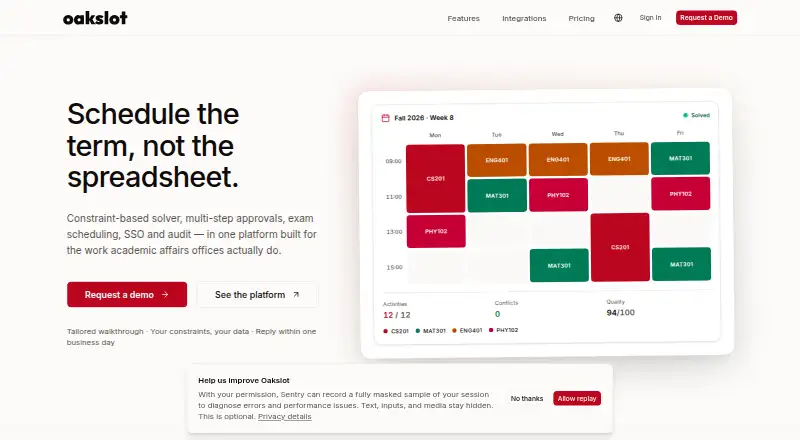
Oakslot is a cloud-based scheduling platform for university academic-affairs offices, registrars, IT teams, and department staff. It combines course and exam scheduling with room, building, equipment, and resource management. Its exam tools cover exam periods, sessions, session windows, invigilator assignments based on instructor availability, student exam-clash detection, and exam-specific constraint scoring. Real-time multi-user editing, approval workflows, analytics, audit logs, and role-based permissions support shared scheduling operations.
Pricing is structured across three tiers. Starter costs $499 per month and includes course scheduling with a hard-constraint solver, exam scheduling, room bookings, CSV import, iCal feeds, and email support. Pro costs $1,499 per month and adds multi-campus scheduling, a hard-and-soft constraint solver, API access, webhooks, and SSO. Enterprise adds unlimited campuses and students, API-first SIS/LMS integration, extended audit retention and SLA, dedicated customer success management and onboarding, custom constraint development, and custom reporting. Annual billing includes a discount, and the site states that no credit card is required for the trial.
Oakslot fits institutions that need more than basic calendar placement. Its REST API, webhooks, iCal feeds, and CSV import connect with Ellucian Banner, Oracle PeopleSoft, Workday Student, Canvas, Blackboard, Moodle, Google Calendar, Outlook, and Apple Calendar. SAML, OIDC, role-based permissions, and audit logs support controlled access, while analytics cover room utilisation, workload, conflicts, and schedule quality. Universities seeking multi-campus coordination, approval controls, and constraint-heavy exam planning should consider Oakslot; smaller teams with simple scheduling needs may find its paid entry point and specialist scope more than they need.
Your product? Our editors can test Oakslot in depth and publish a review, labelled as paid · from $149/mo →
Oakslot pricing
All 3 Oakslot plans and prices →
Oakslot fact sheet
| Free plan | No |
|---|---|
| Paid from | $499/mo |
| Automatic timetabling | Yes |
| Room constraints | Yes |
| Student conflict rules | Yes |
| Invigilator constraints | Yes |
| Course constraints | Yes |
| Deployment | Cloud |
| Maximum exams | Not verified |
| Deployment | Cloud |
| Platforms | Web |
| Compliance & security | GDPR, SSO/SAML |
| Support | |
| Built for | Small business, Mid-market, Enterprise (editorial estimate) |
| Integrations | 9 integrations: Ellucian Banner, Oracle PeopleSoft, Workday Student, Canvas, Blackboard, Moodle … See all → |
| Pricing | Paid (source) |
| Website | oakslot.com |
| Facts checked | 22 Sep 2026 |
Oakslot integrations
Oakslot lists 9 integrations on its own site.
- Ellucian Banner
- Oracle PeopleSoft
- Workday Student
- Canvas
- Blackboard
- Moodle
- Google Calendar
- Outlook
- Apple Calendar
See all Oakslot integrations →
Alternatives to Oakslot
- Optime ExamEnd-to-end exam scheduling for institutions managing complex student, room and invigilator constraints.9.3
- SEAtS ONE TimetablingA cloud timetable and exam scheduling system with seating, access and invigilation controls.9.2
- UniTimeA free, open-source scheduler for universities managing courses, exams, rooms, and conflicts.9.1



See all Oakslot alternatives →
Oakslot vs the competition
- Oakslot vs Optime Exam
- Oakslot vs SEAtS ONE Timetabling
- Oakslot vs UniTime
- Oakslot vs Wise Timetable
- Oakslot vs CampusWorkflow
- Oakslot vs CELCAT Timetabler



Compare Oakslot with any tool side by side →
Used Oakslot? Be the first to review it
The editor score above is our own research. What this page doesn't have yet is a reader's view — what you used Oakslot for, what worked and what didn't. No stars are seeded and no review is paid for; an editor reads every one before it appears.
Write a reviewTwo minutes · verified accounts only · read by an editor before it appears
Featured on iTechGuides

Oakslot is listed in our Exam Scheduling Software directory. Add the badge to your site — it links back to this page.
<a href="https://www.itechguides.com/products/oakslot/"><img src="https://www.itechguides.com/best/badge/oakslot.svg" alt="Featured on iTechGuides" width="230" height="46"></a>
Reviewed by iTechGuides Editors · Editorial team · Updated Oct 2026
Advertiser disclosure: iTechGuides is reader-supported. Vendors can pay for top positions in our rankings and for a place on other products' pages, and we may earn a commission when you click some links. Bought places stand at the number bought; this page and our disclosure say so. Paying vendors may get a fuller, more detailed review from our editors, and that review can change their score. How we rank.
Last updated · How we research and update