
Nitro PDF Pro
Nitro PDF Pro: A broad PDF workspace for desktop teams that need forms, OCR, conversion, and cloud connections. Ranked #19 of 26 in PDF Form Software by our editors (5.6/10); pricing: 14-day trial; best for desktop PDF workflows with cloud integrations.
At a glance
- Editor score5.6 / 10
- Pricing14-day trial
- Best forDesktop PDF workflows with cloud integrations
- Free planNo
- Facts checked20 Sep 2026
Where it wins
- Interactive form creation, filling, and configuration
- OCR, conversion, editing, annotation, and signing in one product
- Integrations with Google Drive, SharePoint, Box, and Microsoft Office
Where it doesn't
- No free plan
- Nitro PDF Classic is limited to Windows desktop
- Plan capabilities vary across Standard, Plus, and Classic
Our verdict on Nitro PDF Pro
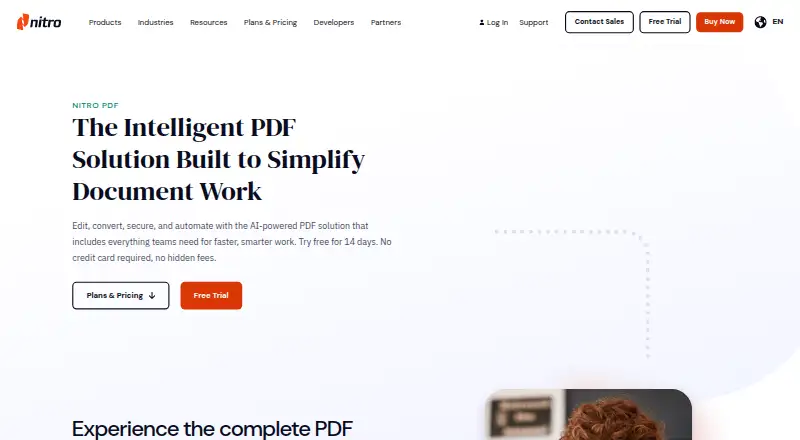
Nitro PDF Pro is a PDF editor for individuals, teams, and businesses that need more than basic file viewing. It supports editing PDF text and images, creating and filling interactive forms, converting files to Word, Excel, and PowerPoint, annotating documents, applying password- or certificate-based security, and signing or requesting signatures. Applications are available for Windows, macOS, and iOS, making it suited to desktop-centered document workflows with cross-device access.
Its strongest fit is breadth combined with document-system connectivity. Users can connect PDF workflows with Alfresco, Box, Dropbox, Google Drive, OneDrive, OneDrive for Business, SharePoint, iManage, and Microsoft Office. OCR can turn scanned PDFs into searchable or editable text, while batch OCR, Bates numbers, form tools, annotations, and document organization cover common operational requirements. This makes Nitro PDF Pro a practical choice for teams handling mixed digital and scanned documents across established storage environments.
The published plans divide capabilities by deployment and organizational scale. Nitro PDF Standard includes core PDF creation, editing, conversion, security, AI-powered productivity tools, batch OCR, the Nitro Admin portal, and integrations. Nitro PDF Plus adds single sign-on, domain control, Azure Information Protection support, Nitro Analytics, volume discounts, and scalable licensing. Nitro PDF Classic provides a three-year license for a Windows desktop application. A 14-day free trial is available, but the product is otherwise paid. Choose Nitro PDF Pro for broad desktop PDF work with cloud integrations; choose an alternative if a free plan or a macOS and iOS option for the Classic license is essential.
Nitro PDF Pro pricing
All 3 Nitro PDF Pro plans and prices →
Nitro PDF Pro fact sheet
| Free plan | No |
|---|---|
| Paid from | Not verified |
| Import existing PDFs | Not verified |
| Field validation | Not verified |
| Conditional logic | Not verified |
| Data export | Not verified |
| API access | Not verified |
| Bulk PDF processing | Not verified |
| Signature fields | Not verified |
| Free trial | 14 days · no card needed |
| Deployment | Desktop, Mobile |
| Platforms | Windows, macOS, iOS |
| Compliance & security | SOC 2, ISO 27001, GDPR, HIPAA |
| Support | Tickets, Community, Docs · 24/7 |
| Built for | Solo, Small business, Mid-market, Enterprise (editorial estimate) |
| Integrations | 10 integrations: Alfresco, Box, Dropbox, Google Drive, OneDrive, OneDrive for Business … See all → |
| Pricing | 14-day trial (source) |
| Website | gonitro.com |
| Facts checked | 20 Sep 2026 |
Nitro PDF Pro integrations
Nitro PDF Pro lists 10 integrations on its own site.
- Alfresco
- Box
- Dropbox
- Google Drive
- OneDrive
- OneDrive for Business
- SharePoint 365
- SharePoint
- iManage
- Microsoft Office
See all Nitro PDF Pro integrations →
Alternatives to Nitro PDF Pro
- FormForgeA free, local-first PDF form editor with field detection, validation, and AcroForm export.9.5
- FillableA practical PDF workflow tool for conditional forms, signatures, OCR, and API automation.9.0
- PDF StudioA one-time-license PDF editor for advanced forms across Windows, macOS, and Linux.8.2



See all Nitro PDF Pro alternatives →
Also listed in
Used Nitro PDF Pro? Be the first to review it
The editor score above is our own research. What this page doesn't have yet is a reader's view — what you used Nitro PDF Pro for, what worked and what didn't. No stars are seeded and no review is paid for; an editor reads every one before it appears.
Write a reviewTwo minutes · verified accounts only · read by an editor before it appears
Featured on iTechGuides

Nitro PDF Pro is listed in our PDF Form Software directory. Add the badge to your site — it links back to this page.
<a href="https://www.itechguides.com/products/nitro-pdf-pro/"><img src="https://www.itechguides.com/best/badge/nitro-pdf-pro.svg" alt="Featured on iTechGuides" width="230" height="46"></a>
Reviewed by iTechGuides Editors · Editorial team · Updated Sep 2026
Advertiser disclosure: iTechGuides is reader-supported. We may earn a commission when you click some links. How we rank.
Last updated · How we research and update