
FormForge
FormForge: A free, local-first PDF form editor with field detection, validation, and AcroForm export. Ranked #1 of 26 in PDF Form Software by our editors (9.5/10); pricing: Free plan; best for free, full-featured PDF form creation.
At a glance
- Editor score9.5 / 10
- PricingFree plan
- Best forFree, full-featured PDF form creation
- Free planYes
- Paid fromNone
- Import existing PDFsYes
- Facts checked20 Sep 2026
Where it wins
- All features are included without an account or credit card
- Detects fields in existing PDFs, flat PDFs, and scans
- Supports validation, batch editing, mail merge, and AcroForm checks
Where it doesn't
- Browser-based workflow rather than a traditional native desktop app
- Mail merge exports a ZIP of filled PDFs rather than another format
- Optional cryptographic signatures are available, but not required
Our verdict on FormForge
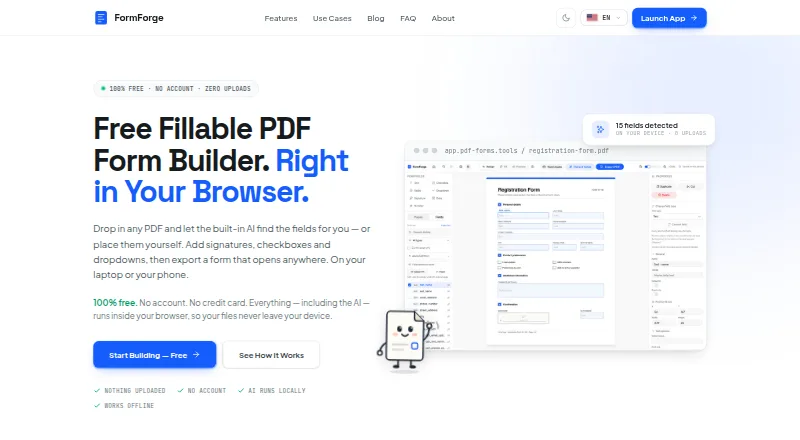
FormForge is a browser-based PDF form editor for individuals, small businesses, developers, HR teams, legal professionals, and public-sector users. It imports existing PDFs and can automatically detect form fields, including through AI-based local detection for flat PDFs and scans. Users can add text, checkbox, radio, dropdown, signature, date, and number fields, then configure required-field settings and validation. The editor exports standards-compliant fillable AcroForms and includes live preview before export.
The published plan structure is straightforward: the Free plan costs nothing, requires no account or credit card, and includes all features. There is no paid tier. The product is available through the web and can be installed as a PWA, with platform listings covering Windows, macOS, Linux, iOS, and Android. Processing occurs locally in the browser, so FormForge suits workflows where keeping PDF work in the browser matters. It is not positioned as a traditional native desktop application.
FormForge’s strongest area is its coverage of the form-building workflow. Field detection can reduce manual placement when working from existing documents, while drag-and-drop controls cover common input types. Field validation, required fields, live preview, and 21 one-click AcroForm checks help prepare forms before export. Batch editing supports changes across multiple fields, and CSV mail merge creates a ZIP of filled PDFs. Optional cryptographic digital signatures add another form capability. Choose FormForge if you want a free editor with broad field support and local browser processing; choose another option if your workflow specifically requires a native desktop application.
FormForge pricing
All 1 FormForge plans and prices →
FormForge fact sheet
| Free plan | Yes |
|---|---|
| Paid from | None |
| Import existing PDFs | Yes |
| Field validation | Yes |
| Conditional logic | Not verified |
| Data export | Fillable PDF (AcroForm); ZIP of filled PDFs |
| API access | Not verified |
| Bulk PDF processing | Yes |
| Signature fields | Yes |
| Deployment | Cloud, Mobile |
| Platforms | Web, Windows, macOS, Linux, iOS, Android |
| Support | |
| Built for | Solo, Small business, Mid-market (editorial estimate) |
| Pricing | Free plan (source) |
| Website | pdf-forms.tools |
| Facts checked | 20 Sep 2026 |
Alternatives to FormForge
- FillableA practical PDF workflow tool for conditional forms, signatures, OCR, and API automation.9.0
- PDF StudioA one-time-license PDF editor for advanced forms across Windows, macOS, and Linux.8.2
- PlatoFormsA strong fit for turning existing PDFs into connected, payment-ready online forms.7.6


See all FormForge alternatives →
FormForge vs the competition
- FormForge vs Fillable
- FormForge vs PDF Studio
- FormForge vs PlatoForms
- FormForge vs Fillfront
- FormForge vs pdfFiller
- FormForge vs Foxit PDF Editor


Compare FormForge with any tool side by side →
Used FormForge? Be the first to review it
The editor score above is our own research. What this page doesn't have yet is a reader's view — what you used FormForge for, what worked and what didn't. No stars are seeded and no review is paid for; an editor reads every one before it appears.
Write a reviewTwo minutes · verified accounts only · read by an editor before it appears
Featured on iTechGuides

FormForge is listed in our PDF Form Software directory. Add the badge to your site — it links back to this page.
<a href="https://www.itechguides.com/products/formforge/"><img src="https://www.itechguides.com/best/badge/formforge.svg" alt="Featured on iTechGuides" width="230" height="46"></a>
Reviewed by iTechGuides Editors · Editorial team · Updated Sep 2026
Advertiser disclosure: iTechGuides is reader-supported. We may earn a commission when you click some links. How we rank.
Last updated · How we research and update