
MeetingBooster
MeetingBooster: A broad meeting workflow suite for established teams that need analytics and control. Ranked #15 of 35 in Meeting Management Software by our editors (7.7/10); pricing: Pricing on request; best for established teams needing analytics and workflows.
At a glance
- Editor score7.7 / 10
- PricingPricing on request
- Best forEstablished teams needing analytics and workflows
- Free planNo
- Agenda templatesYes
- Founded1992
- Facts checked20 Sep 2026
Where it wins
- Covers agendas, minutes, decisions, approvals, voting, and action items
- Reports on attendance, cost, task status, and meeting KPIs
- Connects with Microsoft, Google, task systems, Slack, Zapier, and Power Automate
Where it doesn't
- Pricing requires contacting sales
- There is no free plan
- Cloud subscriptions are charged per device under management
Our verdict on MeetingBooster
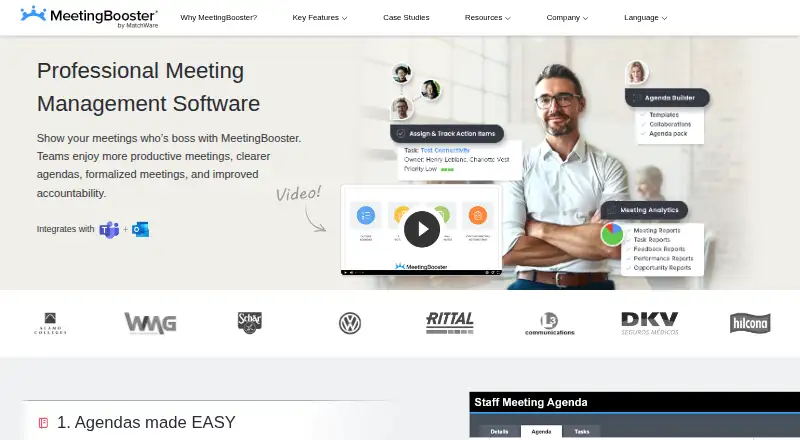
MeetingBooster is meeting management software for organizations that want a structured process before, during, and after meetings. Its scope includes reusable agenda templates, collaborative editing, recurring meeting workflows, meeting notes, decision capture, action-item assignment, reminders, automatically generated minutes, document distribution, and meeting analytics. Established teams with recurring governance, operational reviews, or cross-functional decisions are the clearest fit. It is available through web and API access, with cloud-hosted and on-premise deployment options.
The product’s workflow depth is its main strength. Teams can manage agenda and minutes approvals with version control, while voting, ratings, pros-and-cons tools, and time tracking support more formal decision-making. Analytics cover attendance, cost, task status, and KPI reporting, helping organizations connect meetings with follow-up work. Recurring meeting and meeting-series workflows add structure for teams that run the same forums regularly. This breadth suits organizations that need more than notes and calendars, but may be more than necessary for teams seeking a lightweight scheduling or note-taking tool.
MeetingBooster also fits environments built around Microsoft and Google collaboration tools. Integrations include Outlook, Outlook 365, Google Calendar, Teams, SharePoint, Active Directory, Jira, Microsoft Planner, Trello, Slack, Zapier, and Microsoft Power Automate. The cloud offering uses a monthly subscription charged per device under management, while pricing is handled through contact sales. Choose MeetingBooster when governance, reporting, approvals, and connected task workflows matter; consider a simpler alternative if predictable self-serve pricing or a free plan is a priority.
Your product? Our editors can test MeetingBooster in depth and publish a review, labelled as paid · from $149/mo →
MeetingBooster pricing
MeetingBooster fact sheet
| Free plan | No |
|---|---|
| Paid from | Not verified |
| Agenda templates | Yes |
| Decision tracking | Yes |
| Action-item tracking | Yes |
| Recurring meetings | Yes |
| Outcome reporting | Yes |
| Participant limit | Not verified |
| Deployment | Cloud, Self-hosted |
| Platforms | Web |
| Compliance & security | ISO 27001, HIPAA, 2FA |
| Support | Email, Phone, Docs |
| Built for | Mid-market, Enterprise (editorial estimate) |
| Integrations | 12 integrations: Microsoft Outlook, Outlook 365, Google Calendar, Microsoft Teams, SharePoint, Active Directory … See all → |
| Pricing | Pricing on request |
| Website | meetingbooster.com |
| Facts checked | 20 Sep 2026 |
MeetingBooster integrations
MeetingBooster lists 12 integrations on its own site.
- Microsoft Outlook
- Outlook 365
- Google Calendar
- Microsoft Teams
- SharePoint
- Active Directory
- Jira
- Microsoft Planner
- Trello
- Slack
- Zapier
- Microsoft Power Automate
See all MeetingBooster integrations →
Alternatives to MeetingBooster
- FellowFellow combines AI meeting capture, searchable knowledge, and broad business integrations.9.3
- DecisionsA Microsoft 365-focused workspace for structured agendas, decisions, minutes, and follow-up.9.1
- BeenoteA budget-friendly meeting workspace with AI transcription and governance tools.9.0


See all MeetingBooster alternatives →
Also Ranked In
MeetingBooster is ranked in 4 of our directories.
Used MeetingBooster? Be the first to review it
The editor score above is our own research. What this page doesn't have yet is a reader's view — what you used MeetingBooster for, what worked and what didn't. No stars are seeded and no review is paid for; an editor reads every one before it appears.
Write a reviewTwo minutes · verified accounts only · read by an editor before it appears
Featured on iTechGuides

MeetingBooster is listed in our Meeting Management Software directory. Add the badge to your site — it links back to this page.
<a href="https://www.itechguides.com/products/meetingbooster/"><img src="https://www.itechguides.com/best/badge/meetingbooster.svg" alt="Featured on iTechGuides" width="230" height="46"></a>
Reviewed by iTechGuides Editors · Editorial team · Updated Oct 2026
Advertiser disclosure: iTechGuides is reader-supported. Vendors can pay for top positions in our rankings and for a place on other products' pages, and we may earn a commission when you click some links. Bought places stand at the number bought; this page and our disclosure say so. Paying vendors may get a fuller, more detailed review from our editors, and that review can change their score. How we rank.
Last updated · How we research and update