
js-beautify
js-beautify: A flexible, free formatter with broad language coverage and editor integrations. Ranked #14 of 34 in Code Formatting Tools by our editors (6.0/10); pricing: Free plan; best for javaScript and markup beautification.
At a glance
- Editor score6.0 / 10
- PricingFree plan
- Best forJavaScript and markup beautification
- Free planYes
- Paid fromNone
- Supported languagesJavaScript, JSON, React.js, HTML, CSS, SCSS, SASS
- Facts checked21 Sep 2026
Where it wins
- Formats JavaScript, JSON, HTML, CSS, SCSS, and SASS
- Supports browser, Node.js, Python, and library interfaces
- Offers configurable rules and integrations with major editors
Where it doesn't
- No AI-assisted formatting features
- Requires configuration for advanced formatting behavior
- Less workflow depth than some broader formatting tools
Our verdict on js-beautify
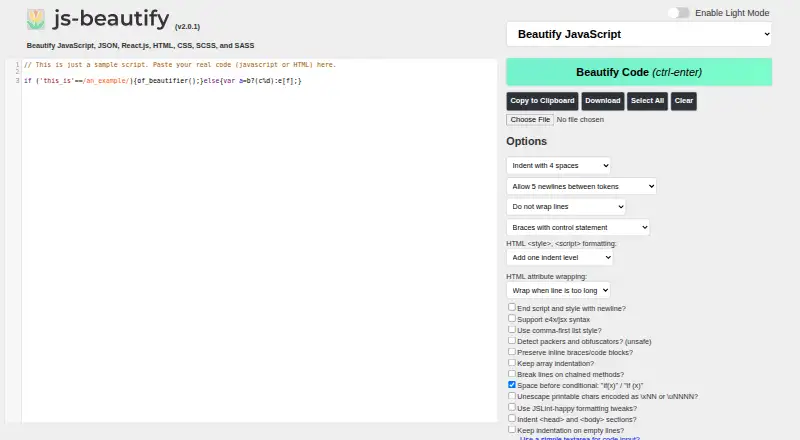
js-beautify is an open-source code formatter for developers working with JavaScript, JSON, HTML, CSS, SCSS, and SASS. It suits individuals and teams that want one formatter across JavaScript and markup files, with access through a browser interface, Node.js command-line tools, a Python command-line package, and JavaScript or Python library APIs. Its configuration options cover indentation, line wrapping, brace styles, templating behavior, and other formatting rules. Ignore and preserve directives can keep selected code sections unchanged.
The published pricing model is open source, with a free plan and no paid tiers described. That makes js-beautify a practical fit for developers who want a formatter without subscription plans or tier-based feature differences. Configuration can be managed through .jsbeautifyrc and EditorConfig, allowing formatting behavior to be carried into development environments. The tradeoff is that teams seeking a guided, paid workflow with expanded service features may prefer a different category option.
Editor and development-environment coverage is a notable part of the product. Documented integrations include Visual Studio Code, Sublime Text, Vim, Emacs, Komodo IDE, Cloud9, Fiddler, Burp Suite, NetBeans, and Adobe Brackets. The combination of command-line, library, browser, and editor access gives developers several ways to add formatting to existing workflows. However, js-beautify does not provide AI features, and its positioning is focused on beautification rather than a broader development workflow. Choose it for configurable, multi-language formatting across common tools; look elsewhere if AI-assisted formatting or deeper workflow capabilities are priorities.
js-beautify pricing
js-beautify fact sheet
| Free plan | Yes |
|---|---|
| Paid from | None |
| Supported languages | JavaScript, JSON, React.js, HTML, CSS, SCSS, SASS |
| Supported platforms | Web browser, Node.js, Python |
| Editor integration | Yes |
| Ignore files | Not verified |
| Changed-lines formatting | Not verified |
| Library API | Yes |
| License model | Open_source |
| Deployment | Cloud, Self-hosted |
| Platforms | Web |
| Support | Community, Docs |
| Built for | Solo, Small business, Mid-market, Enterprise (editorial estimate) |
| Integrations | 10 integrations: Visual Studio Code, Sublime Text, Vim, Emacs, Komodo IDE, Cloud9 … |
| Pricing | Free plan |
| Website | beautifier.io |
| Facts checked | 21 Sep 2026 |
js-beautify integrations
js-beautify lists 10 integrations on its own site.
- Visual Studio Code
- Sublime Text
- Vim
- Emacs
- Komodo IDE
- Cloud9
- Fiddler
- Burp Suite
- NetBeans
- Adobe Brackets
Alternatives to js-beautify
- dprintA broad, editor-friendly formatter for multilingual repositories and changed-file workflows.9.0
- PrettierA broad, open-source formatter for web-language teams across editors and workflows.8.2
- SpotlessA build-focused formatter for JVM projects that need broad language coverage and automation.7.7

See all js-beautify alternatives →
Used js-beautify? Be the first to review it
The editor score above is our own research. What this page doesn't have yet is a reader's view — what you used js-beautify for, what worked and what didn't. No stars are seeded and no review is paid for; an editor reads every one before it appears.
Write a reviewTwo minutes · verified accounts only · read by an editor before it appears
Featured on iTechGuides

js-beautify is listed in our Code Formatting Tools directory. Add the badge to your site — it links back to this page.
<a href="https://www.itechguides.com/products/js-beautify/"><img src="https://www.itechguides.com/best/badge/js-beautify.svg" alt="Featured on iTechGuides" width="230" height="46"></a>
Reviewed by iTechGuides Editors · Editorial team · Updated Sep 2026
Advertiser disclosure: iTechGuides is reader-supported. We may earn a commission when you click some links. It never changes a score or a verdict. How we rank.
Last updated · How we research and update