GE-Proton
GE-Proton: A specialized Linux gaming compatibility tool for Steam Play users who need extra fixes. Ranked #21 of 26 in Windows Compatibility Layers by our editors (5.5/10); pricing: Open source; best for linux Steam users needing specialized game fixes.
At a glance
- Editor score5.5 / 10
- PricingOpen source
- Best forLinux Steam users needing specialized game fixes
- Paid fromNone
- macOS supportNo
- Facts checked20 Sep 2026
Where it wins
- Adds media-foundation patches for video playback
- Includes protonfixes and additional Wine and wine-staging patches
- Supports AMD FSR, NVIDIA features, raw input, and NTSync
Where it doesn't
- Designed for Linux rather than macOS or other platforms
- Its primary workflow is Windows games through Steam Play
- Non-Steam games require umu for supported use
Our verdict on GE-Proton
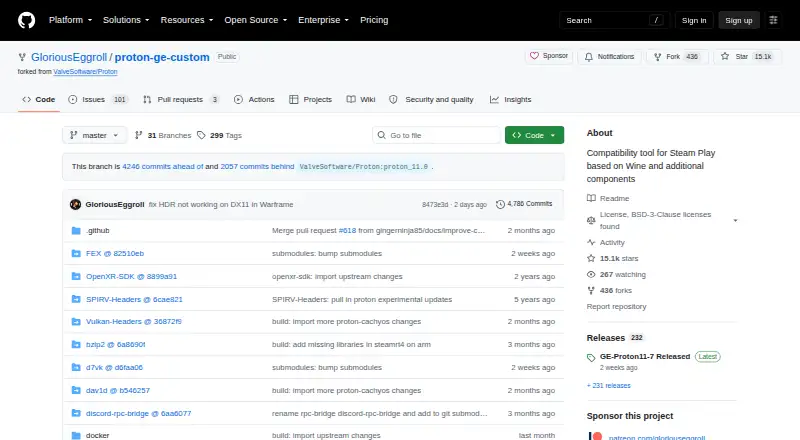
GE-Proton is a custom build of Proton based on Wine and Proton Experimental. It is designed to run Windows games on Linux through Steam Play compatibility tools, making it a focused option for Linux Steam users who need game-specific fixes beyond a standard Proton build. The project is distributed as downloadable compatibility-tool releases and maintained as a public GitHub repository by GloriousEggroll. It is open source and is not affiliated with Valve’s Proton.
Its main strength is the breadth of gaming-oriented patches and components in a specialized package. GE-Proton adds media-foundation patches for video playback, AMD FSR support through a fullscreen hack, NVIDIA CUDA and NVAPI support for PhysX, and raw-input mouse support. Automated per-game protonfixes can apply targeted adjustments, while backported upstream Wine and wine-staging patches extend the underlying compatibility layer. Graphics acceleration is identified with DXVK and VKD3D, and NTSync can be enabled when supported by the Linux kernel.
The trade-off is scope. GE-Proton targets Linux gaming through Steam Play rather than general Windows applications, and its platform coverage is Linux only. Non-Steam games are supported only through umu, so users seeking a broad desktop compatibility layer or a multi-platform solution should choose another option. For Linux players whose games need media, input, graphics, NVIDIA, or per-game compatibility adjustments, GE-Proton offers a concentrated set of additions in an open-source package. Users outside that Steam-centered Linux workflow are less likely to find its design a fit.
GE-Proton pricing
GE-Proton fact sheet
| Free plan | Not verified |
|---|---|
| Paid from | None |
| macOS support | No |
| Linux support | Yes |
| Apple silicon support | No |
| Graphics acceleration | Dxvk-vkd3d |
| Compatibility database | Not verified |
| Prefix management | Not verified |
| Deployment | Self-hosted |
| Platforms | Linux |
| Support | Community |
| Built for | Solo, Small business (editorial estimate) |
| Pricing | Open source |
| Website | github.com |
| Facts checked | 20 Sep 2026 |
Alternatives to GE-Proton
- WineWine is a free, broad foundation for running Windows applications on Linux and macOS.9.0
- CrossOverA paid compatibility layer with application recipes, bottles, ratings, and graphics options.8.7
- BottlesA free, open-source choice for organizing and running Windows apps across platforms.8.2


See all GE-Proton alternatives →
Also listed in
Used GE-Proton? Be the first to review it
The editor score above is our own research. What this page doesn't have yet is a reader's view — what you used GE-Proton for, what worked and what didn't. No stars are seeded and no review is paid for; an editor reads every one before it appears.
Write a reviewTwo minutes · verified accounts only · read by an editor before it appears
Featured on iTechGuides

GE-Proton is listed in our Windows Compatibility Layers directory. Add the badge to your site — it links back to this page.
<a href="https://www.itechguides.com/products/ge-proton/"><img src="https://www.itechguides.com/best/badge/ge-proton.svg" alt="Featured on iTechGuides" width="230" height="46"></a>
Reviewed by iTechGuides Editors · Editorial team · Updated Sep 2026
Advertiser disclosure: iTechGuides is reader-supported. We may earn a commission when you click some links. How we rank.
Last updated · How we research and update