
Fullview Cobrowsing
Fullview Cobrowsing: Advanced cobrowsing and session intelligence for large support organizations. Ranked #25 of 26 in Video Customer Support Software by our editors (6.5/10); pricing: 14-day trial; best for large teams needing advanced cobrowsing analytics.
At a glance
- Editor score6.5 / 10
- Pricing14-day trial
- Best forLarge teams needing advanced cobrowsing analytics
- Free planNo
- Paid from$489/mo
- Co-browsingYes
- Facts checked20 Sep 2026
Where it wins
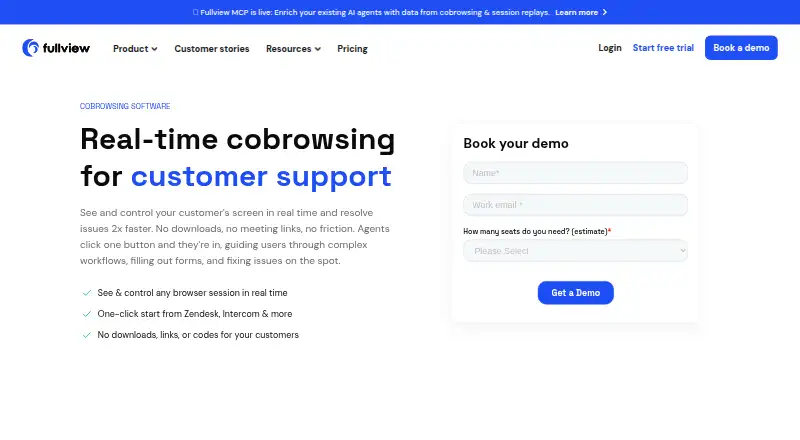
- Real-time cobrowsing with screen control, pointing, clicking, and highlighting
- Automatic recordings with transcripts, sentiment analysis, and data masking
- Helpdesk initiation across Zendesk, Intercom, Salesforce, and HubSpot
Where it doesn't
- Starter begins at $489 per month
- No free plan is available
- Advanced configuration and higher volumes require Custom pricing
Our verdict on Fullview Cobrowsing
Fullview Cobrowsing is a web-based and API-accessible customer support tool for support, success, technical support, and onboarding teams. Agents can view and interact with a customer’s website or web app in real time, guide users with clicks and highlights, or take screen control. Customers can request inbound cobrowsing sessions, and no customer download is required. The product also supports desktop and mobile browsers, making it suitable for organizations assisting customers across web experiences.
Pricing is structured around a paid Starter plan and a Custom plan. Starter costs $489 per month and includes five unlimited cobrowsing seats, 50,000 monthly session replays, unlimited view-only recording seats, and integrations with Intercom, HubSpot Service Hub, and Zendesk. The Custom plan adds higher session replay volumes, more cobrowsing seats, advanced configuration, and standalone cobrowsing or session replay options. The published plans make Fullview a stronger fit for larger teams with substantial support volume than for smaller organizations seeking a low-cost entry point.
Its standout capability is the combination of live assistance and post-session analysis. Teams can access console logs and network data during troubleshooting, automatically record sessions for review or developer handoff, and use AI-generated audio transcripts and sentiment analysis afterward. Sensitive-data masking adds control over recorded sessions. One-click initiation from helpdesk workflows supports an established service operation, while four listed integrations cover major helpdesk and customer-management environments. Choose Fullview Cobrowsing when advanced cobrowsing, recording, and session intelligence justify the monthly cost; teams needing a free plan or lower starting price should consider an alternative.
Your product? Our editors can test Fullview Cobrowsing in depth and publish a review, labelled as paid · from $149/mo →
Fullview Cobrowsing pricing
All 2 Fullview Cobrowsing plans and prices →
Fullview Cobrowsing fact sheet
| Free plan | No |
|---|---|
| Paid from | $489/mo |
| Screen sharing | Yes |
| Co-browsing | Yes |
| Visual annotation | Yes |
| Video recording | Yes |
| Included agent seats | 5 agents |
| Customer platforms | Web_mobile |
| Free trial | 14 days |
| Deployment | Cloud |
| Platforms | Web |
| Compliance & security | SOC 2, GDPR |
| Support | Email, Docs |
| Built for | Small business, Mid-market, Enterprise (editorial estimate) |
| Integrations | 4 integrations: Zendesk, Intercom, Salesforce, HubSpot See all → |
| Pricing | 14-day trial (source) |
| Website | fullview.io |
| Facts checked | 20 Sep 2026 |
Fullview Cobrowsing integrations
Fullview Cobrowsing lists 4 integrations on its own site.
- Zendesk
- Intercom
- Salesforce
- HubSpot
See all Fullview Cobrowsing integrations →
Alternatives to Fullview Cobrowsing
- SightCall Remote Visual SupportEnterprise visual support with video, AR guidance, co-browsing, and service-system integrations.9.4
- LiveCallA capable free starting point for teams offering video and audio support.9.2
- Blitzz Visual Remote AssistanceA focused visual support platform with app-free calls, collaboration tools, and business integrations.9.0



See all Fullview Cobrowsing alternatives →
Also Ranked In
Fullview Cobrowsing is ranked in 2 of our directories.
Used Fullview Cobrowsing? Be the first to review it
The editor score above is our own research. What this page doesn't have yet is a reader's view — what you used Fullview Cobrowsing for, what worked and what didn't. No stars are seeded and no review is paid for; an editor reads every one before it appears.
Write a reviewTwo minutes · verified accounts only · read by an editor before it appears
Featured on iTechGuides

Fullview Cobrowsing is listed in our Video Customer Support Software directory. Add the badge to your site — it links back to this page.
<a href="https://www.itechguides.com/products/fullview-cobrowsing/"><img src="https://www.itechguides.com/best/badge/fullview-cobrowsing.svg" alt="Featured on iTechGuides" width="230" height="46"></a>
Reviewed by iTechGuides Editors · Editorial team · Updated Oct 2026
Advertiser disclosure: iTechGuides is reader-supported. Vendors can pay for top positions in our rankings and for a place on other products' pages, and we may earn a commission when you click some links. Bought places stand at the number bought; this page and our disclosure say so. Paying vendors may get a fuller, more detailed review from our editors, and that review can change their score. How we rank.
Last updated · How we research and update