
Fillfront
Fillfront: A focused way to collect validated PDF submissions without recipient accounts. Ranked #5 of 26 in PDF Form Software by our editors (7.5/10); pricing: Free plan · paid from $29; best for simple shareable PDF submission forms.
At a glance
- Editor score7.5 / 10
- PricingFree plan · paid from $29
- Best forSimple shareable PDF submission forms
- Free planYes
- Import existing PDFsYes
- Facts checked20 Sep 2026
Where it wins
- Automatic field suggestions speed up PDF form creation.
- Recipients can submit without an account, app, or printer.
- Completed PDFs, CSV exports, and ZIP downloads support follow-up work.
Where it doesn't
- The Free plan supports one form at a time.
- Paid branding and email features cost $29 per form.
- It has no compliance posture and holds no certification.
Our verdict on Fillfront
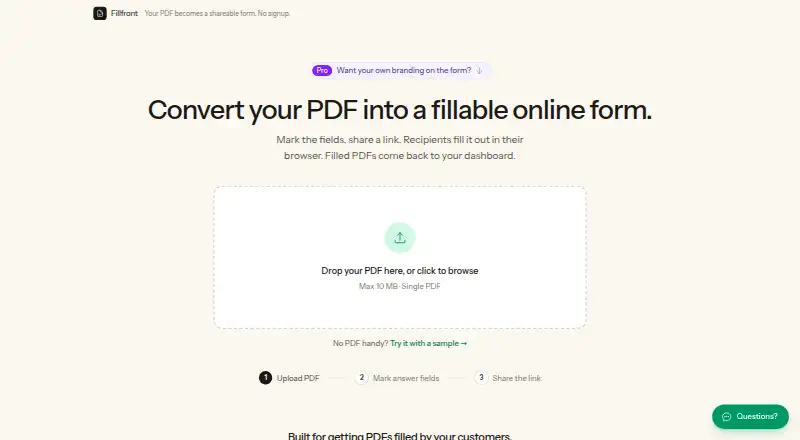
Fillfront converts uploaded PDFs into browser-fillable forms for client intake, registrations, applications, estimates, HR paperwork, and similar document-based workflows. Users can mark or adjust suggested fields, add text, email, number, date, checkbox, multiple-choice, dropdown, and signature fields, then share a link. Recipients complete the form without an account, app, or printer. Fillfront stores submissions in a dashboard and returns each response as a completed copy of the original PDF.
The pricing structure is straightforward. The Free plan allows one form at a time with unlimited responses, every field type including signatures, a completed PDF for every reply, CSV export of all answers, and PDFs up to 10 MB one at a time. The Paid plan is a one-time $29 payment per form rather than a subscription. It removes the Fillfront badge, allows an own logo on the form, sends an email for every submission, and raises the account to 10 forms. That makes the free tier suitable for a single recurring workflow, while the paid tier adds branding, notification, and multi-form capacity.
The main strength is its focused document workflow: automatic suggestions from PDF blanks, required-field and format validation before submission, stored responses, completed-PDF returns, CSV export, and ZIP downloads. It is a practical choice when the original PDF matters as much as the collected answers. The published terms also state that Fillfront has no compliance posture and holds no certification, so organizations with formal compliance requirements should choose an alternative. Pick Fillfront for straightforward, shareable PDF collection on the web; look elsewhere when compliance certification is a deciding requirement.
Fillfront pricing
All 2 Fillfront plans and prices →
Fillfront fact sheet
| Free plan | Yes |
|---|---|
| Paid from | Not verified |
| Import existing PDFs | Yes |
| Field validation | Yes |
| Conditional logic | Not verified |
| Data export | CSV, PDF |
| API access | Not verified |
| Bulk PDF processing | Not verified |
| Signature fields | Yes |
| Deployment | Cloud |
| Platforms | Web |
| Support | Email, Docs |
| Built for | Solo, Small business (editorial estimate) |
| Pricing | Free plan · paid from $29 (source) |
| Website | fillfront.com |
| Facts checked | 20 Sep 2026 |
Alternatives to Fillfront
- FormForgeA free, local-first PDF form editor with field detection, validation, and AcroForm export.9.5
- FillableA practical PDF workflow tool for conditional forms, signatures, OCR, and API automation.9.0
- PDF StudioA one-time-license PDF editor for advanced forms across Windows, macOS, and Linux.8.2



See all Fillfront alternatives →
Fillfront vs the competition
- Fillfront vs FormForge
- Fillfront vs Fillable
- Fillfront vs PDF Studio
- Fillfront vs PlatoForms
- Fillfront vs pdfFiller
- Fillfront vs Foxit PDF Editor


Compare Fillfront with any tool side by side →
Used Fillfront? Be the first to review it
The editor score above is our own research. What this page doesn't have yet is a reader's view — what you used Fillfront for, what worked and what didn't. No stars are seeded and no review is paid for; an editor reads every one before it appears.
Write a reviewTwo minutes · verified accounts only · read by an editor before it appears
Featured on iTechGuides

Fillfront is listed in our PDF Form Software directory. Add the badge to your site — it links back to this page.
<a href="https://www.itechguides.com/products/fillfront/"><img src="https://www.itechguides.com/best/badge/fillfront.svg" alt="Featured on iTechGuides" width="230" height="46"></a>
Reviewed by iTechGuides Editors · Editorial team · Updated Sep 2026
Advertiser disclosure: iTechGuides is reader-supported. We may earn a commission when you click some links. How we rank.
Last updated · How we research and update