
ExcelAI
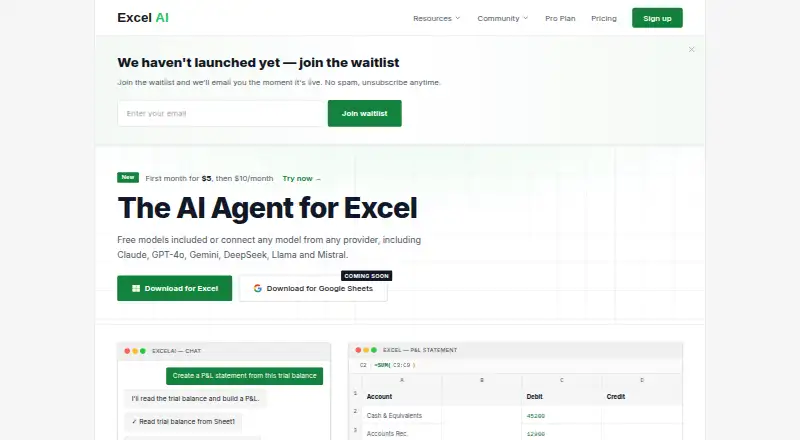
ExcelAI: A practical Excel add-in for formulas, financial reports, analysis, and workflow automation. Ranked #11 of 31 in AI Spreadsheet Tools by our editors (8.3/10); pricing: Free plan; best for excel financial reporting users.
At a glance
- Editor score8.3 / 10
- PricingFree plan
- Best forExcel financial reporting users
- Free planYes
- Paid from$10/mo
- Primary platformMicrosoft_excel
- Facts checked20 Sep 2026
Where it wins
- Generates formulas such as XLOOKUP and SUMIFS from natural-language commands
- Creates P&L, balance sheet, and cash-flow reports
- Combines data cleaning, charts, anomaly detection, and workflow automation
Where it doesn't
- Supports Windows and macOS rather than a broader platform range
- Advanced models require the paid Starter tier
- Pro uses pay-as-you-go balance instead of a standard monthly subscription
Our verdict on ExcelAI
ExcelAI is a Microsoft Excel add-in that turns natural-language commands into spreadsheet actions. It is designed for finance, operations, sales, marketing, HR, and other teams that work in Excel. Supported versions include Excel 2019, Excel 2021, and Microsoft 365 on Windows and macOS. Its feature set covers formula generation, financial reporting, data analysis, table transformation, formatting, chart creation, and multi-step workflow automation.
Pricing is structured around three plans. Free costs $0 per month and includes natural-language commands, basic and fast models, and support for Excel 2019, 2021, and 365. Starter costs $10 per month and adds all advanced models plus email support. Pro costs $20 in pay-as-you-go balance and includes access to supported AI models, monthly spend limits, and configurable auto top-up. The published plans make the free tier a useful entry point for basic spreadsheet assistance, while Starter is the clearer choice for users who need broader model access on a recurring monthly plan.
The standout value is the combination of financial reporting and spreadsheet operations in one Excel-focused tool. ExcelAI can generate P&L, balance sheet, and cash-flow reports, recognize patterns and anomalies, clean and transform tables, apply bulk edits and worksheet formatting, create visualizations, and automate multi-step workflows. Undo history provides a way to reverse spreadsheet actions. It also connects with AI models and providers including OpenAI, Anthropic, Google, DeepSeek, Meta, and Mistral. Choose ExcelAI if your work is centered on desktop Microsoft Excel and financial reporting. Teams needing a different spreadsheet platform or broader platform coverage should consider alternatives.
Your product? Our editors can test ExcelAI in depth and publish a review, labelled as paid · from $149/mo →
ExcelAI pricing
All 3 ExcelAI plans and prices →
ExcelAI fact sheet
| Free plan | Yes |
|---|---|
| Paid from | $10/mo |
| Primary platform | Microsoft_excel |
| Formula generation | Yes |
| Table transformation | Yes |
| Spreadsheet analysis | Yes |
| Workflow automation | Yes |
| Custom functions | Not verified |
| API access | Not verified |
| Deployment | Desktop |
| Platforms | Windows, macOS |
| Support | |
| Built for | Small business, Mid-market (editorial estimate) |
| Integrations | 7 integrations: Microsoft Excel, OpenAI, Anthropic, Google, DeepSeek, Meta … |
| Pricing | Free plan (source) |
| Website | excelai.org |
| Facts checked | 20 Sep 2026 |
ExcelAI integrations
ExcelAI lists 7 integrations on its own site.
- Microsoft Excel
- OpenAI
- Anthropic
- DeepSeek
- Meta
- Mistral
Alternatives to ExcelAI
- RowsRows suits teams that need AI analysis, connected data, automation, and collaboration in one spreadsheet.9.4
- GPTExcelA wide-ranging spreadsheet copilot with a free tier and paid usage limits.9.2
- QuadraticA collaborative spreadsheet that combines AI, code, databases, and familiar exports.9.1



See all ExcelAI alternatives →
Used ExcelAI? Be the first to review it
The editor score above is our own research. What this page doesn't have yet is a reader's view — what you used ExcelAI for, what worked and what didn't. No stars are seeded and no review is paid for; an editor reads every one before it appears.
Write a reviewTwo minutes · verified accounts only · read by an editor before it appears
Featured on iTechGuides

ExcelAI is listed in our AI Spreadsheet Tools directory. Add the badge to your site — it links back to this page.
<a href="https://www.itechguides.com/products/excelai/"><img src="https://www.itechguides.com/best/badge/excelai.svg" alt="Featured on iTechGuides" width="230" height="46"></a>
Reviewed by iTechGuides Editors · Editorial team · Updated Oct 2026
Advertiser disclosure: iTechGuides is reader-supported. Vendors can pay for top positions in our rankings and for a place on other products' pages, and we may earn a commission when you click some links. Bought places stand at the number bought; this page and our disclosure say so. Paying vendors may get a fuller, more detailed review from our editors, and that review can change their score. How we rank.
Last updated · How we research and update