
EventDiagram
EventDiagram: A broad event-planning workspace with 2D, 3D, imports, approvals, and AI assistance. Ranked #1 of 24 in Event Diagramming Software by our editors (9.8/10); pricing: Free plan · paid from $9/mo; best for teams wanting the broadest value.
At a glance
- Editor score9.8 / 10
- PricingFree plan · paid from $9/mo
- Best forTeams wanting the broadest value
- Free planYes
- Seating plansYes
- Facts checked21 Sep 2026
Where it wins
- To-scale 2D plans with seating, occupancy, and capacity calculations
- Imports guest lists, PDFs, images, and diagrams for faster planning
- AI layouts, 3D views, sharing, comments, and client approvals
Where it doesn't
- Free is limited to one active diagram and watermarked exports
- Solo supports one editor, limiting collaboration on the entry paid tier
- Venue features are priced per property rather than per workspace
Our verdict on EventDiagram
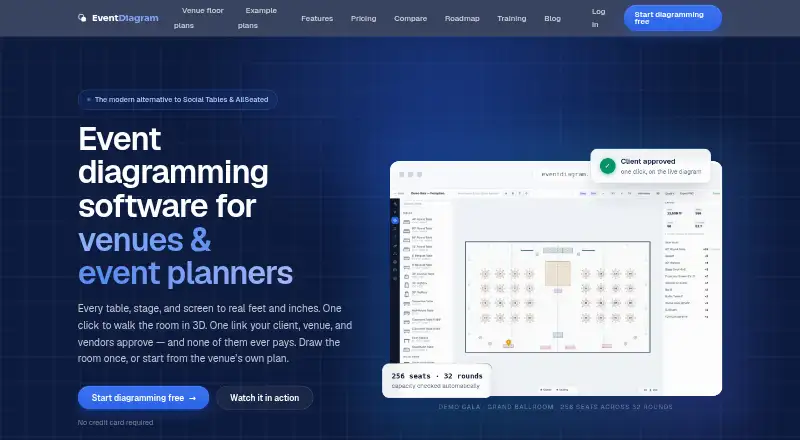
EventDiagram is web-based event diagramming software for venues, planners, hotels, caterers, rental companies, AV teams, churches, nonprofits, and other event operators. It creates to-scale 2D floor plans with real dimensions, tables, seating, staging, AV, décor, and capacity calculations. Teams can import guest lists from spreadsheets, CSV, and TSV files, assign attendees to tables, track occupancy and meal information, and share plans for comments and approvals. The product also offers property-based plans for venues alongside workspace plans for planners.
The plan structure covers both lightweight planning and larger production workflows. Free includes one active diagram, unlimited viewers and commenters, core objects, share links, watermarked exports, and three AI copilot messages per month. Solo costs $9 per workspace per month or $90 per workspace per year and adds unlimited events and diagrams, clean exports, and client approval flow for one editor. Pro costs $18 per workspace per month or $180 per workspace per year, with up to three editors, 3D views, the full production library, branding, version history, and attendee import. Business costs $149 per workspace per month or $1,490 per year and adds unlimited members, custom inventory, and one converted property. Venue costs $149 per property per month and includes unlimited event spaces and team members, concierge floor-plan conversion, and a verified venue profile.
Its strongest fit is for teams that need more than static layouts. Floor-plan and diagram imports, live table occupancy, 3D room walkthroughs, AI layout generation and editing, comments, approvals, API keys, and MCP support connect planning with client review and production work. Integrations include Social Tables, Prismm, and AllSeated. The main trade-off is scope by tier: 3D, branding, version history, and broader production capabilities begin above Solo, while larger teams need Business or Venue. Organizations seeking a web-based planning system with varied event workflows should consider EventDiagram; teams needing multiple editors on a low-cost entry plan should look beyond Solo.
EventDiagram pricing
All 6 EventDiagram plans and prices →
EventDiagram fact sheet
| Free plan | Yes |
|---|---|
| Paid from | Not verified |
| Seating plans | Yes |
| Floor-plan import | Yes |
| Guest-list import | Yes |
| Guest capacity | Not verified |
| 3D view | Yes |
| Team collaboration | Shared |
| Deployment | Cloud |
| Platforms | Web |
| Support | Email, Docs |
| Built for | Solo, Small business, Mid-market, Enterprise (editorial estimate) |
| Integrations | 5 integrations: API, MCP, Social Tables, Prismm, AllSeated |
| Pricing | Free plan · paid from $9/mo (source) |
| Website | eventdiagram.com |
| Facts checked | 21 Sep 2026 |
EventDiagram integrations
EventDiagram lists 5 integrations on its own site.
- API
- MCP
- Social Tables
- Prismm
- AllSeated
Alternatives to EventDiagram
- 3D Event DesignerA broad event-planning workspace for visual layouts, seating, inventory, and collaboration.8.6
- Metis Room PlannerA detailed browser-based planner for teams that need precise layouts, seating and handover outputs.8.5
- E3D PlannerA strong fit for teams that need detailed visual planning and rendered event designs.7.8



See all EventDiagram alternatives →
EventDiagram vs the competition
- EventDiagram vs 3D Event Designer
- EventDiagram vs Metis Room Planner
- EventDiagram vs E3D Planner
- EventDiagram vs Interactiva
- EventDiagram vs SeatPlan.io
- EventDiagram vs EventReception


Compare EventDiagram with any tool side by side →
Used EventDiagram? Be the first to review it
The editor score above is our own research. What this page doesn't have yet is a reader's view — what you used EventDiagram for, what worked and what didn't. No stars are seeded and no review is paid for; an editor reads every one before it appears.
Write a reviewTwo minutes · verified accounts only · read by an editor before it appears
Featured on iTechGuides

EventDiagram is listed in our Event Diagramming Software directory. Add the badge to your site — it links back to this page.
<a href="https://www.itechguides.com/products/eventdiagram/"><img src="https://www.itechguides.com/best/badge/eventdiagram.svg" alt="Featured on iTechGuides" width="230" height="46"></a>
Reviewed by iTechGuides Editors · Editorial team · Updated Sep 2026
Advertiser disclosure: iTechGuides is reader-supported. We may earn a commission when you click some links. How we rank.
Last updated · How we research and update