
CMS Signage
CMS Signage: A straightforward $10-per-screen service for scheduled signage on web and Android. Ranked #140 of 207 in Digital Signage Software by our editors (3.0/10); pricing: 14-day trial; best for simple, low-cost content scheduling.
At a glance
- Editor score3.0 / 10
- Pricing14-day trial
- Best forSimple, low-cost content scheduling
- Free planNo
- Paid from$110/unit/yr
- Founded2019 · Pune, India
- Facts checked21 Sep 2026
Where it wins
- Playlist scheduling with weekday and time controls
- Templates, widgets, feeds, and varied content support
- Uptime monitoring, downtime alerts, and content-played reports
Where it doesn't
- Platform support is limited to web and Android
- User roles are described as basic
- No permanent free plan; paid access starts at $10 per screen monthly
Our verdict on CMS Signage
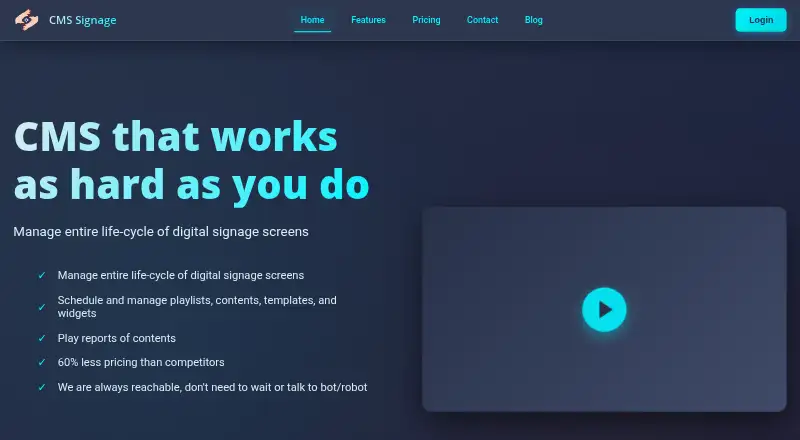
CMS Signage is a cloud-based digital signage content management platform for businesses running screens in retail, restaurants, offices, gyms, education, and advertising. Its web dashboard organizes playlists, templates, widgets, schedules, and screen groups, while supported content includes images, GIFs, videos, PDFs, documents, presentations, feeds, clocks, timers, weather, notice boards, and templates. It is suited to teams that need scheduled screen content without a broad enterprise platform.
Pricing is simple. The Monthly plan costs $10 per screen per month and includes unlimited image and video storage, custom templates, weather and meeting-room widgets, multiple users with permission sharing, and widget branding. The Yearly plan costs $110 per screen per year and includes the same listed features. A 14-day trial is available without a credit card. Enterprise adds custom solutions for large deployments, private cloud setup, support for deployments above 50 screens, and custom templates and widgets. The paid plans provide a clear entry point, while larger deployments have a separate enterprise path.
For day-to-day signage operations, CMS Signage covers scheduling by weekday and time, screen grouping, orientation settings, content expiration, repeat playback, play duration, uptime monitoring, downtime alerts, and content-played reports. Integrations include Facebook feeds, Facebook reviews, RSS feeds, and meeting-room availability. The current platform list includes web and Android; Windows, Linux, and macOS support are described as forthcoming. Choose CMS Signage if simple scheduling, templates, widgets, and basic monitoring fit your needs. Consider a broader suite if you require wider platform coverage, more advanced roles, or a larger integration ecosystem.
Your product? Our editors can test CMS Signage in depth and publish a review, labelled as paid · from $149/mo →
CMS Signage pricing
All 3 CMS Signage plans and prices →
CMS Signage fact sheet
| Free plan | No |
|---|---|
| Paid from | $110/unit/yr |
| Screen limit | Not verified |
| Offline playback | Not verified |
| Content types | GIF images, images, videos, PDF, DOC, PPT, Facebook feeds, RSS feeds, weather forecasts, clocks, countdown timers, notice boards, templates |
| User roles | Basic |
| API access | Yes |
| Mobile app | Not verified |
| Free trial | 14 days · no card needed |
| Money-back guarantee | 30 days |
| Deployment | Cloud, Mobile |
| Platforms | Web, Android |
| Compliance & security | GDPR |
| Support | Email, Tickets |
| Built for | Small business, Mid-market, Enterprise (editorial estimate) |
| Integrations | 4 integrations: Facebook feeds, Facebook reviews, RSS feeds, Meeting room availability |
| Pricing | 14-day trial (source) |
| Website | cmssignage.com |
| Facts checked | 21 Sep 2026 |
CMS Signage integrations
CMS Signage lists 4 integrations on its own site.
- Facebook feeds
- Facebook reviews
- RSS feeds
- Meeting room availability
Alternatives to CMS Signage
- OptiSignsA flexible signage platform with mobile administration, offline playback, and a free plan.9.3
- YodeckA flexible signage platform with a generous free tier and broad content support.9.2
- Play Digital SignageFeature-rich signage with a free screen option and wide platform coverage.9.1



See all CMS Signage alternatives →
Used CMS Signage? Be the first to review it
The editor score above is our own research. What this page doesn't have yet is a reader's view — what you used CMS Signage for, what worked and what didn't. No stars are seeded and no review is paid for; an editor reads every one before it appears.
Write a reviewTwo minutes · verified accounts only · read by an editor before it appears
Featured on iTechGuides

CMS Signage is listed in our Digital Signage Software directory. Add the badge to your site — it links back to this page.
<a href="https://www.itechguides.com/products/cms-signage/"><img src="https://www.itechguides.com/best/badge/cms-signage.svg" alt="Featured on iTechGuides" width="230" height="46"></a>
Reviewed by iTechGuides Editors · Editorial team · Updated Oct 2026
Advertiser disclosure: iTechGuides is reader-supported. Vendors can pay for top positions in our rankings and for a place on other products' pages, and we may earn a commission when you click some links. Bought places stand at the number bought; this page and our disclosure say so. Paying vendors may get a fuller, more detailed review from our editors, and that review can change their score. How we rank.
Last updated · How we research and update