Cap
Cap: A flexible AI recorder with local editing, cloud collaboration, and self-hosting. Ranked #4 of 39 in AI Screen Recorders by our editors (8.7/10); pricing: Free plan; best for teams wanting a broad AI recorder.
At a glance
- Editor score8.7 / 10
- PricingFree plan
- Best forTeams wanting a broad AI recorder
- Free planYes
- Paid from$29/user/yr
- AI transcriptionYes
- Founded2023
- Facts checked20 Sep 2026
Where it wins
- 4K/60fps capture with screen, camera, audio, and window recording
- AI titles, summaries, chapters, captions, and transcriptions
- macOS, Windows, Linux, web, Chrome extension, API, and self-hosting
Where it doesn't
- Free shareable links are limited to 5 minutes
- Some commercial and cloud features require paid plans
- Enterprise capabilities are offered through add-ons and arrangements
Our verdict on Cap
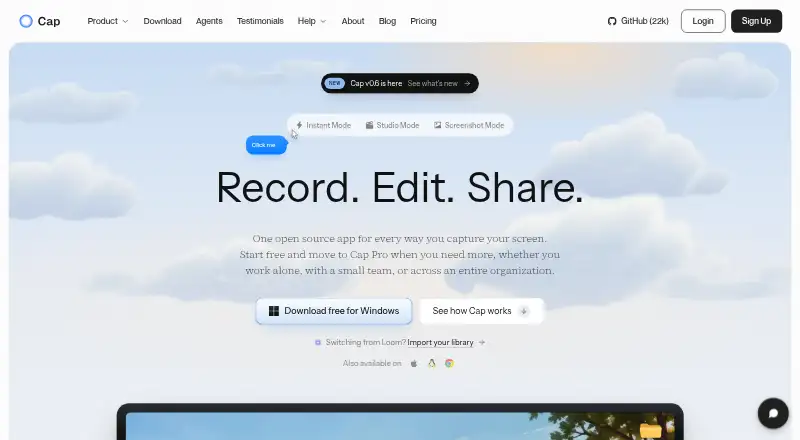
Cap is an open-source screen recorder for creators, educators, marketers, developers, and teams. Its desktop apps capture screens, windows, areas, cameras, microphones, and system audio. Instant Mode supports quick recordings with shareable links, while Studio Mode provides local recording and timeline editing. Cap also supports web access, a Chrome extension, macOS, Windows, Linux, API access, and self-hosting with Docker Compose.
Pricing spans local recording, cloud collaboration, and enterprise needs. The Free plan includes personal use, the full Studio Mode editor, 4K/60fps export, team workspaces, and shareable links up to 5 minutes. The annual Desktop License costs $29 per license per year and adds commercial usage rights, unlimited local recordings and editing, 20 cloud shareable links per month, and export to any format. The $58 Desktop License Lifetime adds the same core commercial and local capabilities without renewal. Cap Pro costs $12 per user per month, or $8.16 per user per month when billed annually, with unlimited cloud storage and bandwidth, AI-generated titles, summaries, chapters, and transcriptions, custom domains, password-protected shares, viewer analytics, and team workspaces.
Cap’s standout area is the combination of recording and documentation output. AI processing can turn recordings into captions, transcriptions, titles, summaries, and clickable chapters, while timestamped comments and viewer analytics support review and collaboration. Google Drive, S3-compatible storage, Loom video importing, Slack, and customer-managed storage options extend its ecosystem. Enterprise adds Cap Pro for large organizations, SAML SSO and signed BAA add-ons, possible SCIM provisioning, volume discounts, and custom S3 or Google Drive storage. Cap suits teams that want flexible capture, editing, AI documentation, and deployment choices; teams needing only basic short recordings may find its broader feature set unnecessary.
Your product? Our editors can test Cap in depth and publish a review, labelled as paid · from $149/mo →
Cap pricing
Cap fact sheet
| Free plan | Yes |
|---|---|
| Paid from | $29/user/yr |
| AI transcription | Yes |
| AI summaries | Yes |
| Documentation output | Yes |
| Speaker identification | Not verified |
| Recording limit | 5 minutes |
| Platform support | Browser+desktop |
| Export formats | MP4, WebM, MOV, GIF, SRT, WebVTT |
| Deployment | Cloud, Self-hosted, Desktop, Browser extension |
| Platforms | Web, Windows, macOS, Linux, Chrome extension |
| Compliance & security | SOC 2, ISO 27001, HIPAA, SSO/SAML |
| Support | Email, Community, Docs |
| Built for | Solo, Small business, Mid-market, Enterprise (editorial estimate) |
| Integrations | 4 integrations: Google Drive, S3-compatible storage, Loom video importer, Slack |
| Pricing | Free plan (source) |
| Website | cap.so |
| Facts checked | 20 Sep 2026 |
Cap integrations
Cap lists 4 integrations on its own site.
- Google Drive
- S3-compatible storage
- Loom video importer
- Slack
Alternatives to Cap
- LoomA polished screen recorder with broad integrations, AI options, and a higher paid entry point.9.2
- ZightA broad AI capture and administration tool with a useful free tier.9.0
- ScreenPalA feature-rich freemium recorder with 4K capture, AI tools, and broad device coverage.8.8



Cap vs the competition



Compare Cap with any tool side by side →
Also Ranked In
Cap is ranked in 3 of our directories.
Used Cap? Be the first to review it
The editor score above is our own research. What this page doesn't have yet is a reader's view — what you used Cap for, what worked and what didn't. No stars are seeded and no review is paid for; an editor reads every one before it appears.
Write a reviewTwo minutes · verified accounts only · read by an editor before it appears
Featured on iTechGuides

Cap is listed in our AI Screen Recorders directory. Add the badge to your site — it links back to this page.
<a href="https://www.itechguides.com/products/cap/"><img src="https://www.itechguides.com/best/badge/cap.svg" alt="Featured on iTechGuides" width="230" height="46"></a>
Reviewed by iTechGuides Editors · Editorial team · Updated Oct 2026
Advertiser disclosure: iTechGuides is reader-supported. Vendors can pay for top positions in our rankings and for a place on other products' pages, and we may earn a commission when you click some links. Bought places stand at the number bought; this page and our disclosure say so. Paying vendors may get a fuller, more detailed review from our editors, and that review can change their score. How we rank.
Last updated · How we research and update