
Recommended Free Tools
iTechGuides is reader-supported. When you buy through links on our site, we may earn an affiliate commission. As an Amazon Associate I earn from qualifying purchases. Learn more
This Itechguide teaches you how to turn off Facebook notifications on Chrome. This guide covers 3 steps to turn off Facebook notifications on Chrome:
Step 1: Block Chrome Notifications
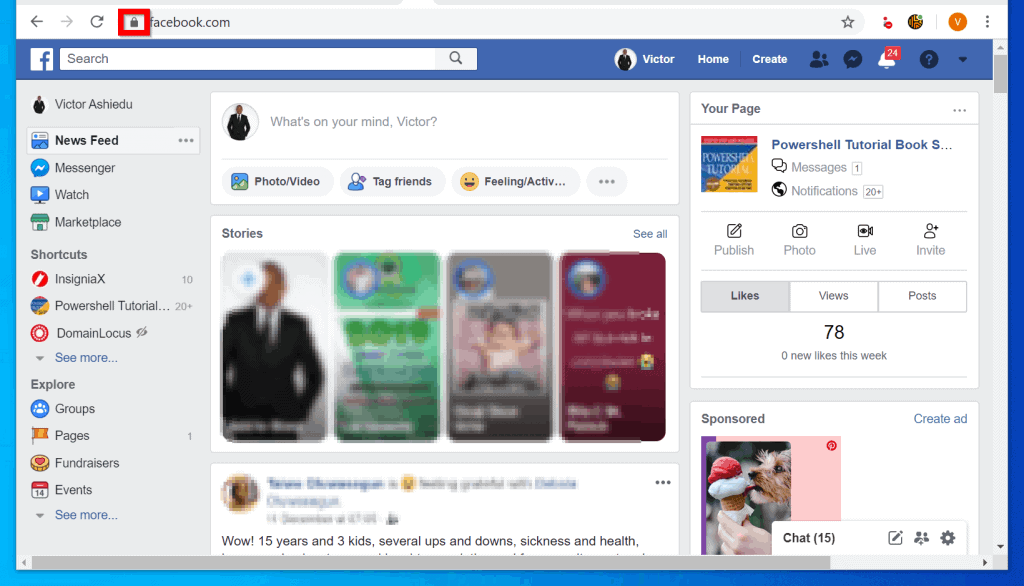
- Open Google Chrome on your Computer. Then open any website – you may open Facebook.com.
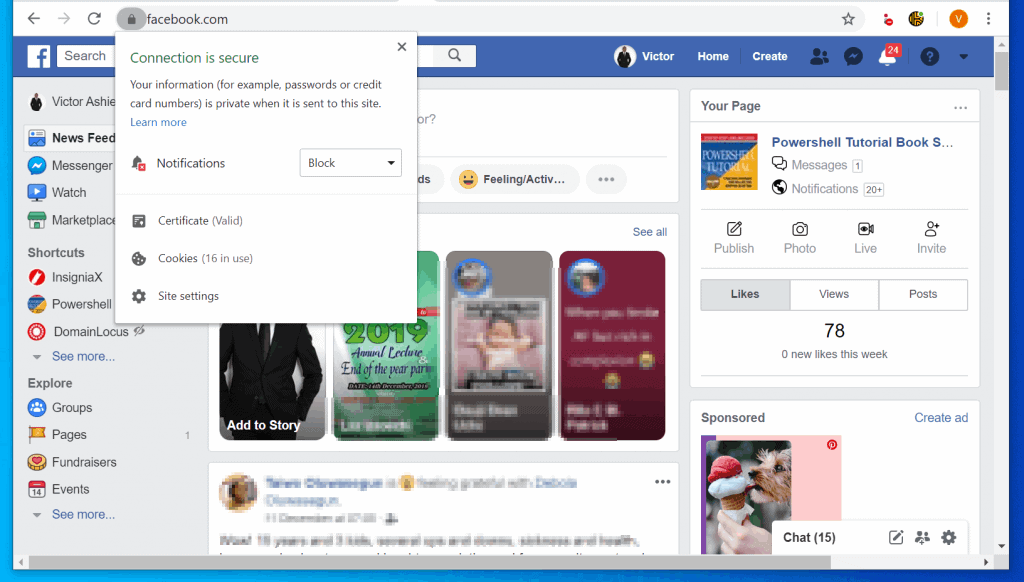
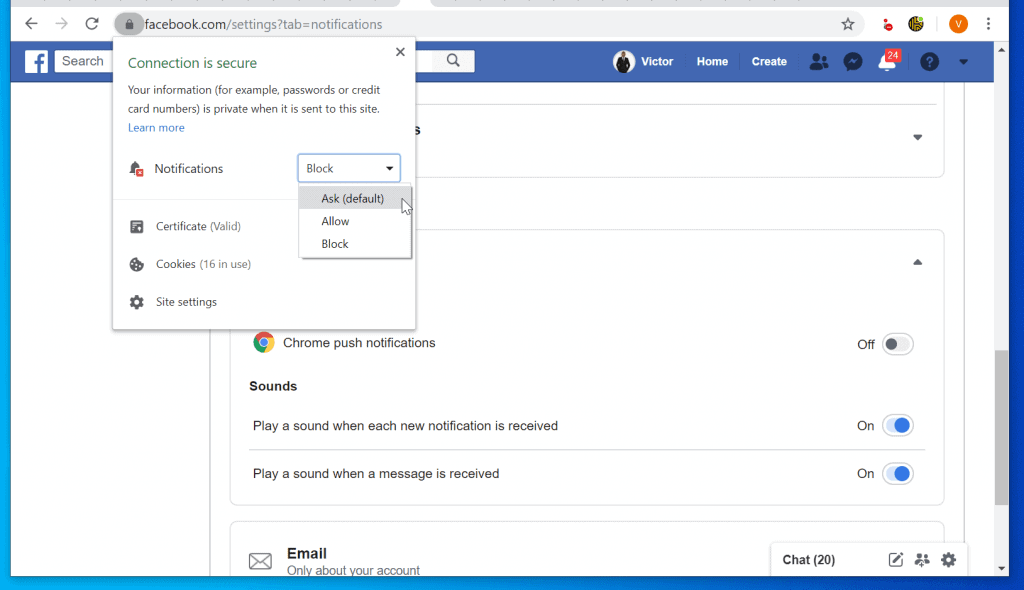
- On the top left of the browser URL bar, click the padlock icon.
- Then, on the Notifications drop-down, select Block.

Step 2: Turn off Facebook Notifications on Chrome
Once you have blocked Chrome Notifications, use the steps below to turn off Facebook notifications:
- Open Facebook.com on your PC. If you have not already signed in to Facebook, sign in with your Facebook account.
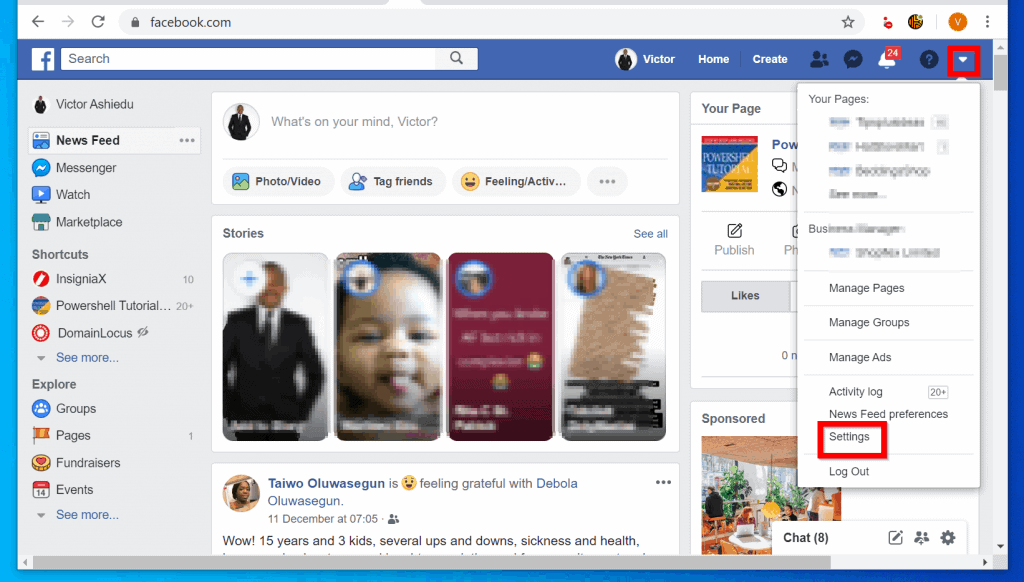
- Then, on the top right of your Facebook News Feed page, click the arrow pointing downwards.

- From the list of displayed options, click Settings – just before the Log out button.
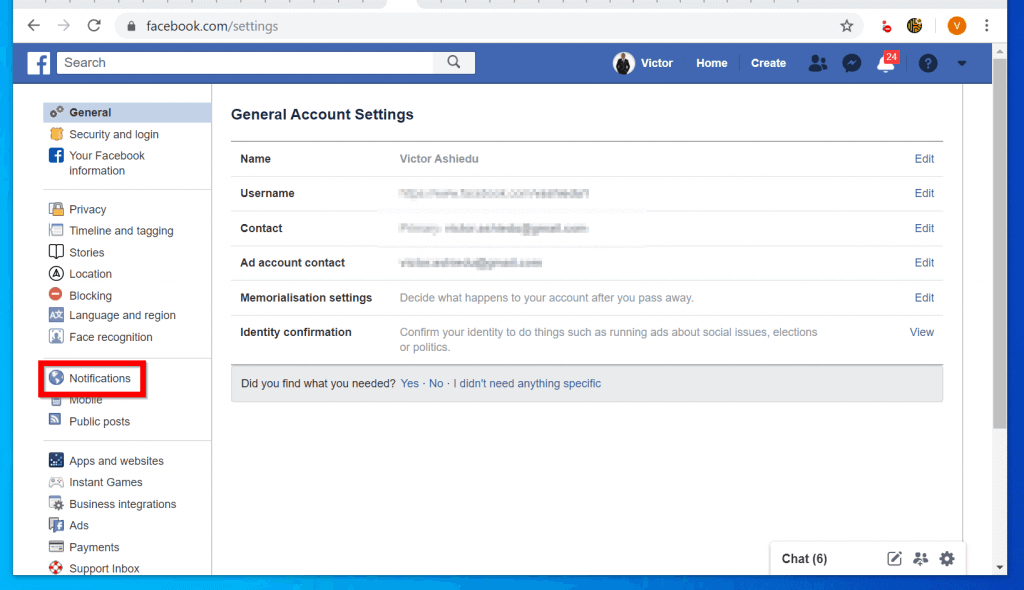
- Then, on the left pane of your General Account Settings page, click Notifications. Notifications is somewhere in the middle of the list of options.
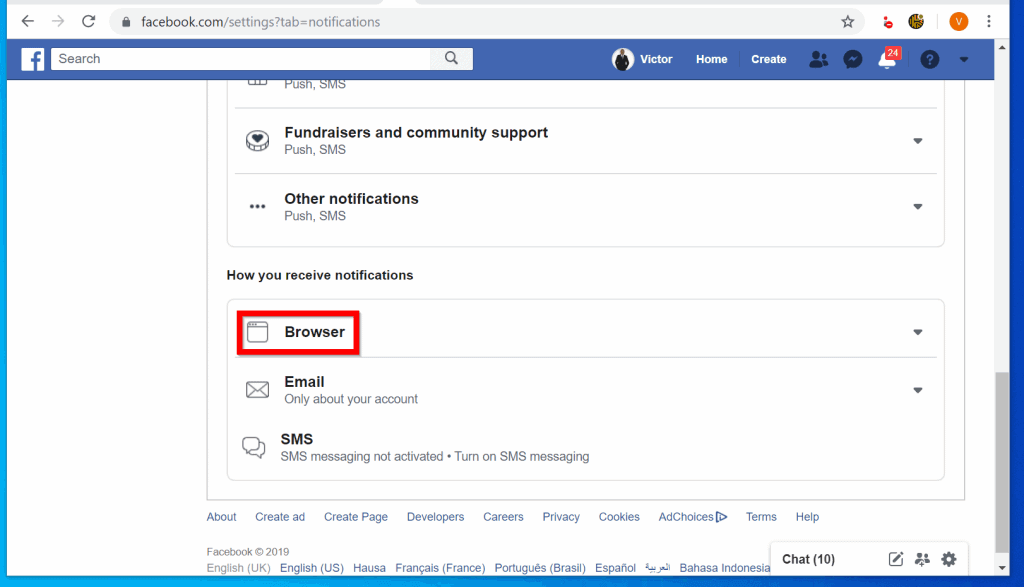
- When the Notifications page opens, scroll down to How you receive notifications. Then click Browser.
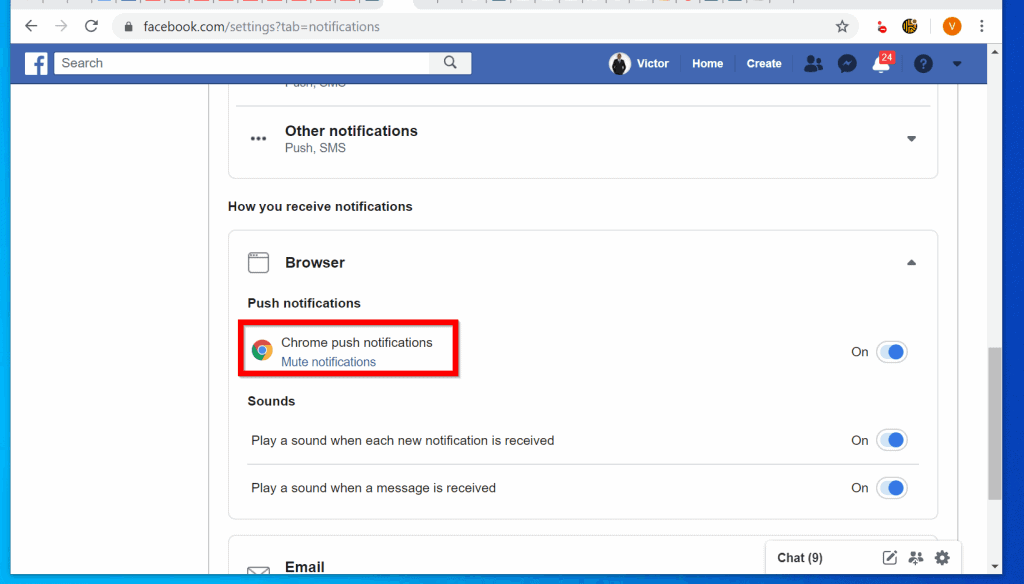
- Finally, to turn off Facebook notifications on Chrome, toggle the switch beside Chrome push notifications from On to Off.

Step 3: Allow Chrome Notifications (Optional)
The final optional step is to enable Chrome notifications. This step is necessary if you want other websites to be able to send notifications to Chrome.
The Tool Desk
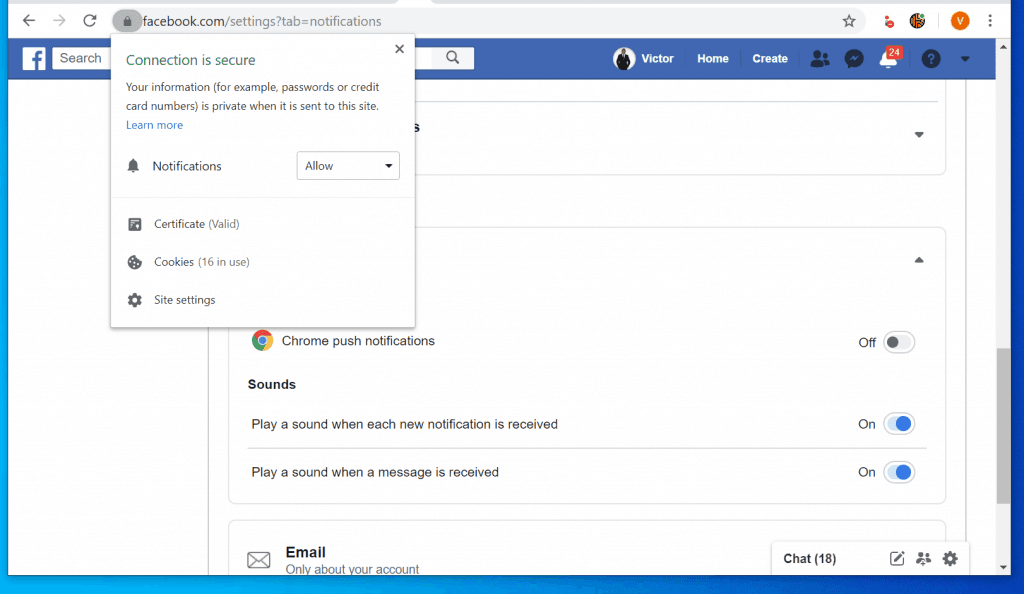
Outbyte PC Repair FREERepair Windows errors before they cause bigger problemsFix Now →Outbyte Driver Updater FREEScan for outdated or missing drivers - takes under a minuteDriver Scan →- Click the padlock icon on the Chrome browser URL bar
- Then, from the displayed list of options, beside Notifications, click the drop-down and select Ask (default) or Allow.
I hope that you found it helpful. If you did, click on “Yes” beside the “Was this page helpful” question below.
Popular on Amazon

- Compact Mouse: With a comfortable and contoured shape, this Logitech ambidextrous wireless mouse feels great in either right or left hand and is far superior to a touchpad
- Durable and Reliable: This USB wireless mouse features a line-by-line scroll wheel, up to 1 year of battery life (2) thanks to a smart sleep mode function, and comes with the included AA battery
- Universal Compatibility: Your Logitech mouse works with your Windows PC, Mac, or laptop, so no matter what type of computer you own today or buy tomorrow your mouse will be compatible
- Plug and Play Simplicity: Just plug in the tiny nano USB receiver and start working in seconds with a strong, reliable connection to your wireless computer mouse up to 33 feet / 10 m (5)
- Better than touchpad: Get more done by adding M185 to your laptop; according to a recent study, laptop users who chose this mouse over a touchpad were 50% more productive (3) and worked 30% faster (4)
You may also express your thoughts and opinions by using the “Leave a Comment” form at the bottom of this page.
Finally, to read more Social media Itechguides, visit our Social Media page.
Quick Recap
Also popular on Amazon

- 【Plug and Play for Home/Office/School】The wireless computer mouse features 2.4GHz connectivity, delivering a stable, interference-free connection up to 32ft. Designed for 𝐦𝐞𝐝𝐢𝐮𝐦 𝐭𝐨 𝐥𝐚𝐫𝐠𝐞 𝐬𝐢𝐳𝐞𝐝 𝐡𝐚𝐧𝐝𝐬, it ensures comfortable use all day. Simply plug in the USB-A receiver for instant pairing—no drivers needed. 📌📌 If the mouse isn’t suitable, place the USB receiver in the battery compartment and return both.
- 【3 Levels Adjustable DPI】This travel USB mouse offers 3 adjustable DPI settings (800, 1200, 1600), allowing you to customize sensitivity for precise design work. Effortlessly switch to match your task and elevate your productivity. 📌 Please remove the film at the bottom of the mouse before use.
- 【Effortless Browsing】Equipped with forward and backward buttons, this computer mice streamlines your workflow, making it easy to navigate through web pages and files with a simple click. 📌Side button does not work on Mac.
- 【Visible Indicator Light】 The pc mouse features a visual indicator for DPI levels and low battery alerts. The red light flashes once for 800 DPI, twice for 1200 DPI, and three times for 1600 DPI. When the battery level is below 10%, the light flashes red until the mouse is completely out of power.
- 【Click to Wake】With smart sleep mode, it saves power by standby after 10 inactive minutes, just 2-3 clicks to wake. This efficient design delivers 3x longer battery life than motion-wake mice. Engineered for durability, its buttons and scroll wheel are tested for 10 million clicks, ensuring long-term reliability and consistent performance.
Also popular on Amazon

- Computer mouse for easily navigating a computer interface; click, scroll, and more
- USB-A wired connection; if existing device only supports USB-C, an additional adapter will be required
- High-definition (1000 dpi) optical tracking ensures responsive cursor control for precise tracking and easy text selection
- 3 buttons offer effortless fingertip control
- Plug-and-go ready for instant use
Also popular on Amazon

- Compact Mouse: With a comfortable and contoured shape, this Logitech ambidextrous wireless mouse feels great in either right or left hand and is far superior to a touchpad
- Durable and Reliable: This USB wireless mouse features a line-by-line scroll wheel, up to 1 year of battery life (2) thanks to a smart sleep mode function, and comes with the included AA battery
- Universal Compatibility: Your Logitech mouse works with your Windows PC, Mac, or laptop, so no matter what type of computer you own today or buy tomorrow your mouse will be compatible
- Plug and Play Simplicity: Just plug in the tiny nano USB receiver and start working in seconds with a strong, reliable connection to your wireless computer mouse up to 33 feet / 10 m (5)
- Better than touchpad: Get more done by adding M185 to your laptop; according to a recent study, laptop users who chose this mouse over a touchpad were 50% more productive (3) and worked 30% faster (4)
Also popular on Amazon

- Ultra-fast LIGHTSPEED wireless technology in this wireless mouse gives you a lag-free gaming experience, delivering incredible responsiveness and reliability with 1 ms report rate for competition-level performance
- G305 wireless computer mouse boasts an incredible 250 hours of continuous gameplay on just 1 AA battery; switch to Endurance mode via Logitech G HUB software and extend battery life up to 9 months
- The durable, compact design with built-in nano receiver storage makes G305 not just a great portable desktop mouse, but also a great laptop travel companion and gaming wireless mouse. Use with a gaming laptop and play anywhere
- The next-generation optical HERO sensor in this gaming mouse delivers incredible performance and up to 10x the power efficiency over previous generations, with 400 IPS precision and up to 12,000 DPI sensitivity
- Wireless does not have to mean heavy. This gaming mouse provides high maneuverability, coming in at only 3.4 oz, thanks to an efficient, lightweight mechanical design and ultra-efficient battery usage