
iTechGuides is reader-supported. When you buy through links on our site, we may earn an affiliate commission. As an Amazon Associate I earn from qualifying purchases. Learn more
Engage website visitors through live chat by making help easy to find, replying quickly with relevant answers, and inviting conversations only when your team can handle them. Start with visitor-initiated chat, prepare routing and staffing, then test carefully targeted proactive invitations on pages where people commonly need assistance. Measure first-reply time, later response times, waiting, missed conversations, duration and visitor feedback together; a busy chat queue with unanswered requests is not successful engagement.
What engaging visitors through live chat actually involves
Live chat has two operating modes. In reactive chat, a visitor opens the widget when they want help. In proactive chat, your site displays an invitation based on conditions such as the page being viewed, a return visit or time spent in a checkout flow. The invitation should remain optional: visitors need a clear way to ignore it and continue browsing.
A useful chat program combines four elements:
- Access: a visible, usable widget that works on the pages and devices your audience uses.
- Relevance: an opening message connected to the visitor’s task, rather than a generic interruption.
- Capacity: trained agents, defined queues, escalation rules and coverage for offline periods.
- Feedback: reporting that shows both answered demand and conversations that waited or were missed.
Chat is a service channel, not a guaranteed conversion or abandonment remedy. Whether it improves an outcome depends on the question asked, the quality and speed of the answer, and what happens when no agent is available.
Do these 3 things before closing this tab:
1Fix the driver behind crashes, sound loss and screen glitches2Repair Windows errors before they cause bigger problems3Scan for outdated or missing drivers - takes under a minuteDecide what job chat will do
Write a one-sentence purpose before changing the widget. Common purposes include:
#1 Best Overall

- Digital Stereo Sound: Fine-tuned drivers provide enhanced digital audio for music, calls, meetings and more
- Rotating Noise Canceling Mic: Minimizes unwanted background noise for clear conversations; the rotating boom arm can be tucked out of the way when you’re not using it
- Handy In-line Controls: Simple in-line controls on the headset cable let you adjust the volume or mute calls without disruption
- Plug-and-Play USB Computer Headset: Simply plug the USB-A connector into your computer and you’re ready to talk or listen without the need to install software
- Padded Comfort: Comfortable headphones with adjustable headband features swivel-mounted, leatherette ear cushions for hours of comfort and is easy to clean
- Answering existing customers’ support questions.
- Helping shoppers choose an item, service or plan.
- Assisting with checkout or account access.
- Routing a complex request to a specialist.
- Directing visitors to a self-service article or other channel.
Give every purpose an owner, an assignment queue and an escalation path. A support question that needs billing expertise should not sit in a sales queue, and a sales invitation should not create a promise that the support team cannot keep. Define which requests agents can resolve in chat, which require a handoff, and how the visitor will be updated during that handoff.
Set up the chat experience before inviting conversations
Configure the widget
In your chat administration area, enable the website widget and style its color, position and launcher so it is recognizable without covering navigation, cookie controls or checkout buttons. Check it on a phone as well as a desktop browser. Keep the launcher available on pages where visitors may need help, but remove or reposition it where it blocks a critical task.
Decide whether a pre-chat form is needed. Ask only for information that changes routing or lets an agent start work, such as an order number or a short description. Long forms delay the conversation and can discourage people who only need a quick answer.
Windows Errors? Fix Them Before They Spread
Repair common Windows errors and clear accumulated junk for a smoother, more stable PC - no reinstall needed.Free scan · no reinstallCrashes, No Sound, or Screen Glitches?
Random freezes, missing sound and display glitches usually trace back to one bad driver. Find and replace yours safely.Free scan · under a minuteDefine offline behavior
When no agent is online, show an offline form or a clear alternative. Tell visitors what they can submit, when they should expect a reply and which channel to use for urgent matters. Route the submission to a monitored queue; an offline form that nobody owns turns a visible promise into a silent failure.
Set security and privacy controls
Apply the widget’s security settings and limit what visitors should enter. Do not ask for passwords, full payment-card numbers or other secrets in an open chat. Explain any authentication step required for account-specific help, and make sure transcripts and submitted forms are accessible only to authorized staff.
Offer a post-chat rating when it is useful
A simple thumbs-up or thumbs-down question can provide immediate visitor feedback. Place it after the conversation, not in the middle of a troubleshooting exchange, and review comments alongside response and missed-chat data rather than treating a rating as a complete quality measure.
Start with visitor-initiated chat
Make the first version deliberately simple. A visitor should be able to see where to ask for help, open the widget, describe the issue and reach the correct queue without guessing. Add a concise greeting that explains the scope of help, for example: “Questions about delivery, returns or choosing a size? We can help.” Avoid claiming 24/7 assistance unless the schedule really provides it.
Train agents on the same workflow. They should acknowledge the visitor’s message, answer the question in plain language, confirm the next action and document a handoff when another team takes over. If they need time to research, say so and provide a realistic update point instead of leaving the visitor watching an idle typing indicator.
Use proactive chat selectively
Choose a visitor situation with a clear reason
Proactive outreach is most defensible when the page or behavior suggests a specific need. Examples documented for Zendesk include:
- A returning visitor who has not already started a chat or received help.
- A visitor who remains on a cart page for a chosen period.
- A visitor viewing pricing or another critical page where a clarification may prevent confusion.
Match the invitation to the context. On a pricing page, ask whether the visitor wants help comparing plans. On a cart page, offer help with shipping or checkout. Do not use a single sales-oriented message across support, account and checkout pages.
Keep the invitation voluntary and easy to dismiss
Use one clear question and a visible close or decline control. Do not repeatedly reopen a prompt after a visitor dismisses it. A proactive invitation should supplement the launcher, not trap the visitor in a conversation.
Recommended Free Tools
Rank #2

- Exceptional call quality - Revel in crystal-clear conversations with the Lenovo USB-A Wired Stereo Headset Gen 2. Powered by Lenovo Accessories and Device Manager (LADM) software that enhances noise-cancelation, ensuring clarity even in the busiest environments.
- Effortless controls - No more fumbling with complicated settings. This headset’s intuitive control box simplifies your life with easy access to call functions, volume, and mute, allowing you to stay focused and productive.
- Supreme comfort - At just 140 g, experience the featherlight embrace of thoughtfully designed earcups. Relish the perfect blend of function and comfort that supports you through every task, making this headset a transformative addition to any professional’s toolkit.
- USB-A Plug & Play Compatible with: Teams, Zoom, Google Meet (Hangout), Google Voice, Slack, GoTo Meeting, WeChat, Cisco Webex
Understand the routing trade-off
A proactive trigger can bypass the pre-chat information and department routing that would normally occur when a visitor opens the widget. Before enabling one, confirm which queue receives the conversation and what context the agent will see. If the trigger creates requests that no available team can answer, turn it off or narrow its audience.
Treat timing values as experiments, not standards
Zendesk’s standard-trigger documentation gives a first-visit greeting after 30 seconds and a separate delayed-response example at 60 seconds when an agent has not joined or replied. Its proactive-chat guidance also uses “more than 60 seconds” as an illustrative cart-page delay. These are product configuration examples, not proven universal timings. Test a delay against your visitors’ tasks, staffing and feedback. A prompt that appears while someone is still reading can feel intrusive; one that appears after the visitor has abandoned the page cannot help.
Write messages that help instead of interrupting
Opening invitation
Name the assistance available and ask one easy question. “Need help choosing the right integration?” is more useful than “Can we help?” Keep the message short enough to read without leaving the page.
First agent reply
Acknowledge the exact issue and state what you will do next: “I see you are asking whether this plan includes phone support. I’ll check the current plan details and reply here.” Do not make the visitor repeat information already entered in a form or captured by the widget.
The Tool Desk
Outbyte Driver Updater FREEFix the driver behind crashes, sound loss and screen glitchesFind Drivers →Outbyte PC Repair FREEClear out junk files and repair common Windows errorsFree Scan →Research, delay and handoff
If the answer requires another team, explain the handoff and preserve the conversation context. Give a time expectation that reflects actual coverage. If the chat must move to email or an offline form, confirm the address or ticket reference and tell the visitor how follow-up will occur.
Closing
Close with the next action, not a vague “anything else?” For example, confirm that a return link was sent or that the visitor can now complete checkout. Offer a rating only after the task is complete.
Prepare staffing, routing and escalation
Proactive chat can increase workload because it creates additional conversations rather than merely exposing existing demand. Before launch:
- Set staffed hours and publish them in the widget.
- Assign queues by topic, language, product or customer status.
- Define who receives missed chats and offline submissions.
- Set an escalation path for billing, safety, account-security and technical issues.
- Train agents on tone, product information, authentication and handoff notes.
- Monitor live demand and pause a trigger if wait times or missed chats rise.
Capacity includes concurrency. An agent who handles several simple questions may not be able to manage a complex troubleshooting session at the same time. Set an internal limit and route overflow to an offline form or queue rather than allowing visitors to wait without explanation.
Quick wins for a faster PC:
Repair Windows errors before they cause bigger problemsFix Now →Fix the driver behind crashes, sound loss and screen glitchesFind Drivers →Measure the complete conversation experience
Review metrics by channel, queue, page and trigger. Zendesk’s live-chat reporting distinguishes the following measures:
| Measure | What it tells you | How to use it |
|---|---|---|
| First-reply time | How long the visitor waits for the first agent response. | Assess whether the initial promise of real-time help is credible. |
| Average-reply time | The typical delay between later visitor and agent messages. | Find conversations that begin promptly but then stall. |
| Longest-reply time | The slowest response interval recorded. | Identify severe outliers for coaching or escalation review. |
| Wait time | Time a visitor spends waiting for service. | Compare staffed capacity with demand, including queues before an agent joins. |
| Duration | How long the conversation remains active. | Separate quick answers from cases needing a process or handoff. |
| Missed chats | Requests that were not answered by an agent. | Expose unattended demand that completion-only reports hide. |
Pair these measures with visitor ratings where appropriate and with the outcome tied to your purpose, such as a resolved support issue, a completed setup or a successful handoff. Do not interpret a higher chat count as success by itself: more conversations may reflect useful access or an overly aggressive prompt.
Run a controlled improvement cycle
- Record a baseline: measure reactive chats, first replies, later replies, waits, missed chats, duration and ratings during a normal staffed period.
- Change one condition: alter a page audience, invitation wording or delay, while leaving routing and staffing documented.
- Watch capacity: check queue length, missed conversations and offline submissions during the test.
- Review conversation quality: sample transcripts for repeated questions, unnecessary handoffs and requests that the prompt could not reasonably solve.
- Keep, narrow or remove: retain a trigger when it brings relevant conversations that the team can answer; narrow or disable it when it raises waiting, missed chats or negative feedback.
Use visitor feedback to locate friction, but do not substitute ratings for operational evidence. A small number of enthusiastic ratings cannot compensate for a queue that regularly goes unanswered.
Rank #3
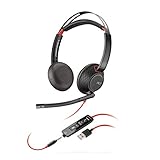
- Connects To: For a professional needing to connect to a PC/Mac using USB-A and/or mobile phone. Compatible with Microsoft Teams and other leading collaboration platforms.
- Ideal For: Users with extensive PC communication and collaboration use.
- Audio Performance: Superb Audio Quality - Noise canceling microphone ensures your voice is heard. Audio automatically switches between wideband for telephony & hi-fi stereo for music. SoundGuard DIGITAL protects against sound levels over 118dBA, sudden loud sounds & long-term exposure.
- Intelligent Features: Enhanced All Day Comfort & Portability - Ultra-soft leatherette ear cushions wrapped around pillow-soft memory foam provide all-day comfort. A lightweight cushioned metal headband offers durability and a comfortable custom fit.
- Global Warranty & Wearing Style: 2 years global warranty; over the head wearing style with two earpieces.
Troubleshoot common live-chat problems
The widget is not visible
- Confirm the widget code or approved installation method is present on the intended pages.
- Check that the widget is enabled for the current site, brand or help center.
- Inspect mobile layout, consent settings and content-security rules that may block it.
- Test in a clean browser session so an old cached script does not mislead you.
Visitors open chat but reach the wrong team
- Review department rules and the fields collected before chat.
- Check whether a proactive trigger bypasses the form or routing step.
- Give agents a transfer procedure that preserves the original question.
Waits and missed chats are rising
- Pause broad proactive triggers first, especially on high-traffic pages.
- Shorten staffed-hour promises or add coverage before reopening invitations.
- Route overflow to an owned offline form with a stated reply expectation.
- Separate simple questions from specialist cases so complex work does not block the whole queue.
Visitors complain about interruptions
- Reduce the audience to a relevant page or behavior.
- Stop repeating a prompt after dismissal.
- Replace generic sales copy with a specific help offer and a clear close control.
Agents ask visitors to repeat themselves
- Shorten or improve pre-chat fields so the captured context is useful.
- Pass the page, form response and previous messages to the receiving queue.
- Require a concise handoff note whenever a conversation changes department.
Be precise about visitor monitoring
Some platforms expose a real-time visitor list, but availability is not universal. Zendesk documents its described Visitors activity as limited to older Chat accounts and unavailable in messaging or Agent Workspace. Do not assume that every live-chat product, account edition or workspace provides that view. Base triggers on the events and fields your own configuration actually supports, and explain monitoring practices in your privacy notice when required.
When to use reactive chat, proactive chat or neither
| Situation | Best starting choice | Reason |
|---|---|---|
| Visitors need occasional support and staffing is limited. | Visitor-initiated chat with an offline form. | Demand is invited by the visitor and easier to match to capacity. |
| A specific page creates recurring confusion. | A narrow proactive invitation on that page. | The message can address a known question without interrupting unrelated browsing. |
| Checkout or cart visitors pause while staffed agents are available. | A tested cart-page trigger. | The context may justify help, but timing and routing must be validated. |
| No reliable owner exists outside business hours. | Launcher plus clearly labeled offline form. | An invitation without coverage creates an avoidable missed conversation. |
| The team cannot measure waits or missed chats. | Improve reporting before expanding invitations. | Without coverage data, you cannot see whether engagement is helping or overloading service. |
Frequently Asked Questions
How quickly should an agent reply to live chat?
As close to immediately as your staffing model can reliably provide. Track first-reply time and later reply intervals separately, because a fast greeting does not make a conversation successful if subsequent responses stall. Publish a realistic expectation rather than promising instant service that your queue cannot sustain.
Should every website use proactive chat?
No. Use it only when a page or behavior supplies a clear reason to offer help and the responsible team can handle the additional demand. A well-supported visitor-initiated channel is preferable to an invitation that produces missed chats.
Is a 30-second trigger the industry standard?
No. Thirty seconds and 60 seconds appear in Zendesk product examples. They are configuration illustrations, not universal benchmarks. Test timing with your audience, page purpose, staffing and visitor feedback.
What should an offline visitor submit?
Collect the minimum information needed to identify the request and reply, such as a contact address, topic and short description. State who owns the submission and when a response is expected, then monitor the queue.
How can I prevent proactive chat from routing incorrectly?
Map each trigger to an explicit queue, verify what fields and context reach the agent, and test the path with a sample visitor. Pay special attention to triggers that bypass a pre-chat form or department-selection step.
What is the most important live-chat report?
No single measure is sufficient. Read first-reply, average-reply, longest-reply, wait, duration and missed-chat measures together, then compare them with visitor ratings and the outcome your chat was designed to support.
Can agents watch every visitor in real time?
Only if the particular product and account edition provide that capability. Zendesk’s documented Visitors activity is restricted to older Chat accounts and is not available in messaging or Agent Workspace, so confirm feature availability rather than assuming it.
Frequently Asked Questions
How do I know whether a proactive invitation is helping?
Compare the invitation period with a documented baseline, looking at relevance of conversations, response and wait times, missed chats, visitor feedback and the business or support outcome the invitation was intended to influence.
What’s actually slowing this PC down?
Pick the symptom - the matching free tool is one click away.
What should happen when a chat needs another department?
The agent should explain the handoff, preserve the visitor’s context, identify the receiving queue or person and state what happens next. The visitor should not have to restart the story.
Where should the chat widget appear?
Place it where visitors can find it without covering navigation, forms or checkout controls. Check desktop and mobile layouts and remove it from pages where it interferes with the task.
Quick Recap
Product prices and availability are accurate as of the date/time indicated and are subject to change. Any price and availability information displayed on Amazon at the time of purchase will apply.

