
iTechGuides is reader-supported. When you buy through links on our site, we may earn an affiliate commission. As an Amazon Associate I earn from qualifying purchases. Learn more
If you no longer need your Outlook.com email account, follow these steps to get rid of it for good.
Step 1: Sign in to Your Outlook.com Account
- Open Live.com (link opens in a new browser tab)
- Then at the top right of the page, click Sign in.

- At the sign in page, enter your outlook.com email address. Then click Next.

- Type your email password and click Sign in.


Step 2: Delete Your Outlook Account
Once you are signed in to your account, follow the steps below to permanently close the account:
- Open Close your Outlook.com account link. Then scroll down and click the Close Account button (See the image below).

- A sign-in page will open on a new browser. Enter the password to your Outlook.com email and click Sign in.

- Microsoft will then send a code to your alternate email address or phone number. To receive the code click the verification method. In my example, I will click Email…

- You will be required to enter the full alternate email address or phone number. Enter it in the field. Then click Send Code.

- Enter the code you received from your alternate email or phone number. Then click Verify.

- On the confirmation page, read the relevant information. When you are sure you want to delete Account, click Next (beneath the page).

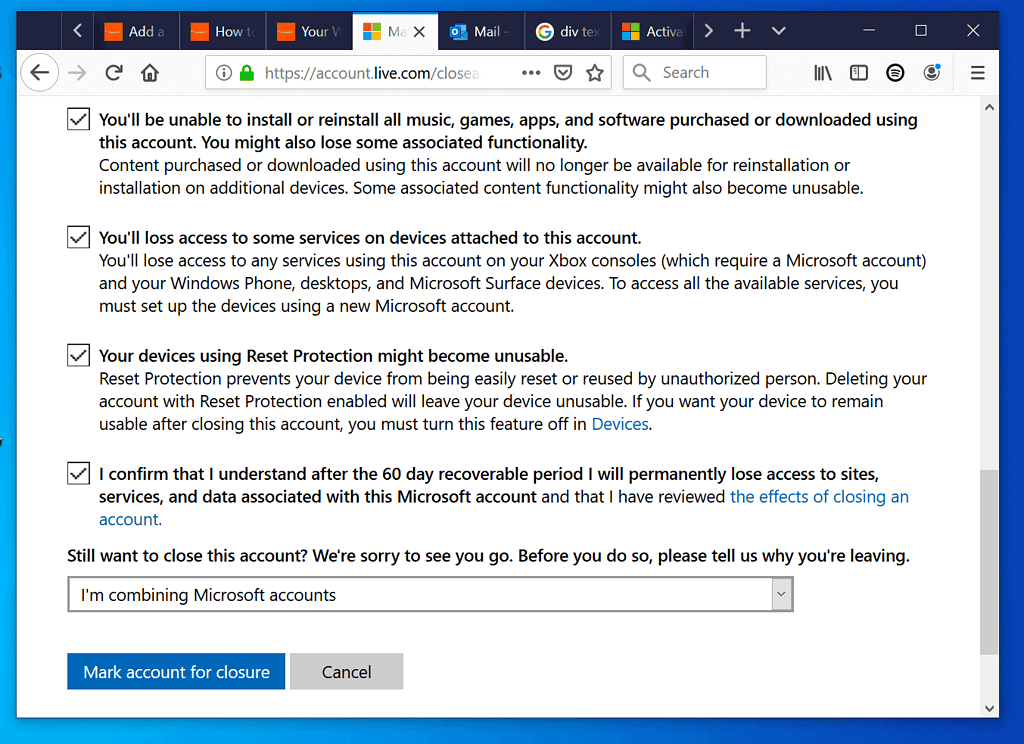
- Finally, check all the boxes on the last page. Then on the Still want to close this account? drop-down, select a reason and click Mark account for closure.

Conclusion
Closing your Outlook.com account is an irreversible action. Once deleted you cannot recover it (except within the 60-day recoverable period). So, it is important to be ensure you really want to close the account.
The Tool Desk
Outbyte PC Repair FREERepair Windows errors before they cause bigger problemsFix Now →Outbyte Driver Updater FREEScan for outdated or missing drivers - takes under a minuteDriver Scan →I hope you found this Itechguide helpful. If you were able to delete Outlook.com account with the steps in this guide, kindly spare 2 minutes to share with us by responding to the “Was this page helpful?” question below.
Quick Recap
Also popular on Amazon

- 【Aluminium Housing · Outstanding Heat Dissipation】 Featuring a thickened aluminium alloy housing with an excellent finish, it provides highly efficient heat conduction and dissipation, keeping the chip cool during high-speed data transfer and ensuring data security.
- 【USB 3.1 High-Speed Transfer】 Equipped with a USB 3.0 data cable featuring a thickened copper core, it delivers read speeds of up to 110–133 MB/s and write speeds of up to 103 MB/s, enabling large files to be transferred in seconds.
- 【Ultra-Slim and Silent · Portable for On-the-Go Use】 The motherboard features a noise-free design, creating a quiet working environment. Its ultra-slim and lightweight body fits easily into a bag, making it ideal for carrying whilst travelling or on business trips.
- 【Plug-and-Play · Wide Compatibility】 No driver installation required; simply plug it in and use it. It delivers stable, high-speed performance on both gaming consoles and computers. A USB-C adapter is included for compatibility with the latest devices.
- 【Full Set of Accessories · Three-Year Warranty】 The package includes the hard drive, a USB 3.0 data cable, a USB-C adapter and a user manual, all presented in an elegant gift box. Enjoy a three-year warranty and free technical support for complete peace of mind.
Also popular on Amazon

- Automatically finds and saves all of your files including photos, videos, documents, contacts, music, online services and email photos
- Effortless automatic "one click” computer AND phone backup
- Hassle-free safeguard and protect hundreds of thousands of photos and files
- Effortless cross-device compatibility. Easily backs up your Smartphone and Computer with USB, USB-C, Apple, Android, PC and Mac devices
- No-subscription external drive
Popular on Amazon

- Automatically finds and saves all of your files including photos, videos, documents, contacts, music, online services and email photos
- Effortless automatic "one click” computer AND phone backup
- Hassle-free safeguard and protect hundreds of thousands of photos and files
- 4-in-1 compatibility with effortless cross-device compatibility. Easily backs up your Smartphone and Computer with USB, USB-C, PC and Mac devices
- No-subscription external drive
For more guides like this visit our How To page.



They provide complete information. You can also recover your email account easily. Create your account.
Thanks for sharing!