
iTechGuides is reader-supported. When you buy through links on our site, we may earn an affiliate commission. As an Amazon Associate I earn from qualifying purchases. Learn more
The AMD Radeon RX 9070 XT is an excellent high-refresh 1440p and capable 4K rasterization graphics card. In a current 52-game comparison, it averaged 107 FPS at 1440p versus 108 FPS for Nvidia’s GeForce RTX 5070 Ti, while at native 4K it averaged 81 FPS versus 84 FPS for the Nvidia card. The RX 9070 XT is much less competitive in heavy ray tracing and path tracing, however, and it typically uses about 20% more power than the RTX 5070 Ti.
Its 16GB of GDDR6 is a sensible capacity for modern 1440p gaming and much 4K gaming, but it does not guarantee smooth native 4K performance in every future title. The card launched at $599 USD on March 6, 2025, but that is a historical launch price rather than a reliable current retail price. The latest supplied U.S. price snapshots from late July and early August 2026 show roughly $719–$739, making the actual price—and the quality of the specific board-partner model—central to the buying decision.
AMD Radeon RX 9070 XT at a glance
The Radeon RX 9070 XT is AMD’s faster launch model in the RDNA 4-based Radeon RX 9000 family. It competes most directly with the GeForce RTX 5070 Ti, not with Nvidia’s higher-tier RTX 5080 or RTX 5090. Its main strength is conventional rasterized rendering: at the right price, it delivers roughly RTX 5070 Ti-class performance without requiring Nvidia’s premium.
RDNA 4 also makes a substantial ray-tracing improvement over AMD’s RX 7000 generation. That improvement should not be confused with leadership, though. Nvidia remains faster and generally more efficient in demanding ray tracing, full path tracing, and many AI-accelerated workloads.
- Best suited to: high-refresh 1440p, conventional 4K gaming, and buyers prioritizing raster performance per dollar.
- Acceptable for: occasional ray tracing and upscaled 4K gaming.
- Less suitable for: path tracing as a default setting, CUDA-dependent software, or systems where low power draw is a priority.
- Memory: 16GB GDDR6, enough for most current 1440p games and many 4K workloads, with game- and settings-dependent limits.
- Power: AMD specifies 304W typical board power and recommends a 750W power supply.
- Retail design: there is no conventional purchasable AMD reference card; buyers choose among board-partner implementations.
For official specifications, AMD’s RX 9070 XT product page is the primary reference.
Popular on Amazon
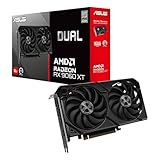
- Axial-tech fans now feature a smaller fan hub that facilitates longer blades and a barrier ring that increases downward air pressure
- 2.5-slot design allows for greater build compatibility while maintaining cooling performance
- 0dB technology lets you enjoy light gaming in relative silence
- Dual BIOS switch lets you toggle between Quiet and Performance BIOS profiles
- Dual ball fan bearings last up to twice as long as sleeve bearing designs
Official Radeon RX 9070 XT specifications
| Specification | Radeon RX 9070 XT |
|---|---|
| Architecture | AMD RDNA 4 |
| GPU family | Radeon RX 9000 Series |
| Compute units | 64 |
| Ray accelerators | 64 |
| AI accelerators | 128 |
| Stream processors | 4,096 |
| ROPs | 128 |
| Game clock | 2,400MHz |
| Boost clock | Up to 2,970MHz |
| Video memory | 16GB GDDR6 |
| Memory interface | 256-bit |
| Memory speed | Up to 20Gbps |
| Memory bandwidth | Up to 640GB/s |
| Infinity Cache | 64MB |
| Typical board power | 304W |
| AMD PSU recommendation | 750W |
| Reference power connectors | 2 × 8-pin |
| Display outputs supported | DisplayPort 2.1a, HDMI 2.1b |
| Video encode/decode | H.264, H.265/HEVC, AV1 |
| Process and bus details | 4nm process, PCIe Gen 5 |
| Reference form factor | Dual-slot |
| Launch availability | March 6, 2025 |
| Launch price | $599 USD SEP |
The clocks, compute resources, memory, display standards, codecs, and power figures come from AMD’s product specifications. AMD’s quick-reference guide identifies the 4nm process, PCIe Gen 5 support, and dual-slot reference specification. AMD announced the March 6, 2025 launch and $599 suggested e-tail price in its RDNA 4 launch announcement.
These are reference specifications, not a promise that every retail card will have the same dimensions, power limit, connector arrangement, cooler, or clock behavior.
Game clock versus boost clock
AMD’s 2.4GHz game clock is the expected sustained frequency target for a typical gaming workload. The up-to-2.97GHz boost clock is an upper operating point that the GPU may reach when temperature, power, workload, and firmware conditions permit.
Neither number is a direct FPS prediction. A board partner may ship a card with a higher factory clock, a different power limit, or a larger cooler. Two RX 9070 XT cards can therefore produce slightly different performance and noise levels even though they use the same GPU.
What the RX 9070 XT is—and is not
The RX 9070 XT is the faster of the two launch Radeon RX 9070 models and the first-generation flagship of AMD’s RDNA 4 desktop lineup. In market terms, it is an upper-midrange or performance-value card rather than an uncompromising flagship. Its design emphasizes throughput in traditional rasterization while adding newer ray-tracing and machine-learning hardware.
AMD does not sell a normal reference or MBA version of the RX 9070 XT for buyers to select. The design shown on AMD’s product page is identified as an artist render that is not available for purchase. Retail buyers therefore choose a board-partner card from companies such as Sapphire, PowerColor, XFX, ASRock, and others. That makes the model selection unusually important: the purchase includes a specific cooler, PCB, firmware profile, physical size, power configuration, and warranty.
Benchmark context: why RX 9070 XT results differ
Graphics-card benchmarks are only comparable when the resolution, preset, ray-tracing setting, upscaling mode, frame-generation mode, drivers, game version, and test system are comparable. A native 4K result is not interchangeable with a 4K output produced from a lower internal resolution using FSR, and a frame-generated FPS figure is not equivalent to the number of frames rendered by the GPU.
The results below come from different TechSpot test suites and should be read as separate snapshots rather than combined into one synthetic score:
- The launch review used an 18-game suite and measured 119 FPS on average at 1440p, with the RX 9070 XT about 6% behind the RTX 5070 Ti. At 4K, it was approximately 1% behind in that suite.
- A later 16-game retest found the RX 9070 XT’s position move from 2.5% behind at launch to 3% ahead after driver and game updates. TechSpot specifically noted meaningful changes in games including Counter-Strike 2, Stalker 2, Delta Force, and Call of Duty: Black Ops 6.
- The current broad comparison uses 52 games and is the more useful source for the present rasterization verdict.
That evolution is why a launch review can accurately describe launch performance while no longer representing the card’s current relative ranking.
Rasterization performance at 1440p
1440p is the RX 9070 XT’s strongest target. In TechSpot’s updated 52-game comparison, the RX 9070 XT averaged 107 FPS compared with 108 FPS for the RTX 5070 Ti. That is approximately a 1.4% advantage for Nvidia, effectively class parity. The reported 1% lows were also nearly identical at 107 FPS versus 108 FPS.
Free tools Windows power users keep installed
One-click scans. No signup required.
This does not mean the cards tie in every game. The aggregate result hides meaningful engine and driver differences:
- The RX 9070 XT wins in some rasterized games, including Forza Horizon 5, Final Fantasy XVI, Starfield, Marvel’s Spider-Man 2, and some PlayStation PC ports.
- The RTX 5070 Ti leads in games such as Stalker 2, Space Marine 2 at higher settings, and Indiana Jones and the Great Circle, as well as several Nvidia-optimized or competitive titles.
At high-refresh 1440p, the RX 9070 XT is therefore a genuine alternative to the RTX 5070 Ti rather than a clearly slower substitute. The size and direction of the advantage depend on the games you actually play.
1080p results deserve less emphasis for this class of GPU. At very high frame rates, the CPU, game engine, or memory subsystem can become the limiting factor, making a GPU ranking less representative of the card’s maximum rendering capability.
Rasterization performance at 4K
In the same current 52-game comparison, the RTX 5070 Ti averaged 84 FPS at 4K while the RX 9070 XT averaged 81 FPS. Nvidia’s lead was approximately 4%, which is still close enough that game selection and street price matter more than the aggregate difference for many buyers.
Crashes, No Sound, or Screen Glitches?
Random freezes, missing sound and display glitches usually trace back to one bad driver. Find and replace yours safely.Free scan · under a minuteWindows Errors? Fix Them Before They Spread
Repair common Windows errors and clear accumulated junk for a smoother, more stable PC - no reinstall needed.Free scan · no reinstallThe RX 9070 XT is a legitimate 4K rasterization card, but “4K capable” does not mean native 4K at maximum settings in every new AAA game. At this resolution, performance is affected by:
Also popular on Amazon

- Axial-tech fans now feature a smaller fan hub that facilitates longer blades and a barrier ring that increases downward air pressure
- Phase-change GPU thermal pad helps ensure optimal heat transfer, lowering GPU temperatures for enhanced performance and reliability
- 2.5-slot design allows for greater build compatibility while maintaining cooling performance
- Dual-ball fan bearings last up to twice as long as standard conventional sleeve bearings designs
- 0dB technology lets you enjoy light gaming in relative silence
- texture quality and VRAM allocation;
- memory bandwidth and cache behavior;
- ray-tracing effects;
- the game engine and its optimization;
- the chosen upscaling mode; and
- whether frame generation is enabled.
For demanding games, a sensible 4K configuration may use a high-quality FSR mode, reduced ray-tracing settings, or a mix of high and ultra settings. Those are different results from native 4K and should be labeled separately when comparing benchmarks.
AMD’s first-party 4K claims
AMD’s current product materials show the RX 9070 XT at 4K Ultra with the following results:
| Game | AMD-published result |
|---|---|
| Arc Raiders | 73 FPS |
| Call of Duty: Black Ops 7 | 82 FPS |
| The Last of Us Part II | 68 FPS |
| Horizon Forbidden West | 72 FPS |
| Marvel’s Spider-Man 2 | 82 FPS |
| Ghost of Tsushima | 73 FPS |
| Forza Horizon 5 with ray tracing | 128 FPS |
| Grand Theft Auto V Enhanced with ray tracing | 78 FPS |
AMD identifies this as May 2026 testing on a Ryzen 7 9800X3D system with 32GB of DDR5-6000 memory, an X870E motherboard, Windows 11, and Adrenalin driver 26.5.2. These are useful examples of AMD’s own testing, but they are first-party claims, not independent benchmark results. The game versions, graphics settings, and any upscaling or frame-generation conditions should be checked in AMD’s published benchmark material before comparing the numbers with a review.
The Tool Desk
Outbyte PC Repair FREEClear out junk files and repair common Windows errorsFree Scan →Outbyte Driver Updater FREEScan for outdated or missing drivers - takes under a minuteDriver Scan →Ray tracing and path tracing
RDNA 4 is a significant step forward from AMD’s RX 7000 generation for ray tracing. It is not, however, enough to put the RX 9070 XT ahead of Nvidia in heavy RT workloads.
TechSpot’s launch ray-tracing aggregate measured the RX 9070 XT approximately:
- 21% behind the RTX 5070 Ti at 1440p; and
- 25% behind the RTX 5070 Ti at 4K.
The size of the gap varies considerably. In lighter hybrid workloads that remain partly raster-bound, the Radeon can approach or match the GeForce. In titles such as Cyberpunk 2077 with ray tracing and Dying Light 2 with ray tracing, the difference can be manageable. In heavier workloads, including Black Myth: Wukong, Indiana Jones and the Great Circle, and full path-tracing modes, Nvidia’s advantage becomes much larger.
A current example is Doom: The Dark Ages with path tracing enabled, where the RTX 5070 Ti was measured at 63% faster than the RX 9070 XT. Both cards produced low frame rates in that test, so the result is not an argument that either card is ideal for unrestricted native path tracing. It does show the direction of the hardware gap.
Recommended Free Tools
| Ray-tracing use case | RX 9070 XT verdict |
|---|---|
| Occasional RT effects | Viable, especially with sensible settings |
| Ray tracing as a default setting | Usable, but Nvidia is generally the safer choice |
| Heavy RT at 4K | Usually requires upscaling and/or reduced settings |
| Path tracing as a priority | Prefer the RTX 5070 Ti unless the Radeon is substantially cheaper and lower settings are acceptable |
FSR, frame generation, and AMD software
AMD’s software terminology has changed since the RX 9070 XT launched. AMD initially promoted FSR 4 as an ML-powered feature associated with RX 9000-series hardware. Current AMD documentation places the technology within the broader FSR “Redstone” suite and commonly labels the upscaling component FSR Upscaling.
According to AMD’s current documentation, ML-based upscaling support is listed for RX 7000 and RX 9000 cards, while the wider Redstone suite includes upscaling, frame generation, ray regeneration, and radiance caching. Support is not identical across GPU generations, and individual games may expose only some features. Older reviews may therefore use “FSR 4” while current AMD Software or game menus use different labels. AMD’s current FSR documentation is the best source for feature and compatibility details.
For supported games, AMD says users can access relevant controls in AMD Software: Adrenalin Edition → Gaming → Graphics, including AMD FSR Upscaling and AMD FSR Frame Generation toggles. AMD recommends Radeon Anti-Lag 2 where a game supports it.
These technologies should be kept separate when reading performance charts:
Do these 3 things before closing this tab:
1Fix the driver behind crashes, sound loss and screen glitches2Clear out junk files and repair common Windows errors3Scan for outdated or missing drivers - takes under a minute- Native rendering: the GPU renders the target resolution directly.
- Upscaled rendering: the game renders internally at a lower resolution and reconstructs the target output. This can substantially increase FPS, but image quality varies by mode and game.
- Frame generation: software inserts generated frames between rendered frames. Displayed FPS can rise, but generated frames do not provide the same input responsiveness as additional fully rendered frames.
- Ray regeneration and other ML features: feature-specific image or lighting improvements with hardware and game compatibility that varies.
A benchmark that combines native rendering, FSR, and frame generation into one ranking can make a card appear faster without showing the same underlying rendering workload. Check the test labels before using an FPS number to make a buying decision.
RX 9070 XT versus GeForce RTX 5070 Ti
| Priority | Better choice | Reason |
|---|---|---|
| Raster performance per dollar | Usually RX 9070 XT | Near-parity performance in current broad testing, often at a lower price |
| 1440p raster performance | Essentially a tie | 107 FPS versus 108 FPS in TechSpot’s 52-game test |
| 4K raster performance | Slight RTX 5070 Ti advantage | 84 FPS versus 81 FPS in the same test |
| Heavy ray tracing | RTX 5070 Ti | About 21–25% faster in TechSpot’s launch RT aggregate |
| Path tracing | RTX 5070 Ti | Much larger leads in some demanding games |
| Power efficiency | RTX 5070 Ti | RX 9070 XT typically uses about 20% more power |
| VRAM capacity | Tie | Both cards have 16GB in the comparison |
| CUDA, AI, and creator software | RTX 5070 Ti | Nvidia’s software and CUDA ecosystem is more relevant to many professional applications |
| Display output capability | RX 9070 XT advantage on specification | DisplayPort 2.1a support alongside HDMI 2.1b |
| Current value | Whichever is cheaper locally | Retail prices fluctuate substantially by country, retailer, and model |
At the original price points—$599 for the RX 9070 XT and $749 for the RTX 5070 Ti—the Radeon’s value proposition was especially strong. Current pricing is less predictable. TechSpot observed an RX 9070 XT around $700 and an RTX 5070 Ti around $1,000 in one market snapshot, while other late-July and early-August 2026 reporting placed RX 9070 XT retail cards around $719–$739. These are dated observations, not permanent prices; check the actual models available in your region using sources such as TechSpot’s price page and Tom’s Hardware’s GPU pricing coverage.
A useful price-gap rule is:
- 15–20% cheaper than the RTX 5070 Ti: the RX 9070 XT is generally the better raster/value buy.
- Same price: Nvidia’s ray tracing, efficiency, DLSS ecosystem, CUDA support, and software advantages become more compelling.
- Modest Radeon premium: the RX 9070 XT can still be preferable if your games are primarily rasterized and you value its performance in those titles.
RX 9070 XT versus older Radeon cards
RX 7900 XT
The RX 9070 XT is not a dramatic pure-raster upgrade over the RX 7900 XT. TechSpot measured it about 2% faster than the RX 7900 XT in its launch raster aggregate. That is too small to justify replacing a working 7900 XT solely for average raster FPS unless the newer card is available at an unusually favorable price.
The upgrade case is stronger if you specifically want RDNA 4’s better ray tracing, newer machine-learning features, improved results in newer engines, or a good resale opportunity. Otherwise, keep the RX 7900 XT and wait for a larger performance step.
What’s actually slowing this PC down?
Pick the symptom - the matching free tool is one click away.
Also popular on Amazon

- System Compatibility Note: 2.5‑slot card measuring 303 mm (L) x 131 mm (W) x 45 mm (H); requires a single 8‑pin power connector and a recommended 550W power supply. Please verify chassis clearance and power supply capacity before purchase.
- Dedicated Support: Please contact us directly through Amazon for any product questions or assistance you may require.
- AMD RDNA 3 Architecture with AI & Ray Tracing Acceleration: Powered by 32 RDNA 3 Compute Units featuring 3rd Gen Ray Tracing Accelerators and 2nd Gen AI Accelerators, delivering lifelike lighting, shadows, and superior machine learning performance for enhanced gaming and content creation.
- Powerful 1080p & 1440p Gaming Engine: Features a max boost clock of up to 2695 MHz, a game clock of 2280 MHz, and 2048 stream processors, ensuring outstanding frame rates in the latest titles.
- 8GB High‑Speed GDDR6 Memory: Equipped with 8GB of GDDR6 memory on a 128‑bit interface running at 18 Gbps, delivering up to 288 GB/s bandwidth for high‑resolution textures and demanding game workloads.
RX 7900 XTX
The RX 7900 XTX remained about 13% faster than the RX 9070 XT in TechSpot’s launch raster comparison. Owners of the 7900 XTX should not expect a meaningful general raster upgrade. The 9070 XT’s more attractive advantages are newer feature support and better RT behavior, not a major increase in traditional rendering speed.
RX 7900 GRE
TechSpot measured approximately a 20% raster uplift from the RX 7900 GRE to the RX 9070 XT in its launch suite. AMD had claimed a 35% raster improvement over the 7900 GRE, so the independent result is materially lower than AMD’s claim. That difference illustrates why an advertised generational uplift should always be tied to a test suite and settings.
A 7900 GRE owner gets a more noticeable upgrade than a 7900 XT owner, but the purchase still makes most sense when ray tracing, newer features, or a favorable sale matters.
RX 7800 XT
The RX 9070 XT occupies a higher performance tier than the RX 7800 XT and adds a newer architecture, but the right upgrade decision depends on the 7800 XT’s purchase price, the target resolution, and the games being played. There is no single 7800 XT-to-9070 XT percentage that applies to every title. Owners who are satisfied with 1440p raster performance should not upgrade merely because the model number is newer; those targeting higher refresh rates, 4K, or stronger RT performance have a more substantial reason to move.
RX 9070
The RX 9070 is the lower-tier launch companion to the XT. It retains the RDNA 4 generation and 16GB memory capacity, so it can be a sensible alternative when the actual price gap is large. The RX 9070 XT is the better choice when the system can use its additional performance and the premium is reasonable. The RX 9070 becomes more attractive for lower power draw, a quieter or smaller build, or a discounted price—subject to the specific board-partner cooler.
Power consumption, cooling, temperatures, and noise
AMD rates the RX 9070 XT at 304W typical board power and recommends a 750W PSU. The reference specification uses two 8-pin power connectors. The 304W number is not a universal measured gaming draw or a guaranteed limit for every retail card: factory-overclocked models can use different power limits, and actual consumption changes with the game, frame rate, voltage, firmware, and power profile.
AMD’s 750W recommendation is a baseline. A high-quality 750W unit is appropriate for many systems, but a factory-overclocked card paired with a high-power CPU, a marginal or aging PSU, or a system with many power-hungry components may justify a stronger supply. Follow the board partner’s connector and PSU instructions rather than relying only on the GPU name.
Cooling varies because there is no standard retail reference card. In TechSpot’s 14-card roundup, measured memory temperatures ranged from approximately 74°C to 90°C. VRM temperatures were generally safe, but differences between models were substantial. Some cards occupy up to four slots, which can block expansion slots and create clearance problems in compact cases.
Quick wins for a faster PC:
Repair Windows errors before they cause bigger problemsFix Now →Fix the driver behind crashes, sound loss and screen glitchesFind Drivers →Clear out junk files and repair common Windows errorsFree Scan →The tested cards also showed roughly a 4–6% gaming performance spread between the fastest and slowest models in selected games. That difference came from clocks, power limits, and cooling—not from a different GPU tier. A larger cooler can be worthwhile for lower noise or better sustained temperatures, but a $100–$200 premium is difficult to justify if the only benefit is a few percent more gaming performance.
Which RX 9070 XT model should you buy?
There is no universal best RX 9070 XT card. Evaluate the card that is actually available, not just the product family name.
- Case fit: check total length, height, radiator clearance, and whether the card is two, three, or four slots thick.
- Power: verify the number and type of connectors and the manufacturer’s PSU recommendation.
- Cooling: prioritize independent noise, hotspot, memory-temperature, and sustained-clock testing over the advertised boost clock.
- Firmware and power limit: factory-overclocked cards may be faster but can consume more power and produce more heat.
- Warranty and service: local support can matter more than a small factory-clock difference.
- Price: do not pay a large premium for a cooler that produces only a small FPS gain.
- Coil whine: retailer reports can be useful as anecdotal evidence, but coil whine varies between individual cards and systems and is not a dependable model-wide benchmark.
TechSpot’s 14-card roundup identified the XFX Mercury, Sapphire Nitro+, Sapphire Pure, PowerColor Red Devil, and ASRock Taichi among the strongest overall implementations. Several other models were considered acceptable midrange choices. The XFX Swift was roughly 4–6% slower than the fastest tested cards, partly because of lower clocks and power consumption. That does not automatically make it a bad purchase: if it is substantially cheaper, the lower performance may be an appropriate trade-off.
Use the full 14-card roundup for model-specific noise and thermal results, then compare the tested card’s price and dimensions with local listings.
Free tools Windows power users keep installed
One-click scans. No signup required.
Driver support and compatibility
The supplied AMD support check lists Adrenalin Edition 26.7.1 WHQL Recommended, released July 28, 2026, for Windows 10 and Windows 11. Driver versions can change after publication, so check AMD’s current RX 9070 XT driver page before installing Windows drivers.
If you want an optional way to check for missing, outdated, or incompatible Windows hardware drivers, Outbyte Driver Updater can supplement AMD’s official driver page.
For a new build, install the latest recommended Adrenalin package, update the motherboard BIOS and chipset software when appropriate, and remove an old vendor driver cleanly if changing from Nvidia. If a game performs unexpectedly, first check whether the benchmark used the same driver, game patch, upscaling mode, ray-tracing setting, and frame-generation state. A driver update can materially change a result, but it cannot make a native-rendering figure directly comparable with an upscaled or generated-frame figure.
Is 16GB of VRAM enough?
Sixteen gigabytes is a useful capacity for this performance class. It is generally sufficient for current 1440p gaming and for many 4K games, including high or ultra texture settings when the game’s streaming system is well behaved.
The Tool Desk
Outbyte PC Repair FREEClear out junk files and repair common Windows errorsFree Scan →Outbyte Driver Updater FREEFix the driver behind crashes, sound loss and screen glitchesFind Drivers →It is not a guarantee of long-term 4K headroom. VRAM requirements depend on resolution, texture quality, ray-tracing data, asset streaming, mods, operating conditions, and the game engine. A card can have enough memory but still lack the shader, ray-tracing, or bandwidth performance needed for a smooth frame rate. Conversely, reducing textures or using upscaling can make a demanding game playable without exceeding 16GB.
Also popular on Amazon

- AMD Radeon RX 550 Chipset, Silver plated PCB & all solid capacitors provide lower temperature, higher efficiency & stability
- 9CM unique fan provide low noise and huge airflow for your GPU
- GPU Boost Clock / Memory Speed : up to 1183 MHz / 4GB GDDR5 / 6000 MHz Memory, Stream Processors 512, Perfect for 3D CAD/CAM working, video and photo editing, Video Games @1080p
- Support: DirectX 12, Shader Model 5.0, OpenGL 4.6/4.5, 4K Video Decode
For most buyers, 16GB is a reasonable compromise rather than a reason alone to reject the card. Buyers planning long-term native 4K ultra gaming, extensive modding, or heavy RT should assess the specific games rather than assuming capacity guarantees longevity.
Who should buy the RX 9070 XT?
Buy it when:
- your priority is traditional rasterized gaming;
- you play at high-refresh 1440p or want strong 4K performance;
- the card is at or near its launch price, or at least 15–20% cheaper than an RTX 5070 Ti;
- you want 16GB of VRAM and DisplayPort 2.1a;
- you are comfortable using FSR in demanding 4K or RT games;
- you do not depend on CUDA-specific applications; and
- you prefer AMD’s more open ecosystem and do not need Nvidia-exclusive software features.
Prefer the RTX 5070 Ti when:
- heavy ray tracing or path tracing is a major reason for the upgrade;
- power efficiency is important;
- DLSS support and Nvidia’s software ecosystem matter to you;
- you use CUDA, AI, Blender, creator applications, or professional tools that favor Nvidia;
- you play games where Nvidia has a known performance advantage; or
- the two cards are priced close enough that AMD’s raster advantage is no longer a meaningful saving.
Consider another Radeon card when:
- an RX 7900 XT is heavily discounted and your games are almost entirely rasterized;
- an RX 9070 costs substantially less while preserving the 16GB RDNA 4 feature set you want;
- you already own an RX 7900 XT or RX 7900 XTX and want a much larger raster upgrade; or
- every RX 9070 XT available is above roughly $750 without a corresponding advantage in cooler quality, warranty, or availability.
Current buying recommendation
Use the original $599 price as historical context, not as the definition of today’s value. Around $599 or below, the RX 9070 XT is a particularly strong raster-focused purchase. Around $650–$700, it remains attractive if the RTX 5070 Ti is substantially more expensive. Around $719–$739—the latest supplied U.S. snapshots—it is still capable, but the value case should be checked against the exact local RTX 5070 Ti price and the premium charged for the selected AIB model. Above $750, the purchase becomes questionable unless Nvidia cards are even more inflated or the Radeon is the only suitable option.
The clearest recommendation is simple: buy the RX 9070 XT for rasterized 1440p and 4K performance at a meaningful discount; buy the RTX 5070 Ti when ray tracing, path tracing, efficiency, DLSS, CUDA, or Nvidia software is worth paying for. Do not choose between them based on one game, an unlabeled “4K” benchmark, or an advertised boost clock.
Frequently Asked Questions
Is the RX 9070 XT good for 4K gaming?
Yes, especially for rasterized games. TechSpot’s current 52-game comparison averaged 81 FPS at native 4K, compared with 84 FPS for the RTX 5070 Ti. It will not deliver native 4K at maximum settings in every new AAA game, so demanding titles may need FSR, reduced ray tracing, or lower settings.
Is the RX 9070 XT better than the RTX 5070 Ti?
Neither card is universally better. They are effectively tied in current 1440p raster testing, while the RTX 5070 Ti is about 4% faster at 4K and substantially faster in heavy ray tracing and path tracing. The RX 9070 XT is usually the better value when it is 15–20% cheaper and your games are primarily rasterized.
How much power does the RX 9070 XT use, and is a 750W PSU enough?
AMD specifies 304W typical board power and recommends a 750W PSU. A good-quality 750W unit is suitable for many systems, but a factory-overclocked AIB card, high-power CPU, aging PSU, or unusually power-hungry build may justify a larger supply. Check the exact card manufacturer’s requirements.
Does the RX 9070 XT support AV1 encoding?
Yes. AMD lists AV1, H.264, and H.265/HEVC encode and decode support for the RX 9070 XT.
What’s actually slowing this PC down?
Pick the symptom - the matching free tool is one click away.
Does the RX 9070 XT support FSR 4 or FSR Redstone?
AMD launched the card with FSR 4 branding, but current AMD documentation presents the technology within the broader FSR Redstone suite and uses the term FSR Upscaling. Feature support varies by GPU generation and game. Supported titles can expose FSR Upscaling and FSR Frame Generation controls through AMD Software: Adrenalin Edition → Gaming → Graphics.
Does AMD sell a reference RX 9070 XT card?
No conventional purchasable AMD reference card is available in the normal retail lineup. The design shown on AMD’s product page is an artist render marked as unavailable for purchase, so buyers must select a board-partner model.
Which RX 9070 XT model is the quietest?
There is no universal answer because noise depends on the specific model, BIOS, case airflow, and fan profile. TechSpot’s roundup highlighted XFX Mercury, Sapphire Nitro+, Sapphire Pure, PowerColor Red Devil, and ASRock Taichi among the strongest overall cards, but model-specific noise measurements and local pricing should determine the purchase.
Is 16GB enough for the RX 9070 XT?
It is generally enough for current 1440p gaming and many 4K games, but it does not guarantee long-term native 4K ultra performance. Ray tracing, high-resolution textures, mods, and future game engines can increase memory requirements, while shader performance and bandwidth can remain limiting factors even when 16GB is sufficient.
Is the RX 9070 XT a worthwhile upgrade from an RX 7900 XT?
Usually not for raster performance alone. TechSpot measured only about a 2% raster advantage for the RX 9070 XT over the RX 7900 XT in its launch aggregate. The upgrade is more defensible if you specifically want better ray tracing, newer ML-based features, improved performance in newer engines, or an unusually favorable trade-in price.
The Bottom Line
Bottom line: The RX 9070 XT is a strong 1440p and rasterized 4K GPU, with current performance broadly matching the RTX 5070 Ti while offering 16GB of VRAM and DisplayPort 2.1a. Its weaknesses are higher power use, weaker heavy ray tracing and path tracing, and a less expansive AI and software ecosystem than Nvidia’s.
Buy it when the local price is meaningfully below the RTX 5070 Ti and your games are mainly rasterized. Choose Nvidia when RT, path tracing, efficiency, DLSS, CUDA, or creator software is central to the system. Whichever Radeon model you select, compare the actual cooler, dimensions, power limit, noise, warranty, and price—because there is no single reference RX 9070 XT card.

