

Crashes, No Sound, or Screen Glitches?
Random freezes, missing sound and display glitches usually trace back to one bad driver. Find and replace yours safely.Free scan · under a minuteWindows Errors? Fix Them Before They Spread
Repair common Windows errors and clear accumulated junk for a smoother, more stable PC - no reinstall needed.Free scan · no reinstalliTechGuides is reader-supported. When you buy through links on our site, we may earn an affiliate commission. As an Amazon Associate I earn from qualifying purchases. Learn more
Acer Chromebook C720: At First Glance
Over the years, Acer’s ability to come up with portable laptops that have just the right amount of power for effective system performance is one to emulate. Moreover, just when it seemed like the netbook movement is history, Acer decides to design a laptop that thoroughly embrace this concept.
Precisely, the Acer Chromebook C720 is an entry-level laptop that has a lightweight, slim design and offers decent performance and battery life. Additionally, the price of the laptop is another factor that makes it the most sought-after since its release in September 2021.
As of the time this review was published in December 2021, the Acer Chromebook C720 had a starting price of $88 – affordable right? My thoughts exactly.
Recommended Free Tools
Are you still wondering if a laptop this affordable can offer adequate performance? Read on to find out!
Popular on Amazon
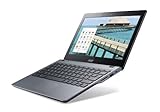
- Intel Celeron 2955U 1.4 GHz (2 MB Cache)
- 2 GB DDR3L SDRAM
- 32 GB Solid-State Drive
- 11.6-Inch Screen, Intel HD Graphics
- Chrome, 8.5-hour battery life
Acer Chromebook C720: Design, Dimension, and Weight
Firstly, it is important to note that when it comes to Chromebooks there is not so much to expect. To be more specific, in terms of looks and design, the Acer Chromebook C720 is unattractive.
On seeing the laptop, you can tell that the chassis makes no attempts to hide the laptop’s inexpensive nature. To give more details, the laptop features a very boring grey chassis.
In addition to that, the laptop’s chassis is made of plastic material. Also, the grey color on the chassis extends throughout the laptop.
The Tool Desk
Outbyte Driver Updater FREEScan for outdated or missing drivers - takes under a minuteDriver Scan →Outbyte PC Repair FREEClear out junk files and repair common Windows errorsFree Scan →However, as expected from an Acer Chromebook, you will find an Acer logo neatly inscribed on the left top corner of the laptop’s lid. Additionally, this smooth plastic lid has a Chrome logo finely placed just above the Acer logo.
These logos make it obvious that this is an Acer Chromebook laptop.
I personally appreciate this Chrome logo as it already gives first-hand information on the type of operating system the laptop operates on – which is ChromeOS.
Moving on, let us quickly discuss the interior of the laptop. The Acer Chromebook C720 features an 11.6-inch display with an HD (1366 x 768) resolution
Quick wins for a faster PC:
Scan for outdated or missing drivers - takes under a minuteDriver Scan →Clear out junk files and repair common Windows errorsFree Scan →Furthermore, this matte-finished 11.6-inch display is surrounded by somewhat thick bezels with a glossy finish. In fact, the bezels seem to be the only glossy surface to be found anywhere on the laptop.
However, like most glossy-black plastic materials, these display bezels tend to attract fingerprints easily. Nevertheless, the glossy effect of the bezels gives the display a beautiful look.
Moreover, at the top bezel, you will find an HD webcam neatly placed in the center.
That said, the 11.6-inch HD display on the Acer Chromebook C720 is made with TN standard panel. Briefly, TN panels are characterized as being the fastest and cheapest among the other main types of display panels.
However, when compared to other display panels like IPS, TN panels offer the worst viewing angles and color. Nonetheless, the display is not that bad, especially for a low-budget laptop.
It is worth noting that you can also purchase the Acer Chromebook C720 with a touchscreen display. However, it comes with an additional price.
Moving on, seated on the base of the laptop is a chiclet-style, non-backlit keyboard. This keyboard has a slick touch, with very little flex.
Unfortunately, the keyboard is a little shallow with a key travel of 1.27 mm. This key travel is a bit less than the typical 1.52 mm that most notebook keyboards have.
Do these 3 things before closing this tab:
1Scan for outdated or missing drivers - takes under a minute2Clear out junk files and repair common Windows errors3Fix the driver behind crashes, sound loss and screen glitchesIf you’re curious, “key travel” refers to how far a key on a computer keyboard sinks when pressed. Moreover, the deeper the key travel of a keyboard, the better the typing experience.
Therefore, with a key travel of 1.27, typing experience may not be excellent on the Acer Chromebook C720, but it will be acceptable.
That said, below the keyboard area is a touchpad. This touchpad is somewhat small and placed exactly in the center of the palm rest.
Moreover, in terms of performance, the touchpad performs flawlessly with a sensitive and accurate surface. Also, the touchpad supports multitouch gestures such as two-finger scrolling.
Free tools Windows power users keep installed
One-click scans. No signup required.
Moving on, when it comes to the port, the Acer Chromebook C720 features a minimal number of ports. To give more details, you will find only a USB 2.0 port and an HDMI port on the left side of the laptop.
Also popular on Amazon

- ✅【Processor】Powered by an Intel Celeron N4020 Dual-Core Processor(Up to 2.80 GHz), the Chromebook loads content-rich webpages fast, provide crisp video playback, and enables you to multitask effortlessly by allowing multiple pages to run at the same time.
- ✅【15.6” HD Display】The large 15.6” HD display with an anti-glare coating and narrow 0.37-inch bezel gives users a greater workspace, so they can be more productive in bright conditions. For added functionality and to keep numerists happy, an integrated numeric keypad has been included.
- ✅【RAM & Storage】4GB RAM, 64GB eMMC meets the needs of people who need Google operating system in companies or schools.
- ✅【Connectivity】12.5 hours of battery life goes a long way. Work efficiently and browse the web knowing that your connection remains secure with Wi-Fi and Bluetooth. Ports & Slot: 2 x USB-C 3.1, 2 x USB-A 3.1, 1 x Headphone Jack.
- ✅【Operating System】Chromebook is a computer for the way the modern world works, with thousands of apps. It is secure, fast, up-to-date, versatile and simple.
Also, on the right side, there are two USB 3.0 ports and an SD card slot. However, considering the laptop’s low-price tag, I believe most buyers will be satisfied with these ports.
Now, let us move on to the weight and dimension of the laptop. Weighing 1350 g and measuring 288 x 204 x 19.9 mm, the Acer Chromebook C720 is definitely one of the lightest and most portable Chromebooks out there.
Therefore, this laptop will be very easy to carry and move around with.
Comparatively, the Acer Chromebook C720 is slightly lighter and more portable than the Dell Chromebook 11. Specifically, the Dell Chromebook 11 measures 303.3 x 206 x 20.7 mm and weighs 1400 g.
In summary, the Acer Chromebook C720 features a very boring design. However, the laptop is very portable and light, making it easy to move around with.
Therefore, I will be rating the Acer Chromebook C720 an eight out of ten in this design review section.
Acer Chromebook C720: Processor (CPU) Performance
For the processor, the Acer Chromebook C720 comes with an Intel Celeron 2955U processor. This processor offers a base frequency of 1.40 GHz which is also its maximum frequency.
Furthermore, the Intel Celeron 2995U processor is a dual-core processor that comes with a 2 MB cache memory. Hence, this processor offers more than enough processing power for anything the Acer Chromebook C720 is designed to do.
Specifically, since Chromebooks are generally designed to run less-demanding applications, this processor is just perfect for the Acer Chromebook C720. Therefore, with this processor, the laptop should be able to handle any basic office task like web surfing and emailing.
Also, the laptop should be able to perform light multitasking.
That said, now let’s quickly discuss the SunSpider 1.0 JavaScript benchmark test results. Briefly, The SunSpider 1.0 JavaScript is a benchmark test tool that measures a processor’s performance.
What’s actually slowing this PC down?
Pick the symptom - the matching free tool is one click away.
To give more details, the SunSpider 1.0 JavaScript benchmark evaluates the cores of the processor on how they process data. Also, on the SunSpider 1.0 Javascript test, the lower the score, the better the performance.
So, based on this benchmark test result, the Acer Chromebook C720 scored 345.1 points. Comparatively, the Dell Chromebook 11 and HP Chromebook 14 scored 704.4 points and 551.1 points respectively on the same benchmark test.
Therefore, it is ideal to say that the Acer Chromebook C720 has a better performance than most of its competitors.
In conclusion, with its Intel Celeron processor, the Acer Chromebook C720 can carry out basic computing tasks. Additionally, this laptop outperformed two of its closest competitors on a CPU benchmark test.
Therefore, I will be rating the Acer Chromebook C720 an eight out of ten in this processor section of this review.
Acer Chromebook C720: Memory (RAM) Performance
The ability of a laptop to efficiently switch between browser tabs and multitask with ease largely depends on the processor and the RAM of the laptop. Unfortunately, the Acer Chromebook C720 doesn’t offer much in the memory department.
To be more specific, this laptop comes with a single memory slot that has 2 GB RAM in it. However, you should be able to upgrade the laptop’s RAM to the maximum capacity of 4 GB.
It is worth noting that this review is based on the Acer Chromebook C720 with 4 GB RAM.
Moreover, when in use, the 4 GB RAM on the Acer Chromebook C720 should offer decent performance. In fact, with this capacity of RAM, the laptop should easily carry out tasks like web browsing, word processing, and online video streaming.
Also popular on Amazon
- THIN & DURABLE DESIGN - Boasting a thin and light design, the Acer Chromebook Plus 514 is designed to keep you productive and entertained from anywhere. It weighs only 3.09 lbs and meets MIL-STD 810H military standards for reliable performance in harsh conditions. With long battery life and fast charge technology, it lets you work, study, watch, and stay connected without interruptions. It is perfect for commuting, travel, or working on the go
- AI-POWERED CREATIVITY - The laptop has AI-powered Google and Adobe tools to turn inspiration into reality faster. Its Gemini AI simplifies organizing creative drafts and optimizing materials. The dedicated Quick Insert key creates high-resolution images and offers writing assistance for seamless creativity. Unlock Google AI Pro for 12 months with this Chromebook Plus purchase. Experience Gemini Advanced, NotebookLM, 5TB of cloud storage, and boost productivity with Gemini integrated into Gmail, Docs, and more
- POWERFUL PERFORMANCE - Powered by the 8-Core Intel Core i3-N355 Processor with Intel Graphics, it ensures smooth performance for everyday tasks. It features 8GB LPDDR5X RAM for fast, efficient multitasking and 512GB SSD, offering ample space for files, apps, media, and more, delivering fast storage access and reduced load times
- EXCELLENT VISUAL - Featuring a 14" WUXGA (1920x1200) IPS touchscreen with 300-nit brightness, this device delivers vibrant visuals and responsive touch functionality. It supports expanding the workspace with 3 external monitors via HDMI (max 4K@30Hz) or USB Type-C (max 4K@60Hz), without a docking station. Plus, a 1080p webcam with a privacy shutter to prevent unauthorized viewing meets daily video chat or conference needs
- RICH CONNECTIVITY OPTIONS - Equipped with 2x USB-C 3.2 Gen 1, 2x USB-A 3.2 Gen 1, HDMI 1.4, and a headphone/microphone combo jack. It features Wi-Fi 6E and Bluetooth 5.3 for blazing-fast wireless speeds and seamless device pairing, plus a white backlit keyboard that lets you work comfortably in any lighting
Additionally, the laptop should be also able to multitask if not excellently but decently. However, to prove that, I carried out thorough research.
Fortunately, the results of my research were indeed pleasing. To be more specific, based on my research, the Acer Chromebook C720 with 4 GB will be able to conveniently open 17 chrome tabs without lagging.
Also, switching between the tabs will be without delays.
Unfortunately, I was unable to get a benchmark test result based on the memory performance of the Acer Chromebook C720. This is because Chrome OS that runs on Chromebooks does not support most benchmark tools.
This is also due to the fact that the laptop is about 8 years old as of the time I wrote this review in December 2021.
Nevertheless, the laptop offers remarkable multitasking abilities. Therefore, I believe in this section of this review, the Acer Chromebook C720 deserves an eight out of ten ratings.
Acer Chromebook C720: Storage Options and Performance
For storage, it is important to know that Chromebooks generally come with small local storage. The reason behind this is that Chromebooks are designed to save most of their files on Google Drive cloud storage.
Crashes, No Sound, or Screen Glitches?
Random freezes, missing sound and display glitches usually trace back to one bad driver. Find and replace yours safely.Free scan · under a minutePC Slower Than It Used to Be?
A free scan shows the junk files, broken settings and background clutter dragging Windows down - then fixes them in one click.Free scan · Windows 10 & 11Therefore, most Chromebooks offer free 100 GB Google Drive cloud storage and the Acer Chromebook C720 is no exception. If you want to know how to activate this free Google Drive cloud storage on your Chromebook, you can follow the detailed guide in this link.
That said, despite having free 100 GB cloud storage, the Acer Chromebook C720 comes with 16 GB SSD storage. Also, the laptop features an SD card slot for storage expansion.
Therefore, this Acer Chromebook offers three storage options in total. However, it is worth noting that to use the free 100 GB cloud storage you must be connected to the internet.
I was supposed to include a CrystalDiskMark test result based on the laptop’s local storage performance like we normally do here at www.itechguides.com. Unfortunately, I was unable to get the benchmark test result.
Do these 3 things before closing this tab:
1Clear out junk files and repair common Windows errors2Fix the driver behind crashes, sound loss and screen glitches3Repair Windows errors before they cause bigger problemsThis is because Chromebooks runs on ChromeOS, which doesn’t support most of the storage benchmark tools like CrystalDiskMark. Nevertheless, since most people know that SSDs are typically fast, one would expect an impressive performance from the Acer Chromebook C720 on the CrystalDiskMark test.
For clarity, CrystalDiskMark is a benchmark test that measures how fast a computer’s SSD or HDD storage is. It does this by measuring the read and write speed of the computer’s storage.
Read speed indicates how fast a storage drive can open a file. Write speed, on the other hand, indicates how fast the storage can store data or files.
In conclusion, the Acer Chromebook 720 offers three storage options, which is pretty impressive. Therefore, I will rate the laptop an eight out of ten in this storage review section.
Free tools Windows power users keep installed
One-click scans. No signup required.
Acer Chromebook C720: Graphics Card Performance
In terms of graphics, the Acer Chromebook C720 comes with an Intel HD Graphics card. This graphics card offers a base frequency of 200 MHz and a maximum frequency of 1000 MHz.
Furthermore, the Intel HD graphic is an integrated graphics card. In case you are wondering what an integrated GPU is, it is a GPU that is built into the processor.
Thus, it lacks dedicated VRAM and it shares memory with the CPU to perform graphics-related tasks. As a result, with its integrated graphics card, don’t expect the Acer Chromebook C720 to run graphics-intensive applications or games.
Notwithstanding, the laptop is capable enough to run simple games like candy crush and solitaire. Also, with this graphics card, the laptop is sufficient for regular video streaming.
Recommended Free Tools
Sadly, I was unable to get benchmark test results based on the graphics performance of the Acer Chromebook C720 during my research. This is due to the fact that Chromebooks doesn’t support the majority of benchmark test available because they run on ChromeOS.
Also popular on Amazon
- Laptop Screen Backlight: LED
- Laptop Screen Size: 11.6"
- Laptop Screen Resolution: 1366x768
- Laptop Screen Finish: Matte
- Laptop Screen Connection Type: 30 Pin, bottom right
However, in the future, if Chromebooks finally support most of the benchmark tests, I will definitely come back to add the necessary benchmark test results. Notwithstanding, I believe with this little information above, it is fair to say the Acer Chromebook C720 isn’t suitable for graphics designers or gamers.
Hence, I will be rating the laptop a seven out of ten in this graphics card review section.
Acer Chromebook C720: Battery Life and Performance
The Acer Chromebook C720 comes with a 3-cell lithium-polymer battery. According to Acer, this laptop battery can last up to 8.5 hours.
To validate Acer’s claim about this battery, I carried out thorough research.
Based on the battery performance test on notebookcheck.net, the laptop has a whopping 9 hours and 4 minutes battery life. Moreover, this battery performance test involves using the laptop to continuously surf the web via WIFI, while the laptop’s brightness is set to the minimum.
That said, the Acer Chromebook C720’s battery life is one of the best I have seen from a Chromebook. Additionally, the battery life of the laptop even beats several Chromebooks that costs way more than its price.
A typical example is the HP Chromebook 11A G8 EE. To be more specific, the HP Chromebook 11A G8 EE cost two times the Acer Chromebook C720’s price and it has a battery life of 5 hours 8 minutes.
What’s actually slowing this PC down?
Pick the symptom - the matching free tool is one click away.
Overall, the battery life of the Acer Chromebook C720 places it far ahead of most Chromebooks in its class. Therefore, in this battery review section, I will be rating the Acer Chromebook C720 a nine out of ten.
Frequently Asked Questions
The Acer Chromebook C720 offers a standard RAM of 2 GB. However, you can upgrade the RAM to a maximum of 4 GB.
The Acer Chromebook C720 was released in September 2013.
Yes, it does. The Acer Chromebook C720 features an HD webcam at the top of its display.
As of the time I wrote this review in December 2021, the Acer Chromebook C720 had a starting price of $88.
No, it doesn’t. The Acr Chromebook C720 employs an integrated graphics card that is embedded into its CPU.
Conclusion
The Acer Chromebook C720 is one of the most portable Chromebook laptops I have seen. Moreover, this laptop offers a reasonable performance at a very affordable price.
Specifically, the battery life of the laptop gives it an edge when placed side by side with most of its competitors. Also, the laptop offers decent specs to carry out basic computing tasks.
However, this laptop isn’t attractive and it comes with a poor keyboard. Nevertheless, if you are a student looking to own a portable low-budget Chromebook, I believe the Acer Chromebook C720 is worth considering.
I hope you found this Acer Chromebook C720 review helpful. If you found it worthwhile, we would love to hear from you.
Kindly spare two minutes to share your thoughts with our community using the comments form below.
Alternatively, simply respond to the “Was this page helpful” question below and provide us with your feedback.
Quick wins for a faster PC:
Fix the driver behind crashes, sound loss and screen glitchesFind Drivers →Clear out junk files and repair common Windows errorsFree Scan →Scan for outdated or missing drivers - takes under a minuteDriver Scan →Finally, for more laptop reviews, visit our Chromebook Reviews page. You may also find our Laptop Specs page very helpful.


