

iTechGuides is reader-supported. When you buy through links on our site, we may earn an affiliate commission. As an Amazon Associate I earn from qualifying purchases. Learn more
Acer Chromebook 15 CB3-532: At First Glance
Chromebooks are highly popular among students because they are typically less expensive than other types of laptops. Thankfully, the Acer Chromebook 15 CB3-532 is no different from other Chromebooks out there.
Specifically, this Chromebook had a starting price of just $259.00 as of December 2021 when I wrote this review. Impressively, despite being so affordable, the Acer Chromebook 15 CB3-532 comes with a few decent features and qualities.
Some of these features include an impressive HD display screen, a super-comfy keyboard, and a sleek design. However, as we all know, laptops this inexpensive are bound to feature some major flaws.
Free tools Windows power users keep installed
One-click scans. No signup required.
To find out more about this Chromebook and its flaws, you will have to read this article to the end!
Popular on Amazon

- Chromebook runs on Chrome OS - an operating system by Google that is built for the way we live today. It comes with built-in virus protection, updates automatically*, boots up in seconds and continues to stay fast over time. (*Internet connection is required).
- All the Google apps you know and love come standard on every Chromebook, which means you can edit, download, and convert Microsoft Office files in Google Docs, Sheets and Slides
- With the Google Play Store, you can access a rich library of apps, games, music, movies, TV, books, magazines, and more, all from your Chromebook.
- Chromebooks come with built-in storage for offline access to your most important files and an additional 100GB of Google Drive space to ensure that all of your files are backed up automatically
- Intel Celeron N3060, 15. 6” HD Display, 4GB Memory, 16GB eMMC and Up to 12-hour Battery Life
Acer Chromebook 15 CB3-532: Design, Dimensions, and Weight
Chromebooks aren’t particularly known for featuring a sleek design since they are mostly cheap. However, the Acer Chromebook 15 CB3-532 broke this stereotype by featuring a rather appealing and eye-catching design.
In fact, if you are shopping around for a laptop, it’s difficult not to be tempted by the Acer Chromebook 15 CB3-532 due to its looks. That’s how good-looking this Chromebook is!
To give more details, the Acer Chromebook 15 CB3-523 features a plastic chassis with a smooth silver finish. The lid of this laptop features a colorful Chrome logo on the left side that adds to the laptop’s sleek appearance.
That’s not all; this laptop’s lid has an “Acer” logo finely imprinted also on the left side. However, as good-looking as this lid is, it flexes significantly when pushed even a bit.
Thus, it is best you handle it with care.
That said, when you open the lid, the first thing you will set your eyes on is the laptop’s 15.6-inch display screen. This display comes with a screen resolution of HD (1366 x 768).
In terms of performance, this display delivers crisp, colorful, and clear images thanks to its HD resolution. However, the display isn’t bright at all, measuring a maximum brightness of just 143 nits.
Also, the display is surrounded by somewhat thick bezels that are likely to obstruct your view to some extent. On a positive note, a 720p webcam is finely placed in the center of the top bezel.
This webcam might not be ideal for taking pictures, but it sure will suffice for casual skyping.
Moving on to the keyboard, the Acer Chromebook 15 CB3-532 features the standard chiclet keyboard. This keyboard is decently spaced, and it has minimal flex when pressed.
That’s not all; the keyboard also comes with a decent key travel of 1.4 millimeters for delivering a comfortable typing experience. For clarity, the distance between a key’s resting state and the depth to which it dips when pressed is referred to as key travel.
Below this keyboard, you will find a spacious touchpad sitting pretty in the middle. Performance-wise, this touchpad is very responsive, and users shouldn’t have issues with it.
Proceeding to the speakers, the speakers of the Acer Chromebook 15 CB3-532 are located on the sides of its keyboard. Unfortunately, these speakers produce mediocre sound quality, and they lack bass.
Also, they aren’t loud enough even to fill a small room with sound.
Also popular on Amazon
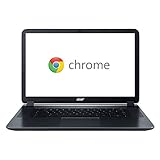
- This chromebook is 15. 6 inch notouch screen; Intel HD Graphics 400 with shared graphics memory
- Intel Celeron Dual-Core N3060 1. 6 GHz, Up to 2. 48GHz
- 2GB DDR3L 1600 MHz; 16GB eMMC Flash Memory, No Optical drive
- SD card reader; 1 x USB 2. 0; 1 x USB 3. 0; 1 x HDMI; 1 x Headphone output/Microphone input combo . Bluetooth4. 0, 802. 11ac, HD Webcam
- Chrome OS, Only 2. 76 lb, Color: Black
Moving on, just like a lot of Chromebooks out there, the Acer Chromebook 15 CB3-532 features a minimal amount of ports.
Specifically, the right side of the laptop houses an SD card reader, a security lock slot, and a USB 3.0 port. The left side, however, features another USB 3.0 port, a headphone/mic jack, an HDMI port, and a power jack.
Recommended Free Tools
That said, now for the dimensions and weight of the laptop. The Acer Chromebook 15 CB3-532 measures 383.5 x 256.5 x 24.1 mm and weighs 1950.4 g.
In comparison, the ASUS Chromebook Flip C302 is significantly lighter than the Acer Chromebook 15 CB3-532. To be more specific, the ASUS Chromebook Flip C302 weighs just 1202.02 g and measures 304.8 x 210.8 x 12.7 mm.
In summary, the Acer Chromebook 15 CB3-532 offers a sleek design, which is uncommon for Chromebooks this inexpensive. However, the laptop features a small number of ports, and its speakers are a mess.
Therefore, I will be rating the Acer Chromebook 15 CB3-532 an eight out of ten to conclude this design review section.
Acer Chromebook 15 CB3-532: Processor (CPU) Performance
The Acer Chromebook 15 CB3-532 is equipped with a dual-core Intel Celeron N3060 CPU. This processor comes with a 1.60 GHz base frequency and a 2.48 GHz maximum frequency.
Additionally, the processor features a cache memory of 2 MB. With this processor, the Acer Chromebook 15 CB3-532 is only capable of handling basic computing tasks like web browsing and word processing.
Also, the laptop should be able to handle light multitasking with this processor. To give more details, the laptop should be able to perform smoothly when 8 to 10 Chrome tabs are opened.
However, for anything exceeding 10 Chrome tabs and basic computing tasks, the laptop will slow down significantly.
Windows Errors? Fix Them Before They Spread
Repair common Windows errors and clear accumulated junk for a smoother, more stable PC - no reinstall needed.Free scan · no reinstallCrashes, No Sound, or Screen Glitches?
Random freezes, missing sound and display glitches usually trace back to one bad driver. Find and replace yours safely.Free scan · under a minuteThat said, to add to this little information about this laptop’s processing capabilities, I will now share the laptop’s results on a JetStream test. Briefly, JetStream is a Javascript benchmark test that measures the overall performance of a computer’s CPU.
Furthermore, on this benchmark test, a high score indicates a better performance. Thus, according to the JetStream benchmark test results, the Acer Chromebook 15 CB3-532 scored 49 points.
Although this score is above average, it isn’t enough to beat the 53.3 points achieved by the Dell Chromebook 11. On a positive note, the Acer Chromebook 15 CB3-532 performed slightly better than the ASUS Chromebook C202.
Also popular on Amazon

- HSXIRQA Charger Compatible With Acer Chromebook 15 CB3-531 CB3-532 CB5-571 C910 Chromebook 14 CB3-431 Chromebook R 13 CB5-312T Chromebook 13 CB5-311 C810 Chromebook R 11 CB5-132T C738T Chromebook 11 N7 C731 C731T CB311-7H CB311-7HT Chromebook 11 C720 C720p C730 C730E C735 C740 CB3-132 CB3-132T CB3-131 CB3-111 Model N16P1 N15Q8 N15Q9 N15Q10 N16Q13 Laptop
- Specification: Input Voltage: 100-240V, 50-60Hz (Worldwide use), Output Voltage: 65W 19V/3.42A, (also Works for 45W Wattage Devices).Power Jack Connector Type: Round Tip 3.0mm*1.1mm. (It is not fit for laptops devices requiring more than 65W)
- Stable Compatibility; Experience faster, more reliable charging with this Portable charger. Lightweight and compact size makes it easy to pack for business trips, vacations, or outdoor or home or daily use at the office.Durable Construction and Made with heat-resistant materials for extended durability.The built-in chip automatically adjusts power based on your devices temperature and battery status. Less heat, safer charging, and a battery that lasts longer
- Safe & Efficient Charging: Built-in safeguards protect against overcurrent, short-circuit, and overheating, ensuring reliable power delivery every time. Designed with high temperature resistant, flame retardant and fire-resistant materials, all our products provide ultimate protection for your devices. Choosing this charger is a smart choice for the safety of yourself and your family
- What's in the Box: 1 X Power Adapter, 1 X Power cord
Specifically, ASUS Chromebook C202 scored 47.9 points on the same benchmark test.
What’s actually slowing this PC down?
Pick the symptom - the matching free tool is one click away.
In conclusion, the Acer Chromebook 15 CB3-532 features a processor that is only capable of handling basic computing tasks. Therefore, I will rate the laptop a seven out of ten in this processor review section.
Acer Chromebook 15 CB3-532: Memory (RAM) Performance
For memory, the Acer Chromebook 15 CB3-532 features a standard memory of 2 GB LPDDR3. Unfortunately, the laptop’s memory is onboard, which means it is soldered directly to the laptop’s motherboard.
Also, 2 GB is the maximum memory that this laptop supports. What all this implies is that you won’t be able to upgrade the laptop’s RAM to more than 2 GB.
Nevertheless, I believe 2 GB RAM is enough for the kind of tasks Chromebooks are designed to carry out – basic computing tasks.
The Tool Desk
Outbyte PC Repair FREERepair Windows errors before they cause bigger problemsFix Now →Outbyte Driver Updater FREEFix the driver behind crashes, sound loss and screen glitchesFind Drivers →Therefore, with 2 GB RAM, the Acer Chromebook 15 CB3-532 will be able to perform day-to-day computing tasks like video streaming and word processing. Also, with this RAM, the laptop should be able to do a bit of multitasking.
Specifically, the laptop will be able to run multiple less-demanding apps like Spotify and Google Docs concurrently. Also, as I already mentioned in the processor review section, opening around 8 Chrome tabs simultaneously shouldn’t be an issue for the laptop.
To further prove the capabilities of the Acer Chromebook 15 CB3-532 with 2 GB RAM, I will now share the laptop’s result on a PCMark for Andriod test. For clarity, PCMark for Andriod test is an app-based benchmark test that measures the memory performance of a computer.
Furthermore, on this kind of benchmark test, the higher the score, the greater the performance. Thus, on the PCMark for Android test, the Acer Chromebook 15 CB3-532 scored 7080 points.
Quick wins for a faster PC:
Fix the driver behind crashes, sound loss and screen glitchesFind Drivers →Clear out junk files and repair common Windows errorsFree Scan →Sadly, this laptop performed significantly below the ASUS Chromebook C202. Specifically, on the PCMark for Andriod test, the ASUS Chromebook C202 scored 7560 points.
All things considered, the Acer Chromebook 15 CB3-532 doesn’t deserve a rating of more than seven out of ten in this memory review section.
Acer Chromebook 15 CB3-532: Storage Options and Performance
When it comes to storage, the Acer Chromebook 15 CB3-532 comes with 16 GB eMMC storage. Before you get disappointed with this storage space, it is important to know that Chromebooks aren’t designed to save files on their local storage.
To give more details, Chromebooks come with free 100 GB of Google Cloud Storage, and the Acer Chromebook 15 CB3-532 is no exception. You can click on this link to learn how you can activate this free Google Cloud storage on your Chromebook.
Do these 3 things before closing this tab:
1Scan for outdated or missing drivers - takes under a minute2Clear out junk files and repair common Windows errors3Fix the driver behind crashes, sound loss and screen glitchesAlso popular on Amazon

- Chromebook runs on Chrome OS - an operating system by Google that is built for the way we live today. It comes with built-in virus protection, updates automatically*, boots up in seconds and continues to stay fast over time. (*Internet connection is required). z)
- All the Google apps you know and love come standard on every Chromebook, which means you can edit, download, and convert Microsoft Office files in Google Docs, Sheets and Slides
- With the Google Play Store, you can access a rich library of apps, games, music, movies, TV, books, magazines, and more, all from your Chromebook.
- Chromebooks come with built-in storage for offline access to your most important files and an additional 100GB of Google Drive space to ensure that all of your files are backed up automatically.
- CB3-532-C8DF comes with these specs - Intel Celeron N3060, 15. 6” HD Display, 4GB Memory, 16GB eMMC, 802. 11ac WiFi 5, 2 - USB 3. 0 Ports, 1 - HDMI port and Up to 12-hour Battery Life
Besides, despite featuring this free 100 GB cloud storage, the Acer Chromebook 15 CB3-532 also comes with an SD card reader for storage expansion. Therefore, you have about three storage options on this laptop – 16 GB eMMC local storage, free 100 GB cloud storage, and an SD card reader.
I should have included a CrystalDiskMark benchmark test result in this section to measure the laptop’s storage performance. Unfortunately, the CrystalDiskMark benchmark test doesn’t support eMMC storage.
CrystalDiskMark benchmark test only supports solid-state drive (SSD) and hard disk drive (HDD). Just in case you are wondering what the Crystaldiskmark benchmark test is, let me explain.
Crystaldiskmark is a benchmark test that analyzes the read and writes speeds of a computer’s storage drive. In case you are wondering, the time it takes a computer’s storage to open a file is referred to as read speed.
Write speed, on the other hand, refers to how long it takes the computer’s storage to store a file.
All things considered, I will rate Acer Chromebook 15 CB3-532 an eight out of ten in this storage review section. This rating is based on the multiple storage options that the laptop offers.
Independent reader supportYour contribution helps us test, update, and keep practical guides available for everyone.Acer Chromebook 15 CB3-532: Graphics Card Performance
For the graphic card, the Acer Chromebook 15 CB3-532 features an Intel HD Graphics 400. This graphics card runs at a base GPU frequency of 320 MHz and a maximum GPU frequency of 600 MHz.
However, this graphics card is an integrated graphics card. As a result, the GPU shares memory with the processor to carry out graphics-related tasks.
Quick wins for a faster PC:
Clear out junk files and repair common Windows errorsFree Scan →Scan for outdated or missing drivers - takes under a minuteDriver Scan →For this reason, the Acer Chromebook 15 CB3-532 won’t be able to smoothly run graphics-intensive apps like Adobe Photoshop and high-end games. However, the laptop will easily run basic android games like Candy Crush and Temple Run.
To further prove the graphic performance of the Acer Chromebook 15 CB3-532, I will share its result on the WebGL Aquarium graphics test. WebGL Aquarium graphics test is a web-based GPU test that measures the 3D graphics-rendering capability of a computer.
So, the Acer Chromebook 15 CB3-532 was able to render 2,000 fish at 25 fps on the WebGL Aquarium graphics test. Sadly, this frame rate is slightly behind the Dell Chromebook 11‘s 28 fps and the ASUS Chromebook C202‘s 27 fps.
It’s worth noting that in the WebGL Aquarium graphic test, a high “fps” indicated better GPU performance.
Outdated Drivers Are Slowing You Down
One free scan finds every outdated or missing driver and matches the right update for your exact hardware.Free scan · exact hardware matchPC Slower Than It Used to Be?
A free scan shows the junk files, broken settings and background clutter dragging Windows down - then fixes them in one click.Free scan · Windows 10 & 11After thorough consideration, I will be rating the Acer Chromebook 15 CB3-532 a seven out of ten in this GPU review section.
Also popular on Amazon

- ✅【Processor】Powered by an Intel Celeron N4020 Dual-Core Processor(Up to 2.80 GHz), the Chromebook loads content-rich webpages fast, provide crisp video playback, and enables you to multitask effortlessly by allowing multiple pages to run at the same time.
- ✅【15.6” HD Display】The large 15.6” HD display with an anti-glare coating and narrow 0.37-inch bezel gives users a greater workspace, so they can be more productive in bright conditions. For added functionality and to keep numerists happy, an integrated numeric keypad has been included.
- ✅【RAM & Storage】4GB RAM, 64GB eMMC meets the needs of people who need Google operating system in companies or schools.
- ✅【Connectivity】12.5 hours of battery life goes a long way. Work efficiently and browse the web knowing that your connection remains secure with Wi-Fi and Bluetooth. Ports & Slot: 2 x USB-C 3.1, 2 x USB-A 3.1, 1 x Headphone Jack.
- ✅【Operating System】Chromebook is a computer for the way the modern world works, with thousands of apps. It is secure, fast, up-to-date, versatile and simple.
Acer Chromebook 15 CB3-532: Battery Life and Performance
As for the battery, a 3-cell Lithium Polymer (Li-Polymer) 3950 mAh battery powers the Acer Chromebook 15 CB3-532. According to Acer, with this battery, the Acer Chromebook 15 CB3-532 can last up to 12 hours.
To be sure this claim is correct, I will now discuss the laptop’s result on a battery rundown test. Specifically, this battery test involves continuously browsing the web via a WIFI connection while the laptop’s brightness is at the medium level.
So, based on the result of this test, the Acer Chromebook 15 CB3-532 delivered a battery life of 10 hours. Although this battery life isn’t up to Acer’s initial 12 hours claim, it sure is very impressive.
In fact, it is better than the HP Chromebook 13 G1‘s battery life. To be more specific, the HP Chromebook 13 G1 delivered a battery life of 9 hours and 28 minutes on the battery test.
In conclusion, Chromebooks are known for having great battery life, and the Acer Chromebook 15 CB3-532 doesn’t disappoint. Thus, a rating of nine out of ten is befitting for the Acer Chromebook 15 CB3-532 in this battery review section.
Frequently Asked Questions
No, the Acer Chromebook 15 CB3-532 doesn’t feature a touchscreen display.
Yes, it is Chromebooks are designed for basic computing tasks like word processing. Thus, 2 GB RAM is enough for a Chromebook.
Recommended Free Tools
Yes, it does.
Yes, the Acer Chromebook 15 CB3-532 features Bluetooth 4.2.
When I wrote this article in December 2021, the Acer Chromebook 15 CB3-532 had a starting price of $259.00.
Conclusion
The Acer Chromebook 15 CB3-532 is an affordable Chromebook that comes with a rather appealing design, unlike most Chromebooks. Moreover, this Chromebook also comes with a clear HD display, a long-lasting battery, and a comfortable keyboard.
However, just like most Chromebooks, the Acer Chromebook 15 CB3-532 can only perform basic computing tasks. Also, the laptop features a small number of ports.
Free tools Windows power users keep installed
One-click scans. No signup required.
Overall, if you need an affordable laptop for simple computing tasks, the Acer Chromebook 15 CB3-532 is worth considering.
I hope you found this Acer Chromebook 15 CB3-532 review helpful. If you found it worthwhile, we would love to hear from you.
Kindly spare two minutes to share your thoughts with our community using the comments form found at the end of this page.
Alternatively, simply respond to the “Was this page helpful” question below and provide us with your feedback.
Do these 3 things before closing this tab:
1Clear out junk files and repair common Windows errors2Fix the driver behind crashes, sound loss and screen glitches3Repair Windows errors before they cause bigger problemsFinally, for more Chromebook reviews, visit our Chromebook Reviews page. You may also find our Laptop Specs page very helpful.
Quick Recap
Product prices and availability are accurate as of the date/time indicated and are subject to change. Any price and availability information displayed on Amazon at the time of purchase will apply.


