
iTechGuides is reader-supported. When you buy through links on our site, we may earn an affiliate commission. As an Amazon Associate I earn from qualifying purchases. Learn more
A 3.5 mm audio-to-Bluetooth transmitter takes analog sound from a TV, stereo, computer, game device, or airplane audio output and sends it wirelessly to paired Bluetooth headphones, earbuds, or a speaker. It changes wired audio into wireless output; it does not provide streaming content, Bluetooth reception, or automatic microphone support.
The central idea is simple: the source continues producing audio through its wired output, while the transmitter acts as a Bluetooth audio source and the headphones or speaker act as the Bluetooth audio sink. The details that determine whether the setup works well are the available input, transmitter mode, codec compatibility, latency, and power arrangement.
Key takeaways
- A 3.5 mm Bluetooth transmitter converts audio from a wired headphone or line output into a wireless Bluetooth stream for compatible headphones, earbuds, speakers, or amplifiers.
- Bluetooth Classic transmitters commonly use the A2DP source role, while the headphones or speaker use the A2DP sink role.
- Bluetooth 5.2, 5.3, or 5.4 does not by itself guarantee low latency, a particular codec, long range, microphone support, or Auracast.
- Low-latency performance depends on a compatible codec or LE Audio technology on both the transmitter and the receiving device.
- A transmitter-only adapter sends audio outward; a 2-in-1 transmitter/receiver can also accept Bluetooth audio, but the operating mode and jack must be selected correctly.
- The source must provide an audio output, and optical-input transmitters may require PCM or LPCM rather than Dolby or another encoded format.
How does a 3.5 mm audio-to-Bluetooth transmitter work?
A 3.5 mm audio-to-Bluetooth transmitter takes analog audio from a source such as a television, stereo, computer, game device, or airplane entertainment system and sends that audio wirelessly to a paired Bluetooth listening device. The transmitter changes the audio output method; it does not create streaming content or automatically turn the source into a Bluetooth receiver.
Recommended Free Tools
The basic signal path is:
Audio source with 3.5 mm output → transmitter AUX input → internal audio conversion and encoding → Bluetooth radio transmission → paired headphones, earbuds, speaker, amplifier, or recording device.
Popular on Amazon
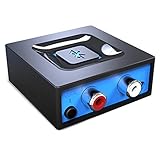
- Listen music wireless: Connect with computer speakers, home stereo systems or other speaker systems via the 3.5 mm or RCA cable, then pair with the Bluetooth audio devices such as smartphones or tablet for streaming music.
- Easy setup and automatic reconnect: There is a big bluetooth symbol button in bluetooth receiver middle. Pair your bluetooth device to this adapter with a single button press. Click once means Bluetooth Connect/Disconnect. Hold the botton 3 second mean ON/OFF. It can reconnect automatically with the previously paired device.
- Wireless range: Indoors(without obstacles) connect rang up 30-40 ft (10-12 m).
- Works with most device: Bluetooth enabled device including smartphones, tablets, computers, laptops upon and any powered PC speakers, home stereo systems and A/V receivers.
- NOTE: This adapter doesn't have built-in battery, power by AC to DC power adapter or USB cable. This product is a bluetooth receiver ONLY, not a bluetooth transmitter. Only to give Bluetooth capabilities to an existing stereo / powered speaker / PA. If you have any problems, please contact us at any time by Amazon Order, and we will speed up the process to resolve the issue.
The 3.5 mm cable carries analog electrical audio. Electronics inside the transmitter prepare that signal for wireless transmission using the Bluetooth audio technology supported by the specific model. The receiving headphones or speaker decode the wireless stream and turn it back into an electrical signal for their drivers. The exact codec, bitrate, chip, and internal conversion process vary by product, so those details should be taken from the selected model’s documentation rather than assumed from the presence of a 3.5 mm jack.
In the common Bluetooth Classic arrangement, Bluetooth SIG’s explanation of Bluetooth audio source and sink roles describes the source as the device generating audio and the sink as the device receiving and rendering it. A 3.5 mm transmitter is normally the source in that relationship; Bluetooth headphones or a speaker are normally the sink.
What can a 3.5 mm Bluetooth transmitter do?
A 3.5 mm Bluetooth transmitter lets a device with a usable wired audio output send sound to Bluetooth headphones, earbuds, or speakers. For example, a television can continue producing audio through its headphone or audio-out jack while a transmitter sends the same audio wirelessly to headphones.
Do these 3 things before closing this tab:
1Scan for outdated or missing drivers - takes under a minute2Clear out junk files and repair common Windows errors3Fix the driver behind crashes, sound loss and screen glitches| Device type | Primary direction | Typical use | What to verify |
|---|---|---|---|
| Transmitter-only adapter | Wired source to Bluetooth receiver | TV, stereo, computer, game device, or airplane audio to headphones | Source input type, Bluetooth audio profile, codec, latency, and power |
| Receiver-only adapter | Bluetooth source to wired audio output | Phone audio to a wired car stereo or powered speaker | Bluetooth receiving mode and output connector |
| 2-in-1 transmitter/receiver | Either direction, depending on mode | One adapter used with both old wired sources and wired playback equipment | TX/RX mode, jack assignment, supported codecs, and whether features work in both modes |
A transmitter does not necessarily add Bluetooth input to the source. A transmitter-only adapter generally sends audio outward and cannot receive music from a phone. A 2-in-1 product can perform both jobs, but the user must select the correct mode and connect the cable to the correct jack.
A transmitter also does not automatically provide two-way voice communication. A2DP is fundamentally a source-to-sink audio-streaming arrangement. Calls, voice chat, and gaming microphone support require suitable microphone hardware and additional Bluetooth profiles or product-specific features. A TV transmitter with a 3.5 mm input should not be assumed to carry microphone audio back to the television.
What is the difference between Bluetooth Classic and Bluetooth LE Audio?
Bluetooth Classic Audio uses the Bluetooth Classic radio and commonly relies on A2DP for higher-quality one-way audio, while LE Audio uses Bluetooth Low Energy and introduces additional capabilities for compatible products.
Also popular on Amazon

- Bluetooth 5.4 Version: The latest Bluetooth 5.4 technology allows for 33 feet long range transmission and stable connection, giving you a pleasant music environment while driving with an aux Bluetooth adapter.
- Enjoy High-Quality Music: The Bluetooth receiver converts non-Bluetooth devices into Bluetooth devices for wireless connection, In Transmitter Mode, send audio from your TV to Bluetooth headphones for private listening. In Receiver Mode, stream music wirelessly from your phone to your car stereo , cutting the cord. Suitable for cars with a bluetooth aux adapter for car, speakers, stereo systems and headphones.
- Plug and Play: Bluetooth car adapter auxiliary design with ON/OFF switch, when you turn on the switch, it will automatically enter the pairing mode, very easy to use
- Built-in HD Microphone: This 3.5mm bluetooth aux adapter has a built-in HD microphone, just press the power button to answer or hang up, pause or play music, no need to operate the phone interface, so you can drive safely
- Premium Portability: The size of this bluetooth transmitter is very mini, you can carry this adapter with you, and when you need it, you can easily take it out and use it immediately
Bluetooth SIG’s LE Audio overview identifies capabilities including improved performance, hearing-aid support, and Auracast broadcast audio. LE Audio can change how compatible transmitters and receivers exchange audio, but the presence of a Bluetooth 5.x label does not prove that a product supports LE Audio.
The Tool Desk
Outbyte Driver Updater FREEFix the driver behind crashes, sound loss and screen glitchesFind Drivers →Outbyte PC Repair FREEClear out junk files and repair common Windows errorsFree Scan →Auracast is a broadcast-audio capability that can allow compatible equipment to send audio to multiple compatible receivers. Auracast is not an automatic feature of every Bluetooth 5.x transmitter, and both the transmitting equipment and receiving devices need the relevant LE Audio and Auracast support.
For a general 3.5 mm transmitter, A2DP remains the safest baseline assumption only when the product documentation lists A2DP. Current products can combine A2DP and AVRCP with codecs such as SBC and aptX variants. For example, the manufacturer’s specifications for the Avantree Orbit Pro list AUX 3.5 mm input, A2DP, AVRCP, and multiple codec options. That specification describes that model, not every transmitter in the category.
Why does codec matching matter for audio delay?
Codec matching matters because the transmitter and receiver need a compatible audio path, and different codec implementations can produce different delays. Bluetooth 5.x alone is not a reliable prediction of television lip-sync performance.
The transmitter and headphones or speaker should support at least one compatible codec or LE Audio technology. A transmitter may advertise aptX Adaptive, aptX Low Latency, aptX HD, LC3, SBC, or another option, but a codec listed on only one side cannot guarantee that the connection will use it.
- Read the transmitter specification and list its supported codecs or LE Audio technology.
- Check the headphones, earbuds, or speaker for matching support.
- Look for an explicit manufacturer statement about low-latency operation and the required matching devices.
- Test the complete transmitter-and-receiver combination with the intended television or game system.
Avantree’s audio-lag guidance states that its low-latency features depend on support for technologies such as aptX Adaptive, aptX Low Latency, or Auracast, depending on the product and connected device. Manufacturer specifications also show that latency can differ among LC3, aptX Lite, aptX Adaptive, aptX HD, and SBC implementations.
Also popular on Amazon

- Upgraded Bluetooth 5.3 Adapter: This bluetooth adapter for pc uses the latest upgraded Bluetooth 5.3 BR+EDR technology, greatly improves the stability of the connection data transfer speed, reduces the possibility of signal interruption and power consumption.
- Up to 5 Devices Sync Connected: UGREEN Bluetooth dongle for PC supports up to 5 different types of Bluetooth devices to be connected at the same time without interfering with each other, such as Bluetooth mouse/keyboard/mobile phone/headphones, etc. If Bluetooth audio devices of the same type (such as speakers/headphones) are connected, only one device can play music.
- Plug and Play: The Bluetooth adapter is developed for Windows systems only and does not support other systems. No driver installation is required under Windows 11/10/8.1. NOTE: Win 7, Linux and MacOS System are NOT supported.
- Mini Size: An extremely compact Bluetooth stick that you can leave on your laptop or PC without removing it.The compact size does not interfere with other USB ports. Convenient to carry, no space occupation.
- What Can I do if the Bluetooth adapter can not work?: Ensure there are no other Bluetooth devices installed on the computer. If there are, disable all existing Bluetooth devices in "Device Manager", then insert the adapter and try again. (For detailed information please read the user manual)
Television viewers should treat low latency as a compatibility requirement rather than a guaranteed result. Ordinary Bluetooth audio can create a noticeable gap between a person’s lips and the sound, and perfect synchronization should not be promised unless the complete combination is documented as compatible.
Which connections can a Bluetooth transmitter use?
AUX is the simplest connection, but some transmitters also accept RCA, optical, or coaxial digital audio. The correct choice depends on the outputs available on the source and the inputs listed on the transmitter.
| Source connection | What it carries | When to use it | Main check |
|---|---|---|---|
| 3.5 mm AUX or headphone output | Analog stereo audio | Most direct connection for a TV, computer, tablet, stereo, or travel system with an audio output | Use an output, not a microphone or AUX input |
| RCA red/white output | Analog stereo audio | Televisions, stereos, and amplifiers with left/right audio outputs | Connect the RCA plugs to audio outputs; use a suitable 3.5 mm-to-RCA cable or adapter |
| Optical/TOSLINK output | Digital audio | Sources that provide optical output and a transmitter with optical input | The transmitter may require PCM or LPCM instead of Dolby or another encoded format |
| Coaxial digital output | Digital audio | Sources and transmitters that specifically support coaxial audio | Confirm that the connector and supported format match |
The 1Mii B06TX manual documents optical, AUX, RCA, and coaxial input paths for that model. A different transmitter may support fewer connections, use a different selector, or require a different cable.
Quick wins for a faster PC:
Repair Windows errors before they cause bigger problemsFix Now →Scan for outdated or missing drivers - takes under a minuteDriver Scan →Does the 3.5 mm cable power the transmitter?
No. A 3.5 mm audio cable carries the audio signal and normally does not power the transmitter. Portable transmitters may contain a rechargeable battery, while larger TV adapters may use USB power or a wall adapter. Check the product’s power instructions before installation.
How do you connect a 3.5 mm transmitter to a TV or other source?
To set up a 3.5 mm transmitter, power the adapter, connect its AUX input to the source’s headphone or line output, select the correct input mode, and pair the transmitter with the Bluetooth headphones, earbuds, or speaker.
- Power the transmitter. Charge a battery-powered model or connect its USB or wall power supply.
- Connect the source. Plug a 3.5 mm cable from the source’s headphone, line-out, or audio-out jack to the transmitter’s AUX input. Use RCA, optical, or coaxial instead if the selected model and source require it.
- Select the input. Choose AUX, optical, coaxial, or the appropriate input setting if the transmitter has an input selector.
- Enter pairing mode. Follow the transmitter’s instructions until its pairing indicator shows that it is searching.
- Enter pairing mode on the receiver. Put the headphones, earbuds, or speaker into Bluetooth pairing mode.
- Wait for connection. After the devices connect, play audio and adjust volume at the source or receiving device as appropriate.
Avantree’s AUX setup instructions demonstrate the essential wired-source connection and input-mode selection steps. The exact button names, indicator lights, pairing timeout, and volume behavior remain model-specific.
Also popular on Amazon

- SEAMLESS WIRELESS MUSIC STREAMING: Whether you want to upgrade your home stereo as a Bluetooth receiver for home stereo, breathe new life into an old system using it as a Bluetooth adapter for old receiver, or add Bluetooth to your stereo receiver, this device is the key to a modern, wire-free listening setup.
- MULTIFUNCTIONAL CONNECTIVITY: This Bluetooth adaptor for old stereo is a connectivity powerhouse. With support for RCA and 3.5mm jacks, it's compatible with 99% of speakers. From classic AV receivers to your car or home stereo, a Bluetooth audio receiver fits right in. Plus, its TF card music playback support gives you extra ways to enjoy your tunes.
- FAST NFC QUICK CONNECT: Our Bluetooth to RCA adapter features a built-in NFC chip. Just bring your NFC-enabled smartphone or tablet close, and you're instantly connected. No more tedious manual pairing. It's the quickest way to start streaming your favorite music.
- PREMIUM CRYSTAL CLEAR SOUND: Experience audio like never before. Our aux to Bluetooth adapter ensures crystal-clear sound. The 3D music playback mode creates a rich, surround-sound experience. Whether it's soft ballads or high-octane tracks, you get distortion-free sound, even at full volume.
- EFFORTLESS AUTOMATIC PAIRING: Once you've set it up, the Bluetooth RCA receiver pairs automatically every time you power it on. No more struggling with wires or complex connections. Just turn it on and let the music play.
Why will a 3.5 mm Bluetooth transmitter not pair or play sound?
Most pairing failures come from an incorrect source jack, wrong transmitter mode, an occupied Bluetooth connection, insufficient power, or an incompatible input format rather than from the 3.5 mm concept itself.
Crashes, No Sound, or Screen Glitches?
Random freezes, missing sound and display glitches usually trace back to one bad driver. Find and replace yours safely.Free scan · under a minutePC Slower Than It Used to Be?
A free scan shows the junk files, broken settings and background clutter dragging Windows down - then fixes them in one click.Free scan · Windows 10 & 11If the transmitter cannot find the headphones
- Confirm that both devices are charged or powered.
- Put both devices into their actual pairing modes rather than merely turning Bluetooth on.
- Disconnect the headphones or speaker from a phone, tablet, television, or another previously paired device.
- Move the devices close together during initial pairing.
- Clear old pairings or reset the transmitter and receiver according to their manuals.
- Check whether the transmitter supports the receiver’s required Bluetooth audio technology.
If pairing succeeds but there is no audio
- Make sure the cable is connected to a source output, not a microphone input or source AUX input.
- Select AUX, optical, or the correct active input on the transmitter.
- Confirm that the source is not muted and that its audio is routed to the connected output.
- For optical input, set the source to PCM or LPCM if the transmitter does not support Dolby or another encoded format.
- Try another cable or source output to separate a cable problem from a transmitter problem.
If the audio has a delay
Check codec compatibility on both devices and look for an explicit low-latency mode. Do not treat Bluetooth 5.3 or Bluetooth 5.4 as proof of low delay. If the transmitter and receiver cannot use a compatible low-latency path, a different receiver may be necessary; changing only the transmitter may not solve the problem.
What should Windows users check?
A standalone 3.5 mm transmitter normally does not require a Windows driver because the transmitter receives analog audio from the computer’s output and handles the Bluetooth transmission externally. Windows troubleshooting matters when the computer cannot produce audio through its 3.5 mm output or when Windows is separately pairing with a Bluetooth audio device.
For a Windows Bluetooth problem, start with Microsoft’s Bluetooth troubleshooting guidance. Check pairing state, range, battery, configuration, updates, and drivers before treating third-party software as a solution.
If Windows itself has a Bluetooth adapter or audio-device driver issue, Microsoft’s driver guidance recommends Windows Update, Device Manager, driver reinstall or rollback where appropriate, and the computer manufacturer’s support site. Driver-management software is not a prerequisite for operating an external 3.5 mm transmitter and should not be the first recommendation for this hardware setup.
Free tools Windows power users keep installed
One-click scans. No signup required.
How should you choose a 3.5 mm Bluetooth transmitter?
Choose by source output, transmission or receiver mode, codec compatibility, latency, power, and required inputs—not by Bluetooth version alone.
Also popular on Amazon
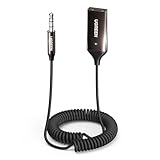
- High-Fidelity Stereo Audio: Featuring Bluetooth 6.0 chipset, this 3.5mm Bluetooth adapter provides stable connection up to 100FT (30m) without delay. Made for car use, this car Aux Bluetooth adapter supports SBC codec, delivering clear, functional, and enjoyable sound—both for listening and for speaking.
- Add Bluetooth to Your Car: This UGREEN Bluetooth receiver upgrades your car, home audio systems and speakers to Bluetooth-enabled devices. It’s an ideal solution for vehicles without built-in Bluetooth, letting you stream music and take hands-free calls via your car speakers.
- Plug and Play: This UGREEN 3.5mm Bluetooth Car Adapter saves your trouble with multi-device memory. It can remember up to 5 paired devices. Simply plug into the 3.5mm AUX jack and power it via USB port, no frequent battery charging required! It auto reconnects to your phone once you start your car and supports simultaneous pairing of two devices for easy sharing.
- Hands-Free Calling: This UGREEN Bluetooth car AUX receiver has a built-in microphone for hands-free calls through your car speakers. Its compact design keeps you from glancing at your phone while driving, helping you stay focused on the road for safer trips.
- Durable and Portable: This UGREEN Bluetooth Car Adapter features zinc alloy connectors for improved durability. Equipped with 0.3M–1.5M premium TPE flexible cable, it fits multiple scenarios. Its compact mini design saves space in your vehicle.
| Decision | What to look for | Why it matters |
|---|---|---|
| Source connection | 3.5 mm AUX, RCA, optical, coaxial, or a combination | The transmitter must accept the output available on the TV, stereo, computer, or other source |
| Operating mode | Transmitter-only or 2-in-1 TX/RX | A transmitter-only product cannot receive phone audio; a 2-in-1 product requires the correct mode |
| Audio technology | A2DP, listed codecs, or LE Audio/Auracast | The receiver must support a compatible path |
| Television delay | Explicit low-latency compatibility with the intended headphones | Bluetooth version alone does not guarantee lip-sync performance |
| Power | Rechargeable battery, USB power, or wall power | The installation location and travel use determine which arrangement is practical |
| Voice support | Explicit microphone and bidirectional-profile support | A 3.5 mm input does not automatically support calls, voice chat, or gaming microphones |
| Multiple receivers | Explicit simultaneous-device or Auracast support | One transmitter should not be assumed to serve multiple headphones without documented support |
The most useful shopping phrase for this category is 3.5 mm Bluetooth transmitter. Before buying, confirm that the listing identifies the input as AUX or 3.5 mm audio input, rather than offering only a 3.5 mm output for receiver mode.
Which accessories might be necessary?
Buy accessories only when the selected transmitter and source require them. A 3.5 mm stereo AUX cable is useful for a source with a headphone or line output. A 3.5 mm-to-RCA cable is appropriate for a television or stereo with red-and-white audio outputs. An optical cable applies only when both the source and transmitter use optical audio. A USB power adapter or charging cable may be needed when the chosen transmitter requires external power and does not include the necessary accessory.
For TV or gaming use, compatible Bluetooth headphones or earbuds may be more important than the transmitter’s maximum advertised Bluetooth version. Check for matching aptX, aptX Adaptive, or LE Audio support when low latency matters. A matching codec can improve the available path, but it cannot guarantee perfect synchronization without compatibility across the complete system.
What a 3.5 mm audio-to-Bluetooth transmitter does not guarantee
- Bluetooth reception: transmission and reception are different operating roles.
- Streaming access: the adapter transports audio from an existing source and does not provide a music or video catalog.
- Microphone return: voice communication requires explicit hardware and profile support.
- Low latency: a Bluetooth version number does not establish lip-sync performance.
- Auracast: LE Audio and Auracast support must be documented on compatible equipment.
- Universal codec support: codecs must be supported by both the transmitter and the receiver.
- Unlimited range or sound quality: those outcomes depend on the specific hardware, environment, codec, and receiver.
For US buyers, the setup works when the source exposes a usable audio output and the receiving device supports a compatible Bluetooth audio technology. The practical buying priorities are source-output type, transmitter mode, receiver compatibility, codec or LE Audio support, latency, and power.
Frequently Asked Questions
Does a 3.5 mm Bluetooth transmitter also receive Bluetooth audio?
A 3.5 mm Bluetooth transmitter sends audio from a wired source to a Bluetooth receiver such as headphones or a speaker. A transmitter-only model does not receive music from a phone; that requires a receiver or 2-in-1 transmitter/receiver.
Does Bluetooth 5.3 guarantee low latency for a TV transmitter?
Bluetooth 5.x does not by itself guarantee low audio delay. Low latency depends on compatible codecs or LE Audio technology supported by both the transmitter and the headphones or speaker, plus the implementation of the complete system.
Which 3.5 mm port should connect to a Bluetooth transmitter?
Use the source’s headphone, line-out, or audio-out jack. Do not connect the transmitter to a microphone input or an AUX input on the source, because those are not normally audio outputs for the transmitter.
Can a 3.5 mm Bluetooth transmitter carry microphone audio?
A 3.5 mm transmitter does not automatically support calls, voice chat, or microphone audio returning to the source. Those functions require explicit microphone hardware and bidirectional Bluetooth-profile support.
The Bottom Line
A 3.5 mm audio-to-Bluetooth transmitter is a wireless bridge for a wired audio output: connect the source’s audio output to the transmitter, pair compatible headphones or a speaker, and let the transmitter handle the Bluetooth stream. Select the product by input type, TX/RX mode, codec compatibility, latency, and power—not by Bluetooth version alone.
Quick Recap
Product prices and availability are accurate as of the date/time indicated and are subject to change. Any price and availability information displayed on Amazon at the time of purchase will apply.

