
What’s actually slowing this PC down?
Pick the symptom - the matching free tool is one click away.
Set the playlist’s end behavior to Loop to send playback back to its first shot. If the last shot is a video clip and that clip still stops at its endpoint, set the clip’s separate Source Properties → When Finished option to Loop too. These controls apply to different things: the playlist setting restarts the list, while the source setting repeats an individual clip.
Set the playlist to loop
- Select the playlist shot and open its playlist behavior control.
- Choose Loop. Telestream’s Wirecast 16.3 User Guide for Windows describes this behavior as transitioning back to the first shot endlessly.
With playlist Loop enabled, Wirecast returns to the first shot after reaching the last shot. The playlist control does not replace the final video’s own end behavior.
If the final video still stops
- Select the final video clip or its source.
- Open Source Properties.
- Set When Finished to Loop.
The clip-level setting controls what happens when that video reaches its endpoint. For continuous playback of a playlist ending in a video, use Loop for the playlist and, if needed, Loop for that final clip.
Choose Hold only when you want playback to stop on the last frame
Hold leaves the playlist on its last shot. If the final shot is a video and you want it to remain on its last frame, set both the playlist behavior and the clip’s Source Properties → When Finished option to Hold. These two settings work at separate levels.
Recommended Free Tools
#1 Best Overall
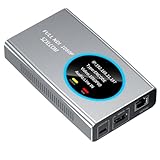
- 【Real-Time IP Workflow】1920×1080@60fps NDI encoder, enabling frame-accurate synchronization for live streaming teams, sports events, game streaming, and multi-camera production. The NDI encoder converts HDMI signals into full NDI video streams with latency below 65 milliseconds, ensuring seamless synchronization of video motion and fast-paced actions. Compatible with vMix/OBS/Wirecast integration.
- 【Flexible IP to Display】A bidirectional all-in-one device that functions as both an NDI encoder and NDI decoder. When used as an decoder, it converts NDI streams into 1080p60 HDMI signals. Decode NDI signals from the production console to HDMI large screens for real-time multi-camera monitoring, project vMix NDI video streams onto meeting room displays, or route live signals to broadcast monitors. Eliminate complex cabling—a single Ethernet cable can simultaneously transmit power and signals. (Select encoder or decoder mode via the NDI backend network interface).
- 【IP-Based Wiring Infrastructure】Using an HDMI-to-NDI converter, a single network cable can replace long-distance HDMI cabling (up to 100 meters), enabling both power supply (PoE+) and network transmission over a single cable, significantly simplifying on-site cabling. Also supports PoE+ or Type-C interface 5V power supply, reducing cabling costs. It is an ideal solution for educational live streaming and recording classrooms, as well as enterprise IT management IP-based production.
- 【Real-Time Status Monitoring】The HDMI decoder is equipped with a Tally indicator light and an LCD screen that displays real-time information, including IP address, network status, encoding/decoding status, video resolution, audio input/output status, and indicator light status. Without the need for a computer, you can monitor the latest program updates in real-time during live events.
- 【Real-Time Monitoring via Uncompressed HDMI Signal Loop-Out】The NDI live streaming encoder supports HDMI loop-out functionality, enabling near-zero latency signal pass-through. This allows for real-time video signal monitoring without interrupting NDI encoder processing and transmission. This provides a simpler setup solution for video production or live streaming.
If the settings are correct but playback still misbehaves
Check your installed Wirecast version and its matching documentation before relying on exact control locations. The cited guide covers Wirecast 16.3 for Windows; the labels or navigation may differ in other versions or on Mac. Telestream’s release notes list Wirecast 16.4.1, dated March 14, 2025, as fixing hold behavior when playing media files and a single black frame issue during media-file looping or transitions. Those fixes may be relevant to unexpected playback, but do not establish the cause of a particular user’s problem.
Or let it run in the cloud
If your goal is to keep uploaded videos playing on a YouTube channel around the clock rather than configure a Wirecast playlist, StreamNeo runs the stream from the cloud:
Rank #2

- Professional HDMI to NDI Conversion – Converts HDMI input of up to 4096x2160 (30fps 4:4:4/4:2:2 or 60fps 4:2:0) into high-quality NDI output stream of up to 2048x2160 120fps 4:2:2 for IP-based production workflows.
- Seamless HDMI Loop-Through – Integrated HDMI output enables real-time local monitoring while transmitting the same signal over NDI with minimal latency.
- On-Board Video Processing – Built-in processing includes de-interlacing, aspect ratio conversion, cropping/scaling, and color format conversion to optimize output for downstream systems.
- PTZ Control & Tally Support – Remote PTZ camera control and tally integration via supported control interfaces for streamlined multi-camera productions.
- Flexible Power Options – Powered via PoE or USB power adapter for versatile deployment in studios, classrooms, and field environments.
- Upload a recording or build a playlist.
- Add your YouTube stream key once.
- Go live; StreamNeo loops the uploaded videos from the cloud.
Nothing has to stay on at home. Each slot streams the uploaded quality up to 4K 60fps at one flat price, and StreamNeo automatically recovers if YouTube drops the stream. The first day is free with no card. Monthly pricing is $9.99 per month.
Quick Recap
Best Value
- Professional HDMI to Full NDI Conversion – Converts HDMI input of up to 4096x2160 60fps 4:4:4 8-bit into high-quality NDI high bandwidth output stream of up to 4096x2160 60fps 4:2:2 8-bit for IP-based production workflows.
- Seamless HDMI Loop-Through – Integrated HDMI output enables real-time local monitoring while transmitting the same signal over NDI with minimal latency.
- On-Board Video Processing – Built-in processing includes de-interlacing, aspect ratio conversion, cropping/scaling, and color format conversion to optimize output for downstream systems.
- PTZ Control & Tally Support – Remote PTZ camera control and tally integration via supported control interfaces for streamlined multi-camera productions.
- Flexible Power Options – Powered via PoE or USB power adapter for versatile deployment in studios, classrooms, and field environments.
Rank #4

- 【TV Broadcasting Level Encoder & Decoder】 ORIVISION NDI encoder decoder is the latest launched product for broadcasting level use mainly for radio and TV programme production, Video production, remote production,studio, new media...etc. Also can be used to do live streaming. It’s compatible with OBS, Xsplit,Vmix, Wirecast ...etc.
- 【Full NDI Converter 1080P@60】Full NDI technology ensures high definition quality with a low latency. It supports Full NDI encoding and decoding. When use it as an encoder, it supports 1080P@60HZ HDMI signal source input and loop-out. Then convert it to full NDI stream to output. Or as a decoder, it supports decode Full NDI signal to output to HDMI devices like monitors, projectors, screens...etc. Also, you may take 2pcs work as encoder and decoder separately.
- 【Tally Light & LED Screen】There’s a design of tally light. Green for preview and red for program. Tally light of the ndi encoder decoder will help distinguish the camera and devices status to ensure a smoother TV programme production process. LED screen is in the center of the tally ring light. It shows info including IP,Type,Video resolution, Audio...etc. Help check the device's working status in real-time.
- 【PTZ Control & WEB UI】It offers WEB UI for users to log in. You may implement a lot of settings on it. For example, monitor the status of device, do network configuration,set the NDI video & audio coding bandwidth, select the transmission protocol, set the Tally light. Besides, you may adjust the PTZ parameter to control the PTZ camera which is connected with the device by an USB to RS232 cable.
- 【Lightweight & Easy Install & POE Power】It is portable and light weight. There is a 1/4-20 nuts are used to connect accessories and fix the device on camera. You may choose gigabit POE power supply. Or use a standard power adapter for it with a type-C cable. Tips: If pass switch, it must be a gigabit switch to avoid any possible freezes of video and audio.
Rank #3
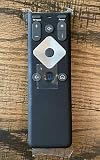
- To Be Used XFINITY FLEX Device Only
- Voice control
- Batteries included
Start your free day with StreamNeo.
Product prices and availability are accurate as of the date/time indicated and are subject to change. Any price and availability information displayed on Amazon at the time of purchase will apply.

