
iTechGuides is reader-supported. When you buy through links on our site, we may earn an affiliate commission. As an Amazon Associate I earn from qualifying purchases. Learn more
Which is faster: USB 3.0 or eSATA? A native eSATA connection based on SATA 6Gb/s usually has the higher storage bandwidth, but USB 3.0 can be equally fast or faster with a good UASP enclosure. Mechanical hard drives often erase the difference, while SATA SSDs reveal it more clearly.
The correct answer depends on the complete storage path, not just the connector: host controller, cable, bridge chip, enclosure, drive, operating system, and workload all affect the result.
Key takeaways
- eSATA based on SATA 6Gb/s has a higher nominal link rate than USB 3.0: 6Gb/s versus 5Gb/s.
- eSATA based on SATA 3Gb/s has a lower nominal link rate than USB 3.0, although a well-designed UASP enclosure can still produce competitive real-world results.
- A mechanical hard drive is commonly the bottleneck, so USB 3.0 and eSATA often perform similarly with a single HDD.
- A native SATA 6Gb/s eSATA connection can give a SATA SSD more interface headroom than ordinary USB 3.0.
- USB 3.0 is usually the more practical choice because it is widely available, can power many portable drives, and works with hubs and other peripherals.
What are USB 3.0 and eSATA?
USB 3.0 is a general-purpose external bus designed for storage, displays and docks in some configurations, phones, printers, input devices, and many other peripherals. The original USB 3.0 speed class is now commonly described by the USB Implementers Forum as USB 5Gbps within the broader USB 3.2 naming family. Product listings and older articles still commonly call the same class “USB 3.0” or “SuperSpeed USB.”
Do these 3 things before closing this tab:
1Fix the driver behind crashes, sound loss and screen glitches2Repair Windows errors before they cause bigger problems3Scan for outdated or missing drivers - takes under a minuteeSATA means external Serial ATA. eSATA extends the SATA storage interface outside a computer through defined external connectors, signal requirements, and shielded cables. SATA-IO describes eSATA as an external implementation of SATA and specifies cable guidance of approximately 2 meters. eSATA was designed primarily for direct-attached storage, not as a universal replacement for USB peripherals.
Popular on Amazon

- ADD AN EXTERNAL HARD DRIVE: This 3ft / 1m USB 3.0 to eSATA adapter lets you connect any external eSATA hard drive (HDD), solid state drive (SSD), or optical disc drive (ODD) through the USB 3.0 port on your laptop or desktop
- MAXIMUM COMPATIBILITY: Easily connect your USB-enabled computer or laptop, such as your Dell OptiPlex or MacBook to an eSATA drive using this eSATA HDD cable.
- COMPACT DESIGN: This hard drive adapter cable features a compact, portable form factor design that fits perfect in your laptop bag, making it ideal for professionals on the go
- HIGH TRANSFER SPEEDS: For fast access to external storage, this USB to eSATA converter cable supports transfer rates up to 5Gbps using USB 3.0
- NOTE: Connects to an eSATA or eSATAp port only; Please ensure eSATA drive/device has its own power as this is an eSATA (data-only) cable, not eSATAp (eSATA + power); OS Independent; Plug-and-play and hot-swap compatible
Standard eSATA should not be confused with eSATAp. eSATAp is a special powered connector that combines eSATA data with USB-derived power. An ordinary eSATA port generally carries data only, so an external eSATA drive or enclosure normally needs its own power supply.
What do the USB 3.0 and eSATA speed numbers mean?
USB 3.0 and eSATA speed labels describe nominal signaling rates, not guaranteed file-copy speeds. The following comparison shows the rough decimal byte equivalent before implementation and protocol overhead:
| Interface | Nominal signaling rate | Approximate decimal maximum before implementation overhead |
|---|---|---|
| USB 3.0 / USB 5Gbps | 5Gbps | 625MB/s from simple bit-to-byte conversion; usable payload is lower |
| eSATA based on SATA Revision 2.x | 3Gb/s | About 300MB/s interface-payload class |
| eSATA based on SATA Revision 3.x | 6Gb/s | About 600MB/s interface-payload class |
According to SATA-IO’s naming guidelines, SATA Revision 2.x is the 3Gb/s class and SATA Revision 3.x is the 6Gb/s class. SATA-IO also warns against ambiguous marketing labels such as “SATA II” and “SATA III.” Check for the actual 3Gb/s or 6Gb/s rate instead.
What’s actually slowing this PC down?
Pick the symptom - the matching free tool is one click away.
Gigabits per second and megabytes per second are different units. Dividing a gigabit figure by eight gives only a rough byte equivalent. Encoding, bus protocol, command handling, bridge-chip behavior, driver support, filesystem activity, and the storage device itself reduce the speed available to files.
Therefore, USB 3.0 at 5Gbps does not mean that an external SSD will always read at 625MB/s. Similarly, eSATA at 6Gb/s does not mean that every eSATA port, enclosure, or drive can transfer files at 600MB/s. The connector must support the relevant generation, and every other component must avoid becoming the bottleneck.
Is eSATA 6Gb/s theoretically faster than USB 3.0?
Yes. Native eSATA based on SATA 6Gb/s has the higher nominal interface rate: 6Gb/s compared with USB 3.0’s 5Gbps. A native SATA path also avoids the SATA-to-USB translation layer used by a typical USB SATA enclosure. That does not mean SATA has no overhead; it means the storage device is communicating through a native SATA-oriented path rather than through a USB storage bridge.
A SATA SSD is the type of device most likely to benefit. A fast SSD can approach the practical limits of a 6Gb/s SATA connection, while USB 3.0’s lower interface ceiling may become the limiting factor. A native 6Gb/s eSATA port paired with an enclosure that explicitly supports SATA 6Gb/s is consequently the strongest theoretical choice for maximum performance from a SATA SSD.
The Tool Desk
Outbyte Driver Updater FREEFix the driver behind crashes, sound loss and screen glitchesFind Drivers →Outbyte PC Repair FREERepair Windows errors before they cause bigger problemsFix Now →The eSATA port and enclosure must both support 6Gb/s. An eSATA connector alone does not establish the generation. Some older computers and enclosures implement only SATA 3Gb/s, in which case USB 3.0 has the higher headline link rate.
SATA-IO identifies 6Gb/s as the current SATA bandwidth ceiling and says in its SATA-IO FAQ that there are currently no plans to extend SATA bandwidth beyond 6Gb/s. That statement concerns the SATA interface family, not the maximum speed of every external storage product.
Which is faster in real-world use: USB 3.0 or eSATA?
There is no permanent real-world winner. A USB 3.0 enclosure with UASP can approach or sometimes exceed eSATA in large sequential transfers, while native eSATA can perform better in some application-style or smaller-transfer workloads.
Also popular on Amazon
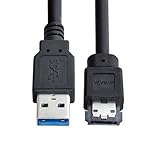
- USB 3.0 to Power Over eSATA DC5V Adapter USB2.0 to HDD/SSD/ODD eSATAp Converter
- This 1m USB 3.0 to eSATA / Power eSATA adapter lets you connect any external eSATA hard drive (HDD), solid state drive (SSD), or optical disc drive (ODD) through the USB 3.0 port on your laptop or desktop.
- Provide DC 5V power for power eSATA port. (not power for eSATA port)
- Easily connect your USB-enabled computer or laptop, such as your Dell OptiPlex or MacBook to a SATA drive using this eSATA HDD cable.
- For fast access to external storage, this USB to eSATA converter cable supports transfer rates up to 5Gbps using USB 3.0.
Historical testing demonstrates why a single ranking is unreliable. A Computerworld comparison using similar 7,200-rpm external hard drives recorded approximately 90MB/s USB 3.0 read versus 75MB/s eSATA read, while eSATA produced approximately 75MB/s write versus 62MB/s USB 3.0 write in that particular setup. The comparison used different external drive models, an older Windows 7 system, and an add-in USB 3.0 card, so the results demonstrate variability rather than a current universal speed ranking. See the Computerworld USB 3.0 versus eSATA test for the test context.
AnandTech’s testing of a USB 3.0/eSATA multi-drive enclosure likewise found that USB 3.0 with UASP was superior for some sequential and large-transfer workloads, while eSATA won in several application-style workloads involving smaller or more varied transfers. Those historical results are best treated as evidence that the enclosure, controller, and workload matter; they are not guaranteed results for current hardware. The AnandTech enclosure testing provides the workload-specific comparison.
Why does the same drive perform differently over USB 3.0 and eSATA?
The meaningful storage path is:
host controller → cable → external connector → bridge chip → drive interface → drive media or flash
The slowest or least capable component in that path determines the result. These are the main variables.
1. Is the drive an HDD or an SSD?
A mechanical hard drive often limits throughput before USB 3.0 or eSATA reaches its interface ceiling. Platter speed, head movement, areal density, cache behavior, and the location of data on the disk can matter more than whether the disk uses a 5Gbps USB connection or a 6Gb/s eSATA connection.
Outdated Drivers Are Slowing You Down
One free scan finds every outdated or missing driver and matches the right update for your exact hardware.Free scan · exact hardware matchWindows Errors? Fix Them Before They Spread
Repair common Windows errors and clear accumulated junk for a smoother, more stable PC - no reinstall needed.Free scan · no reinstallA SATA SSD can expose the interface difference more clearly because flash storage can deliver data faster than many HDDs. A SATA SSD connected through eSATA 3Gb/s remains limited to roughly the SATA 3Gb/s performance class, even if the SSD itself is capable of more. A SATA SSD in a USB 3.0 enclosure can also be limited by the USB bridge, its firmware, or the quality of UASP support.
2. Does the USB enclosure support UASP?
UASP means USB Attached SCSI Protocol. UASP improves command queuing and concurrent I/O behavior compared with the older USB mass-storage transport. UASP support can make a substantial difference with SSDs and with workloads involving multiple outstanding commands.
UASP must be supported across the host controller, operating system, USB-to-SATA bridge, and enclosure firmware. A UASP-capable enclosure connected to a host that falls back to the older transport will not receive the full benefit. Look for explicit UASP support in the enclosure specification, then verify that the operating system recognizes the device as using UASP.
PC Perspective reported that USB 3.0 performance increased substantially when UASP was enabled on a SATA SSD enclosure, with results approaching practical SATA-class SSD limits in some configurations. The PC Perspective UASP testing is historical and platform-specific, so it should not be read as a guaranteed speed for every USB 3.0 enclosure.
3. What does the enclosure bridge support?
A USB enclosure translates between USB and SATA. An older or inexpensive bridge may support only SATA 3Gb/s internally even when the installed SSD supports SATA 6Gb/s. Bridge firmware can also affect command handling, TRIM and SMART pass-through, power management, compatibility, and sustained performance.
Also popular on Amazon

- The USB 3.0 to power eSATA cable ,One end of it is connected to the USB3.0 port on a laptop or desktop computer, and the other end is connected to any external eSATA hard disk drive (HDD) solid state drive (SSD) or optical disk drive (ODD) for high-speed data transmission.
- This USB to eSATA cable has a built-in conversion chip, and the eSATA end has a 5V power supply output. If your hard disk is a power eSATA port, you do not need to supply power again. If your hard disk is a SATA port, you need to supply additional power.
- For fast access to external storage, this USB to eSATA converter cable supports USB3.0 transfer rates up to 5Gbps.
- Plug and play, no need to install driver, compact and simple design, easy to carry.
- The USB end is connected to the computer, and the power eSATA end is connected to the hard disk. Reverse connection is not allowed. The USB terminal must be connected to the computer and compatible with any system as long as the computer has a USB interface.
A native eSATA enclosure can still contain electronics and may still be limited by its SATA generation. “eSATA” on the box is not enough information; verify whether the enclosure supports SATA 3Gb/s or SATA 6Gb/s.
4. Is the host controller sharing bandwidth?
A USB 3.0 port connected through a congested or weak controller can underperform. Multiple devices sharing a USB controller or hub divide available bandwidth and add contention. An add-in PCIe USB card can behave differently from a chipset-integrated motherboard port.
eSATA results can also change with a port multiplier. One eSATA connection serving several drives through a port multiplier shares the link and does not behave like a direct one-drive connection. Multi-drive USB enclosures share USB bandwidth too, but their bridge and UASP implementations can produce different queueing behavior.
5. Are the cable and connection suitable?
A USB cable must support SuperSpeed operation. A USB 2.0 cable, damaged cable, marginal connector, or USB 2.0 hub can silently reduce a USB 3.0 enclosure to USB 2.0 behavior. An eSATA setup requires an appropriate shielded eSATA cable; ordinary internal SATA cabling should not automatically be treated as equivalent to an external eSATA cable.
SATA-IO’s eSATA overview describes the external cable and connector requirements and the approximately 2-meter cable guidance. Excessive length, poor shielding, or a damaged connector can cause link negotiation failures, instability, or unexpected fallback behavior.
6. What kind of files are being transferred?
Large sequential reads and writes are the best tests of interface bandwidth. Copying one large video file can produce a different result from opening thousands of small documents, launching applications, or running a database workload.
Small random transfers depend more on latency, queue depth, and input/output operations per second than on the headline gigabit number. A direct SATA path may help in some application-style workloads, but UASP can reduce the USB disadvantage and may produce the better result on a particular enclosure.
Recommended Free Tools
How does USB 3.0 compare with eSATA 3Gb/s?
USB 3.0 has the higher headline rate in this comparison: 5Gbps versus eSATA’s 3Gb/s. A SATA SSD connected through eSATA 3Gb/s is constrained by the older SATA interface class, regardless of the SSD’s higher native capability.
However, it is incorrect to conclude that USB 3.0 is always faster. USB protocol and bridge overhead can reduce the benefit suggested by the 5Gbps label. A well-implemented USB 3.0 enclosure with UASP can be competitive, while a weak USB controller, poor cable, or non-UASP bridge can lose to a stable eSATA connection.
| Comparison | Theoretical advantage | What can happen in practice |
|---|---|---|
| USB 3.0 versus eSATA 3Gb/s with an HDD | USB 3.0 has the higher link rate | The HDD may limit both connections, making the difference small |
| USB 3.0 versus eSATA 3Gb/s with a SATA SSD | USB 3.0 has more nominal interface headroom | UASP, bridge quality, and host-controller behavior can reverse or narrow the result |
| USB 3.0 without UASP versus good eSATA 3Gb/s | USB 3.0 has the higher nominal rate | eSATA may win some workloads because the USB storage path is poorly implemented |
How does USB 3.0 compare with eSATA 6Gb/s?
eSATA 6Gb/s is the stronger theoretical storage connection. The 6Gb/s SATA link has a higher nominal ceiling than USB 3.0’s 5Gbps link, and native eSATA avoids the typical USB-to-SATA bridge layer.
Also popular on Amazon
- Provide DC 5V power for power eSATA port. (not power for eSATA port)
- Can connect any external eSATA hard drive (HDD), solid state drive (SSD), or optical disc drive (ODD) through the USB 3.0 port on your laptop or desktop.
- USB 3.0 to Power Over eSATA DC5V Adapter USB2.0 to HDD/SSD/ODD eSATAp Converter
- Easily connect your USB-enabled computer or laptop, to a SATA drive using this eSATA HDD cable.
- For fast access to external storage, this USB to eSATA converter cable supports transfer rates up to 5Gbps using USB 3.0.
With a SATA SSD, eSATA 6Gb/s usually has the best chance of delivering the drive’s full SATA-class performance. With a mechanical HDD, the SSD-specific advantage usually disappears because the disk cannot sustain enough throughput to fill either interface.
Quick wins for a faster PC:
Fix the driver behind crashes, sound loss and screen glitchesFind Drivers →Clear out junk files and repair common Windows errorsFree Scan →Scan for outdated or missing drivers - takes under a minuteDriver Scan →USB 3.0 with UASP can narrow the gap and may win a particular large-file test. An eSATA port limited to 3Gb/s, an enclosure with an older controller, or a poor cable can also eliminate eSATA’s theoretical advantage. Confirm the host port and enclosure generation before choosing based on “eSATA.”
Which interface is more convenient?
USB 3.0 is generally more convenient even when eSATA has the higher storage bandwidth. USB ports are far more common, USB supports hubs and many peripheral types, and USB can provide bus power for many portable devices. USB power is subject to the port, cable, device, and power limits; a 3.5-inch hard drive, multi-drive array, or high-power enclosure commonly still needs an external adapter.
Standard eSATA is generally data-only, so an eSATA enclosure usually requires separate power. eSATA was designed to support hot plugging, but safe unplugging depends on the host controller, operating system, enclosure electronics, and write-caching state. Use the operating system’s safe-eject function rather than assuming every eSATA system handles removal identically.
| Consideration | USB 3.0 | eSATA |
|---|---|---|
| Typical role | General-purpose peripheral and storage bus | External storage interface |
| Power | Can power many portable drives, subject to limits | Standard eSATA generally carries data only |
| Compatibility | Broad availability across computers and accessories | Uncommon on current computers; useful with compatible legacy hardware |
| Hubs and peripherals | Supports hubs and many device types | Not a general-purpose peripheral bus |
| Potential storage path | Usually includes a USB-to-SATA bridge | Can provide a native external SATA path |
| Port generation risk | USB 3.0 can silently fall back to USB 2.0 | eSATA can be limited to SATA 3Gb/s despite the connector |
Which interface should you use for each storage scenario?
| Use case | Recommended choice | Reason |
|---|---|---|
| External HDD backup | Whichever port is available and stable | The HDD commonly limits throughput before either interface does |
| SATA SSD with genuine 6Gb/s eSATA | eSATA | Higher interface ceiling and a direct SATA-oriented path |
| Portable 2.5-inch drive | USB 3.0 | Bus power and broad computer compatibility are usually more valuable |
| Multi-drive enclosure | Benchmark the complete enclosure | Port multipliers, shared bandwidth, bridge behavior, and queueing matter |
| Large sequential media files | Either, with a UASP USB enclosure preferred if using USB | USB 3.0 UASP can be highly competitive in large transfers |
| Small-file or application workloads | Often eSATA, but not guaranteed | Direct SATA behavior may help, while UASP and bridge quality can change the result |
| Older computer with eSATA but no USB 3.0 | eSATA | It avoids falling back to USB 2.0 |
| Buying new high-performance SSD equipment | Consider USB 10Gbps, USB 20Gbps, USB4, Thunderbolt, or internal NVMe | Older USB 3.0 and eSATA provide limited headroom for modern SSD workflows |
What should you buy for a USB 3.0 or eSATA setup?
For a USB computer and a reused SATA drive, a USB 3.0 SATA enclosure with UASP is usually the most practical accessory. Verify explicit UASP support, SATA 6Gb/s support inside the enclosure, the supported drive size, power requirements, thermal design, and documented TRIM and SMART pass-through. A 2.5-inch portable drive may be bus-powered, while a 3.5-inch drive generally needs external power.
Free tools Windows power users keep installed
One-click scans. No signup required.
For an existing eSATA-only enclosure and a computer with USB 3.0 but no eSATA, a USB 3.0-to-eSATA adapter can bridge the compatibility gap. The adapter does not turn USB 3.0 into native SATA; the adapter adds a USB-to-SATA bridge, so performance depends on the adapter chipset, UASP support, drivers, and enclosure.
A dual-interface USB 3.0/eSATA dock or enclosure is useful when the same drives must move between computers with different ports. Check whether the eSATA side supports 3Gb/s or 6Gb/s, whether the USB side supports UASP, whether the dock accepts 2.5-inch and 3.5-inch drives, and whether the dock requires external power.
For a new high-performance SSD workflow, USB 10Gbps offers more headroom than USB 3.0 when the computer supports it. USB4 or Thunderbolt can be more appropriate for high-performance NVMe storage, while an internal SATA or NVMe connection avoids the external bridge and cable. Network-attached storage is a different choice for multi-computer access because the network becomes the relevant bottleneck.
As one example of the specifications to look for, the StarTech S251SMU33EP datasheet documents USB 3.0, eSATA, SATA 6Gb/s, and UASP support. The datasheet confirms product capabilities, not current retail price, stock, regional availability, or performance in every computer.
How can you test USB 3.0 versus eSATA on your own computer?
The most useful comparison uses the same drive, host, workload, and software while changing only the connection. Follow these steps.
Also popular on Amazon

- The cable only work for USB3.0 Host to ESATA/ESATAp disk. Not work for ESATA/ESATAp Host to usb3.0 device.
- This 1m USB 3.0 to eSATA / Power eSATA adapter lets you connect any external eSATA hard drive (HDD), solid state drive (SSD), or optical disc drive (ODD) through the USB 3.0 port on your laptop or desktop.
- Provide DC 5V power for power eSATA port. (not power for eSATA port)
- Easily connect your USB-enabled computer or laptop, such as your OptiPlex or Mac to a SATA drive using this eSATA HDD cable.
- For fast access to external storage, this USB to eSATA converter cable supports transfer rates up to 5Gbps using USB 3.0.
- Confirm the host port. Check the computer manual, manufacturer specification, operating-system device information, or controller utility. Do not infer USB 3.0 from a USB-A or USB-C connector shape, and do not infer SATA 6Gb/s from an eSATA connector alone.
- Confirm the enclosure or adapter. Record whether the USB bridge supports UASP and whether the eSATA path supports SATA 3Gb/s or SATA 6Gb/s. Also record whether the enclosure uses a port multiplier.
- Check the negotiated USB mode. Verify that the device is operating at SuperSpeed rather than USB 2.0 and that UASP is active where supported. A USB 3.0 enclosure can silently operate at USB 2.0 because of a cable, hub, port, connector, firmware, power, or driver problem.
- Use the same drive. If possible, test one drive through both interfaces. Different drive models make it impossible to attribute the result confidently to USB or eSATA.
- Keep the software conditions consistent. Use the same operating system, filesystem, test application, file sizes, power mode, and free-space condition. Do not compare a freshly formatted SSD with a nearly full SSD.
- Test sequential reads and writes. Use a large test file or a storage benchmark with a sufficiently large test set. Repeat both directions because read and write results can differ.
- Test a mixed workload. Include smaller files or random I/O if the drive will hold applications, project files, or many documents. A large sequential copy alone does not predict every workload.
- Measure sustained performance. A short burst may use the drive’s cache and report a high temporary rate. A longer transfer can reveal thermal throttling, cache exhaustion, or power-management behavior.
- Repeat the test. Run multiple passes and note whether the drive is warm, whether the source drive is slower, and whether other devices are sharing the controller or hub.
- Eject safely. Use the operating system’s safe-removal command before disconnecting either interface, especially when write caching is enabled.
A useful test record includes the host controller, exact port, cable, enclosure or adapter model, bridge capability, UASP status, drive model, filesystem, test size, read/write direction, and sustained result. Without those details, a benchmark number is difficult to reproduce or generalize.
What are the most common USB 3.0 and eSATA failure modes?
USB 3.0 is running at USB 2.0 speed
Check for a USB 2.0 cable or hub, a damaged cable, a USB 2.0 port, poor connector contact, bridge firmware problems, unstable power, or outdated controller drivers. Confirm the negotiated link mode in the operating system instead of relying on the enclosure’s label.
eSATA is slower than expected
Verify that both the computer’s controller and the enclosure support SATA 6Gb/s. An eSATA connector may implement only SATA 3Gb/s. Also check the cable, the enclosure bridge, any port multiplier, and whether the drive is an HDD that cannot approach the interface limit.
The same SSD produces inconsistent results
Compare the same SSD in the same computer, keep the filesystem and test files consistent, check UASP status, allow the device to reach a consistent thermal state, and use a long enough test to expose sustained performance. SSD cache behavior can make an initial burst look faster than a long transfer.
Hot-plug removal causes problems
Although eSATA was designed with hot-plugging in mind, actual behavior depends on the host controller, operating system, enclosure electronics, and write-caching state. Safely eject the drive before removing the cable. Do not treat a standard’s hot-plug capability as a guarantee that every implementation is safe to unplug at any moment.
Should you choose USB 3.0 or eSATA when buying in 2026?
For existing hardware, choose the faster stable path that matches the drive and enclosure. Use native eSATA when the host and enclosure both support SATA 6Gb/s and maximum SATA SSD throughput matters. Use USB 3.0 when portability, bus power, broad compatibility, hubs, or easy replacement matters more than a possible sequential-transfer advantage.
For a new purchase, eSATA is best viewed as a legacy or specialist interface. eSATA remains useful for compatible existing computers and storage enclosures, but current computers commonly offer faster USB 10Gbps, USB 20Gbps, USB4, Thunderbolt, internal NVMe, or network-storage options. A new buyer seeking high-performance SSD storage should compare those newer interfaces rather than assuming that an eSATA enclosure is the best long-term choice.
Frequently Asked Questions
Is eSATA faster than USB 3.0 for an external hard drive?
eSATA is not universally faster than USB 3.0 for an external hard drive. A native SATA 6Gb/s eSATA connection has the higher nominal bandwidth, but a mechanical hard drive often limits both interfaces, making real-world performance similar; a good USB 3.0 enclosure with UASP can also win particular workloads.
Is USB 3.0 the same as USB 5Gbps?
The original USB 3.0 speed class is commonly described by USB-IF as USB 5Gbps within the USB 3.2 naming family. Product listings may still use “USB 3.0” or “SuperSpeed USB,” but the 5Gbps label identifies the relevant nominal speed class.
Does eSATA provide power to an external hard drive?
Standard eSATA generally provides data only, so an eSATA external hard drive or enclosure normally needs separate power. A special eSATAp connector combines eSATA data with power, but eSATAp is not universally compatible with ordinary eSATA ports.
Does UASP make USB 3.0 faster than eSATA?
UASP can substantially improve USB 3.0 storage performance by improving command queuing and concurrent I/O, but UASP does not guarantee that USB 3.0 will beat eSATA. The result still depends on the host controller, bridge, enclosure, drive, cable, and workload.
Should you buy eSATA or USB 3.0 for a new external SSD?
USB 3.0 is usually the more practical choice because it is widely compatible and supports many portable enclosures, but neither old interface is ideal for a new high-performance SSD purchase when USB 10Gbps, USB4, Thunderbolt, or internal NVMe is available. Choose native 6Gb/s eSATA mainly when compatible existing hardware makes its storage performance useful.
The Bottom Line
Bottom line: choose native SATA 6Gb/s eSATA for the highest likely performance from a SATA SSD when the computer and enclosure both support it. Choose USB 3.0 with UASP for portability, power, compatibility, and everyday external HDD use. If the drive is mechanical, the interface difference may be negligible; if the drive is an SSD, verify the port generation, bridge, UASP status, and sustained workload before deciding.

