
Do these 3 things before closing this tab:
1Scan for outdated or missing drivers - takes under a minute2Clear out junk files and repair common Windows errors3Fix the driver behind crashes, sound loss and screen glitchesContact the clinic that follows your implant and report the interruption. A lost app or monitor connection means the clinic may not be receiving transmissions; by itself, it does not show that the implant has stopped working. If you have severe or urgent symptoms, seek medical help rather than waiting for connectivity to return.
What to do first
- Check for symptoms before troubleshooting. If you feel seriously unwell or have symptoms your care team has told you are urgent, follow your emergency plan and contact local emergency services. Do not wait for a remote transmission or a reply from the monitoring platform.
- Record what happened. Note when the connection stopped, the exact message or error code shown, and whether the clinic has sent a missed-transmission notice. Keep the monitor or app available so you can report its details accurately.
- Contact your implant clinic. Tell the team that transmissions have stopped. Ask whether to retry a transmission, keep to the prescribed schedule, use another monitor already provided to you, or arrange another kind of follow-up. Ask how long to try approved troubleshooting before contacting them again. The appropriate timing depends on your device and care plan.
- Use only instructions for your exact monitoring system. Follow the monitor manual or directions from your clinic or device manufacturer. Do not reset, reprogram, or disconnect the implant, install software, disable wireless functions, or connect unapproved equipment based on generic online advice.
- Escalate unresolved monitor errors. If the clinic recommends it, contact the device maker using the support details in the monitor materials for your country. Have the model, error message, and time of the interruption ready.
Does lost connectivity mean the implant has failed?
Not necessarily. Remote monitoring is a communication path from the implanted device, through a prescribed monitor or app and its connection, to the clinic. A failure along that path can prevent or delay transmission without establishing that the implant itself has failed. However, the clinic may lose access to information it expects to receive, so report missed transmissions and let the treating team decide whether another transmission or an in-person check is needed.
The device type matters. The patient troubleshooting information cited here is primarily about implanted heart devices and their external monitors. The technical steps for those systems should not be assumed to apply to glucose-related systems, neurostimulators, or other implants.
How to troubleshoot without making the problem worse
Start with the displayed message
Write down the full error text or code and check the instructions for that specific monitor. A message can point to a monitor, connection, or service issue, but it is not a diagnosis of the implant. If you cannot tell which instructions match your model, ask the clinic or manufacturer before changing settings.
Windows Errors? Fix Them Before They Spread
Repair common Windows errors and clear accumulated junk for a smoother, more stable PC - no reinstall needed.Free scan · no reinstallOutdated Drivers Are Slowing You Down
One free scan finds every outdated or missing driver and matches the right update for your exact hardware.Free scan · exact hardware match#1 Best Overall

- ❤️ 𝐌𝐞𝐝𝐢𝐜𝐚𝐥 𝐀𝐥𝐞𝐫𝐭 𝐏𝐞𝐧𝐝𝐚𝐧𝐭 𝐰𝐢𝐭𝐡 𝐅𝐚𝐥𝐥 𝐃𝐞𝐭𝐞𝐜𝐭𝐢𝐨𝐧: Designed for seniors and individuals with medical conditions, this wearable alert device automatically detects falls and immediately call and send SOS notification to preselected emergency contacts.
- ✅ 𝐄𝐚𝐬𝐲 𝐀𝐜𝐭𝐢𝐯𝐚𝐭𝐢𝐨𝐧 | 𝐌𝐨𝐧𝐭𝐡𝐥𝐲 𝐬𝐮𝐛𝐬𝐜𝐫𝐢𝐩𝐭𝐢𝐨𝐧 𝐫𝐞𝐪𝐮𝐢𝐫𝐞𝐝: $20 per month. Unlimited Fall Alerts, Unlimited Live Tracking, Assistive Speakerphone with Unlimited Voice Mins every month, Intelligent Alerts, Premium Safety Features, Unlimited Live 7 Days a week Customer Care, & more.
- 📞 𝐒𝐎𝐒 𝐁𝐮𝐭𝐭𝐨𝐧 𝐰𝐢𝐭𝐡 𝟐-𝐖𝐚𝐲 𝐂𝐚𝐥𝐥𝐢𝐧𝐠: One-touch emergency communication makes a cellular call just like a cellphone. Also receives calls easily with hands-free auto-answer feature for convenience and reliability. This personal emergency alert device allows direct, hands-free voice calls with caregivers or emergency contacts.
- 📍 𝐑𝐞𝐚𝐥-𝐓𝐢𝐦𝐞 𝐆𝐏𝐒 𝐓𝐫𝐚𝐜𝐤𝐢𝐧𝐠 & 𝐆𝐞𝐨𝐟𝐞𝐧𝐜𝐞 𝐙𝐨𝐧𝐞𝐬: Always know your loved one's location. Set custom safe zones with this medical alert system GPS and receive alerts when they enter or leave designated areas. 1 Year location history available
- 🧓 𝐄𝐚𝐬𝐲-𝐭𝐨-𝐔𝐬𝐞, 𝐒𝐞𝐧𝐢𝐨𝐫-𝐅𝐫𝐢𝐞𝐧𝐝𝐥𝐲 𝐃𝐞𝐬𝐢𝐠𝐧: Built for simplicity, the pendant features a clear display showing time, battery, and signal. Large SOS button and intuitive interface make it ideal for elderly users.
Use product-specific steps only
For certain Medtronic MyCareLink cellular monitor signal problems, Medtronic advises trying a location near a window or outside wall and changing the monitor’s orientation. Its troubleshooting information also notes that some errors may involve inactive cellular service. These directions are for the relevant MyCareLink products, not a general fix for other manufacturers or implant categories. If the signal remains inadequate, follow the manufacturer’s support directions.
Do not buy a substitute accessory on guesswork
Monitors and connectivity accessories are tied to particular systems. Medtronic describes a free USB cellular stick for certain MyCareLink models as part of a monitor upgrade program; it is not a universal implant accessory. Confirm compatibility and the replacement process with your clinic or manufacturer before buying a monitor, router, cellular device, power supply, or other equipment.
Rank #2

- NO MONTHLY FEES OR CONTRACTS – No subscriptions, monitoring fees, activation fees, or long-term contracts. 911 Help Now gives you a simple way to reach emergency services without the recurring monthly cost of a traditional monitored medical alert system.
- CALLS 911 DIRECTLY — NO MONITORING CENTER – Press and hold the SOS button for 3 seconds to place a call directly to 911. There is no third-party monitoring center or operator required to relay your emergency call.
- BUILT-IN MICROPHONE & SPEAKER – Speak directly with a 911 dispatcher through the built-in microphone and speaker after the call connects, allowing you to explain the emergency and communicate with the dispatcher without needing a separate phone.
- HELPS PREVENT ACCIDENTAL CALLS – The included protective safety cover combined with the 3-second press-and-hold SOS design helps reduce accidental activations while carrying the device in a pocket, purse, or bag.
- 4G CELLULAR & READY TO GO – Uses built-in 4G cellular connectivity and works throughout the United States wherever compatible cellular service is available. Includes 3 AAA batteries, protective cover, removable neck lanyard, and belt/clothing clip for convenient everyday carry.
Choosing among monitoring options with your clinic
If your clinic offers more than one approved monitoring method, use these questions to compare them before changing systems:
- Is it compatible with your exact implant and the clinic’s monitoring platform?
- Does it use Wi-Fi, cellular service, a manufacturer-provided communicator, or another connection method, and can you reliably use that method?
- How will the clinic confirm that a test transmission arrived, and what should you do if a scheduled transmission is missed?
- What manufacturer support and replacement process are available where you live?
- Does the option require a compatible phone, a dependable home network, or other equipment you may not have?
Medtronic describes multiple monitor and app-based options and advises patients to work with their doctor or clinic to identify an appropriate option. Treat any comparison as a care-team discussion, not a reason to purchase or switch equipment independently.
Rank #3
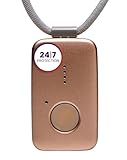
- Small Device, Big Backup: MGMini is a discreet medical alert necklace that supports your independence at home and on the go. Wear the device your way with the included lanyards or belt clip, for steady protection that fits your lifestyle. Hourly location updates and step counting features are available to view on our online portal or app.
- Press. Speak. Get Help: Press the emergency button to connect with Medical Guardian’s 24/7 monitoring team through the device’s two-way speaker. One of our trained, U.S. based operators will contact EMS, family, or friends to get you the exact type of help you need.
- Activate Before First Use: 24/7 emergency monitoring services must be activated online or by phone prior to device use. For a limited time, get 1 free month of 24/7 monitoring. After trial, service is $43.95/month. Cancel anytime. During activation, consider extra protection with our optional fall detection add-on for an additional $10/month.
- A Trusted Name in Care: Founded on one man's mission to protect his grandmother and trusted by over 630,000 members, Medical Guardian supports older adults and their care partners with connected safety solutions designed for independence and peace of mind.
- Industry-Leading Battery Life: Enjoy 3 days of protection on a single charge, plus a fast 4-hour recharge. Battery life may vary based on network connection and cellular signal strength. Note: only one device can be active per member at a time.
Is a connectivity error a sign of hacking?
A lost connection alone does not establish that a device has been hacked. The FDA’s general consumer guidance, “Medical Device Cybersecurity: What You Need to Know,” advises connecting a medical device to other devices or software only when the manufacturer or healthcare provider says it is appropriate. Do not install patches, apps, or other software, or change wireless settings, unless directed for your system.
The FDA safety communication updated July 2, 2025, about cybersecurity vulnerabilities in certain Contec and Epsimed patient monitors concerns those specific monitors. It is not a general notice that routine connection problems with all implants indicate a cybersecurity incident.
Quick Recap
Best Value

- TRUSTED ADT MONITORING CALL TO ACTIVATE: Backed by over 150 years of ADT monitoring experience. Simple phone activation required. Monthly monitoring plan needed for use, with flexible options and no long-term contracts
- ALL-IN-ONE MEDICAL ALERT SYSTEM NO PENDANTS REQUIRED: One simple mobile medical alert device with everything built in. No wristbands, neck pendants, or external accessories to wear, charge, or replace-making daily protection easier and more comfortable
- OPTIONAL AUTOMATIC FALL DETECTION: Add integrated automatic fall detection during activation for an additional monthly cost. Alerts monitoring if a fall is detected, even if you can't press the help button. Fall detection does not detect 100% of falls
- ONE-BUTTON EMERGENCY HELP WITH 24/7 MONITORING: Press the SOS button to instantly connect with ADT's U.S.-based professional monitoring agents, available 24/7 to assess emergencies and coordinate fast response when help is needed
- GPS MEDICAL ALERT FOR HOME & ON-THE-GO SAFETY: Built-in GPS and nationwide cellular service provide reliable protection at home or on the go, helping seniors stay independent while giving families peace of mind wherever life happens
Rank #4

- Monitoring Subscription Required and 24/7 Live Monitoring: Activation after purchase, an active monitoring subscription and cellular coverage are required. Once activated, press and hold SOS for approximately 3–5 seconds to connect with a live monitoring professional.
- SOS, Two-Way Voice and Emergency Contacts: Speak directly with a monitoring professional through the necklace’s built-in speaker and microphone without a nearby smartphone. If the wearer cannot respond, established procedures may include attempting the customer’s phone, contacting designated emergency contacts in their selected order and requesting local emergency services when appropriate.
- Automatic Fall Detection and GPS Location: If a possible fall is detected and not canceled, an alert and device location are sent to the monitoring center even without an SOS button press. Fall detection is available with a qualifying monitoring plan and may not detect every fall. Location availability and accuracy vary by coverage, signal, surroundings and indoor use.
- Optional Med Alert Pro App: View device location, battery percentage and GPS accuracy; receive SOS and fall alarm notifications; and use Find Me and Refresh Location. The app is not required for monitoring. Each device registers to one app account, authorized users share the same login and one account can monitor up to three compatible devices.
- Rechargeable Everyday-Wear Design: Features an adjustable woven lanyard, magnetic charging, built-in cellular connectivity, water-resistant construction and spoken time from the green microphone button. Water resistant, not waterproof; do not submerge. Includes the necklace, magnetic charging cable, USB adapter, user manual and activation card.
Product prices and availability are accurate as of the date/time indicated and are subject to change. Any price and availability information displayed on Amazon at the time of purchase will apply.

