
What’s actually slowing this PC down?
Pick the symptom - the matching free tool is one click away.
iTechGuides is reader-supported. When you buy through links on our site, we may earn an affiliate commission. As an Amazon Associate I earn from qualifying purchases. Learn more
The TP-Link Archer AX12 review verdict is conditional: the AX12 remains a sensible low-cost Wi-Fi 6 router for a small home or apartment with broadband up to 1 Gbps, but it is not a 1.5 Gbps real-world router, a multi-gigabit upgrade, or a future-proof mesh platform. In 2026, regional support and hardware revision matter as much as price.
TP-Link’s Archer AX12 is an entry-level dual-band router with an AX1500 rating, gigabit Ethernet, four external antennas, and Wi-Fi 6 efficiency features. The hardware can still cover ordinary browsing, streaming, video calls, and smart-home use, but the purchase only makes strong sense when the AX12 is substantially cheaper than newer AX3000-class or entry-level Wi-Fi 7 alternatives.
Key takeaways
- The Archer AX12 is an AX1500 dual-band Wi-Fi 6 router rated for up to 1,201 Mbps on 5 GHz and 300 Mbps on 2.4 GHz under theoretical link-rate conditions.
- Gigabit Ethernet makes the AX12 potentially suitable for a broadband plan up to 1 Gbps, but wireless clients are not guaranteed to reach 1 Gbps.
- The AX12 is best suited to a small apartment, modest home, or ordinary household workload rather than a large house, multi-gigabit service, or heavily loaded network.
- EasyMesh Ethernet backhaul and access-point mesh are documented in at least one 2026 regional firmware release, but features vary by country, hardware revision, and firmware.
- TP-Link regional support pages still show AX12 firmware in 2026, while TP-Link’s 2026 end-of-life document appears to include the model in at least some markets or revisions.
- Buy the AX12 only when the local version is supported and meaningfully cheaper than newer Wi-Fi 6 hardware; skip it when the price is close to a newer AX3000 or Wi-Fi 7 router.
TP-Link Archer AX12 Review: what is the verdict?
The Archer AX12 is a competent budget router, but it is not an especially compelling 2026 upgrade unless the price is low. The AX12 gives a small household basic Wi-Fi 6 features and gigabit wired networking without moving into the higher-capacity AX3000, Wi-Fi 6E, or Wi-Fi 7 classes.
Outdated Drivers Are Slowing You Down
One free scan finds every outdated or missing driver and matches the right update for your exact hardware.Free scan · exact hardware matchPC Slower Than It Used to Be?
A free scan shows the junk files, broken settings and background clutter dragging Windows down - then fixes them in one click.Free scan · Windows 10 & 11| Buyer situation | Verdict | Why |
|---|---|---|
| Small apartment or modest home | Consider buying | The AX12’s dual-band Wi-Fi 6 feature set and gigabit ports are appropriate for ordinary use. |
| Broadband up to 1 Gbps | Potentially suitable | A wired client can make the best use of a gigabit connection, while Wi-Fi results depend on distance, client hardware, and interference. |
| Large or multi-story home | Usually skip | One entry-level router is unlikely to provide consistent whole-home coverage; a properly matched access point or mesh system is more suitable. |
| Broadband faster than 1 Gbps | Skip | The AX12 is a gigabit-class router rather than a multi-gigabit router. |
| Need for long-term support | Use caution | Regional firmware is still available in some markets, but current end-of-life documentation complicates the support outlook. |
| Price close to newer AX3000 or Wi-Fi 7 hardware | Skip | Newer hardware offers a stronger performance and longevity case for a small price difference. |
The most important qualification is regional. The AX12 name covers different hardware and firmware branches, so a unit bought in one country should not automatically be treated as equivalent to a locally sold unit.
Popular on Amazon
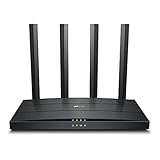
- Wi-Fi 6 Technology: Archer AX12 comes equipped with the latest wireless technology, Wi-Fi 6, for faster speeds, greater capacity and reduced network congestion
- Next-Gen 1.5 Gbps Speeds: Archer AX12 dual-band router reaches even faster speeds up to 1.5 Gbps (1201 Mbps on 5 GHz band and 300 Mbps on 2.4 GHz band)
- Connect More Devices: Wi-Fi 6 technology communicates more data to more devices using revolutionary OFDMA and MU-MIMO technology while simultaneously reducing lag
- More Reliable Coverage: Achieve the strongest, most reliable WiFi coverage with Archer AX12 as it focuses signal strength to your devices using Beamforming technology and four antennas
- Increased Battery Life: Target Wake Time technology reduces your devices' power consumption to extend their battery life
What are the Archer AX12 specifications?
The Archer AX12 is a dual-band Wi-Fi 6 router in the AX1500 class. According to TP-Link’s Archer AX12 product information, the router is rated for up to 1,201 Mbps on 5 GHz and 300 Mbps on 2.4 GHz. Those figures are combined theoretical physical-layer rates, not a promise that one device can download at 1.5 Gbps.
| Specification | Archer AX12 | What it means in practice |
|---|---|---|
| Wi-Fi generation | Wi-Fi 6 | Newer compatible clients can use Wi-Fi 6 features; older Wi-Fi devices remain usable but do not gain every Wi-Fi 6 benefit. |
| Wi-Fi class | AX1500 | The class combines the maximum advertised rates of both wireless bands. |
| 5 GHz rate | Up to 1,201 Mbps | Requires suitable client hardware and favorable radio conditions; application throughput is lower. |
| 2.4 GHz rate | Up to 300 Mbps | Usually offers better reach through obstacles but more interference and lower peak speed. |
| Antennas | Four external antennas | Antenna count alone does not establish a coverage radius. |
| Wired networking | Gigabit-class WAN and LAN connectivity | Appropriate for ordinary gigabit networking, but not designed as a multi-gigabit router. |
| Management | TP-Link Tether app and web interface | Users can configure the router through the app or through the documented web interface. |
| Mesh | EasyMesh on at least some later regional firmware | Compatibility, Ethernet backhaul, and access-point mode must be checked for the exact region and revision. |
The US Archer AX12 datasheet describes full gigabit ports and positions the router for broadband speeds up to 1 Gbps. Verify the port arrangement and firmware features for the country where the router will be purchased, because regional versions can differ.
Does AX1500 mean 1.5 Gbps real-world speed?
No. AX1500 is the combined maximum link-rate class of the Archer AX12’s two bands, not a single-client download guarantee. A compatible Wi-Fi 6 device may show a high negotiated link rate near the router, but protocol overhead, channel conditions, client limitations, distance, and competing traffic reduce application throughput.
Recommended Free Tools
The 5 GHz and 2.4 GHz rates also do not add together for one ordinary client. A device normally uses one band at a time, and the router’s internet result is additionally limited by the wired WAN connection and the speed of the broadband service.
| Measurement | What can reasonably be concluded | What cannot be promised |
|---|---|---|
| Advertised 5 GHz rate | The maximum stated 5 GHz physical link rate is 1,201 Mbps. | A 1,201 Mbps application download in a normal room. |
| Advertised 2.4 GHz rate | The maximum stated 2.4 GHz physical link rate is 300 Mbps. | 300 Mbps at long range or in a congested neighborhood. |
| Gigabit Ethernet | A wired client has the most credible path to approaching a 1 Gbps internet plan. | Multiple wireless clients each receiving gigabit throughput. |
| Wi-Fi 6 features | Compatible devices may share airtime more efficiently. | A fixed maximum device count or guaranteed lower latency. |
No independent throughput measurements are available in the supplied research, so this review does not invent 5 GHz, 2.4 GHz, latency, or multi-client benchmark figures. A hands-on review should identify the test client, firmware, channel width, distance, ISP speed, and number of repetitions before presenting measured results.
Is the Archer AX12 suitable for gigabit internet?
The Archer AX12 is potentially suitable for a broadband plan up to 1 Gbps when a wired gigabit client is used, but wireless gigabit performance should be treated as possible only under favorable conditions rather than guaranteed.
- Wired gigabit: The gigabit WAN and LAN design is appropriate when the ISP connection and client equipment also use gigabit Ethernet.
- One wireless client: A capable Wi-Fi 6 client close to the router may perform well, but real throughput depends on signal quality, channel width, interference, and the client’s own radio.
- Several active users: The entry-level hardware and shared wireless airtime make sustained high-speed activity across many clients less suitable than a higher-tier router.
- Internet above 1 Gbps: The AX12 is a poor fit because it is not positioned with multi-gigabit WAN or LAN networking.
The AX12 may need an ISP modem or optical network terminal in front of it. Provider requirements such as PPPoE credentials, VLAN tagging, IPv6 settings, static addressing, and bridge mode vary, so broadband compatibility cannot be decided from the router name alone.
How much coverage can the Archer AX12 provide?
The Archer AX12 can be a reasonable starting point for a small apartment or modest home, but TP-Link’s four-antenna and beamforming design claims do not establish a guaranteed room count or coverage radius. Building materials, neighboring networks, transmit-power regulations, router placement, and client antenna quality determine practical coverage.
Expect the 5 GHz band to provide the best performance near the router and the 2.4 GHz band to remain useful farther away at lower speeds. A distant room separated by several dense walls may have an apparently strong connection but poor throughput or unstable latency.
Also popular on Amazon

- DUAL-BAND WIFI 6 ROUTER: Wi-Fi 6(802.11ax) technology achieves faster speeds, greater capacity and reduced network congestion compared to the previous gen. All WiFi routers require a separate modem. Dual-Band WiFi routers do not support the 6 GHz band.
- AX1800: Enjoy smoother and more stable streaming and gaming with 1.8 Gbps total bandwidth (up to 1200 Mbps on 5 GHz and up to 574 Mbps on 2.4 GHz). Actual speeds cannot exceed your internet plan and vary based on conditions, distance, and obstacles.
- CONNECT MORE DEVICES: Wi-Fi 6 technology communicates more data to more devices simultaneously using revolutionary OFDMA technology
- EXTENSIVE COVERAGE: Achieve the strong, reliable WiFi coverage with Archer AX1800 as it focuses signal strength to your devices far away using Beamforming technology, 4 high-gain antennas and an advanced front-end module (FEM) chipset
- OUR CYBERSECURITY COMMITMENT: TP-Link is a signatory of the U.S. Cybersecurity and Infrastructure Security Agency’s (CISA) Secure-by-Design pledge. This device is designed, built, and maintained, with advanced security as a core requirement.
Place the router in an open, central position rather than inside a cabinet or next to large metal objects. If one room remains unreliable, adding a correctly compatible access point or mesh node is generally more predictable than simply expecting the AX12’s antennas to overcome the building.
Which Wi-Fi 6 features does the Archer AX12 provide?
The Archer AX12 includes OFDMA, MU-MIMO, beamforming, and Target Wake Time, but those technologies improve particular conditions rather than transforming an entry-level router into a high-capacity system.
Quick wins for a faster PC:
Scan for outdated or missing drivers - takes under a minuteDriver Scan →Repair Windows errors before they cause bigger problemsFix Now →| Feature | Practical purpose | Important limitation |
|---|---|---|
| OFDMA | Divides airtime more efficiently for compatible clients transmitting smaller amounts of data. | Benefits depend on compatible devices and the traffic pattern. |
| MU-MIMO | Can support communication with multiple compatible clients more efficiently. | Client support, traffic direction, and simultaneous workload affect the result. |
| Beamforming | Can focus radio energy toward a compatible client and improve signal quality in some conditions. | It is not a guaranteed coverage-radius increase. |
| Target Wake Time | Allows supported devices to schedule communication and potentially reduce power use. | Only compatible client devices can benefit. |
| Backward compatibility | Older Wi-Fi devices can connect to the router. | Older devices do not gain every Wi-Fi 6 efficiency feature. |
TP-Link describes the AX12 as backward-compatible with earlier 802.11 standards and Wi-Fi devices, while its advertised rates are derived from IEEE specifications. Wi-Fi 6 therefore improves compatibility and airtime efficiency, but it does not create a fixed “number of devices” capacity or guarantee low latency under load.
How do setup and firmware updates work?
The Archer AX12 can be configured through TP-Link’s Tether app or through a web browser. The user guide documents the web address tplinkwifi.net and the firmware path Advanced > System > Firmware Upgrade.
- Connect to the router and open
tplinkwifi.net. - Sign in to the administration interface.
- Open Advanced > System > Firmware Upgrade.
- Select Check for Upgrades.
- Select Upgrade if a compatible update is offered.
- Wait for the router to reboot and restore service before disconnecting power.
Before a manual update, record the exact hardware revision from the router label, use the official support page for the purchase region, and back up the configuration. TP-Link’s Archer AX12 user guide warns users to obtain firmware for the local purchase location, back up settings, and avoid interrupting the upgrade.
Why do Archer AX12 hardware revisions and regions matter?
The same Archer AX12 retail name does not guarantee identical firmware, menus, radio behavior, feature availability, or update timing. TP-Link support systems show separate regional and hardware references, including US V1.6, EU V1, and version mappings such as V1.0, V1.6, V1.8, and V1.9 in some support pages.
Do these 3 things before closing this tab:
1Scan for outdated or missing drivers - takes under a minute2Repair Windows errors before they cause bigger problems3Fix the driver behind crashes, sound loss and screen glitchesThe TP-Link Singapore support page, TP-Link Nordic support page, and TP-Link India support page illustrate why the local support branch matters. Imported hardware may have a different regulatory configuration, transmit-power limit, language set, firmware branch, or support policy.
Does the Archer AX12 support mesh networking?
The Archer AX12 supports EasyMesh-related features on at least some later regional firmware, but “TP-Link mesh” is not one universal compatibility guarantee. EasyMesh, OneMesh, and Deco mesh should be treated as separate ecosystems unless TP-Link explicitly confirms interoperability for the exact devices and firmware.
TP-Link’s UK support page lists a 2026 firmware release that adds EasyMesh Ethernet Backhaul and EasyMesh in Access Point mode, along with other enhancements. Those capabilities should not automatically be generalized to every AX12 hardware revision or country.
Also popular on Amazon

- OneMesh Compatible Router - Form a seamless WiFi when work with TP-Link OneMesh WiFi Extenders
- Next-Gen Wi-Fi 6 Technology – The Archer AX10 leverages advanced Wi-Fi 6 features like OFDMA and 1024-QAM to deliver improved efficiency across your entire network. Perfect for high-bandwidth activities like streaming, gaming, and smart home connectivity.
- Next-gen Dual Band router - 300 Mbps on 2. 4 GHz (802. 11n) plus 1201 Mbps on 5 GHz (802. 11ax)
- Connect more devices than ever before - Wi-Fi 6 technology simultaneously communicates more data to more devices using OFDMA and MU-MIMO while reducing lag dramatically
- Powerful Dual-Core 900MHz Processor – Handles multiple data streams simultaneously for reliable performance across your devices. Ensures smooth streaming, online gaming, and video conferencing without buffering or lag.
Before buying a second router or extender, confirm all of the following:
- The satellite device appears on the current compatibility information for the buyer’s region.
- Both units use compatible hardware revisions and firmware.
- Ethernet backhaul is supported in the intended router or access-point mode.
- Roaming and band steering meet the household’s expectations.
- The proposed device is EasyMesh-compatible rather than merely carrying the TP-Link name or belonging to the Deco range.
For a small dead zone, a compatible satellite or wired access point may cost less and solve the problem. For a large home, a purpose-built current mesh system may provide more predictable roaming and longer support than assembling an uncertain AX12-based mesh.
What security and advanced features should you check?
The current security and management feature set should be checked on the review unit rather than inferred from generic AX12 marketing. Regional firmware can expose different functions and menus.
| Feature to inspect | Why it matters | How to report it responsibly |
|---|---|---|
| WPA3 | Determines whether newer clients can use the newer wireless security mode. | State whether the exact firmware exposes WPA3 and which operating modes are available. |
| Guest-network isolation | Helps separate guest devices from the main home network. | Test whether guests can reach local devices, not merely whether a guest SSID exists. |
| Automatic updates | Can reduce the chance that important firmware fixes are missed. | Distinguish automatic update capability from a promise of continued support. |
| VPN functions | Determines whether the router can provide the required VPN server or client role. | Do not claim VPN support without checking the exact current interface. |
| Parental controls and DNS controls | May affect filtering, scheduling, and household administration. | Identify limitations, account requirements, and whether controls are local or cloud-dependent. |
| Remote administration and telemetry | Influences privacy and exposure to internet-based management. | Report defaults, opt-in settings, cloud-account requirements, and app permissions. |
The supplied user guide confirms the firmware-upgrade workflow, but it does not establish the complete current security feature set for every regional revision. A review should label each observed feature with the hardware version and firmware build.
Is the Archer AX12 still supported in 2026?
The careful answer is that support is region- and revision-dependent. TP-Link regional pages still show AX12 firmware in 2026; the UK page lists a release identified as 1.5.0 Build 20260605 and describes additions including EasyMesh Ethernet Backhaul, access-point EasyMesh, Google Assistant, and guest-network portal authentication.
At the same time, TP-Link’s 2026 home-networking end-of-life document appears to list the Archer AX12, with dates shown as February 4, 2026 and August 3, 2026 in the relevant table. Because the document contains multiple models, versions, markets, and columns, the dates should not be presented as universal end-of-support dates for every AX12 unit.
The safest buying statement is: the Archer AX12 is still present on some regional support pages and has received 2026 firmware, but current end-of-life documentation appears to include the model in at least some markets or revisions. Check the local TP-Link support page and the hardware label before buying.
A router can continue working after an end-of-life date, but future risk includes unpatched security issues, unavailable firmware downloads, and missing compatibility fixes. That support uncertainty is a major reason not to pay a near-new-router price for the AX12.
How should you test Archer AX12 performance?
A credible performance review needs measurements rather than a conversion of advertised link rates into supposed download speeds. The following test plan separates the router’s wireless behavior from the internet connection.
Free tools Windows power users keep installed
One-click scans. No signup required.
Also popular on Amazon

- Wi-Fi 6 Technology: Archer AX1450 comes equipped with the new wireless technology, Wi-Fi 6, for faster speeds, greater capacity and less network congestion.
- Next-Gen 1.45 Gbps Speeds: Archer AX1450 dual-band router reaches even faster speeds up to 1.45 Gbps (1201 Mbps on 5 GHz band and 250 Mbps on 2.4 GHz band)
- Connect More Devices: Wi-Fi 6 technology communicates more data to more devices using revolutionary OFDMA technology while simultaneously reducing lag.
- More Reliable Coverage: Achieve the strongest, most reliable WiFi coverage with Archer AX1450 as it focuses signal strength to your devices using Beamforming technology and four antennas.
- Increased Battery Life: Target Wake Time technology reduces your devices' power consumption to extend their battery life
- Test a Wi-Fi 6 client on 5 GHz at close range.
- Repeat the 5 GHz test at one or two known distances and through defined obstructions.
- Test 2.4 GHz separately rather than combining both bands into one result.
- Measure wired LAN-to-LAN throughput.
- Use an internet connection faster than the expected router ceiling where possible, so the ISP connection does not hide the router’s limit.
- Run simultaneous downloads, video calls, and streaming to expose latency or bufferbloat under load.
- Test several clients concurrently, recording each client’s result and the aggregate result.
- Test roaming and mesh only with documented compatible hardware and the exact firmware being reviewed.
Every result should include the client device, firmware build, channel width, test distance, connection speed, number of repetitions, and whether the result measures internet throughput or local-network transfer. Without those details, a single “Wi-Fi speed” number is difficult to apply to another home.
Independent reader supportYour contribution helps us test, update, and keep practical guides available for everyone.Who should buy the Archer AX12?
The Archer AX12 is a reasonable purchase for a small household that wants an inexpensive Wi-Fi 6 replacement and does not need advanced networking features or multi-gigabit connectivity.
Good matches
- A small apartment or modest single-story home.
- A broadband plan no faster than 1 Gbps.
- Ordinary browsing, streaming, video calls, gaming, and smart-home devices.
- A buyer replacing an older Wi-Fi 4 or Wi-Fi 5 router at a clearly discounted price.
- A household whose local TP-Link page actively supports the exact hardware revision.
Poor matches
- A large or multi-story home requiring consistent whole-home coverage.
- A household with heavy simultaneous traffic and many demanding clients.
- Internet service above 1 Gbps.
- Anyone seeking 6 GHz Wi-Fi, 160 MHz operation, multi-gigabit Ethernet, VLANs, detailed traffic management, or advanced VPN functions.
- Anyone prioritizing a clearly documented long support life.
- A buyer considering imported hardware with unclear region, revision, or firmware provenance.
What are the best alternatives to the Archer AX12?
The best alternative depends on the limitation that makes the AX12 unattractive. Exact current models and prices require a live regional check, so the comparison below is intentionally category-based rather than a claim about a particular retailer listing.
| Alternative category | Choose it when | Trade-off |
|---|---|---|
| Newer AX3000-class Wi-Fi 6 router | The price is close to the AX12 and stronger multi-client performance or a longer support outlook matters. | It may cost more than a deeply discounted AX12. |
| Entry-level Wi-Fi 7 router | You want newer wireless capabilities and a longer upgrade horizon. | Older client devices may not benefit immediately, and value depends on local pricing. |
| Dedicated current mesh system | The home has multiple floors, dead zones, or a need for more consistent roaming. | A mesh system costs more and may replace rather than extend the AX12. |
| Compatible EasyMesh satellite or wired access point | The AX12 works adequately near the main router but one area has poor coverage. | Compatibility and Ethernet-backhaul support must be verified for the exact firmware. |
| Higher-tier Archer router | You need greater capacity, stronger processing, more advanced controls, or higher wired speeds. | Higher purchase cost and potentially more configuration than a basic household needs. |
| ISP-supplied router | The priority is provider support and simple installation. | Features, wireless performance, and upgrade options may be limited by the ISP. |
The Archer AX12 should not be rejected simply because newer products exist; it should be rejected when the price difference no longer compensates for its entry-level performance class and uncertain support horizon.
What are the main Archer AX12 failure modes?
Wrong firmware or hardware revision
Downloading firmware for another country or revision can cause an upgrade failure, lost features, or support and warranty complications. Read the label, open the support page for the purchase region, back up the configuration, and never interrupt an upgrade.
Imported hardware behaves differently
An imported AX12 may use different regulatory settings, power limits, language options, firmware, or update policies. Imported hardware should not be assumed equivalent to locally sold hardware.
Mesh products do not interoperate automatically
EasyMesh, OneMesh, and Deco are not interchangeable merely because they share the TP-Link brand. Confirm compatibility before buying a second router, extender, or satellite.
Wireless speed is lower than the link rate
A client showing a 1,201 Mbps connection rate can deliver considerably less application throughput because of overhead, interference, distance, channel width, client limitations, and simultaneous traffic.
Gigabit service is bottlenecked by the router
The AX12’s gigabit-class wired design limits its usefulness for broadband faster than 1 Gbps, even if a local wireless test looks strong.
Also popular on Amazon

- Dual band router upgrades to 1200 Mbps high speed internet (300mbps for 2.4GHz plus 900Mbps for 5GHz), reducing buffering and ideal for 4K stream
- Full Gigabit Ports - Gigabit Router with 4 Gigabit LAN ports, ideal for any internet plan and allow you to directly connect your wired devices
- Boosted Coverage - Four external antennas equipped with Beamforming technology extend and concentrate the Wi-Fi signals
- MU-MIMO technology - (5GHz band) allows high speeds for multiple devices simultaneously
- Access Point Mode - Supports AP Mode to transform your wired connection into wireless network, an ideal wireless router for home
Placement creates a false hardware diagnosis
A router hidden in a cabinet or placed beside metal objects can perform poorly. Test it in an open, central position before deciding that the hardware is defective.
How much should you pay for the Archer AX12?
No reliable current US retail price was established for this review, so a precise price would be misleading. Use a relative rule: the AX12 is a strong buy only when it is meaningfully cheaper than current AX3000-class alternatives, a conditional buy when discounted and locally supported, and a skip when priced near newer Wi-Fi 6 or Wi-Fi 7 hardware.
If the Archer AX12 is still legitimately available in your market, check the exact hardware revision and local support listing before ordering. A cheaper imported unit is not necessarily better value if firmware compatibility, regulatory configuration, or future downloads are uncertain.
The Tool Desk
Outbyte PC Repair FREERepair Windows errors before they cause bigger problemsFix Now →Outbyte Driver Updater FREEFix the driver behind crashes, sound loss and screen glitchesFind Drivers →Frequently Asked Questions
Can the TP-Link Archer AX12 deliver 1.5 Gbps Wi-Fi speed?
No. The Archer AX12’s AX1500 label combines theoretical maximum rates of up to 1,201 Mbps on 5 GHz and 300 Mbps on 2.4 GHz; one client does not normally receive 1.5 Gbps of real-world application throughput.
Is the TP-Link Archer AX12 good for a 1 Gbps internet plan?
The Archer AX12 can be suitable for a 1 Gbps plan over gigabit Ethernet, but wireless clients are not guaranteed to reach 1 Gbps. A wired client is the most credible way to approach the full connection speed.
Does the Archer AX12 support EasyMesh?
The Archer AX12 supports EasyMesh Ethernet backhaul and access-point EasyMesh on at least one later UK regional firmware release, but support is not universal across every country, hardware revision, or firmware branch. Check the local compatibility information before buying a mesh satellite.
Is the Archer AX12 still worth buying in 2026?
The Archer AX12 is worth considering in 2026 only when it is substantially cheaper than newer routers and the exact local hardware revision has active support. Buyers who need multi-gigabit Ethernet, 6 GHz, Wi-Fi 7, broad whole-home coverage, or a clearly long support horizon should choose a newer or higher-tier alternative.
Free tools Windows power users keep installed
One-click scans. No signup required.
Can I install Archer AX12 firmware from another country?
You should not install firmware from another country or hardware revision. TP-Link directs users to firmware for the local purchase location, and a mismatch can cause upgrade failure, lost features, or support complications.
The Bottom Line
Bottom line: The TP-Link Archer AX12 remains a capable basic Wi-Fi 6 router for a small home, but its 2026 value is entirely price- and region-dependent. Buy it only if the local version is supported and substantially cheaper than newer AX3000-class hardware. Choose a newer router or dedicated mesh system for multi-gigabit service, demanding multi-client workloads, whole-home coverage, 6 GHz or Wi-Fi 7, or a longer support horizon.

