
Crashes, No Sound, or Screen Glitches?
Random freezes, missing sound and display glitches usually trace back to one bad driver. Find and replace yours safely.Free scan · under a minuteWindows Errors? Fix Them Before They Spread
Repair common Windows errors and clear accumulated junk for a smoother, more stable PC - no reinstall needed.Free scan · no reinstalliTechGuides is reader-supported. When you buy through links on our site, we may earn an affiliate commission. As an Amazon Associate I earn from qualifying purchases. Learn more
For an AI workstation, choose the platform before choosing the motherboard. TRX50 is the sensible tier for Threadripper or supported Threadripper PRO systems that can work within four memory channels and moderate expansion. WRX90 is the better fit for Threadripper PRO builds that need eight-channel memory, much larger memory capacity, or many high-bandwidth PCIe devices. The board itself does not make model training or inference faster; it determines whether your CPUs, GPUs, memory and storage can operate together without avoidable limits.
In AMD’s current platform descriptions, TRX50 supports up to 80 PCIe lanes and four-channel memory, while WRX90 adds eight-channel memory and enterprise-class manageability. AMD’s Threadripper 7000 launch table gives WRX90 up to 2 TB of DDR5-5200 RDIMM and 148 total/144 usable PCIe lanes, compared with 1 TB and 92 total/88 usable lanes for TRX50. Those latter figures are generation-specific, so confirm the exact processor, board revision and manual before ordering.
How do I choose between TRX50 and WRX90 for an AI workstation?
Start with four questions: how many accelerators will be installed, how much system memory the workload needs, how many PCIe devices must run at once, and whether the processor will be Threadripper or Threadripper PRO. If the answer is one to several GPUs, a manageable memory footprint and no requirement for eight-channel bandwidth, a well-specified TRX50 board can be enough. If the build is centered on Threadripper PRO, eight populated memory channels, very large RDIMM capacity or a dense accelerator and storage layout, WRX90 is the appropriate starting point.
Free tools Windows power users keep installed
One-click scans. No signup required.
Choose TRX50 when
- Your processor and motherboard support list allow the Threadripper or Threadripper PRO model you intend to use.
- Four-channel memory provides the bandwidth and capacity your data pipeline requires.
- Your planned GPUs, NVMe drives, network adapters and capture or storage cards fit the board’s actual slot wiring and spacing.
- You want a lower motherboard entry price without paying for WRX90 capabilities you will not populate.
Choose WRX90 when
- You are building around a Threadripper PRO processor and need eight-channel memory.
- The workload benefits from a larger RDIMM pool than the TRX50 generation table allows.
- Several GPUs and other PCIe cards must coexist, making lane budget and physical slot placement the main constraints.
- Remote-management and other workstation or enterprise-oriented features are part of the deployment requirement.
Do not treat the platform lane headline as a benchmark. More lanes can make a multi-device design practical, but no cited manufacturer specification establishes faster AI training or inference for one motherboard over another.
#1 Best Overall

- AMD socket sTR5 supports up to 96-core CPUs: Ready for AMD Ryzen Threadripper PRO 9000 & 7000 WX-Series Processors and AMD Ryzen Threadripper 9000 & 7000 Series Processors.
- Ready for Advanced AI PC: Designed for the future of AI computing, with the power and connectivity needed for demanding AI applications
- CPU and memory overclocking: Support for up to 1TB ECC R-DIMM DDR5 memory modules (1DPC)
- Robust Power & Thermal Design: 20 power stages with two 8-pin power connectors for the CPU, massive VRM cooling, chipset and M.2 heatsinks, and M.2 thermal pad.
- Ultrafast Connectivity: Three PCIe 5.0 x16 slots, one PCIe 4.0 x16 slot, two USB4 (40Gbps) ports, 10 Gb & 2.5 Gb LAN ports, four M.2 slots, front USB 20Gbps Type-C ports, and SlimSAS NVMe support.
What is the difference between TRX50 and WRX90?
TRX50 and WRX90 target different Threadripper workstation tiers. AMD’s current overview describes TRX50 as a four-channel platform with up to 80 PCIe lanes. WRX90 is the Threadripper PRO platform, with eight-channel memory and enterprise-class manageability; AMD’s 2023 Threadripper 7000 table supplies the more detailed lane and memory figures shown below.
| Decision axis | TRX50 | WRX90 |
|---|---|---|
| Processor tier | Threadripper and, on supported boards, Threadripper PRO | Threadripper PRO platform |
| Memory channels | Four-channel in AMD’s current platform overview | Eight-channel in AMD’s current platform overview |
| PCIe expansion | Up to 80 lanes in AMD’s current overview | Higher-expansion tier; AMD’s 7000-era table lists 148 total and 144 usable lanes |
| Maximum memory in AMD’s Threadripper 7000 table | Up to 1 TB DDR5-5200 RDIMM | Up to 2 TB DDR5-5200 RDIMM |
| Typical use in an AI build | Small-to-medium multi-GPU systems, fewer add-in cards, and four-channel memory needs | Threadripper PRO systems with large memory pools or dense PCIe expansion |
| Example board | ASRock TRX50 WS or ASUS Pro WS TRX50-SAGE WIFI A | ASUS Pro WS WRX90E-SAGE SE |
The 1 TB/2 TB and 92/88 versus 148/144 figures come specifically from AMD’s 2023 Threadripper 7000 launch table. They should not be silently applied to every later processor, BIOS or motherboard revision. Use the CPU support list and board manual as the final authority for a current build.
Which Threadripper processors can each platform use?
WRX90 is intended for Threadripper PRO. TRX50 is more flexible, but support is board-specific rather than automatic. A board may accept standard Threadripper, Threadripper PRO, or both, depending on its firmware, socket implementation and validation list.
What’s actually slowing this PC down?
Pick the symptom - the matching free tool is one click away.
Verify the exact CPU and BIOS
- Write down the complete processor model, including its generation and PRO designation.
- Open the motherboard manufacturer’s CPU support list and locate that exact model.
- Check the minimum BIOS version and whether the board revision is identified separately.
- Confirm the memory type listed for that processor and board; the platforms discussed here use registered ECC memory in the cited specifications.
- Plan for a BIOS update method that works before the new CPU is installed, if the board requires one.
For example, ASRock lists its TRX50 WS for Threadripper 9000/7000 and Threadripper PRO 9000/7000 WX processors. That is a manufacturer statement for that model, not a guarantee that every TRX50 board has the same range.
What are the best named TRX50 and WRX90 alternatives?
The following boards illustrate the platform choices. Their published slot counts and features are not a substitute for checking lane maps, GPU clearances or the CPU support list.
| Motherboard | Platform fit | Published expansion and connectivity | Published price or availability note |
|---|---|---|---|
| ASRock TRX50 WS | TRX50; listed for Threadripper 9000/7000 and Threadripper PRO 9000/7000 WX | Four DDR5 DIMM slots; quad-channel ECC registered memory; three PCIe 5.0 x16-length slots; two PCIe 4.0 x16-length slots; one Gen5 M.2, one Gen4 M.2, MCIO and SlimSAS; 10GbE, 2.5GbE and Wi-Fi 6E | US price was not stated in the reviewed material; ASRock notes regional availability can vary |
| ASUS Pro WS TRX50-SAGE WIFI A | TRX50, AMD TR5 CEB workstation board | Multi-GPU support, USB4, 10Gb and 2.5Gb LAN | ASUS USA starting price of $999.99, checked October 25, 2026; manufacturer pricing can change |
| ASUS Pro WS WRX90E-SAGE SE | WRX90 for Threadripper PRO | Seven PCIe 5.0 x16-length slots, four PCIe 5.0 M.2 slots and dual 10Gb LAN | ASUS USA price of $1,299.99, checked October 25, 2026; manufacturer pricing can change |
What the ASRock TRX50 WS specification means
Four DIMM slots match the four-channel TRX50 design, so the board presents a straightforward population plan: one module per channel for a balanced starting configuration. The three PCIe 5.0 and two PCIe 4.0 x16-length connectors provide flexibility for GPUs, networking and storage, while MCIO and SlimSAS expand storage or connectivity options beyond the visible slots. The specification does not state that all five physical x16-length slots operate electrically at x16 simultaneously.
What the ASUS TRX50-SAGE WIFI A specification means
This board is positioned as a workstation model rather than a consumer desktop board, with USB4, dual-speed networking and multi-GPU support called out by ASUS. The $999.99 figure is a US manufacturer starting price captured on October 25, 2026, not a guaranteed retailer checkout price.
Rank #2

- AMD socket sTR5 supports up to 96-core CPUs: Ready for AMD Ryzen Threadripper PRO 7000 WX-Series Processors and AMD Ryzen Threadripper 7000 Series Processors.
- CPU and memory overclocking: Support for up to 1TB ECC R-DIMM DDR5 memory modules (1DPC)
- Robust power and thermal design: 36 power stages with two 8-pin power connectors for the CPU, massive VRM cooling, chipset and M.2 heatsinks, and M.2 thermal pad.
- Ultrafast connectivity: three PCIe 5.0 x16 slots, WiFi 7, 10 Gb & 2.5 Gb LAN ports, three M.2 slots, front and rear USB 20Gbps Type-C and SlimSAS NVMe support.
- Server-grade IPMI remote management: hardware and software support for ASUS IPMI expansion cards, plus ASUS Control Center Express software for real-time monitoring and management
What the ASUS WRX90E-SAGE SE specification means
Seven PCIe 5.0 x16-length slots and four PCIe 5.0 M.2 slots make this the high-expansion example in the shortlist. A Threadripper PRO processor is required for the platform, and the physical arrangement still has to be checked against the width, power plugs and cooling system of the selected GPUs.
How should I plan a multiple-GPU Threadripper workstation?
Count the accelerators first, then map every other device that needs direct PCIe connectivity. A board with many x16-length connectors is not automatically a board that supplies x16 electrical bandwidth to every connector in every configuration.
Use this device inventory
- GPUs: number of cards, slot thickness, length, auxiliary power connector position and exhaust direction.
- Storage: number of NVMe drives, M.2 locations, U.2 or SlimSAS devices and any add-in storage controller.
- Networking: onboard Ethernet capability plus any 25/40/100GbE adapter the workload needs.
- Other cards: video capture, FPGA, accelerator, sound, security or diagnostic adapters.
- Cooling: air or liquid CPU cooler, radiator location, GPU intake clearance and case slot spacing.
Read the lane map, not just the slot labels
- Download the manual for the exact board model and revision.
- Find the PCIe slot block diagram or expansion-slot table.
- Record the electrical width of each slot with one, two, three and four GPUs installed.
- Note any slot that shares lanes with an M.2, SlimSAS, MCIO, SATA or networking controller.
- Check whether a full-length card physically blocks an adjacent connector or prevents the use of a lower slot.
- Compare the resulting map with the GPU vendor’s minimum link and spacing requirements.
The cited manufacturer pages establish slot counts, but they do not provide one consistent, independently verified lane map for all three boards. That is why the manual and a physical fit check matter more than the phrase “multi-GPU support.”
How much memory and memory bandwidth does an AI build need?
Memory capacity determines how much model, dataset, cache and preprocessing state can remain in system RAM; channel count determines the available path between the CPU and that memory. TRX50’s four-channel design can be appropriate when capacity and bandwidth targets fit within it. WRX90’s eight-channel design is the stronger choice when a Threadripper PRO system needs more aggregate memory bandwidth or a larger RDIMM pool.
Populate channels evenly
Use the board’s recommended DIMM order and populate one module in each channel before adding a second module to any channel. Follow the QVL for the exact module density and speed. AMD’s 7000-era table specifies DDR5-5200 RDIMM ceilings, but the achieved speed can depend on the processor, DIMM count, rank arrangement and firmware.
Budget capacity, not just DIMM price
Calculate the working set for the model, operating system, data loader, compiler caches and checkpoint staging. Then leave headroom for concurrent jobs and file-system cache. A board that technically supports a large total does not make every DIMM kit valid; confirm supported capacities, registered ECC type and the maximum configuration in the motherboard manual.
Does the motherboard itself make AI training or inference faster?
No. The selected official specifications contain no directly comparable motherboard AI benchmark, so it would be inaccurate to claim that one of these boards accelerates training or inference by itself. Performance comes primarily from the accelerators, their interconnect and software stack; the motherboard’s role is to provide sufficient lanes, memory access, power delivery, firmware support and cooling clearance.
Rank #3
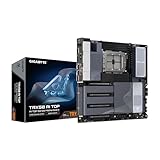
- AMD sTR5 Socket: Supports AMD Ryzen Threadripper PRO 7000 Series Processors/Ryzen Threadripper 7000 Series Processors
- Power Design: 16+8+4 Phases Digital VRM Solution
- DDR5 Compatible: 8*SMD ECC R-DIMMs with Maximum 2TB capacity
- Cutting-Edge Thermal Design: VRM Thermal Armor Advanced, M.2 Thermal Guard
- Next Gen Connectivity: Dual USB4 Type-C, PCIe 5.0
Expansion can still affect real workloads indirectly. If a lane-starved layout forces a device to share bandwidth, disables an NVMe connector or prevents the intended GPU arrangement, data movement and job scheduling can suffer. That is a system-design constraint, not a benchmark result attributable to the motherboard model.
What should I check before buying a Threadripper workstation motherboard?
Use this purchase checklist in order. It catches incompatibilities before the board, processor, memory and GPUs are committed to a chassis.
- Platform: select TRX50 or WRX90 from the CPU, channel and expansion requirements rather than from a single feature.
- Processor support: confirm the exact model, BIOS requirement and board revision.
- Memory: verify registered ECC type, supported densities, channel population and the board’s maximum validated capacity.
- Lane allocation: document electrical widths and sharing for the exact GPU, M.2 and add-in-card combination.
- Mechanical fit: measure GPU thickness, length, connector locations, slot spacing, radiator clearance and case support.
- Power: size the power supply for the CPU, every GPU, transient load and the board’s auxiliary connectors; verify cable routing before installation.
- Cooling: ensure the CPU cooler is approved for the socket and leaves unobstructed airflow to densely packed GPUs.
- Networking and storage: decide whether onboard 10GbE, 2.5GbE, dual 10GbE, M.2, MCIO or SlimSAS capability meets the build plan.
- Firmware and support: check update tools, operating-system support, warranty terms and regional availability.
- Total cost: add RDIMMs, cooler, chassis, power supply, storage, network adapters and any riser or blower solution before comparing board prices.
How much should I budget for the platform?
In the cited ASUS USA listings checked October 25, 2026, the Pro WS TRX50-SAGE WIFI A started at $999.99 and the Pro WS WRX90E-SAGE SE was listed at $1,299.99. The $300 difference is only the motherboard portion of the decision. WRX90 systems also require a compatible Threadripper PRO processor, while a TRX50 build may use a supported standard Threadripper processor; memory, cooling and accelerator choices can dominate the final system cost.
ASRock’s TRX50 WS price was not stated in the reviewed material, and the manufacturer warns that availability can vary by region. Treat both ASUS figures as time-stamped manufacturer prices rather than permanent street prices, and check the live product page before placing an order.
Independent reader supportYour contribution helps us test, update, and keep practical guides available for everyone.Which platform fits common AI workstation scenarios?
One or two large GPUs with moderate system memory
TRX50 is usually the first tier to investigate. Confirm that the cards fit with adequate intake clearance and that the intended M.2 and network devices do not reduce the required slot bandwidth.
Several GPUs plus high-speed networking and local NVMe
Compare the complete lane map rather than relying on the number of x16-length connectors. WRX90 becomes more compelling when the Threadripper PRO processor, eight memory channels and additional PCIe budget solve constraints that TRX50 cannot.
Large in-memory datasets or many simultaneous jobs
Start with WRX90 and size RDIMM capacity from the working set. The eight-channel arrangement and the 7000-era 2 TB platform ceiling provide more headroom than the corresponding TRX50 figures, subject to current CPU and board validation.
Rank #4

- AMD sTR5 Socket: Supports AMD Ryzen Threadripper PRO 7000 Series Processors
- Power Design: 16+8+4 Phases Digital VRM Solution
- DDR5 Compatible: 4*SMD R-DIMMs with AMD Expo & Intel XMP Support
- Cutting-Edge Thermal Design: VRM Thermal Armor, M.2 Thermal Guard
- Next Gen Connectivity: Dual USB4 Type-C, PCIe 5.0
A future expansion build
List the devices you expect to add within the chassis, not just the hardware installed on day one. Paying for WRX90 is defensible when the expansion plan is concrete; otherwise, a balanced TRX50 configuration can leave budget for GPUs, memory and cooling.
What are the most common build mistakes?
- Confusing slot length with electrical bandwidth: an x16-length connector may run at fewer lanes or share them with another device.
- Mixing platform generations: AMD’s 2023 Threadripper 7000 table is not a universal specification for every newer processor.
- Ignoring physical spacing: three- or four-slot GPUs can cover neighboring connectors even when the slot map appears suitable.
- Using the wrong memory: registered ECC requirements and QVL limits must be checked before buying a large kit.
- Assuming every TRX50 board supports PRO: PRO compatibility is a manufacturer validation decision; verify the exact model.
- Comparing motherboard prices alone: WRX90’s processor, memory and cooling requirements can change the system total more than the board premium.
- Expecting a motherboard AI benchmark: platform specifications describe capability and connectivity, not a measured training or inference advantage.
What is the practical buying decision?
Pick TRX50 if your supported CPU, four-channel memory plan and actual device inventory fit its lane and physical limits. Pick WRX90 if the build is Threadripper PRO-based and requires eight-channel memory, a larger validated RDIMM pool or substantially more simultaneous PCIe connectivity. Between boards in the same tier, choose from the manual’s lane map, QVL, GPU spacing, cooling provisions, networking and support details—not from the number of visible connectors alone.
Quick wins for a faster PC:
Clear out junk files and repair common Windows errorsFree Scan →Scan for outdated or missing drivers - takes under a minuteDriver Scan →Repair Windows errors before they cause bigger problemsFix Now →Frequently Asked Questions
Can a TRX50 motherboard run Threadripper PRO?
Some can. ASRock lists the TRX50 WS for Threadripper PRO 9000/7000 WX processors, but PRO support is not automatic across the TRX50 family. Check the exact board’s CPU list and required BIOS version.
Do more PCIe lanes guarantee faster model training?
No. Lanes provide connectivity and can prevent contention among GPUs, storage and network cards, but the cited specifications include no comparable AI performance test. Accelerator hardware, interconnect topology and software remain major performance factors.
Are the ASUS motherboard prices fixed?
No. The $999.99 and $1,299.99 figures are ASUS USA listings checked on October 25, 2026. Manufacturer prices, stock and regional availability can change, so verify the live listing before budgeting.
What should I verify when buying a used workstation board?
Confirm the exact model suffix and revision, inspect the socket and DIMM slots for damage, ask for the current BIOS version, and obtain proof that every required PCIe and memory slot works. Also ensure the seller includes proprietary cables, brackets or Wi-Fi hardware needed by the configuration.
Recommended Free Tools
Quick Recap
Product prices and availability are accurate as of the date/time indicated and are subject to change. Any price and availability information displayed on Amazon at the time of purchase will apply.

