
iTechGuides is reader-supported. When you buy through links on our site, we may earn an affiliate commission. As an Amazon Associate I earn from qualifying purchases. Learn more
The best keyboard for a Mac depends on what you value most. Choose the Apple Magic Keyboard with Touch ID and Numeric Keypad for the most seamless Apple experience, the Logitech MX Keys S for Mac for office productivity, the Keychron B6 Pro for an inexpensive full-size option, the Logitech Pebble Keys 2 K380s for portability, or the NuPhy Node Series for mechanical-switch enthusiasts.
These recommendations reflect RTINGS’ current 2026 Mac-keyboard lineup and its standardized testing approach, which includes equipment for measuring force curves and latency rather than relying only on subjective impressions. Prices and availability can change, so treat the figures below as research-time references rather than permanent prices.
Best Mac keyboards at a glance
| Keyboard | Best for | Layout and connection highlights | Research-time price |
|---|---|---|---|
| Apple Magic Keyboard with Touch ID and Numeric Keypad | Best overall | Full-size; Bluetooth and USB-C charging; Touch ID on compatible Apple-silicon Macs | $149 |
| Logitech MX Keys S for Mac | Productivity | Full-size; backlighting; customizable shortcuts; multi-device workflow | $129.99 |
| Keychron B6 Pro | Budget full-size | Bluetooth, 2.4 GHz wireless, or USB-C wired; non-backlit | $44.99 |
| Logitech Pebble Keys 2 K380s | Cheap compact keyboard | Compact Bluetooth keyboard; three devices; two AAA batteries | Check current listing |
| NuPhy Node Series | Mechanical typing | Low- and standard-profile options; 75% and full-size variants; wireless | Varies by variant |
Prices were recorded during the research period and should be checked before purchase. Regional layouts, bundles, colors, and availability may differ.
1. Apple Magic Keyboard with Touch ID and Numeric Keypad: Best overall for Mac
Choose the Apple Magic Keyboard with Touch ID and Numeric Keypad if you want a full-size keyboard that most closely resembles a native Mac accessory. It combines a rigid aluminum chassis, stable keys, responsive tactile switches, Bluetooth connectivity, and approximately a month of battery life. Its defining feature is Touch ID, which can authenticate logins and purchases without requiring you to type a password or reach for another device.
Apple’s current USB-C version was listed at $149 in the United States during research. It is wireless, rechargeable, includes a woven USB-C charging cable, and pairs automatically with a Mac. The current U.S. listing specifies a Mac with Apple silicon running macOS 15.1 or later for Touch ID compatibility.
Popular on Amazon
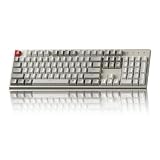
- The Keychron C2 (non-backlight version) is a 104 keys full size wired retro color keycaps mechanical keyboard made for Mac and Windows. Engineered to maximize your productivity with most popular full size layout with number pad.
- With a layout optimized for Mac, the C2 has all necessary multimedia and function keys (Num Lock works with Windows only), while compatible with Windows, and comes with a dedicated Siri or Cortana key. Extra keycaps for both Mac and Windows operating systems are included.
- Designed with reliability in mind, the C2 comes with USB Type-C wired connection with a braid cable, which ensures a constant power supply, and best to fit home and light gaming. Inclined bottom frame and 2 level adjustable feet (6˚ & 9˚) makes the C2 more comfortable to type.
- The pre-installed tactile Keychron switch providing unrivaled tactile responsiveness with up to 50 million keystroke durable lifespan.
- Outfitted the C2 Non-Backlight version with retro-inspired color scheme looks as good in the office as it does in the game room.
That system requirement matters. Touch ID is not a general biometric feature that works with every Mac, iPad, or iPhone. The keyboard can still be useful as a typing device, but the biometric advantage depends on having a compatible Apple-silicon Mac. Verify the exact Apple model and macOS requirement before buying.
Why it is the best native Mac choice
- Touch ID: Convenient for Mac login, password authentication, and supported purchases.
- Apple-style layout: The legends and key arrangement fit macOS naturally.
- Solid construction: The aluminum body feels more substantial than inexpensive plastic alternatives.
- Low maintenance: Rechargeable battery life is approximately a month under typical use.
Limitations
The keyboard supports only one direct Bluetooth pairing at a time. Apple’s Universal Control can allow one keyboard to control multiple nearby Macs, but that is different from storing several independent Bluetooth device connections and switching between them. If you frequently move between a Mac, Windows PC, tablet, and phone, Logitech or Keychron’s multi-device features may be more convenient.
What’s actually slowing this PC down?
Pick the symptom - the matching free tool is one click away.
Best for: iMac owners, Mac mini and Mac Studio users, and Apple-focused desks where Touch ID and native integration matter more than mechanical switches or multi-platform flexibility.
2. Logitech MX Keys S for Mac: Best for productivity
The Logitech MX Keys S for Mac is the strongest choice for long office, writing, and programming sessions when you want more productivity features than Apple’s keyboard provides. It has a premium-feeling low-profile design, quiet typing, full macOS compatibility, backlighting, and software-based customization.
Logitech listed the dedicated Mac model at $129.99 in the United States during research. It has a Mac-specific layout and Apple-matching finishes, so it avoids the Windows legends that can make a general-purpose keyboard look less tidy on an Apple desk.
What makes the MX Keys S better for office work
The keyboard’s spherically dished keycaps are designed to guide the fingertips toward the center of each key and reduce mistypes. Smart illumination can adjust the backlight, and Logitech’s Logi Options+ software provides control over backlight behavior, programmable keys, and Smart Actions. Logitech Flow can also help you use one keyboard across multiple computers and operating systems.
The Tool Desk
Outbyte PC Repair FREERepair Windows errors before they cause bigger problemsFix Now →Outbyte Driver Updater FREEFix the driver behind crashes, sound loss and screen glitchesFind Drivers →That combination makes it a better fit than Apple’s keyboard when you work in a multi-device environment, need illuminated keys, or want shortcuts customized for your applications. It remains a full-size board, however, so it takes more desk space than a compact travel keyboard.
Mac version versus regular MX Keys S
Pay attention to the exact product listing. The dedicated for Mac version is the cleanest choice for a primarily Apple setup. The regular MX Keys S may be preferable if you specifically want a Logi Bolt receiver included, but the contents and labeling should not be assumed to be identical across versions.
The main compromises are the lack of Touch ID and reliance on Logitech’s software ecosystem for some customization features. Basic typing does not require every software feature, but advanced remapping and Smart Actions do.
Best for: writers, programmers, office workers, and anyone who wants quiet low-profile typing, backlighting, customizable shortcuts, and a practical multi-device workflow.
Quick wins for a faster PC:
Scan for outdated or missing drivers - takes under a minuteDriver Scan →Clear out junk files and repair common Windows errorsFree Scan →Also popular on Amazon
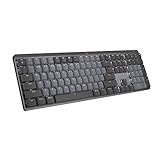
- Tactile Quiet mechanical key switches with a satisfying tactile bump you feel - for precise feedback, reactive key reset, and less noise so your typing doesn't disturb those around you
- Low-profile keys, more comfort: A keyboard layout designed for effortless precision, with a full-size form factor and low-profile mechanical switches for better ergonomics
- Smart illumination: Backlit keys light up the moment your hands approach the cordless keyboard and automatically adjust to suit changing lighting conditions
- Faster workflow, more customization: Customize Fn keys, assign backlighting effects, enable Flow cross-computer, multi-device control, and more in the improved Logi Options+ (1)
- Multi-device, multi-OS: Pair MX Mechanical Bluetooth wireless keyboard with up to 3 devices on nearly any operating system via Bluetooth Low Energy or included Logi Bolt receiver(2)
3. Keychron B6 Pro: Best budget full-size keyboard
The Keychron B6 Pro is the budget pick for Mac users who need a numpad and flexible connectivity but do not need aluminum construction or backlighting. It uses a low-profile layout similar in broad shape to the MX Keys S and works with macOS, Windows, and Linux.
Keychron listed the B6 Pro at $44.99 during research. It supports three connection modes: Bluetooth, 2.4 GHz wireless through its receiver, and USB-C wired operation. Its 109-key ANSI full-size layout includes a number pad, which makes it more suitable than the Pebble K380s for spreadsheets, accounting, and data entry.
Battery and connection advantages
Keychron specifies Bluetooth 5.2, an 800 mAh rechargeable battery, and up to 1,200 hours—or approximately eight months—of working time under its stated conditions. The 2.4 GHz receiver can be useful when you want a more direct wireless connection, while USB-C provides a fallback for charging or wired use.
It also supports VIA customization. That gives technically minded users more control over key assignments than a basic inexpensive keyboard usually provides.
What the low price gives up
The B6 Pro is made from plastic, has some deck flex, flatter keycaps, and more key wobble than the Logitech MX Keys S. It is also not backlit. If you work in a dim room, regularly use a backlight, or care about a particularly refined typing feel, the extra cost of the MX Keys S is easier to justify.
Best for: budget-conscious Mac users who want a full-size layout, a number pad, multiple connection modes, and very long battery life.
4. Logitech Pebble Keys 2 K380s: Best cheap compact keyboard
The Logitech Pebble Keys 2 K380s is the best choice when small size, low cost, and portability matter more than a conventional layout. It is a compact Bluetooth keyboard that works with Macs without a dongle or USB port, pairs with up to three devices, and runs on two AAA batteries.
Logitech lists compatibility with macOS 11 or later, Bluetooth Low Energy connectivity, three Easy-Switch channels, and optional customization through Logi Options+. It is approximately 279 mm wide and uses laptop-like low-profile keys. Logitech estimates up to 36 months of battery life, although actual life depends on usage and battery conditions.
Why it suits MacBook owners
The K380s is easy to move between rooms, classrooms, workstations, and travel bags. Three device channels let you switch among a MacBook, desktop Mac, tablet, or another Bluetooth device without repeatedly pairing. Because it uses replaceable AAA batteries, you do not need to keep a charging cable nearby.
Its round keycaps and compact spacing are the principal adjustment. Users accustomed to a full-size Apple or Logitech board may initially make more typing errors. There is no number pad, and the compressed layout is not ideal for spreadsheet-heavy work.
Also popular on Amazon

- 【75% Space‑saving Layout】The KN85 series is a compact 85‑key keyboard (13.68" × 5.51" × 1.77") that keeps all the essentials (F1–F12, arrows, shortcuts) without the number pad. It frees up 25% of desk space for better mouse movement. Designed for small desks, laptop setups, gamers and minimalists. For frequent number‑pad input, choose our full‑size KN104 with a complete dedicated numpad, or opt for our new KN98 model — compact 99‑key that retains the numpad while saving desktop real‑estate
- 【Tri-Mode Connectivity for Multi-Device Workflow】Connect via USB‑C, 2.4GHz wireless, or Bluetooth 5.0 (3 channels supported), with ultra‑low latency (USB 2ms, 2.4G 5ms, BT 11ms). Switch seamlessly between Windows and Mac to work across your PC, laptop, tablet, smartphone, or gaming console. Perfect for programmer, student, creator, or hybrid worker. The built‑in 4000mAh rechargeable battery ensures stable wireless performance. Continue typing while charging via wired mode when power runs low
- 【Creamy Thocky Typing Sound】The gasket mount absorbs harsh vibrations and hollow echoes to produce a smooth marbly thock, rather than loud clacky taps. Each keypress feels softly cushioned. Whether you’re working late at home or typing in a shared office space, the mellow, ASMR-like tone makes every keystroke a genuinely enjoyable experience
- 【Hot-swap for Tailored Sound & Tactile】Pre-lubed Bsun linear switches (45-50gf actuation) deliver a buttery response. Compatible with both 3 pin and 5pin switches, they enables solder-free swapping. From beginners to frequent typists and dedicated writers, craft your preferred typing signature without complex modding
- 【RGB Backlighting & Programmable】A warm ambient glow surrounds PBT keycaps and case edges, creating a calm, inviting desk vibe for late-night workspace. Adjust hues and brightness through shortcut keys or companion software. The KN85 driver (Windows only, wired/2.4G mode) lets you remap keys and set custom macros to boost your daily productivity
The optional Logi Bolt receiver may add flexibility in some setups, but check the specific package and receiver compatibility before assuming one is included.
Best for: travelers, students, MacBook users, small desks, and anyone who wants an inexpensive second keyboard with three-device Bluetooth support.
5. NuPhy Node Series: Best mechanical keyboard for Mac
The NuPhy Node Series is the recommendation for Mac users who specifically want mechanical-switch feedback, switch choice, and deeper remapping options. The lineup includes low-profile and standard-profile models, 75% and full-size layouts, Mac-specific legends, a physical Mac/Windows switch, and Mac-compatible web software for remapping keys, lighting, macros, and profiles.
Because “Node Series” covers multiple variants, verify the exact model before ordering. A low-profile Node75 and a full-size Node100 should not be treated as identical products, and switch, layout, wireless, and lighting details can vary by configuration and market.
Low-profile versus standard-profile Node
The low-profile version is the more broadly suitable choice for Mac users. It sits lower on the desk, has a more laptop-adjacent posture, and can generally be used comfortably without a wrist rest. RTINGS describes the tested low-profile model as solid and sturdy, with tactile feedback and gasket-mounted cushioning.
The standard-profile version is better if you want the taller, more traditional mechanical-keyboard experience. Its height can be more comfortable with a suitable keyboard wrist rest, particularly during long sessions, but a wrist rest is an ergonomic preference rather than a requirement.
Do these 3 things before closing this tab:
1Clear out junk files and repair common Windows errors2Scan for outdated or missing drivers - takes under a minute3Repair Windows errors before they cause bigger problemsThe softer cushioned feel of the low-profile model will not suit everyone. Some users prefer a crisp, firm bottom-out, while others prefer reduced harshness and a more yielding key feel. Mechanical keyboards are also typically more audible than scissor-switch alternatives, so consider coworkers, shared rooms, and microphones before choosing one.
Best for: mechanical-keyboard enthusiasts, programmers, gamers who also use a Mac, and users who want remapping, macros, lighting control, and switch choices.
Independent reader supportYour contribution helps us test, update, and keep practical guides available for everyone.How to choose the right Mac keyboard
Choose by your primary priority
- Native Apple integration and Touch ID: Apple Magic Keyboard.
- Quiet productivity and backlighting: Logitech MX Keys S for Mac.
- Lowest-cost full-size option: Keychron B6 Pro.
- Portability and three-device pairing: Logitech Pebble Keys 2 K380s.
- Mechanical switches and customization: NuPhy Node Series.
Full-size, compact, or mechanical?
A full-size board is the safest choice if you use a number pad, navigation cluster, or dedicated arrow keys frequently. The Apple and Logitech MX Keys S models are polished full-size options, while the Keychron B6 Pro provides the same broad layout at a much lower price.
A compact keyboard saves desk space and is easier to carry, but it requires compromises. The K380s has no number pad and compresses some keys into a smaller footprint. It is excellent as a travel or secondary keyboard, but less suitable as the only keyboard for frequent numeric entry.
Outdated Drivers Are Slowing You Down
One free scan finds every outdated or missing driver and matches the right update for your exact hardware.Free scan · exact hardware matchPC Slower Than It Used to Be?
A free scan shows the junk files, broken settings and background clutter dragging Windows down - then fixes them in one click.Free scan · Windows 10 & 11A mechanical keyboard is about feel, sound, and customization rather than automatically being more productive. Choose the NuPhy if you already know you prefer mechanical switches or want to experiment with them—not merely because mechanical keyboards are popular.
Also popular on Amazon

- Keychron K3, a compact 75% layout ultra-slim wireless mechanical keyboard built for peak productivity and a great tactile typing experience.
- Be ready to multitask without missing a beat by connecting the K3 with up to 3 devices via the stable Broadcom Bluetooth 5.1 chipset and switch between your laptop, PC, tablet and phone seamlessly. *Keep the distance between the keyboard and the device within reasonable limits to minimize signal interference.
- With a unique Mac layout, the K3 has all the necessary Mac multimedia keys while still being compatible with Windows. Extra keycaps for both Windows and Mac operating systems are included. *If it doesn't match your device exactly, you can try updating the keyboard's firmware.
- With open-source QMK firmware, it offers endless possibilities for key remapping, macros, and shortcuts. Customize every key easily using the Keychron Launcher web app for a more personalized typing experience. With its built-in AI assistant (live in beta now), keyboard customization is no longer complicated — just ask in plain language, and AI handles the rest.
- Together with the reinforced aluminum body (plastic bottom frame) make the K3 one of the thinnest and lightweight wireless mechanical keyboards on the market. The K3 also comes with a floating keycap design with a charming white backlight with modern keycap legends to sync with your mood.
Check the connection options
- Bluetooth: Convenient and cable-free, especially for MacBooks and iPads.
- 2.4 GHz wireless: Available on the Keychron B6 Pro and useful when you want a receiver-based connection.
- USB-C wired: Useful for charging, avoiding wireless pairing, or connecting to a device without Bluetooth.
- Multi-device switching: The Logitech K380s supports three Easy-Switch channels; the MX Keys S supports a broader multi-device workflow; Apple’s keyboard has one direct Bluetooth pairing.
Mac compatibility cautions before buying
Verify the physical layout
Check whether the keyboard is ANSI or ISO and confirm the regional layout. Key sizes, Enter-key shape, modifier placement, and printed legends can differ. A keyboard advertised as “Mac compatible” may support macOS while still using a layout that is unfamiliar or inconvenient for your region.
Separate basic compatibility from software compatibility
A third-party keyboard may type normally on macOS even when its optional configuration software requires a particular macOS version. For example, Logitech lists macOS 11 or later for the Pebble Keys 2 K380s, while Logi Options+ is an additional software layer for customization.
Apple’s current USB-C Touch ID keyboard has a more specific requirement: Apple lists the current U.S. model for Apple-silicon Macs running macOS 15.1 or later. Confirm this before buying if Touch ID is the reason you want the keyboard.
Recommended Free Tools
Check what is actually in the box
Do not assume that two similarly named keyboard variants include the same receiver, cable, key legends, or regional layout. This is especially important with the regular and Mac-specific MX Keys versions, NuPhy Node variants, and Keychron configurations.
Accessories worth considering
Accessories should solve a problem rather than be automatic add-ons. A wrist rest can make a standard-profile mechanical keyboard more comfortable, while a carrying case is more relevant to a compact or frequently transported board. Mechanical-keyboard buyers may also want a compatible Mac keycap set or replacement mechanical keyboard switches, but compatibility depends on the exact layout, mounting system, and switch design. Check those details before ordering parts.
Frequently Asked Questions
What is the best keyboard for a Mac in 2026?
The Apple Magic Keyboard with Touch ID and Numeric Keypad is the best overall choice for native Mac integration and Touch ID. The Logitech MX Keys S for Mac is better for many office users who want backlighting, customization, and multi-device features.
Does Apple Touch ID work with every Mac?
No. The current USB-C Apple Magic Keyboard with Touch ID is intended for compatible Apple-silicon Macs, and Apple’s current U.S. listing specifies macOS 15.1 or later. Verify your Mac and operating-system version before buying.
Free tools Windows power users keep installed
One-click scans. No signup required.
What is the best inexpensive full-size Mac keyboard?
The Keychron B6 Pro is the budget full-size pick. It has macOS support, Bluetooth, 2.4 GHz wireless, USB-C wired modes, a number pad, and a very long stated battery life, but it lacks backlighting and feels less premium than the Logitech MX Keys S.
Is the Logitech Pebble Keys 2 K380s good for a MacBook?
Yes, especially for travel, small desks, and secondary setups. It is compact, supports three Bluetooth devices, and uses two AAA batteries. Its lack of a number pad and compressed layout make it less suitable for spreadsheet-heavy work.
Should Mac users buy a mechanical keyboard?
Buy one if you specifically prefer mechanical-switch feedback, sound, and customization. The NuPhy Node Series is the mechanical recommendation here, but its variants differ, so confirm the profile, layout, switch, and wireless configuration before ordering.
The Bottom Line
For most Apple-focused desks, choose the Apple Magic Keyboard with Touch ID and Numeric Keypad. Pick the Logitech MX Keys S for Mac for a more productivity-oriented, backlit, multi-device experience; the Keychron B6 Pro for an affordable full-size board; the Logitech Pebble Keys 2 K380s for portability; and the NuPhy Node Series when mechanical switches are the point of the purchase.

