
iTechGuides is reader-supported. When you buy through links on our site, we may earn an affiliate commission. As an Amazon Associate I earn from qualifying purchases. Learn more
They control different parts of the heating system. A smart thermostat controls when the boiler or central heating zone runs. A smart radiator thermostat (smart TRV) regulates hot-water flow through one radiator. Choose both for whole-system scheduling plus room-by-room temperatures, provided your boiler controls and radiator valves support them. Choose a smart thermostat first when you need remote control of the heat source; choose smart TRVs first when the heat source is already controlled and rooms need separate schedules. In a district or block-heating system with no wall thermostat, smart TRVs can sometimes control radiators on their own. Compatibility checks come before purchase: verify boiler wiring and voltage for a smart thermostat, and verify a thermostatic valve body, thread and adapter for every smart TRV.
What is the difference between a smart thermostat and a smart radiator thermostat?
A smart thermostat is the system-level control. It sends a heat demand to a boiler, heat pump controller or other central heating equipment, then follows schedules, app commands or automatic temperature adjustments. ENERGY STAR defines one as a Wi-Fi-enabled device that automatically adjusts heating and cooling settings for performance: ENERGY STAR’s smart-thermostat explanation.
A smart radiator thermostat is a room-level valve control. It adjusts the valve on one radiator so more or less hot water enters that emitter. The Energy Saving Trust describes conventional thermostatic radiator valves (TRVs) as devices that control how much hot water flows through each radiator: its heating-controls guide.
Free tools Windows power users keep installed
One-click scans. No signup required.
| Question | Smart thermostat | Smart radiator thermostat (smart TRV) |
|---|---|---|
| What it controls | Boiler or whole heating zone heat demand | Hot-water flow through one radiator |
| Typical location | Wall-mounted room or central thermostat position | On an individual radiator valve |
| Main compatibility check | Boiler or heating-system type, control protocol, voltage, wiring and possible C-wire or adapter | Thermostatic valve body, valve thread and any required adapter |
| Zoning effect | One whole-home or wired-zone target | Different target temperatures and schedules by radiator or room |
| Installation work | Electrical/control wiring and commissioning | Replacing the existing thermostatic valve head and pairing the device |
| Best first purchase | No remote or automatic control of the heat source | Heat source is already controlled, but rooms overheat or need independent schedules |
Neither device automatically replaces the other in a conventional boiler system. The thermostat decides whether heat should be produced; each TRV decides how much of that heat a particular radiator receives.
#1 Best Overall
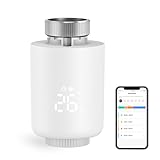
- NOTE: The Zigbee hub is required (sold separately)
- POWERFUL FUNCTION: Smart Radiator Thermostat adopts a new mini design, with a LCD digital display. The thermostatic radiator valve comes with a of powerful features, including windowing, -scale, temporary mode, -freezing, low vole warning, and a child lock function. Artificially set indoor temperature, mainly used in floor heating systems to control the closing and opening of pipes.
- APP CONTROL & VOICE CONTROL: You can control the temperature of the room in real time via Tuya/Smart life App. You can also voice control via Alxea and Google, Just say "Alexa, set the temperature in the bedroom to 22℃".
- MULTIPLE MODES :The smart thermostat valve provides multiple modes, vacation mode, comfort mode, window opening function, automatic mode, manual mode, and energy saving mode.
- WEEKLY PROGRAMMABLE FUNCTION: Temperture Controller supports manual set up 5+2, 6+1 and 7 days weekly schedule with 6 periods for option, providing you with the maximum convenience for different situation and setting customized schedule for your house temperature.
Do I need a smart thermostat if I have smart radiator valves?
Usually, yes, if your boiler currently relies on a wall thermostat or programmer and you want the smart system to start and stop heat production. Smart TRVs can close individual radiators, but they do not normally provide the boiler with a central heat demand. Without a compatible central control, the boiler may run on its existing schedule, run continuously when enabled, or fail to respond to a room that needs heat.
There is an important exception. In some district- or block-heating installations, radiators have no wall thermostat controlling the heat source. tado°’s compatibility guide says that users in this arrangement can use a starter kit with a Smart Radiator Thermostat and additional radiator thermostats, and that a Smart Thermostat is not needed: tado° Smart Thermostat Compatibility Guide (PDF). That applies to the documented no-wall-thermostat arrangement, not to every boiler installation.
When should I buy a smart thermostat, smart TRVs, or both?
Match the purchase to the control problem rather than to the product category.
Choose a smart thermostat first when the heat source is the problem
- You want to control the boiler or central heating remotely.
- The existing thermostat has no schedule, app or presence features.
- The entire home follows one temperature schedule and room-by-room control is not yet necessary.
- You have confirmed the thermostat can operate your boiler, heat pump or zone controller at the required voltage and with the available wiring.
A smart thermostat is the foundation for a conventional system because it can issue the call for heat. Most smart thermostats use low-voltage wiring, and a C-wire or manufacturer-supplied adapter may be needed. ENERGY STAR’s buying guidance explains these wiring and system checks: ENERGY STAR smart-thermostat buying guidance.
Choose smart TRVs first when the heat source already works
- The boiler or central controller already follows a useful schedule.
- Some rooms are consistently too warm while others are comfortable.
- Bedrooms, offices or guest rooms need different temperatures or operating times.
- Every radiator you want to automate has a compatible thermostatic valve body.
TRVs add local control without replacing the central heat-source control. They are especially useful when occupancy differs by room, but they cannot correct an incompatible boiler connection.
Choose both for coordinated room-by-room zoning
With both devices, the smart thermostat manages heat production while smart TRVs set limits for individual rooms. A bedroom can request a lower temperature than the living room, and unused rooms can be kept cooler while the central schedule remains active. Manufacturer documentation treats the wall thermostat and radiator thermostats as separate control points; for example, Drayton by Schneider Electric documents coordination between a Wiser room thermostat and radiator thermostat in the same room: Drayton controls information.
Rank #2

- Shelly Blu TRV - Smart Thermostatic Radiator Valve. Enjoy comfort and efficiency with precise climate control, sleek design, and quick response times. Bluetooth-operated and Wi-Fi-enabled (*gateway required), it offers long battery life and seamless smart home integration.
- The new standard for comfort living - Shelly BLU TRV has precise temperature control, maintaining your desired comfort level with an accuracy of ±0.1°C, ensuring a consistent and comfortable environment. For those moments when you need a quick warm-up, the Boost Mode can swiftly bring your room to the perfect temperature in no time.
- Customized heating made easy - Smart scheduling allows you to align your heating with your daily routines, optimizing both comfort and energy efficiency. For enhanced temperature accuracy, the Shelly BLU TRV can support external sensors like Shelly BLU H&T and Shelly BLU Door/Window, which makes it a versatile addition to any home heating system.
- A perfect blend of comfort and efficiency - Ensure your home is cozy when you arrive, while reducing unnecessary energy usage when you're away. With our app, you can easily create smart heating schedules that adapt to your lifestyle - keeping your home comfortable when needed and helping you save on energy costs when it's not.
- Shelly is one of the fastest-growing Smart Home brands, offering automation solutions for homes, buildings, and businesses. Device include a 3-year warranty and professional support. With the Shelly Smart Control App, you can configure and manage devices remotely, get real-time notifications, and create personalized scenes by combining Shelly devices to trigger automated actions across your smart home.
Do not install two independent controls in one room and leave their relationship undefined. If the wall thermostat is satisfied while a TRV-equipped room still needs heat, the boiler may not run. Configure the manufacturer’s designated room-control relationship, or place the central thermostat in a representative location where its measurement makes sense.
Can smart radiator thermostats replace a central thermostat?
They can replace the wall thermostat only in a documented system where the heat source does not use one, such as certain district or block-heating arrangements. In a typical boiler installation, a smart TRV is a valve actuator, not a boiler relay. It can regulate its radiator after hot water is available but normally cannot substitute for the wired or wireless control that starts the boiler.
Before treating a radiator-only setup as an exception, identify who controls heat production. If a building manager, district network or central plant supplies heat without a resident wall thermostat, radiator-level control may be all that is available. If your home has a private boiler with a thermostat cable, assume that a compatible central controller is required until the boiler manufacturer or installer confirms otherwise.
Will a smart thermostat work with my boiler and radiators?
Compatibility is system-specific. A smart thermostat must communicate with the heat source using the correct control method and electrical characteristics; the fact that a device is marketed as “smart” does not make it universal.
Check the heat source
- Identify whether you have a combi, system or regular boiler, a district or block-heating connection, a heat pump, or an electric/line-voltage heating system.
- Record the existing thermostat or programmer model and photograph the wiring before disconnecting anything.
- Use the smart thermostat maker’s compatibility checker to confirm the boiler interface, relay or digital protocol.
- Verify the operating voltage and whether a common wire (C-wire), receiver, bridge or adapter is required.
ENERGY STAR warns that zoned, variable-speed and line-voltage systems may need specialist help. Stop and use a qualified heating-controls or HVAC professional if the wiring is unfamiliar, the system has multiple zones, or the equipment uses a control method not listed by the thermostat maker.
What’s actually slowing this PC down?
Pick the symptom - the matching free tool is one click away.
Check the radiator valves separately
Radiator compatibility is not established by boiler compatibility. A smart TRV replaces a thermostatic valve head; it does not generally fit a simple manual on/off valve. The tado° radiator guide states that its Smart Radiator Thermostat works only with thermostatic radiator valves and replaces the existing thermostatic head: tado° Smart Radiator Thermostat Compatibility Guide (PDF).
Rank #3

- NOTE: The Zigbee hub is required (sold separately)
- POWERFUL FUNCTION: Smart Radiator Thermostat adopts a new mini design, with a LCD digital display. The thermostatic radiator valve comes with a of powerful features, including windowing, -scale, temporary mode, -freezing, low vole warning, and a child lock function. Artificially set indoor temperature, mainly used in floor heating systems to control the closing and opening of pipes.
- APP CONTROL & VOICE CONTROL: You can control the temperature of the room in real time via Tuya/Smart life App. You can also voice control via Alxea and Google, Just say "Alexa, set the temperature in the bedroom to 22℃".
- MULTIPLE MODES :The smart thermostat valve provides multiple modes, vacation mode, comfort mode, window opening function, automatic mode, manual mode, and energy saving mode.
- WEEKLY PROGRAMMABLE FUNCTION: Temperture Controller supports manual set up 5+2, 6+1 and 7 days weekly schedule with 6 periods for option, providing you with the maximum convenience for different situation and setting customized schedule for your house temperature.
- Turn the heating off and let the radiator cool.
- Inspect the existing control. A numbered temperature dial usually indicates a thermostatic head; a plain handwheel or simple lever may be a manual valve.
- Remove only the valve head according to its instructions; do not loosen the water-bearing valve body.
- Match the valve thread and dimensions with the smart TRV’s compatibility list. An adapter may be needed, and an M30 x 1.5 mm thread is only appropriate when your valve actually has that specification.
- Replace a manual valve with a compatible thermostatic valve before fitting the smart head, using an installer if the valve body or pipework must be changed.
How do I install a smart thermostat and smart TRVs safely?
Installation has two distinct parts: central control wiring and radiator-head replacement. Complete the identification and compatibility work before buying devices.
Central thermostat installation sequence
- Switch off the relevant heating-control circuit at the consumer unit or isolator, not just from the thermostat menu.
- Label existing conductors and photograph the terminals. Never assume wire colors or terminal names are universal.
- Confirm the new thermostat’s wiring diagram matches your boiler’s control input, receiver and voltage.
- Install the receiver or adapter specified by the manufacturer, including a C-wire adapter if the thermostat requires one and no common wire is present.
- Restore power, run the thermostat’s setup, select the correct heating equipment and test a heat demand.
- Verify that the boiler or zone starts, reaches operating status and turns off when the demand is cancelled.
Do not work live or improvise a connection between low-voltage thermostat terminals and line-voltage equipment. Zoned, variable-speed and line-voltage systems are the point at which a professional installation is the safer choice.
Smart TRV installation sequence
- List every radiator and decide which rooms actually need independent control.
- Confirm that each selected radiator has a compatible thermostatic valve and identify any adapter before removing a head.
- Remove the old thermostatic head, fit the adapter if specified, and attach the smart head without forcing the thread.
- Insert batteries or power the device as directed, then pair it with the hub or app.
- Calibrate or run the valve’s installation routine so it learns the open and closed positions.
- Set a temporary high temperature and confirm that the valve opens; then set a low temperature and confirm that it closes after the system has time to respond.
If a valve will not move, the pin may be stuck or the head may be incorrectly fitted. Do not pull on the valve pin or open a water connection; isolate the radiator and call a heating professional if mechanical service is required.
How do a smart thermostat and smart TRV coordinate in the same room?
The central thermostat and the radiator thermostat measure different things, so their settings must be assigned deliberately. The central thermostat measures air at its location and decides whether the system needs heat. The TRV measures or estimates conditions at its radiator and meters flow.
If the central thermostat is in the living room and that room reaches its target, it can stop the boiler even while a cooler bedroom is asking its TRV to open. Conversely, if the central thermostat is in a cool hallway, it can keep the boiler running after a TRV-equipped room has reached its target. Use the system’s room-assignment or “main room” feature where available, and avoid putting a restrictive TRV on the radiator that the central thermostat relies on unless the manufacturer explicitly supports that arrangement.
Do I need smart TRVs in every room?
No. Install them where independent control solves a real problem. A room that already stays comfortable under the central schedule gains little from an automated valve.
Rank #4

- Save up to 23% every year on heating and cooling costs, adjusts to your set schedule to save energy when you’re gone and optimize comfort when you’re home. Compared to a hold of 72
- Compatible with 85% of systems, check your system’s compatibility with our online ecobee Compatibility Checker on the ecobee support page
- Change your temperature by easily tapping the color touchscreen or using the ecobee app. Plus, free software upgrades ensure you get the best out of your Smart Thermostat Essential, for years to come
- Automatically adjusts to your set schedule to save energy when you’re gone and optimize comfort when you’re home. Keep track of your energy consumption when you're on the go on the ecobee app
- Easy DIY install. No C Wire, no problem. Get the ecobee Power Extender Kit (PEK) for homes without a C-Wire and keep your walls looking nice with our trim kit – both sold separately
Prioritize these rooms
- Bedrooms with lower night-time temperature targets.
- Home offices used only during working hours.
- Guest rooms or storage rooms that are often unoccupied.
- Rooms that overheat because of solar gain, cooking or their position in the home.
- Frequently used rooms whose schedules differ from the central thermostat’s schedule.
Leave these rooms on conventional control when appropriate
- The room containing the central thermostat, unless your system documents coordinated operation.
- Radiators with manual valves until a compatible thermostatic valve is installed.
- Rooms where a fixed minimum temperature is required and automation adds no useful adjustment.
Partial deployment reduces the number of devices and compatibility checks while still providing zoning where it matters. You can add compatible TRVs later if the central system and hub support expansion.
Quick wins for a faster PC:
Fix the driver behind crashes, sound loss and screen glitchesFind Drivers →Clear out junk files and repair common Windows errorsFree Scan →Scan for outdated or missing drivers - takes under a minuteDriver Scan →How much energy can these controls save?
Savings depend on climate, building insulation, equipment, schedules and occupant behavior. ENERGY STAR reported average certified-smart-thermostat savings of approximately 8% of heating and cooling bills, or about $50 per year, in its 2017 FAQ; that figure is an average estimate, not a guarantee for a particular home: ENERGY STAR energy-savings FAQ.
There is no universal smart-TRV savings figure in the cited official sources. A TRV can reduce flow to rooms that do not need full heat, but the result depends on whether the boiler can actually respond to reduced demand, how the system is balanced and whether occupants keep unused rooms cooler. Treat room comfort and controllability as the immediate benefits; estimate financial savings only from your own bills after a comparable heating period.
What problems occur after installation, and how do I fix them?
The boiler never starts when a room requests heat
Check that the central thermostat is powered, set above the current temperature and configured for the correct equipment. Confirm the receiver or relay is paired and that the boiler’s own schedule or lockout is not overriding the call. A TRV opening by itself is not proof that the boiler has received a demand.
One room remains cold while its TRV is open
Check that the central thermostat or another controller is requesting heat, then verify the radiator valve is the correct type and the smart head completed calibration. Air in the radiator, a stuck valve pin, poor hydraulic balancing or a closed lockshield can also limit heat; those mechanical issues require heating-system service rather than an app setting.
PC Slower Than It Used to Be?
A free scan shows the junk files, broken settings and background clutter dragging Windows down - then fixes them in one click.Free scan · Windows 10 & 11Crashes, No Sound, or Screen Glitches?
Random freezes, missing sound and display glitches usually trace back to one bad driver. Find and replace yours safely.Free scan · under a minuteA room overheats despite a low TRV setting
Confirm the smart head is firmly seated and that its calibration completed. Check whether another controller is calling for heat continuously and whether the radiator is receiving residual heat from the pipework. If the valve remains hot at every setting, isolate the control issue from a mechanical valve fault before replacing the electronics.
Best Value

- ENERGY STAR certified smart thermostat for home that helps you save energy and stay comfortable.Connectivity : Wi-Fi - 802.11b/g/n 2.4 GHz, 802.11a/n 5 GHz Wi-Fi., Wireless interconnect : Bluetooth Low Energy Please refer to the product description section below for all applicable legal disclaimers.Product note: You can also check your system’s compatibility before purchasing a Nest thermostat with our online Nest Compatibility Checker on the Google Nest support page
- The Nest Thermostat is designed to work without a C wire in most homes, but for some systems, including heating only, cooling only, zone controlled, and heat pump systems, you’ll need a C wire or other compatible power accessory
- Nest Thermostat turns itself down when you leave, so you don’t waste energy heating or cooling an empty home. Lock feature: No
- Programmable thermostat that lets you create an energy efficient schedule in the Google Home app on your Android or iPhone
- Remote control lets family members change the thermostat temperature from anywhere on a phone, laptop, or tablet[1]
The thermostat wiring does not match the installation guide
Stop before reconnecting anything. Photograph and label the existing terminals, identify the boiler and control voltage, and have a qualified installer verify the circuit. This is particularly important for line-voltage, multi-zone and variable-speed systems.
What is the simplest decision checklist?
- Need to start or stop the boiler remotely? Start with a compatible smart thermostat.
- Boiler control already works, but rooms need different temperatures? Add smart TRVs to compatible thermostatic valves.
- Want central scheduling plus room-by-room limits? Use both and configure their room relationship.
- No wall thermostat in a district or block-heating installation? A radiator-only setup may be suitable, subject to the device maker’s documented compatibility.
- Manual radiator valves? Replace them with compatible thermostatic valves before fitting smart heads.
- Unfamiliar wiring, line voltage, variable-speed equipment or multiple zones? Use a qualified installer.
The practical order is heat-source compatibility first, valve compatibility second, and control coordination third. That sequence prevents the most common mistake: buying smart radiator heads for a system that still has no way to call the boiler.
Frequently Asked Questions
Can I use smart TRVs with a heat pump?
Possibly, but the answer depends on the heat-pump controller, zoning design and the TRV maker’s approved integration. Confirm both the heat-source control interface and the radiator-valve compatibility; do not assume a boiler-oriented thermostat will operate a heat pump correctly.
Recommended Free Tools
What should I do if my radiator has a manual valve?
A smart TRV head is not a direct replacement for a manual valve. Have the manual valve body replaced with a compatible thermostatic valve, then fit the smart head specified for that valve’s thread and adapter arrangement.
Can one central thermostat control several heating zones?
Only when the thermostat, receivers and zone controller are designed to work together. Check the manufacturer’s wiring diagram and zone limits; a single thermostat connected to one zone does not automatically control separate circuits.
Is a radiator-only smart setup suitable for every apartment?
No. It is appropriate only when the building’s heating arrangement does not use a resident wall thermostat and the radiator valves accept the chosen smart heads. Ask the building manager or installer how heat production is controlled before removing any valves.
Quick Recap
Product prices and availability are accurate as of the date/time indicated and are subject to change. Any price and availability information displayed on Amazon at the time of purchase will apply.
Do these 3 things before closing this tab:
1Repair Windows errors before they cause bigger problems2Scan for outdated or missing drivers - takes under a minute3Clear out junk files and repair common Windows errors
