
iTechGuides is reader-supported. When you buy through links on our site, we may earn an affiliate commission. As an Amazon Associate I earn from qualifying purchases. Learn more
Choose NASA Spot the Station for a straightforward International Space Station (ISS) alert, Heavens-Above for detailed multi-satellite planning, ISS Detector for notification-first forecasting, Stellarium Mobile for a realistic planetarium view, SkySafari for telescope-based observing, and Sky Tonight for a polished “what can I see tonight?” workflow. The best choice depends on whether you need one object, many satellites, camera-planning data, or a broader astronomy guide.
Which satellite tracker app should you use?
Start with the result you need rather than the app with the longest feature list. NASA Spot the Station is the clearest recommendation for seeing the ISS. Heavens-Above is the strongest data-first choice when you want to compare visible satellites, including Starlink-related passes, before an observing or imaging session. ISS Detector is aimed at people who mainly want reminders. Stellarium Mobile places satellites in a realistic planetarium and can support offline observing. SkySafari adds deeper observing context for experienced users and telescope owners. Sky Tonight is designed around visibility planning, event reminders and augmented-reality identification.
| App | Best for | Coverage and guidance | Planning depth | Offline or connectivity notes |
|---|---|---|---|---|
| NASA Spot the Station | Simple ISS alerts | ISS only; real-time map and augmented-reality path overlay | Local time, viewing duration, maximum elevation, appearance and disappearance directions | Uses current location and service data; check the app before an observation |
| Heavens-Above | Multi-satellite and astrophotography planning | Visible satellites, Starlink-related objects and other categories; live sky chart | Pass lists, altitude and azimuth at key times, estimated magnitude, track charts and configurable magnitude cutoff | Can obtain phone geolocation and store the next 24 hours locally after a data download |
| ISS Detector | Notification-oriented forecasting | ISS and other objects, with current coverage determined by the store listing | Quick pass workflow and reminders; detailed features and extensions vary | Verify current paid extensions and subscription terms in the iOS or Android listing |
| Stellarium Mobile | Realistic planetarium context | Satellite layer inside a broad sky simulation and catalog | Useful for orientation and offline observing; less specialized for pass tables | Comparison coverage describes it as an offline-observing option |
| SkySafari | Advanced observers and telescope owners | Satellites alongside extensive observing context | Deeper object, field-of-view and telescope-related planning | Check the edition’s current capabilities and connectivity requirements |
| Sky Tonight | Beginner-friendly nightly planning | Visible Tonight workflow, satellite and sky-object identification, AR view | Visibility forecasts, reminders and observing-condition guidance | Use current app settings and downloaded data where supported |
NASA Spot the Station: the simplest way to track the ISS
NASA describes Spot the Station as its official app for tracking and receiving notifications about ISS viewings from a selected location. It is free to download and use on iOS and Android. The app provides a local sighting time, the expected duration, maximum height above the horizon, and the directions in which the station will appear and disappear. It also offers real-time tracking and an augmented-reality path overlay, so you can hold up a phone and see the predicted route across the sky.
This is the right starting point when the question is “What is the best app to track the ISS?” rather than “Which satellites can I photograph tonight?” The station is bright enough to see with the naked eye because it reflects sunlight; a telescope is not required. NASA’s current Spot the Station information says the ISS completes 16 orbits each day and has a 51.6-degree orbital inclination. Those orbital facts do not mean that every location receives 16 visible passes: most orbits occur in daylight or below a useful local horizon.
Popular on Amazon

- CAPTURE IMAGES AND VIDEO THROUGH YOUR SCOPE: The Celestron Smartphone Adapter connects your phone to your telescope, spotting scope, binocular, monocular & microscope! You can capture amazing images & video through the eyepiece to share with friends.
- UNIVERSAL SMARTPHONE ADAPTER: Fits a wide range of smartphones, including the latest iPhone, Samsung Galaxy, and Google Pixel models — even with most cases on.
- EASY TO USE: Simply place your phone in the adapter, center your phone’s camera over the eyepiece, and use the knobs to secure the adapter in place.
- STURDY CONSTRUCTION: Durable metal frame and polymer body for worry-free use in the field — perfect for star parties or birding events.
- COMPATIBLE EYEPIECES: Smartphone adapter fits almost any eyepiece from 29 millimeters to 45 millimeters in diameter, including telescopes equipped with 1.25” eyepieces.
NASA reported more than 770,000 users in 227 countries and territories in 2024. That broad reach does not remove local constraints. An alert is issued for a visible opportunity at the selected location, but clouds, haze, daylight, buildings, trees and a low local horizon can still hide the station. Use the app’s direction and elevation information to find an unobstructed viewpoint before the alert time.
Heavens-Above: the data-first choice for many satellites
Heavens-Above is designed for readers who want to inspect a pass rather than wait for a single notification. Its live-sky chart shows satellites that are currently visible. Prediction lists include visible satellites up to a magnitude cutoff that you configure, allowing you to include only objects bright enough for your equipment and sky conditions. A pass detail gives the start, maximum-altitude and end altitude/azimuth, estimated magnitude and a track chart.
The service can obtain your phone’s geolocation and, after data is downloaded, store the next 24 hours locally. That is useful at a dark site where cellular service is unreliable. Download the predictions while connected, then confirm the schedule again before a critical imaging session because orbital data and visibility conditions can change.
Free tools Windows power users keep installed
One-click scans. No signup required.
Choose Heavens-Above when “satellite tracking” includes more than the ISS: Starlink-related objects, Earth-observation spacecraft, radio satellites or a broad list of visible targets. Its information-dense interface is better for comparing candidate passes than for a first-time AR experience. For astrophotography, its altitude, azimuth, brightness estimate and track chart provide the planning data needed to decide whether a pass fits your lens and composition.
Also popular on Amazon

- Capture What You See Through Your Scope — TRIDAPTOR helps connect your smartphone to most spotting scope, telescope, monocular or microscope eyepieces, so you can capture and share birds, wildlife, targets, celestial objects and distant scenes.
- Precise 3-Axis Alignment for Cleaner Shots (Patent Pending) — This 3-axis digiscoping adapter lets you adjust your phone left/right, up/down and forward/back to line up the camera with the eyepiece. The Z-axis adjustment helps reach the right eye relief, reducing dark edges or vignetting for clearer photos and videos.
- All-Metal Build, No Phone Sagging — Rigid aluminum construction helps keep your phone steady and aligned, unlike flimsy plastic telescope phone adapters that can flex, tilt or lose position. Rubber pads help protect your phone and eyepiece from scratches.
- Shoot Without Touching the Scope — Use the included Bluetooth remote with this phone scope adapter to take photos or videos without tapping your phone and shaking the image, making it easier to capture sharper shots and share your view.
- Fits Most Phones & Many Standard Eyepieces — This smart phone adapter for telescope fits most iPhone and Android smartphones from 2.36"–3.44" wide / 60–87.5 mm. It also fits eyepieces with an outer diameter of 0.86"–2.4" / 22–61 mm.
ISS Detector: alerts first, details second
ISS Detector is a notification-focused mobile option that covers the ISS and other objects. Independent comparison coverage places it alongside NASA Spot the Station and Heavens-Above as a leading alert choice. It suits a reader who wants a reminder, opens the app for a quick pass view, and does not need a full planetarium or a large catalog.
Object coverage, paid extensions and subscription terms can change. Check the current iOS or Android listing before relying on a particular satellite category or extension. Treat the store description as the authority for what is included in the edition you install, especially if you need a specific non-ISS target.
Stellarium Mobile: put satellites in a realistic sky
Stellarium Mobile is useful when satellite tracking is one layer of a broader planetarium. Its realistic simulation and broad sky catalogs help you understand where a pass sits relative to stars, constellations and other objects. Comparison coverage also describes it as an offline-observing option, which can be valuable when you prepare at home and observe away from a data connection.
Satellite tracking is a secondary function here. Pair Stellarium Mobile with Heavens-Above when exact pass tables, estimated brightness or magnitude filtering are central to the session. Use Stellarium Mobile to check the visual context and composition, then use a dedicated pass list to verify timing and trajectory.
Also popular on Amazon

- Capture the World :This spotting scope phone adapter allows you to easily capture the beauty of the world through your screen. Connecting your phone to telescopes, spotting scopes, binoculars, monoculars and microscopes, you can capture wonderful images and videos through the eyepiece and share them with your friends.
- Easy Setup:Put your phone into the spotting scope phone mount, precisely align the camera with the eyepiece, and then turn the knob, the adapter will hold your phone firmly in place with just these three steps. The whole process is easy and convenient, no need for complicated adjustments, even a novice can get started quickly.
- Regular Size:This spotting scope phone adapter is extremely compatible with almost any eyepiece on the market with a diameter between 28mm and 47mm. Whether it's a normal eyepiece you use every day or a specialized eyepiece with special features, as long as the diameter is within this range, the adapter can be accurately mated and easily assembled.
- Durable Material :The main body is made of zinc alloy (more durable than aluminum alloy) with grooved metal case. The phone clip is made of high-strength PA plastic, and the metal body of the adapter is durable enough to be used in the field and in harsh weather conditions.
- Fits most smartphones:Ranging from 2.13 inches to 3.54 inches (54-90 mm). Fits almost all smartphones on the market iPhone 16Pro Max, 16 Pro, 15, 15 mini, 14 Pro Max, 14 Pro,14, SE, Xs, Xr, X, S20, S20+, S20FE, S10, S10+, S10E, S8, S7, S6, S5, S4, Note20, Note20 Ultra, Note10+, Note 10, Note 9, Note 6, Note 5, Note 4, A51, A71, A70 and more.
SkySafari: for advanced observing and telescope owners
SkySafari is aimed at serious observers who want satellites in the same planning environment as a deeper astronomy catalog. The comparison source specifically positions it for telescope owners and for users who need richer observing context and telescope-related features. It is appropriate when you already plan around a mount, telescope field of view, equipment control or a structured observing list.
It is more complex than an ISS-alert app. If your only goal is to stand outside and see the station, the additional catalog and telescope functions add little. If you are coordinating a satellite pass with a telescope or a carefully framed camera setup, the extra context can make it the better long-term companion.
Sky Tonight: a guided “what can I see tonight?” workflow
Sky Tonight emphasizes visibility forecasts, a “Visible Tonight” workflow, event reminders, augmented-reality identification and observing-condition guidance. It is a good general astronomy companion for a beginner who wants to decide what is worth seeing on a particular evening and then identify it in the sky.
Crashes, No Sound, or Screen Glitches?
Random freezes, missing sound and display glitches usually trace back to one bad driver. Find and replace yours safely.Free scan · under a minutePC Slower Than It Used to Be?
A free scan shows the junk files, broken settings and background clutter dragging Windows down - then fixes them in one click.Free scan · Windows 10 & 11Use it when the decision is broader than satellites. For detailed multi-object pass tables, configurable brightness limits and track verification, a dedicated service such as Heavens-Above remains more suitable. Sky Tonight’s value is the guided sequence from tonight’s opportunities to identification, not the deepest orbital-data interface.
Also popular on Amazon
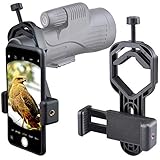
- For phone width range: 55~85 mm(2.16"~3.35"). Fit iPhone X/8/8 Plus/7/7 Plus/6/6s/6 Plus/5/5s - Fit Samsung Galaxy S9/S8/S7/S6/S6/S5 Note 9/8/7/6/5 - Fit Sony, LG, HTC, and other brands.
- With this universal smartphone telescope adapter, you can connect your phone to a telescope or microscope to take images of the moon and cells, or to a spotting scope to take images of birds and other objects.
- Smartphone mount compliable with microscope, telescope, binoculars, monocular, night vision spotting scope. Fit eyepiece diameter 22mm~ 44mm(0.86"-1.73").
- Optimized weight, lighter and reduce the pressure on the telescope eyepiece, weight: 75 g / 2.65 oz.The body is made of high-strength PA plastic. The surface of the mobile phone and eyepiece has a soft EVA pad to avoid scratching and damage.
- Warranty service:If you have questions about installation and not using, please contact us in time, we will reply and deal with your problems as soon as possible.
How to choose an app for astrophotography
Match the app to the target
- ISS-only image or visual pass: NASA Spot the Station gives the clearest alert, direction and maximum-elevation information.
- Several possible satellites: Heavens-Above lets you sort through visible objects and compare their tracks and brightness.
- Reminder-driven sessions: ISS Detector is appropriate when a notification is the main requirement.
- Satellite plus a star-field composition: Stellarium Mobile shows the pass in a realistic planetarium context.
- Telescope, mount or advanced observing list: SkySafari provides the surrounding equipment and catalog context.
- General nightly planning: Sky Tonight helps identify what is visible and where to point a phone.
Use elevation, brightness and trajectory—not just the clock
A bright pass low on the horizon can be blocked by trees or buildings and can suffer more atmospheric haze. A fainter object high overhead may be easier to record from an unobstructed site. Compare maximum elevation, estimated magnitude and the start-to-end azimuth path. Then compare that path with your camera’s field of view, focal length and intended composition.
For a wide-angle time-lapse, a long track through the frame may be desirable. For a narrower lens or a telescope, the same pass may leave the frame quickly. The app tells you where the object is predicted to be; it cannot guarantee that the chosen framing, focus, exposure or tracking settings will produce a usable image.
A practical satellite-imaging workflow
- Set the exact observing location. Allow the chosen app to use phone geolocation or enter the site manually. A city-centre location can differ materially from a hilltop or rural site because the visible horizon is different.
- Choose the date and local time window. Filter for passes that occur in darkness or twilight appropriate to your image. Do not assume an orbital pass is visible simply because the spacecraft is above your location.
- Filter candidate objects. In Heavens-Above, set a magnitude cutoff that reflects your camera and sky. For an ISS-only session, use NASA Spot the Station or the ISS filter in your chosen app.
- Inspect the full pass. Record the start, maximum-altitude and end altitude/azimuth, estimated magnitude and track direction. A countdown without a track is insufficient for composing a frame.
- Check the physical site. Visit or map the viewpoint, identify obstructions, and decide where the camera can be safely placed. The app’s horizon model cannot account for every tree, roof or nearby light.
- Download data before leaving. Heavens-Above can store the next 24 hours locally after a data download. Other apps may differ, so open the relevant pass while connected rather than assuming every screen will work offline.
- Verify close to the session. Refresh predictions shortly before setup. Launches, maneuvers, orbital decay and stale catalog data can alter a prediction, and weather can eliminate an otherwise good opportunity.
- Point and confirm with the sky view. Use an AR overlay or live chart for orientation, then frame the camera with extra margin around the predicted track. Start early enough to capture the beginning of the pass.
How accurate are satellite tracker apps?
An app computes a position or pass forecast from your location, time and orbital data; the phone is not continuously measuring the spacecraft. Predictions can degrade after a launch, an orbital maneuver, orbital decay or a delay in catalog updates. Heavens-Above’s detailed tables and NASA’s official ISS data are useful planning inputs, but neither replaces a final check immediately before observing.
Do these 3 things before closing this tab:
1Clear out junk files and repair common Windows errors2Scan for outdated or missing drivers - takes under a minute3Repair Windows errors before they cause bigger problemsAccuracy also has two separate meanings. The calculated path may be mathematically close while the object remains invisible because it is in daylight, below the effective horizon, behind terrain or obscured by clouds. Conversely, a bright object can be visible even when a local obstruction prevents you from following the whole predicted path. Treat orbital prediction and local visibility as separate checks.
Also popular on Amazon

- Capture What You See Through Your Scope — TRIDAPTOR turns your spotting scope, telescope, monocular or microscope into a smartphone viewing and camera setup. View through your phone screen instead of staying pressed against the eyepiece, then capture and share birds, wildlife, targets, celestial objects and distant views.
- Precise 3-Axis Alignment for Cleaner Shots (Patent Pending) — This 3-axis digiscoping adapter lets you adjust your phone left/right, up/down and forward/back to line up the camera with the eyepiece. The Z-axis adjustment helps reach the right eye relief, reducing dark edges or vignetting for clearer photos and videos.
- All-Metal Build, No Phone Sagging — Rigid aluminum construction helps keep your phone steady and aligned, unlike flimsy plastic telescope phone adapters that can flex, tilt or lose position. Rubber pads help protect your phone and eyepiece from scratches.
- One Adapter for Most Phones — The telescope phone mount fits most iPhone and Android smartphones from 2.36"–3.44" wide / 60–87.5 mm. No need to buy a new adapter every time you upgrade your phone or scope.
- Check Eyepiece Size Before Ordering — This smart phone adapter fits many spotting scope eyepieces within 0.86"–2.4" / 22-61 mm outer diameter. Please measure your eyepiece before purchase. Compatible with most Vortex, Swarovski, Celestron, Nikon, Zeiss, Kowa and Leupold eyepieces.
- Timing error: refresh after a launch or maneuver and avoid relying on an old downloaded list for a later date.
- Position error: use the app’s latest track and verify the selected location, time zone and device clock.
- Brightness uncertainty: estimated magnitude varies with viewing geometry and does not account for every camera, haze or light-pollution condition.
- Horizon mismatch: compare the predicted altitude with actual buildings, trees, hills and your camera’s unobstructed angle.
Can you see satellites without a telescope?
Yes. The ISS is visible to the naked eye because it reflects sunlight, and other satellites can be visible when their predicted brightness, illumination and altitude are favorable. A telescope is not required for an ISS pass, but binoculars or a camera can help with orientation and recording. Visibility still depends on darkness, sunlight geometry, haze, terrain and obstructions.
Connectivity, alerts and paid features
Alerts are convenient but should not be treated as a guarantee that you will see an object. Notification eligibility depends on the selected location and the app’s visibility calculation; clouds and local obstructions remain your responsibility. For remote observing, download schedules while online and confirm which functions remain available without a connection.
Feature availability and monetization change, particularly for ISS Detector and the paid editions or extensions of general astronomy apps. Check the current store listing for the exact iOS or Android version, object categories, subscription terms and any extension before planning around a feature. NASA Spot the Station is documented as free to download and use; the other apps’ current prices and inclusions are not fixed by the information available here.
Useful accessory for telescope-based phone work
If you combine a tracker or planetarium app with a telescope or eyepiece, a smartphone telescope adapter can hold the phone’s camera over the eyepiece. Compatibility depends on the phone, camera position, eyepiece diameter and adapter design. It is optional: none of the apps requires one, and a wide-field camera setup may work better without an eyepiece.
Quick Recap
Bottom line for different readers
- First ISS sighting: install NASA Spot the Station.
- Comparing satellite passes for a camera: use Heavens-Above, then verify the pass immediately before shooting.
- Notifications above all else: consider ISS Detector and check its current object coverage.
- Realistic sky orientation: choose Stellarium Mobile.
- Telescope or advanced observing workflow: choose SkySafari.
- Beginner nightly visibility planning: choose Sky Tonight.

