
iTechGuides is reader-supported. When you buy through links on our site, we may earn an affiliate commission. As an Amazon Associate I earn from qualifying purchases. Learn more
Download ReShade from the official site at reshade.me/home. The current release listed there is ReShade 6.8.0, released on August 2, 2026. Most players should use the standard installer; the separate full add-on build is intended for specific single-player use cases and may cause problems with anti-cheat systems.
Official ReShade downloads
| Download | Best for | Important limitation |
|---|---|---|
ReShade 6.8.0 standard installerReShade_Setup_6.8.0.exe |
Most games, including ordinary post-processing and shader presets | Depth access is restricted when ReShade detects network activity from the game |
ReShade 6.8.0 with full add-on supportReShade_Setup_6.8.0_Addon.exe |
Single-player games that need third-party add-ons or unrestricted depth access | The build is unsigned and is more likely to be blocked or flagged by anti-cheat software |
ReShade’s official site asks users not to redistribute its binaries or shader files. Use the official download links rather than third-party “repack” downloads. The site displays the X.509 signature thumbprint 589690208A5E52FB96980C4A6698F50ACD47C49F.
Which ReShade installer should you choose?
- Choose the standard build unless you know that a particular add-on requires the full build. It is the safer choice for games with multiplayer or anti-cheat systems.
- Choose the full add-on-support build only when you need third-party add-ons or unrestricted depth access. Treat it primarily as a single-player option.
The installers are separate builds. Installing the standard version does not give it general third-party add-on support.
What’s actually slowing this PC down?
Pick the symptom - the matching free tool is one click away.
Requirements and supported graphics APIs
ReShade 6.8.0 supports Windows 7 SP1, Windows 8.1, Windows 10, and Windows 11, and requires .NET Framework 4.8.
#1 Best Overall

- ACHIEVE TRUE COLOR - Ensures your monitor displays colors accurately, critical for photography, design, and video editing, with unlimited gamma, whitepoint, and brightness settings. Standard Calibration provides professional-grade results in 90 seconds, or New Deeper Calibration measures more points across the grayscale for an average 30%+ accuracy improvement (varies by display).
- OPTIMIZE DISPLAY PERFORMANCE - Calibrate a wide range of backlight types including Wide LED, Standard LED, OLED, QD-OLED, Apple Liquid Retina XDR, and Mini LED, with support for brightness up to 12,000 nits, ensuring consistent and accurate color across all your screens.
- ENHANCE WORKFLOW EFFICIENCY - Projector Calibration feature allows for accurate color representation during presentations, while Display Analysis/MQA provides comprehensive screen quality assessment. Export 3D LUTs (.cube) for compatible video monitors, with support for Rec.709, Rec.2020, and DCI-P3.
- WIDE DEVICE COMPATIBILITY - Supports unlimited number of displays (per computer capability) and offers native USB-C connection plus an included USB-A adapter, ensuring seamless connectivity with modern laptops and desktop computers for streamlined use. StudioMatch and SpyderTune keep color consistent across multi-monitor setups.
- USER-FRIENDLY SOFTWARE - Features an intuitive interface supporting 10 languages, including English, Spanish, French, German, Chinese and Japanese, making calibration accessible to a global audience. Existing SpyderPro users upgrade to the new software free.
The supported rendering APIs are:
- Direct3D 9
- Direct3D 10
- Direct3D 11
- Direct3D 12
- OpenGL
- Vulkan
You must select the API the game actually uses. A Direct3D 11 game will not necessarily work if ReShade is installed as Direct3D 9, for example. If a game supports multiple APIs, check its graphics settings, launcher options, or documentation before installing.
How to install ReShade
- Download the appropriate installer from the official links above and run the Setup Tool.
- Select the game’s primary executable. If the game is not listed, click Browse… and locate its
.exefile manually. - Select the rendering API used by that executable.
- Choose one or more shader repositories when prompted. You can also click Browse… and select a preset
.inifile; the tool can install packages referenced by that preset. - Complete the setup and close the tool.
- Launch the game. A ReShade banner should appear and show the key used to open the overlay. The current default key is Home.
ReShade is installed in the folder containing the executable you selected. If that folder is under a protected location such as C:Program Files, run the Setup Tool as administrator. Selecting the launcher instead of the actual game executable is a common reason for an apparently successful installation that does nothing.
Install shaders and presets
ReShade is the injector and effect framework; it does not automatically provide a visible effect unless shaders are installed and enabled. A preset is also not a complete ReShade installation. It is an .ini configuration that references shader files and their settings.
If you install shaders manually, extract the shader repository into the game’s ReShade-Shaders folder and preserve both subfolders:
ReShade-ShadersShaders
ReShade-ShadersTextures
If effects are missing, open the ReShade overlay with Home, select Settings, and check these paths:
Rank #2
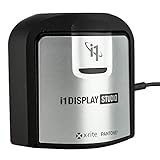
- For Color Perfectionists seeking simplicity, i1Display Studio delivers incredibly consistent color with zero stress, letting you stay more focused on doing what you love.
- Easy to use wizard driven software makes calibrating and profiling monitors and projectors a snap.
- Allows multiple monitor profiling and flare correct option for glossy screens.
- Profile validation and evaluation tools and adjustable reminder ensures your monitor calibration and profile is always up to date.
- This product is NOT for use with 3rd party software - BenQ, View Sonic, Eizo, Dell, etc. Review i1Display Pro EODIS3.
| Setting | Value |
|---|---|
| Effect Search Path | .ReShade-ShadersShaders** |
| Texture Search Path | .ReShade-ShadersTextures** |
Remove the extra leading space if you copy the values from formatted text. Return to the Home tab and click Reload. If a preset still reports missing effects, install the shader repositories it requires; the preset file alone cannot supply those files.
Manual installation notes
Use the Setup Tool whenever possible. If it cannot install ReShade for a particular application, the installer can be extracted with 7-Zip or WinRAR. It contains DLLs for different architectures, so use the DLL matching the game’s 32-bit or 64-bit architecture.
Quick wins for a faster PC:
Scan for outdated or missing drivers - takes under a minuteDriver Scan →Repair Windows errors before they cause bigger problemsFix Now →Fix the driver behind crashes, sound loss and screen glitchesFind Drivers →| Game API | DLL name used for manual installation |
|---|---|
| DirectX 9 | d3d9.dll |
| DirectX 10, 11, or 12 | dxgi.dll recommended |
| OpenGL | opengl32.dll |
DirectX 10/11/12 installations can also use d3d10.dll, d3d11.dll, or d3d12.dll, but dxgi.dll is the recommended name and is what the Setup Tool installs. Do not try to install Vulkan by copying or renaming a DLL. Vulkan uses a different loading mechanism and should be installed through the Setup Tool’s Vulkan option.
ReShade troubleshooting
ReShade does not appear in the game
Rerun the Setup Tool and verify both the executable and rendering API. The wrong executable or API is the most common cause. Also check whether the game has an anti-cheat system that blocks ReShade, and confirm that you installed the build appropriate for that game.
The game crashes immediately
Remove any recently installed add-ons first, then test the game with the standard build. Add-ons can conflict with one another or with the game. Antivirus and anti-cheat software can also terminate the process, particularly when the full add-on-support build is used.
Rank #3

- 𝗘𝗡𝗦𝗨𝗥𝗘 𝗔𝗖𝗖𝗨𝗥𝗔𝗧𝗘 𝗖𝗢𝗟𝗢𝗥: Groundbreaking lens-based color engine provides a higher level of color accuracy for multiple monitors. Spyder X Pro features room-light monitoring, automatic profile changing and significantly more precise screen color, shadow detail and white balance.
- 𝗘𝗔𝗦𝗬-𝗧𝗢-𝗨𝗦𝗘: Spyder X Pro is so intuitive, you don’t have to be a color expert. It features quick and easy single-click calibration and wizard workflow with 12 predefined calibration targets for advanced color accuracy.
- 𝗤𝗨𝗜𝗖𝗞 𝗖𝗢𝗟𝗢𝗥 𝗖𝗔𝗟𝗜𝗕𝗥𝗔𝗧𝗜𝗢𝗡: Calibrating your monitor to achieve color precision is quick and easy, taking just a minute or two.
- 𝗖𝗢𝗠𝗣𝗔𝗥𝗘 𝗕𝗘𝗙𝗢𝗥𝗘 & 𝗔𝗙𝗧𝗘𝗥: SpyderProof functionality provides before-and-after evaluation of your display and allows you to see the difference using your own images.
- 𝗖𝗔𝗟𝗜𝗕𝗥𝗔𝗧𝗘 𝗠𝗨𝗟𝗧𝗜𝗣𝗟𝗘 𝗗𝗜𝗦𝗣𝗟𝗔𝗬𝗦: Spyder X software allows you to calibrate multiple laptops and desktop monitors.
The game launches but looks exactly the same
Install at least one shader repository and enable an effect in the ReShade overlay. ReShade without shaders does not automatically change the game’s appearance.
A preset loads with missing effects
Install the repositories required by that preset, verify the Effect Search Path and Texture Search Path, then choose Home → Reload. Presets often depend on shader files that are not bundled with the .ini file.
Settings do not persist
Make sure the game directory is writable. If it is protected, run the installer with suitable permissions and check whether security software is preventing ReShade from writing its configuration files.
Online-game compatibility is uncertain
Use the standard build and check the game developer’s or anti-cheat provider’s policy before playing online. Do not assume that because ReShade works technically, it is permitted by the game’s rules.
How to uninstall ReShade
- Run the ReShade Setup Tool.
- Select the game with ReShade installed.
- Select the detected rendering API.
- Choose Uninstall ReShade and effects.
- Click Finish after the confirmation screen.
If you must remove it manually, inspect the game folder and delete only files that belong to ReShade, such as ReShade.ini, ReShade.log, the ReShade-Shaders folder, and the applicable dxgi.dll, d3d9.dll, d3d10.dll, d3d11.dll, or d3d12.dll. Verify each file before deleting it because similarly named DLLs may belong to the game itself.
Free tools Windows power users keep installed
One-click scans. No signup required.
Rank #4
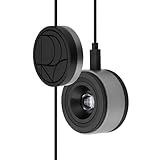
- 3-in-1 multiple function with Colorimeter, Display OSD control and ASUS Dial features
- Integrated colorimeter, both with Hardware and Software Calibration via ASUS exclusive software tool to keep long-term color accuracy and consistency
- Measuring up to 10000 nits for precise HDR calibration, seamlessly compatible with LED, OLED, Mini-LED, and more
- 5-way navigator and shortcut key provide intuitive Display OSD control accessible within the reach of your hand
- Integrate ASUS Dial provide customize shortcuts for easy, precise control of your creator software
FAQ
Where is the official ReShade download?
Use reshade.me/home, or download the standard ReShade 6.8.0 installer directly from ReShade_Setup_6.8.0.exe.
Should I download the standard or full add-on ReShade installer?
Use the standard installer for most games, especially multiplayer or anti-cheat-protected games. Use the full add-on-support build only when you specifically need third-party add-ons or unrestricted depth access, preferably for single-player use.
What key opens ReShade after installation?
The current default overlay key is Home. You can change it from ReShade’s settings if the key conflicts with the game.
Why are my ReShade preset effects missing?
A preset is only an .ini configuration and may depend on separate shader repositories. Install the required shaders, check the effect and texture search paths, and select Home → Reload in the ReShade overlay.
Recommended Free Tools
The Bottom Line
Download ReShade 6.8.0 from the official ReShade website, select the game’s real executable and rendering API, and use the standard build unless you have a clear need for full add-on support. Install the shader repositories required by your preset, and avoid the full build for anti-cheat-protected online games unless the game’s policy explicitly allows it.
Quick Recap
Product prices and availability are accurate as of the date/time indicated and are subject to change. Any price and availability information displayed on Amazon at the time of purchase will apply.

