
Zoho Social
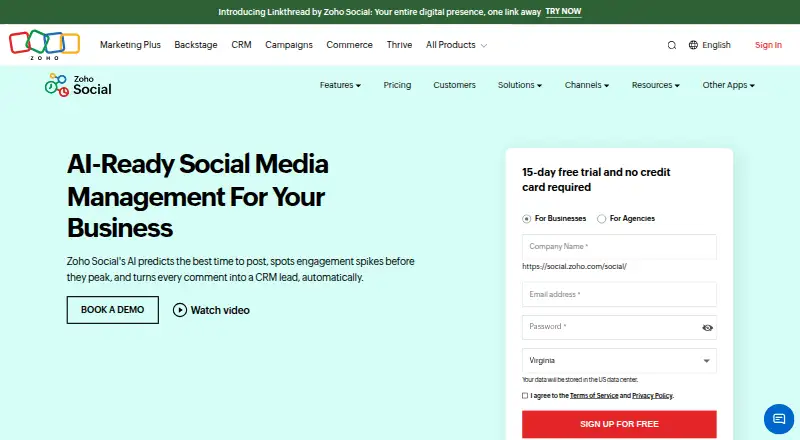
Zoho Social: A broad publishing and collaboration tool with especially strong Zoho integrations. Ranked #7 of 144 in Social Media Management Tools by our editors (8.6/10); pricing: Free plan · 15-day trial; best for zoho users needing deep publishing workflows.
At a glance
- Editor score8.6 / 10
- PricingFree plan · 15-day trial
- Best forZoho users needing deep publishing workflows
- Free planYes
- Social inboxNo
- Founded1996 · Chennai, India
- Facts checked22 Sep 2026
Where it wins
- Bulk-schedule up to 350 posts using CSV or XLSX
- Social inbox, approvals, monitoring, and advanced analytics
- Integrates with Zoho CRM, Zoho Desk, Canva, and major cloud storage tools
Where it doesn't
- Free plan supports only 1 brand, 6 channels, and 1 team member
- Standard and Professional plans remain limited to 1 team member
- Agency management features are reserved for higher-tier plans
Our verdict on Zoho Social
Zoho Social is a social media management platform for businesses, marketers, and agencies that need to publish, schedule, monitor, and report across multiple networks. It supports Facebook Pages, X Profiles, Instagram Business Profiles, LinkedIn, Google Business Profile, YouTube, Pinterest, TikTok, Mastodon, Threads, WhatsApp Business, Telegram Business, and Bluesky. Web, iOS, Android, and Chrome extension access give teams several ways to manage publishing activity.
The plan structure starts with a permanent Free plan for 1 brand, 6 social channels, 1 team member, and the zShare browser extension. Standard adds content scheduling across 11–12 channels, while Professional adds bulk scheduling and a monitoring dashboard. Premium expands the setup to 13–14 channels and 3 team members, with an inbox, content approvals, and workflow features. Agency and Agency Plus are aimed at client work, supporting 10 or 20 clients respectively, with 13–14 channels per client and 5 team members. A 15-day free trial is also available.
Its strongest depth is in publishing operations: content calendars, queues, bulk scheduling of up to 350 posts, approval workflows, team discussions, roles, permissions, reports, custom reports, and monitoring for mentions, keywords, and reviews. Zoho CRM and Zoho Desk integrations make it a natural fit for organizations already using Zoho, while Canva and storage connections such as Google Drive, Dropbox, OneDrive, Box, Evernote, and WorkDrive extend the content workflow. Choose Zoho Social for broad network coverage and structured publishing; smaller teams wanting more collaborators on entry-level plans may prefer an alternative.
Your product? Our editors can test Zoho Social in depth and publish a review, labelled as paid · from $149/mo →
Zoho Social pricing
All 6 Zoho Social plans and prices →
Zoho Social fact sheet
| Free plan | Yes |
|---|---|
| Paid from | Not verified |
| Social accounts | 12 |
| Supported networks | X, Instagram, Facebook, Google Business Profile, LinkedIn, TikTok, Pinterest, Mastodon, YouTube, Threads, Bluesky |
| Scheduled posts | Not verified |
| Social inbox | No |
| Approval workflow | No |
| Analytics level | Basic |
| Team users | 1 |
| Free trial | 15 days · no card needed |
| Deployment | Cloud, Mobile, Browser extension |
| Platforms | Web, iOS, Android, Chrome extension |
| Compliance & security | GDPR |
| Support | Email, Docs |
| Built for | Solo, Small business, Mid-market, Enterprise (editorial estimate) |
| Integrations | 15 integrations: X, Instagram, Facebook, Google Business Profile, LinkedIn, TikTok … See all → |
| Pricing | Free plan · 15-day trial (source) |
| Website | zoho.com |
| Facts checked | 22 Sep 2026 |
Zoho Social integrations
Zoho Social lists 15 integrations on its own site.
- X
- Google Business Profile
- TikTok
- Mastodon
- YouTube
- Threads
- Bluesky
- Zoho CRM
- Zoho Desk
- Canva
- RSS feeds
See all Zoho Social integrations →
Alternatives to Zoho Social
- Sprout SocialA broad social management suite for teams that need integrations and advanced workflows.9.3
- HootsuiteA mature multi-network suite for teams that can justify a high per-user price.9.2
- Brandwatch Social Media ManagementA broad platform for coordinated publishing, listening, inbox work, and custom reporting.9.1



See all Zoho Social alternatives →
Zoho Social vs the competition
- Zoho Social vs Sprout Social
- Zoho Social vs Hootsuite
- Zoho Social vs Brandwatch Social Media Management
- Zoho Social vs Meta Business Suite
- Zoho Social vs Buffer
- Zoho Social vs Agorapulse



Compare Zoho Social with any tool side by side →
Also Ranked In
Zoho Social is ranked in 9 of our directories; the 6 strongest besides Social Media Management Tools.
Used Zoho Social? Be the first to review it
The editor score above is our own research. What this page doesn't have yet is a reader's view — what you used Zoho Social for, what worked and what didn't. No stars are seeded and no review is paid for; an editor reads every one before it appears.
Write a reviewTwo minutes · verified accounts only · read by an editor before it appears
Featured on iTechGuides

Zoho Social is listed in our Social Media Management Tools directory. Add the badge to your site — it links back to this page.
<a href="https://www.itechguides.com/products/zoho-social/"><img src="https://www.itechguides.com/best/badge/zoho-social.svg" alt="Featured on iTechGuides" width="230" height="46"></a>
Reviewed by iTechGuides Editors · Editorial team · Updated Oct 2026
Advertiser disclosure: iTechGuides is reader-supported. Vendors can pay for top positions in our rankings and for a place on other products' pages, and we may earn a commission when you click some links. Bought places stand at the number bought; this page and our disclosure say so. Paying vendors may get a fuller, more detailed review from our editors, and that review can change their score. How we rank.
Last updated · How we research and update