
ZOC
ZOC: A broad terminal toolkit for professional Windows and macOS communication workflows. Ranked #21 of 40 in Terminal Emulators by our editors (7.4/10); pricing: Paid; best for professional Windows and macOS communication workflows.
At a glance
- Editor score7.4 / 10
- PricingPaid
- Best forProfessional Windows and macOS communication workflows
- Free planNo
- Paid from$79.99 one-time
- Facts checked20 Sep 2026
Where it wins
- Supports SSH, Telnet, serial, modem, ISDN, and legacy terminal emulations
- Combines file transfer, logging, host directories, scripting, and automation
- Includes perpetual licensing, support, and ZOC v9.xx updates
Where it doesn't
- No free plan is available
- The one-time license costs $79.99
- Platform support is limited to Windows and macOS
Our verdict on ZOC
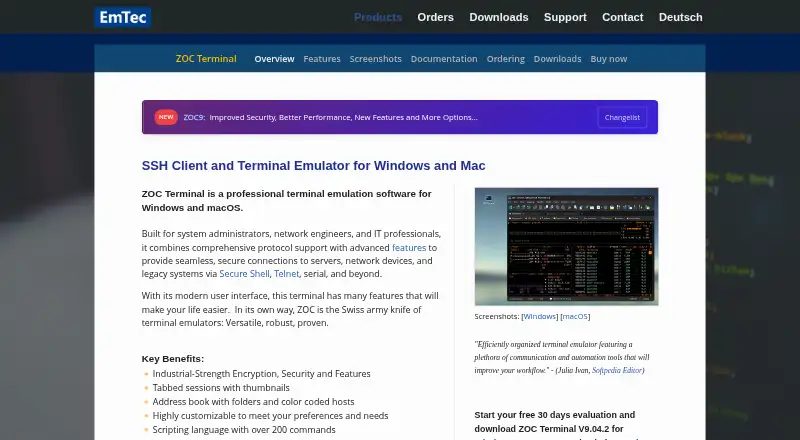
ZOC is a desktop terminal emulator and SSH client for system administrators, network engineers, IT professionals, and others who connect to Unix/Linux hosts, network devices, legacy systems, mainframes, serial equipment, or BBS services. Its communication coverage extends beyond SSH to Telnet, SSL-Telnet, Rlogin, serial, modem, and ISDN connections. Terminal emulations include xterm, VT, TN3270, TN5250, Wyse, QNX, and Tandem-6530, making it suited to mixed modern and legacy environments.
The feature depth is a central strength. SSH connections support public-key, password, keyboard-interactive, FIDO2, agent forwarding, and port forwarding. Sessions can be organized with tabs, thumbnails, movable tabs, folders, connection profiles, and automatic login sequences. ZOC also brings integrated FTP, FTPS, SFTP, SCP, Zmodem, Xmodem, Ymodem, and Kermit transfers into the same application. Logging, scrollback, raw data tracing, highlighting, printing, customizable keyboard mappings, and command-line automation support operational workflows that need repeatability and records.
Automation and platform fit will matter most to teams with established terminal procedures. REXX scripting is available, with AppleScript support on macOS, DDE on Windows, macros, auto-replies, and script execution from the command line. The ZOC9 License costs $79.99 as a one-time purchase, includes support, and includes updates for ZOC v9.xx. There is no free plan, so occasional users may prefer a lower-cost alternative. ZOC is a strong choice for professional users who need broad protocol, emulation, transfer, and automation coverage on Windows or macOS; it is less suitable for users seeking a free terminal or support beyond those platforms.
Your product? Our editors can test ZOC in depth and publish a review, labelled as paid · from $149/mo →
ZOC pricing
ZOC fact sheet
| Free plan | No |
|---|---|
| Paid from | $79.99 one-time |
| Supported platforms | Windows, macOS |
| Split panes | Not verified |
| Session sync | Not verified |
| GPU acceleration | Not verified |
| Scripting API | Yes |
| SSH support | Yes |
| Deployment | Desktop |
| Platforms | Windows, macOS |
| Pricing | Paid (source) |
| Website | emtec.com |
| Facts checked | 20 Sep 2026 |
Alternatives to ZOC
- TabbyA versatile open-source terminal for power users who automate across systems.9.4
- Windows TerminalA free, open-source Windows terminal with tabs, panes, profiles, and automation.9.3
- iTerm2A capable Mac terminal with advanced panes, profiles, session restoration, and automation.9.2


Also Ranked In
ZOC is ranked in 2 of our directories.
Used ZOC? Be the first to review it
The editor score above is our own research. What this page doesn't have yet is a reader's view — what you used ZOC for, what worked and what didn't. No stars are seeded and no review is paid for; an editor reads every one before it appears.
Write a reviewTwo minutes · verified accounts only · read by an editor before it appears
Featured on iTechGuides

ZOC is listed in our Terminal Emulators directory. Add the badge to your site — it links back to this page.
<a href="https://www.itechguides.com/products/zoc/"><img src="https://www.itechguides.com/best/badge/zoc.svg" alt="Featured on iTechGuides" width="230" height="46"></a>
Reviewed by iTechGuides Editors · Editorial team · Updated Oct 2026
Advertiser disclosure: iTechGuides is reader-supported. Vendors can pay for top positions in our rankings and for a place on other products' pages, and we may earn a commission when you click some links. Bought places stand at the number bought; this page and our disclosure say so. Paying vendors may get a fuller, more detailed review from our editors, and that review can change their score. How we rank.
Last updated · How we research and update