yamlfmt
yamlfmt: A configurable YAML formatter for recursive checks, CI workflows, and Go-based tooling. Ranked #17 of 34 in Code Formatting Tools by our editors (7.6/10); pricing: Free plan; best for YAML-heavy repositories.
At a glance
- Editor score7.6 / 10
- PricingFree plan
- Best forYAML-heavy repositories
- Free planYes
- Paid fromFree
- Supported languagesYAML
- Facts checked21 Sep 2026
Where it wins
- Formats YAML files and directories recursively
- Supports lint, dry-run, standard input, and standard output modes
- Works with pre-commit, Docker, GitLab CI, and Go libraries
Where it doesn't
- Supports YAML only
- Does not format changed lines only
- Maintained by an individual contributor, not officially by Google
Our verdict on yamlfmt
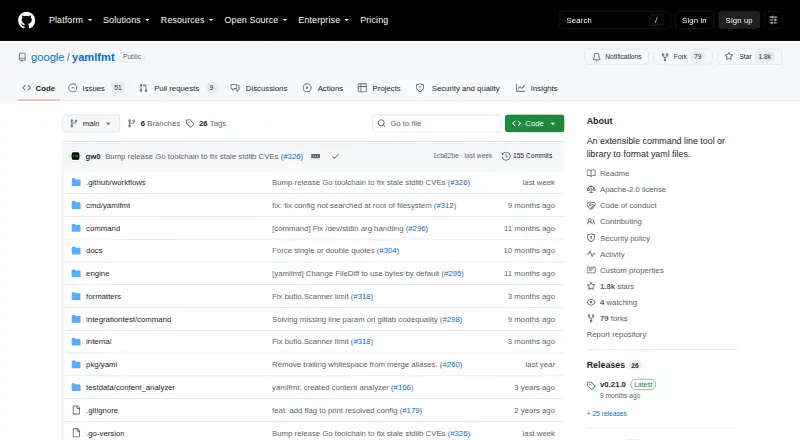
yamlfmt is an open-source YAML formatter available as a standalone command-line binary or Go module. It is designed for teams maintaining YAML-heavy repositories across Windows, macOS, and Linux. Recursive formatting covers files and directories, while lint mode reports formatting differences and exits with a failure status. Dry-run mode shows which files differ without rewriting them, and standard input/output support fits shell-based workflows and automation.
Its strongest fit is repository-wide consistency with configurable path and output rules. Include and exclude settings can be combined with Gitignore-based exclusions, helping teams control which files are processed. Formatting options cover indentation, line endings, comments, whitespace, and quoting, with support for alternate KYAML formatting. That breadth makes yamlfmt suitable for repositories with varied YAML conventions, while the Go library provides an option for integrating formatting into Go tooling rather than relying only on the command line.
For automation, yamlfmt can run as a pre-commit hook or in containerized CI/CD workflows, with integrations listed for pre-commit, Docker, and GitLab CI. Its open-source licensing and free plan make it a practical choice when a YAML-focused formatter is preferred over a broader multi-language tool. Teams should choose it when recursive formatting, ignore-aware paths, lint checks, and configurable output matter most. It is less suitable for projects that require support for languages beyond YAML, formatting only changed lines, or an officially Google-supported project, since the project is maintained by an individual contributor and is not officially supported by Google.
Your product? Our editors can test yamlfmt in depth and publish a review, labelled as paid · from $149/mo →
yamlfmt pricing
yamlfmt fact sheet
| Free plan | Yes |
|---|---|
| Paid from | Free |
| Supported languages | YAML |
| Supported platforms | Windows, macOS, Linux |
| Editor integration | Not verified |
| Ignore files | Yes |
| Changed-lines formatting | No |
| Library API | Yes |
| License model | Open_source |
| Deployment | Self-hosted, Desktop |
| Platforms | Windows, macOS, Linux |
| Support | Community, Docs |
| Built for | Solo, Small business, Mid-market, Enterprise (editorial estimate) |
| Integrations | 3 integrations: pre-commit, Docker, GitLab CI |
| Pricing | Free plan |
| Website | github.com |
| Facts checked | 21 Sep 2026 |
yamlfmt integrations
yamlfmt lists 3 integrations on its own site.
- pre-commit
- Docker
- GitLab CI
Alternatives to yamlfmt
- dprintA broad, editor-friendly formatter for multilingual repositories and changed-file workflows.9.4
- PrettierA broad, open-source formatter for web-language teams across editors and workflows.9.2
- SpotlessA build-focused formatter for JVM projects that need broad language coverage and automation.9.0

See all yamlfmt alternatives →
Used yamlfmt? Be the first to review it
The editor score above is our own research. What this page doesn't have yet is a reader's view — what you used yamlfmt for, what worked and what didn't. No stars are seeded and no review is paid for; an editor reads every one before it appears.
Write a reviewTwo minutes · verified accounts only · read by an editor before it appears
Featured on iTechGuides

yamlfmt is listed in our Code Formatting Tools directory. Add the badge to your site — it links back to this page.
<a href="https://www.itechguides.com/products/yamlfmt/"><img src="https://www.itechguides.com/best/badge/yamlfmt.svg" alt="Featured on iTechGuides" width="230" height="46"></a>
Reviewed by iTechGuides Editors · Editorial team · Updated Oct 2026
Advertiser disclosure: iTechGuides is reader-supported. Vendors can pay for top positions in our rankings and for a place on other products' pages, and we may earn a commission when you click some links. Bought places stand at the number bought; this page and our disclosure say so. Paying vendors may get a fuller, more detailed review from our editors, and that review can change their score. How we rank.
Last updated · How we research and update