
Yakuake
Yakuake: A focused, free Linux terminal with drop-down access, tabs, panes, and automation. Ranked #14 of 40 in Terminal Emulators by our editors (7.9/10); pricing: Free plan; best for linux users who prefer a lightweight drop-down terminal.
At a glance
- Editor score7.9 / 10
- PricingFree plan
- Best forLinux users who prefer a lightweight drop-down terminal
- Free planYes
- Paid fromFree
- Split panesYes
- Facts checked20 Sep 2026
Where it wins
- Drop-down access keeps terminal sessions readily available
- Tabs, split panes, and inherited directories support multitasking
- Free, open-source software with D-Bus automation support
Where it doesn't
- Supports Linux desktops rather than multiple operating systems
- Focused feature set may not suit users seeking broader terminal tooling
- Customization centers on dimensions, animation, skins, tabs, and panes
Our verdict on Yakuake
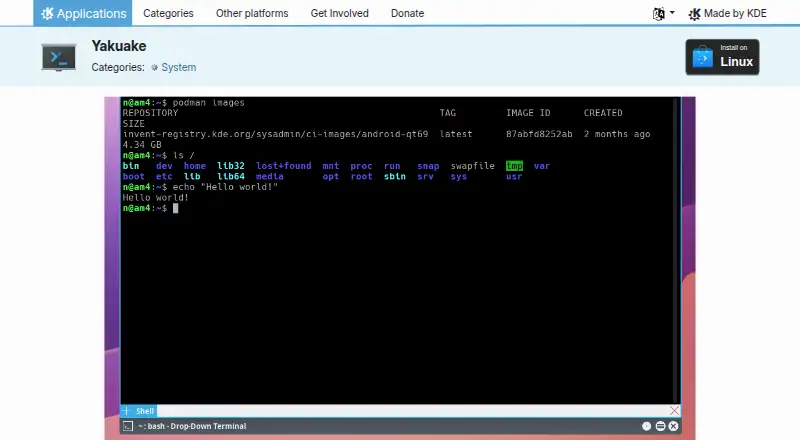
Yakuake is a free, open-source terminal emulator for Linux desktops, distributed by KDE under the GPL family of licenses. Its defining behavior is a terminal window that rolls down from the top of the screen, making it suited to Linux users who want quick access without keeping a full terminal window permanently visible. A tabbed interface, split panes, configurable dimensions, animation speed, and custom skins give it a focused set of controls for managing multiple terminal sessions.
Its layout features are the main reason to choose it. New tabs and split panes can inherit the current directory, which helps preserve context while opening related sessions. The application also provides a D-Bus interface for automation, giving users a way to connect terminal behavior with desktop workflows. Together, these features make Yakuake a practical fit for users who value fast access, compact organization, and configurable presentation over a broad collection of terminal-specific tools.
Yakuake’s scope is intentionally narrow: it centers on drop-down access, session layout, appearance controls, and automation. Linux support makes it a clear match for Linux desktops, while users who need a terminal emulator across multiple platforms should choose another product. Yakuake is also better suited to users comfortable with a focused desktop utility than to buyers looking for an extensive ecosystem of specialized capabilities. Pick it for a lightweight, customizable drop-down terminal; look elsewhere if portability beyond Linux or a wider feature scope matters more.
Your product? Our editors can test Yakuake in depth and publish a review, labelled as paid · from $149/mo →
Yakuake pricing
Yakuake fact sheet
| Free plan | Yes |
|---|---|
| Paid from | Free |
| Supported platforms | Linux |
| Split panes | Yes |
| Session sync | Not verified |
| GPU acceleration | Not verified |
| Scripting API | Yes |
| SSH support | Not verified |
| Deployment | Desktop |
| Platforms | Linux |
| Pricing | Free plan |
| Website | apps.kde.org |
| Facts checked | 20 Sep 2026 |
Alternatives to Yakuake
- TabbyA versatile open-source terminal for power users who automate across systems.9.4
- Windows TerminalA free, open-source Windows terminal with tabs, panes, profiles, and automation.9.3
- iTerm2A capable Mac terminal with advanced panes, profiles, session restoration, and automation.9.2


See all Yakuake alternatives →
Used Yakuake? Be the first to review it
The editor score above is our own research. What this page doesn't have yet is a reader's view — what you used Yakuake for, what worked and what didn't. No stars are seeded and no review is paid for; an editor reads every one before it appears.
Write a reviewTwo minutes · verified accounts only · read by an editor before it appears
Featured on iTechGuides

Yakuake is listed in our Terminal Emulators directory. Add the badge to your site — it links back to this page.
<a href="https://www.itechguides.com/products/yakuake/"><img src="https://www.itechguides.com/best/badge/yakuake.svg" alt="Featured on iTechGuides" width="230" height="46"></a>
Reviewed by iTechGuides Editors · Editorial team · Updated Oct 2026
Advertiser disclosure: iTechGuides is reader-supported. Vendors can pay for top positions in our rankings and for a place on other products' pages, and we may earn a commission when you click some links. Bought places stand at the number bought; this page and our disclosure say so. Paying vendors may get a fuller, more detailed review from our editors, and that review can change their score. How we rank.
Last updated · How we research and update