windmenu
windmenu: A free, keyboard-focused launcher for Windows Start Menu shortcuts and custom commands. Ranked #32 of 39 in Start Menu Customization Software by our editors (5.7/10); pricing: Free plan; best for keyboard-driven users wanting a minimal launcher.
At a glance
- Editor score5.7 / 10
- PricingFree plan
- Best forKeyboard-driven users wanting a minimal launcher
- Free planYes
- Paid fromFree
- Facts checked20 Sep 2026
Where it wins
- Free and open source with a self-contained executable
- Scans Start Menu shortcuts and supports custom commands
- Fuzzy filtering, themes, and Vim-style keyboard navigation
Where it doesn't
- Windows-only platform support
- Launcher-only design does not customize the Start button or taskbar
- Configuration packs and custom commands require configuration work
Our verdict on windmenu
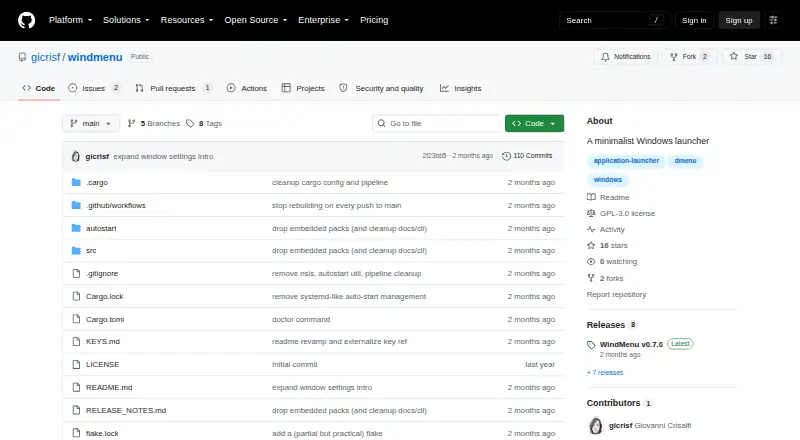
windmenu is a GPL-licensed, open-source application launcher for Windows. It opens with a configurable keyboard shortcut, scans Windows Start Menu shortcuts automatically, and lets users filter and launch entries from a keyboard-driven interface. It is aimed at people who want a minimal replacement-mode launcher rather than a broader Start Menu or taskbar customization tool. Arrow-key and Vim-style navigation, selection-frequency history, and fuzzy filtering support fast access without relying on mouse navigation.
Its strongest area is focused launcher functionality. Users can define custom commands, trigger keyboard shortcuts from those commands, and choose vertical or horizontal menu layouts. Configurable colors and appearance settings provide visual control, while named theme and command configuration packs support reusable setups. The software is distributed as a self-contained executable and can be installed through PowerShell, ZIP, Scoop, or Cargo, giving Windows users several ways to add it to their workflow.
windmenu is free and open source, with no paid-tier structure described. That makes it a practical fit for users who want a lightweight launcher built around shortcuts, Start Menu scanning, custom search, and keyboard navigation. Its narrower scope is also the main boundary: it does not customize the Windows Start button or taskbar, and its general Windows designation does not specify a particular Windows version. Choose windmenu if launcher replacement and command-driven navigation are the priority; choose a broader Start Menu customization tool if you need taskbar or Start button changes.
Your product? Our editors can test windmenu in depth and publish a review, labelled as paid · from $149/mo →
windmenu pricing
windmenu fact sheet
| Free plan | Yes |
|---|---|
| Paid from | Free |
| Supported Windows | Not verified |
| Replacement mode | Launcher |
| Start button controls | Not verified |
| Custom search | Yes |
| Taskbar controls | Not verified |
| Saved profiles | Not verified |
| Deployment | Desktop |
| Platforms | Windows |
| Support | Community, Docs |
| Built for | Solo, Small business (editorial estimate) |
| Pricing | Free plan |
| Website | github.com |
| Facts checked | 20 Sep 2026 |
Alternatives to windmenu
- Start11A paid Windows customization tool for detailed Start menu, taskbar, search, and deployment control.9.3
- Seelen UIA broad, free Windows shell replacement for users who want more than Start menu tweaks.9.1
- Open-Shell MenuA flexible classic Start menu replacement with useful search and shortcut controls.8.9

See all windmenu alternatives →
Used windmenu? Be the first to review it
The editor score above is our own research. What this page doesn't have yet is a reader's view — what you used windmenu for, what worked and what didn't. No stars are seeded and no review is paid for; an editor reads every one before it appears.
Write a reviewTwo minutes · verified accounts only · read by an editor before it appears
Featured on iTechGuides

windmenu is listed in our Start Menu Customization Software directory. Add the badge to your site — it links back to this page.
<a href="https://www.itechguides.com/products/windmenu/"><img src="https://www.itechguides.com/best/badge/windmenu.svg" alt="Featured on iTechGuides" width="230" height="46"></a>
Reviewed by iTechGuides Editors · Editorial team · Updated Oct 2026
Advertiser disclosure: iTechGuides is reader-supported. Vendors can pay for top positions in our rankings and for a place on other products' pages, and we may earn a commission when you click some links. Bought places stand at the number bought; this page and our disclosure say so. Paying vendors may get a fuller, more detailed review from our editors, and that review can change their score. How we rank.
Last updated · How we research and update