
Windhawk
Windhawk: A flexible, open-source mod platform for deep Windows Start menu and taskbar customization. Ranked #11 of 39 in Start Menu Customization Software by our editors (7.8/10); pricing: Open source; best for advanced users comfortable with customization mods.
At a glance
- Editor score7.8 / 10
- PricingOpen source
- Best forAdvanced users comfortable with customization mods
- Paid fromFree
- Supported WindowsBoth
- Facts checked20 Sep 2026
Where it wins
- Open-source platform with reviewable mod source code
- Supports custom Start menu layouts, controls, colors, and resources
- Extensive Windows taskbar customization through mods
Where it doesn't
- Windows-only, with no cross-platform support
- Uses a mod-based overlay rather than a dedicated Start menu replacement
- Requires users to select and configure individual mods
Our verdict on Windhawk
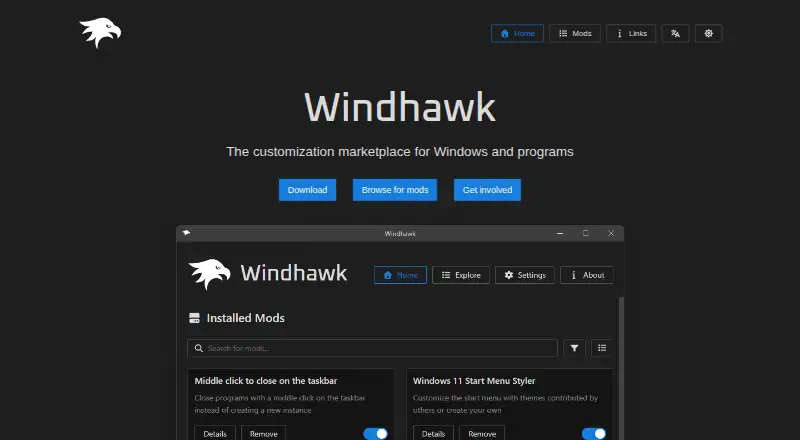
Windhawk is an open-source Windows customization platform from Ramen Software. It lets users browse an online mod catalog, install and configure mods, and review mod source code. For Start menu customization, its Windows 11 Start Menu Styler supports contributed themes and custom styles, making it a fit for advanced Windows users who want to adjust system components rather than install a standalone Start menu replacement.
The Start Menu Styler covers more than visual theming. Users can customize layouts, controls, colors, and resources, while CSS-like rules can style search WebView content. Windhawk also extends customization to the Windows taskbar, File Explorer, notification center, browser tabs, and other Windows components. This broader mod catalog makes it suitable for users who want one platform for several Windows interface changes, not only the Start menu. The included Windows 10 theme also gives the platform reach beyond its explicitly documented Windows 11 Start menu focus.
Windhawk’s main trade-off is its mod-based overlay approach. It is not a dedicated Start menu replacement with a single, self-contained interface; users choose and configure contributed or custom mods for the changes they want. That model offers detailed control and access to source code, but it also places more responsibility on the user. Choose Windhawk if you are comfortable managing Windows customization mods and want deep control over Start menu, search, and taskbar behavior. Choose a dedicated replacement instead if you prefer a single-purpose Start menu product with less configuration.
Your product? Our editors can test Windhawk in depth and publish a review, labelled as paid · from $149/mo →
Windhawk pricing
Windhawk fact sheet
| Free plan | Not verified |
|---|---|
| Paid from | Free |
| Supported Windows | Both |
| Replacement mode | Overlay |
| Start button controls | Not verified |
| Custom search | Yes |
| Taskbar controls | Extensive |
| Saved profiles | Not verified |
| Deployment | Desktop |
| Platforms | Windows |
| Support | Community |
| Built for | Solo, Small business (editorial estimate) |
| Pricing | Open source |
| Website | windhawk.net |
| Facts checked | 20 Sep 2026 |
Alternatives to Windhawk
- Start11A paid Windows customization tool for detailed Start menu, taskbar, search, and deployment control.9.3
- Seelen UIA broad, free Windows shell replacement for users who want more than Start menu tweaks.9.1
- Open-Shell MenuA flexible classic Start menu replacement with useful search and shortcut controls.8.9
See all Windhawk alternatives →
Used Windhawk? Be the first to review it
The editor score above is our own research. What this page doesn't have yet is a reader's view — what you used Windhawk for, what worked and what didn't. No stars are seeded and no review is paid for; an editor reads every one before it appears.
Write a reviewTwo minutes · verified accounts only · read by an editor before it appears
Featured on iTechGuides

Windhawk is listed in our Start Menu Customization Software directory. Add the badge to your site — it links back to this page.
<a href="https://www.itechguides.com/products/windhawk/"><img src="https://www.itechguides.com/best/badge/windhawk.svg" alt="Featured on iTechGuides" width="230" height="46"></a>
Reviewed by iTechGuides Editors · Editorial team · Updated Oct 2026
Advertiser disclosure: iTechGuides is reader-supported. Vendors can pay for top positions in our rankings and for a place on other products' pages, and we may earn a commission when you click some links. Bought places stand at the number bought; this page and our disclosure say so. Paying vendors may get a fuller, more detailed review from our editors, and that review can change their score. How we rank.
Last updated · How we research and update