
w0a
w0a: A low-cost Windows optimizer with strong controls for CS2 and system tuning. Ranked #6 of 18 in Game Booster Software by our editors (8.1/10); pricing: Free plan · 3-day trial; best for power users wanting low-cost Windows tweaking.
At a glance
- Editor score8.1 / 10
- PricingFree plan · 3-day trial
- Best forPower users wanting low-cost Windows tweaking
- Free planYes
- Paid from$60/yr
- Supported platformsWindows 10 and 11, 64-bit
- Facts checked6 Nov 2026
Where it wins
- Reversible optimizations with repair and one-click revert tools
- FPS benchmarking with before-and-after measurements
- Process, GPU, power-plan, DNS, and registry controls
Where it doesn't
- Windows-only support for 64-bit Intel or AMD systems
- Game optimization is centered on Counter-Strike 2
- The download page says the build is not yet published
Our verdict on w0a
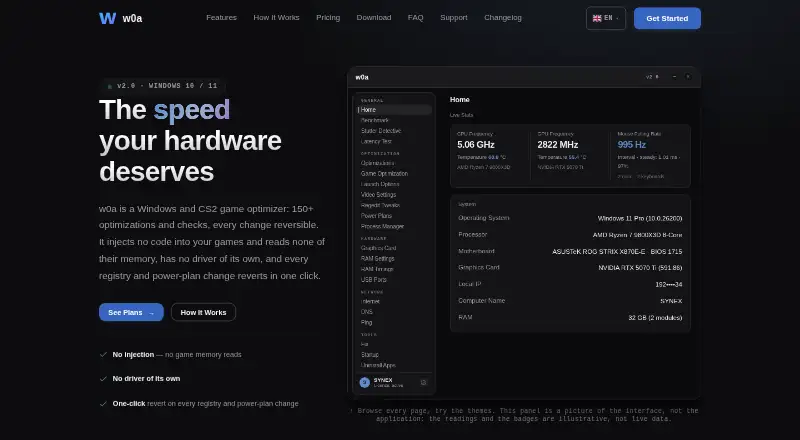
w0a is a Windows desktop game optimizer for power users who want direct control over system and game performance, especially Counter-Strike 2. It supports Windows 10 and 11 on 64-bit Intel or AMD systems. Its feature set combines hardware and sensor monitoring, FPS benchmarking, reversible Windows changes, registry management, process priority and CPU core-affinity controls, power-plan switching, graphics-card controls, DNS tools, and startup, uninstall, log-cleaning, and backup utilities.
The pricing structure keeps the entry point low. The Free plan costs $0 and includes hardware sensors, a benchmark, the 39-switch Optimizations page, CS2 launch options and video config, DNS and ping tests, RAM settings with a RAM cleaner, repair cards, a startup manager, an uninstaller, a graphics-driver check, log cleaning, backups and revert. A 3-day Pro trial is claimed inside the app through Discord, with no card. Paid plans open ten more pages: registry tweaks, adapter tuning, CS2 game optimization, process and background-engine controls, power plans, graphics-card controls, RAM timings, a stutter detective, USB ports and a latency test. Monthly costs $7 per month, Biannually $35 per 6 months, Yearly $60 per year, and Lifetime $150 once with all future updates and private support on Discord. The pricing page says the shop is not open yet, so none of the paid plans can be bought today; Paddle will handle payment as merchant of record.
w0a stands out for making system changes reversible while exposing detailed controls that suit users comfortable with Windows tuning. Benchmarking can provide before-and-after measurements, and the repair page, backups, and revert option add safeguards around configuration changes. The trade-off is a narrow platform and game focus: it is Windows-only, with game-specific configuration explicitly centered on CS2 rather than a broad selection of titles. The official download page states that the build is not yet published. Choose w0a if you want granular Windows and CS2 controls at a low price; choose an alternative if you need broader game coverage or another operating system.
Your product? Our editors can test w0a in depth and publish a review, labelled as paid · from $149/mo →
w0a pricing
w0a fact sheet
| Free plan | Yes |
|---|---|
| Paid from | $60/yr |
| Supported platforms | Windows 10 and 11, 64-bit |
| Boost control | Not verified |
| Automatic game detection | Not verified |
| Process management | Yes |
| Game profiles | Yes |
| Performance overlay | Not verified |
| Free trial | 3 days |
| Deployment | Desktop |
| Platforms | Windows |
| Support | Email, Community, Docs |
| Built for | Solo, Small business (editorial estimate) |
| Pricing | Free plan · 3-day trial (source) |
| Website | w0a.app |
| Facts checked | 6 Nov 2026 |
Alternatives to w0a
- CorePinA free Windows utility for granular CPU control, game profiles, recording, and benchmarking.9.4
- PC Game BoosterAn affordable Windows booster with automatic game launching, monitoring, and resource controls.9.1
- Gaming OptimizerA focused Windows optimizer for users who want per-game CPU and process control.8.8

w0a vs the competition
- w0a vs CorePin
- w0a vs PC Game Booster
- w0a vs Gaming Optimizer
- w0a vs Wise Game Booster
- w0a vs PotatoBoost
- w0a vs Smart Game Booster


Compare w0a with any tool side by side →
Used w0a? Be the first to review it
The editor score above is our own research. What this page doesn't have yet is a reader's view — what you used w0a for, what worked and what didn't. No stars are seeded and no review is paid for; an editor reads every one before it appears.
Write a reviewTwo minutes · verified accounts only · read by an editor before it appears
Featured on iTechGuides

w0a is listed in our Game Booster Software directory. Add the badge to your site — it links back to this page.
<a href="https://www.itechguides.com/products/w0a/"><img src="https://www.itechguides.com/best/badge/w0a.svg" alt="Featured on iTechGuides" width="230" height="46"></a>
Reviewed by iTechGuides Editors · Editorial team · Updated Nov 2026
Advertiser disclosure: iTechGuides is reader-supported. Vendors can pay for top positions in our rankings and for a place on other products' pages, and we may earn a commission when you click some links. Bought places stand at the number bought; this page and our disclosure say so. Paying vendors may get a fuller, more detailed review from our editors, and that review can change their score. How we rank.
Last updated · How we research and update