CorePin
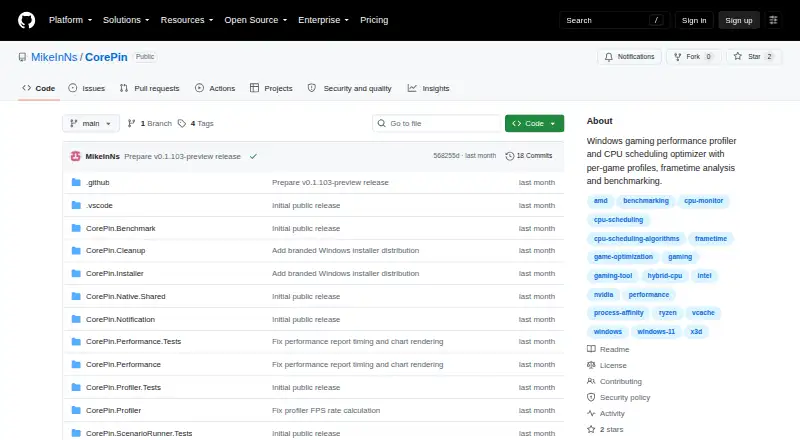
CorePin: A free Windows utility for granular CPU control, game profiles, recording, and benchmarking. Ranked #1 of 18 in Game Booster Software by our editors (9.4/10); pricing: Free plan; best for free Windows users wanting deep per-game control.
At a glance
- Editor score9.4 / 10
- PricingFree plan
- Best forFree Windows users wanting deep per-game control
- Free planYes
- Paid fromFree
- Supported platformsWindows 10 and Windows 11
- Facts checked20 Sep 2026
Where it wins
- Per-game CPU, scheduling, priority, affinity, and power controls
- Automatic detection across major PC game launchers
- Recording, hardware metrics, comparisons, and DirectX benchmarking
Where it doesn't
- Windows 10 and 11 only
- No AI features
- Not a supported commercial service
Our verdict on CorePin
CorePin is a free Windows utility for players who want per-game control over CPU placement, scheduling, process priority, affinity, power behavior, and background workloads. It automatically detects configured games and applies saved settings when they start, then restores temporary changes after exit. The software also includes reusable CPU profiles, game-library discovery, gameplay recording, hardware metrics, run comparison, and repeatable DirectX benchmarking. It is aimed at Windows users who want more control than a simple automatic boost switch provides.
Its strongest fit is the combination of granular profiles and broad launcher discovery. CorePin can find games across Steam, the Xbox app, Microsoft Store, Epic Games Store, GOG Galaxy, EA app, Ubisoft Connect, Battle.net, Amazon Games App, and Meta PC VR. That gives users one place to associate settings with games from different ecosystems. Per-game controls cover AMD/Windows-managed CPU placement, process priority, affinity, power behavior, and background-workload isolation, while automatic application reduces the need to repeat those changes manually.
CorePin also extends beyond tuning with recording, FPS, frame-time, CPU, GPU, memory, and storage metrics, plus baseline comparison and repeatable DirectX benchmarking. Those features suit users who want to inspect performance changes across repeatable runs rather than adjust settings without measurements. The trade-off is its narrow platform scope: it targets 64-bit Windows 10 and Windows 11, with no cross-platform option. It is distributed as a source-available personal project rather than a commercial service, so users seeking a supported commercial product should consider an alternative. Choose CorePin for free, detailed Windows game control; avoid it if you need another operating system or commercial support.
Your product? Our editors can test CorePin in depth and publish a review, labelled as paid · from $149/mo →
CorePin pricing
CorePin fact sheet
| Free plan | Yes |
|---|---|
| Paid from | Free |
| Supported platforms | Windows 10 and Windows 11 |
| Boost control | Automatic |
| Automatic game detection | Yes |
| Process management | Yes |
| Game profiles | Yes |
| Performance overlay | Not verified |
| Deployment | Desktop |
| Platforms | Windows |
| Support | Community, Docs |
| Built for | Solo, Small business (editorial estimate) |
| Integrations | 10 integrations: Steam, Xbox app, Microsoft Store, Epic Games Store, GOG Galaxy, EA app … |
| Pricing | Free plan |
| Website | github.com |
| Facts checked | 20 Sep 2026 |
CorePin integrations
CorePin lists 10 integrations on its own site.
- Steam
- Xbox app
- Microsoft Store
- Epic Games Store
- GOG Galaxy
- EA app
- Ubisoft Connect
- Battle.net
- Amazon Games App
- Meta PC VR
Alternatives to CorePin
- PC Game BoosterAn affordable Windows booster with automatic game launching, monitoring, and resource controls.9.1
- Gaming OptimizerA focused Windows optimizer for users who want per-game CPU and process control.8.8
- Wise Game BoosterA free, focused Windows booster with one-click optimization and manual controls.8.5


See all CorePin alternatives →
CorePin vs the competition
- CorePin vs PC Game Booster
- CorePin vs Gaming Optimizer
- CorePin vs Wise Game Booster
- CorePin vs PotatoBoost
- CorePin vs w0a
- CorePin vs Smart Game Booster


Compare CorePin with any tool side by side →
Also Ranked In
CorePin is ranked in 2 of our directories.
Used CorePin? Be the first to review it
The editor score above is our own research. What this page doesn't have yet is a reader's view — what you used CorePin for, what worked and what didn't. No stars are seeded and no review is paid for; an editor reads every one before it appears.
Write a reviewTwo minutes · verified accounts only · read by an editor before it appears
Featured on iTechGuides

CorePin is listed in our Game Booster Software directory. Add the badge to your site — it links back to this page.
<a href="https://www.itechguides.com/products/corepin/"><img src="https://www.itechguides.com/best/badge/corepin.svg" alt="Featured on iTechGuides" width="230" height="46"></a>
Reviewed by iTechGuides Editors · Editorial team · Updated Oct 2026
Advertiser disclosure: iTechGuides is reader-supported. Vendors can pay for top positions in our rankings and for a place on other products' pages, and we may earn a commission when you click some links. Bought places stand at the number bought; this page and our disclosure say so. Paying vendors may get a fuller, more detailed review from our editors, and that review can change their score. How we rank.
Last updated · How we research and update