
VanceAI Photo Restorer
VanceAI Photo Restorer: A restoration-focused enhancer for repairing and preserving scanned family photos. Ranked #16 of 28 in AI Image Enhancers by our editors (7.3/10); pricing: Free plan; best for restoring scanned family photos.
At a glance
- Editor score7.3 / 10
- PricingFree plan
- Best forRestoring scanned family photos
- Free planYes
- Paid from$99.90/yr
- Facts checked20 Sep 2026
Where it wins
- Repairs scratches, tears, stains, creases and faded color
- Enhances facial details such as eyes, hair and skin texture
- Encrypted uploads, 24-hour deletion, Windows batch support and API access
Where it doesn't
- Batch restoration is supported on Windows through VanceAI for PC
- Web plans provide credits rather than unlimited processing
- Upload size is limited to 10 MB
Our verdict on VanceAI Photo Restorer
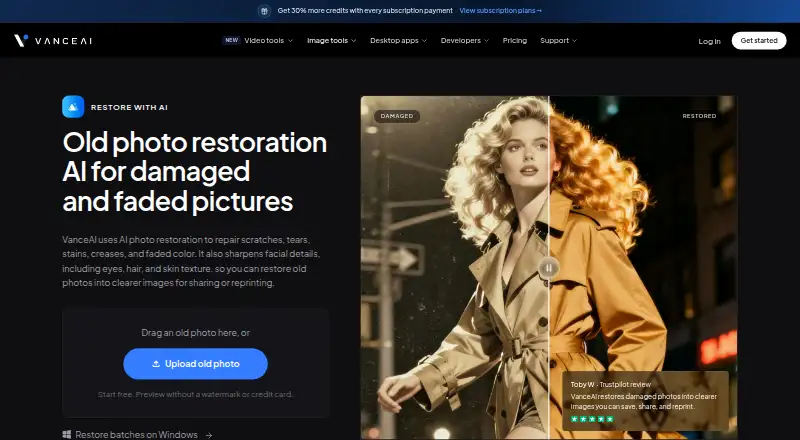
VanceAI Photo Restorer is an AI image enhancement service focused on repairing scanned and old photographs. It addresses scratches, tears, stains, creases and faded color, while also enhancing facial details such as eyes, hair and skin texture. The online service suits people restoring family photos, archived portraits or images intended for sharing and reprinting. VanceAI for PC adds local processing and batch restoration on Windows, while separate colorization and upscaling tools can support related work.
The published plans show free access alongside paid web tiers billed annually. Starter costs $9 per month for 260 credits, image and video workspaces, and credit rollover. Popular costs $17 per month for 650 credits with the same workspace and rollover features. Creator costs $26 per month for 1,300 credits and is designed for frequent video and batch processing. Studio costs $42 per month for 2,600 credits and high-volume production. Desktop options include VanceAI for PC at $39.90 per month, $99.90 per year or $129.90 lifetime, each with unlimited local processing, all features, a one-PC license, web-app credits and priority technical support. Enterprise adds custom integration, automated batch processing and direct engineering support.
Platform coverage includes web, Windows, macOS, Linux and an API, although the stated batch-restoration workflow is tied to Windows. Uploads are encrypted in transit and deleted within 24 hours after processing, which fits personal archive work where handling practices matter. The 10 MB upload limit and credit-based web plans may make the service less suitable for large or continuous collections unless desktop or Enterprise options fit the workflow. Choose VanceAI Photo Restorer for targeted repair of damaged family photographs; consider another tool when the priority is broader creative generation or an operating-system-independent batch process.
Your product? Our editors can test VanceAI Photo Restorer in depth and publish a review, labelled as paid · from $149/mo →
VanceAI Photo Restorer pricing
All 8 VanceAI Photo Restorer plans and prices →
VanceAI Photo Restorer fact sheet
| Free plan | Yes |
|---|---|
| Paid from | $99.90/yr |
| AI denoising | Not verified |
| Lighting enhancement | Not verified |
| Color enhancement | Yes |
| Batch processing | Yes |
| Maximum upload size | 10 MB |
| API access | Yes |
| Money-back guarantee | 7 days |
| Deployment | Cloud, Desktop |
| Platforms | Web, Windows, macOS, Linux |
| Support | Email, Docs · 24/7 |
| Built for | Solo, Small business, Mid-market, Enterprise (editorial estimate) |
| Pricing | Free plan (source) |
| Website | vanceai.com |
| Facts checked | 20 Sep 2026 |
Alternatives to VanceAI Photo Restorer
- VanceAI Image EnhancerA flexible enhancer with free access, desktop apps, batch processing, and an API.9.4
- Topaz PhotoA deep desktop enhancer for photographers who need RAW, batch, masking, and AI retouching tools.9.1
- Media.io Gemini Photo EnhanceA broad free web enhancer for sharpening, restoring, upscaling, and refining photos.8.8



See all VanceAI Photo Restorer alternatives →
Also Ranked In
VanceAI Photo Restorer is ranked in 3 of our directories.
Used VanceAI Photo Restorer? Be the first to review it
The editor score above is our own research. What this page doesn't have yet is a reader's view — what you used VanceAI Photo Restorer for, what worked and what didn't. No stars are seeded and no review is paid for; an editor reads every one before it appears.
Write a reviewTwo minutes · verified accounts only · read by an editor before it appears
Featured on iTechGuides

VanceAI Photo Restorer is listed in our AI Image Enhancers directory. Add the badge to your site — it links back to this page.
<a href="https://www.itechguides.com/products/vanceai-photo-restorer/"><img src="https://www.itechguides.com/best/badge/vanceai-photo-restorer.svg" alt="Featured on iTechGuides" width="230" height="46"></a>
Reviewed by iTechGuides Editors · Editorial team · Updated Oct 2026
Advertiser disclosure: iTechGuides is reader-supported. Vendors can pay for top positions in our rankings and for a place on other products' pages, and we may earn a commission when you click some links. Bought places stand at the number bought; this page and our disclosure say so. Paying vendors may get a fuller, more detailed review from our editors, and that review can change their score. How we rank.
Last updated · How we research and update