
Media.io Gemini Photo Enhance
Media.io Gemini Photo Enhance: A broad free web enhancer for sharpening, restoring, upscaling, and refining photos. Ranked #3 of 28 in AI Image Enhancers by our editors (8.8/10); pricing: Free plan; best for free web-based all-purpose enhancement.
At a glance
- Editor score8.8 / 10
- PricingFree plan
- Best forFree web-based all-purpose enhancement
- Free planYes
- AI denoisingYes
- Founded2003 · Shenzhen, China
- Facts checked20 Sep 2026
Where it wins
- Free account includes all features, unlimited preview, and 1 free credit
- Covers denoising, lighting, color, portraits, restoration, and detail recovery
- Offers 2×, 4×, and 8× upscaling with prompt-based enhancement controls
Where it doesn't
- Web-only access limits platform flexibility
- Batch processing requires an optional upgrade
- Ongoing use depends on monthly subscription or pay-as-you-go credits
Our verdict on Media.io Gemini Photo Enhance
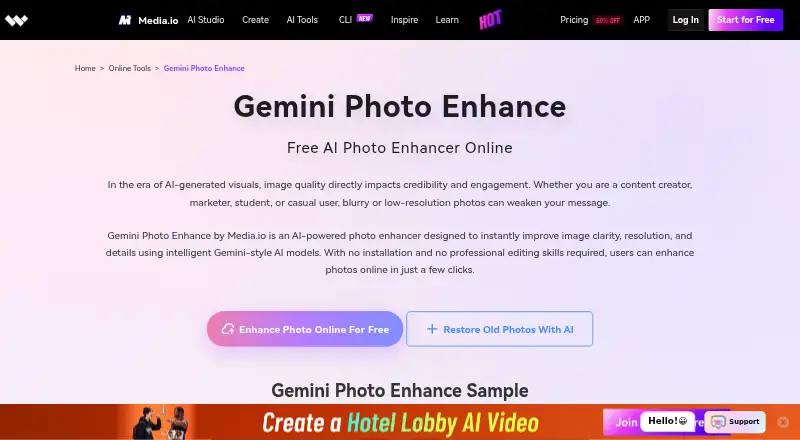
Media.io Gemini Photo Enhance is a browser-based AI tool for improving image clarity, resolution, sharpness, lighting, and fine detail. It is aimed at creators, designers, marketers, professionals, students, and casual users who want to enhance portraits, product photos, landscapes, AI-generated images, or older and blurry pictures without installing software. The workflow centers on uploading an image, choosing Photo Enhance, Upscale, or AI Detail Recovery, and downloading the processed result.
Its freemium structure gives new users a practical way to evaluate the full feature set. The Free Account includes all features, unlimited preview, and 1 free credit. Continued use is organized through either a Monthly Plan or Pay As You Go credits. That structure suits occasional users who prefer credit-based processing as well as recurring workflows that fit a subscription. The free account is particularly useful for comparing enhancement modes before committing to a paid option.
Breadth is the main reason to choose this tool. It combines AI denoising and blur reduction with lighting and exposure improvement, color correction, white-balance adjustment, portrait refinement, old-photo restoration, and 2×, 4×, or 8× upscaling. Prompt-based controls add direction over enhancement styles, while batch processing is available through optional upgrades. The trade-off is that the service is web-only, and batch workflows require an upgrade. Choose it for broad browser-based enhancement needs; users who need a desktop or mobile application should consider a tool built for those platforms instead.
Your product? Our editors can test Media.io Gemini Photo Enhance in depth and publish a review, labelled as paid · from $149/mo →
Media.io Gemini Photo Enhance pricing
All 3 Media.io Gemini Photo Enhance plans and prices →
Media.io Gemini Photo Enhance fact sheet
| Free plan | Yes |
|---|---|
| Paid from | Not verified |
| AI denoising | Yes |
| Lighting enhancement | Yes |
| Color enhancement | Yes |
| Batch processing | Yes |
| Maximum upload size | Not verified |
| API access | Not verified |
| Money-back guarantee | 30 days |
| Deployment | Cloud |
| Platforms | Web |
| Support | Email, Live chat, Docs |
| Built for | Solo, Small business, Mid-market (editorial estimate) |
| Pricing | Free plan (source) |
| Website | media.io |
| Facts checked | 20 Sep 2026 |
Alternatives to Media.io Gemini Photo Enhance
- VanceAI Image EnhancerA flexible enhancer with free access, desktop apps, batch processing, and an API.9.4
- Topaz PhotoA deep desktop enhancer for photographers who need RAW, batch, masking, and AI retouching tools.9.1
- PicEnhancer.aiA broad web toolkit with free daily credits and affordable paid batch processing.8.6



See all Media.io Gemini Photo Enhance alternatives →
Media.io Gemini Photo Enhance vs the competition
- Media.io Gemini Photo Enhance vs VanceAI Image Enhancer
- Media.io Gemini Photo Enhance vs Topaz Photo
- Media.io Gemini Photo Enhance vs PicEnhancer.ai
- Media.io Gemini Photo Enhance vs Pinin
- Media.io Gemini Photo Enhance vs Viesus
- Media.io Gemini Photo Enhance vs CrispFix



Compare Media.io Gemini Photo Enhance with any tool side by side →
Used Media.io Gemini Photo Enhance? Be the first to review it
The editor score above is our own research. What this page doesn't have yet is a reader's view — what you used Media.io Gemini Photo Enhance for, what worked and what didn't. No stars are seeded and no review is paid for; an editor reads every one before it appears.
Write a reviewTwo minutes · verified accounts only · read by an editor before it appears
Featured on iTechGuides

Media.io Gemini Photo Enhance is listed in our AI Image Enhancers directory. Add the badge to your site — it links back to this page.
<a href="https://www.itechguides.com/products/media-io-gemini-photo-enhance/"><img src="https://www.itechguides.com/best/badge/media-io-gemini-photo-enhance.svg" alt="Featured on iTechGuides" width="230" height="46"></a>
Reviewed by iTechGuides Editors · Editorial team · Updated Oct 2026
Advertiser disclosure: iTechGuides is reader-supported. Vendors can pay for top positions in our rankings and for a place on other products' pages, and we may earn a commission when you click some links. Bought places stand at the number bought; this page and our disclosure say so. Paying vendors may get a fuller, more detailed review from our editors, and that review can change their score. How we rank.
Last updated · How we research and update