
UXM
UXM: Broad hybrid monitoring for IT teams that need endpoint, application, and network visibility. Ranked #9 of 26 in Digital Experience Monitoring Software by our editors (8.5/10); pricing: Pricing on request; best for hybrid environments needing broad monitoring coverage.
At a glance
- Editor score8.5 / 10
- PricingPricing on request
- Best forHybrid environments needing broad monitoring coverage
- Endpoint monitoringYes
- Facts checked20 Sep 2026
Where it wins
- Monitors endpoints, applications, networks, SaaS, desktops, and synthetic checks
- Supports Windows, macOS, Linux, UNIX, web, API, and self-hosted deployments
- Connects remediation and operations workflows with ServiceNow, Teams, and Splunk
Where it doesn't
- Contact-sales pricing makes budget comparison less immediate
- Broad coverage may be more than teams needing one focused monitoring layer
- Automated remediation depends on external tools and workflow integrations
Our verdict on UXM
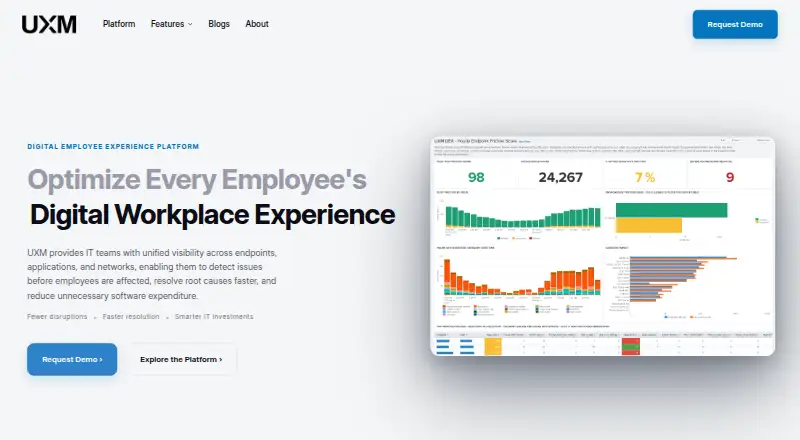
UXM is a digital employee experience and digital experience monitoring platform for IT teams and organizations. It brings together endpoint health, connectivity, application, network, desktop, web, SaaS, browser, and synthetic monitoring. The platform is designed for hybrid environments, with SaaS and on-premises deployment options and support for Windows, macOS, Linux, UNIX, web, API, Chrome extension, and self-hosted environments. Its coverage suits organizations that need a shared view of employee-facing technology rather than a tool limited to one application or infrastructure layer.
The monitoring scope is a central strength. UXM can track LAN and Wi-Fi connectivity, applications, core network services, desktop crashes, hangs, transactions, SaaS performance, and synthetic checks based on ping, TCP connect, and website tests. Application usage and software spend analysis add an operational planning layer, while dashboards and customizable reports help present findings to IT stakeholders. Teams can connect workflows with ServiceNow, Microsoft Teams, Power Automate, Microsoft Intune, and Splunk. Automated remediation is available through external tools, making the surrounding integration setup important for teams that want actions to follow detected issues.
UXM uses a contact-sales pricing model, so organizations should plan for a sales-led evaluation rather than selecting from published plan tiers. The platform’s breadth makes it a fit for IT groups managing mixed operating systems, applications, networks, and deployment models. It may be less suitable for buyers seeking a narrowly focused, independently priced monitoring utility or built-in remediation without external workflow tools. Teams should choose UXM when broad digital experience coverage and hybrid deployment matter more than simple packaging.
Your product? Our editors can test UXM in depth and publish a review, labelled as paid · from $149/mo →
UXM pricing
UXM fact sheet
| Free plan | Not verified |
|---|---|
| Paid from | Not verified |
| Endpoint monitoring | Yes |
| Application monitoring | Yes |
| Network monitoring | Yes |
| Automated remediation | Yes |
| Deployment | Hybrid |
| Supported operating systems | Windows, macOS, Linux, UNIX |
| Data retention | Not verified |
| Deployment | Cloud, Self-hosted, Desktop, Browser extension |
| Platforms | Web, Windows, macOS, Linux, Chrome extension |
| Compliance & security | ISO 27001, GDPR |
| Support | Email, Phone, Tickets, Docs |
| Built for | Small business, Mid-market, Enterprise (editorial estimate) |
| Integrations | 100+ integrations: ServiceNow, Microsoft Teams, Power Automate, Microsoft Intune, Splunk |
| Pricing | Pricing on request |
| Website | uxmapp.com |
| Facts checked | 20 Sep 2026 |
UXM integrations
UXM lists 100+ integrations on its own site — the 5 named here are the ones its pages call out.
- ServiceNow
- Microsoft Teams
- Power Automate
- Microsoft Intune
- Splunk
Alternatives to UXM
- ControlUp ONEA broad enterprise DEX suite for monitoring, remediation, compliance, and virtual workspaces.9.4
- Lakeside SysTrackA broad hybrid observability platform for diagnosing endpoint, application, network, and web issues.9.3
- Nexthink InfinityA broad cloud platform for monitoring and improving enterprise digital employee experience.9.2



Used UXM? Be the first to review it
The editor score above is our own research. What this page doesn't have yet is a reader's view — what you used UXM for, what worked and what didn't. No stars are seeded and no review is paid for; an editor reads every one before it appears.
Write a reviewTwo minutes · verified accounts only · read by an editor before it appears
Featured on iTechGuides

UXM is listed in our Digital Experience Monitoring Software directory. Add the badge to your site — it links back to this page.
<a href="https://www.itechguides.com/products/uxm/"><img src="https://www.itechguides.com/best/badge/uxm.svg" alt="Featured on iTechGuides" width="230" height="46"></a>
Reviewed by iTechGuides Editors · Editorial team · Updated Oct 2026
Advertiser disclosure: iTechGuides is reader-supported. Vendors can pay for top positions in our rankings and for a place on other products' pages, and we may earn a commission when you click some links. Bought places stand at the number bought; this page and our disclosure say so. Paying vendors may get a fuller, more detailed review from our editors, and that review can change their score. How we rank.
Last updated · How we research and update