
UptimePad
UptimePad: A practical free starting point with API access, while server monitoring begins on Pro. Ranked #15 of 55 in Website Monitoring Software by our editors (6.2/10); pricing: Free plan · paid from $12/mo; best for simple free monitoring with API access.
At a glance
- Editor score6.2 / 10
- PricingFree plan · paid from $12/mo
- Best forSimple free monitoring with API access
- Free planYes
- Paid from$12/mo
- Check typesHttp
- Facts checked20 Sep 2026
Where it wins
- Free plan includes HTTP, SSL, DNS, status pages, and API assertions
- Monitoring API supports automation and reporting
- Broad alert routing across email, chat, webhooks, and incident tools
Where it doesn't
- Free plan limits users to 10 monitors and 5-minute checks
- Server monitoring is available only on Pro and Scale
- More monitoring regions and faster checks require paid plans
Our verdict on UptimePad
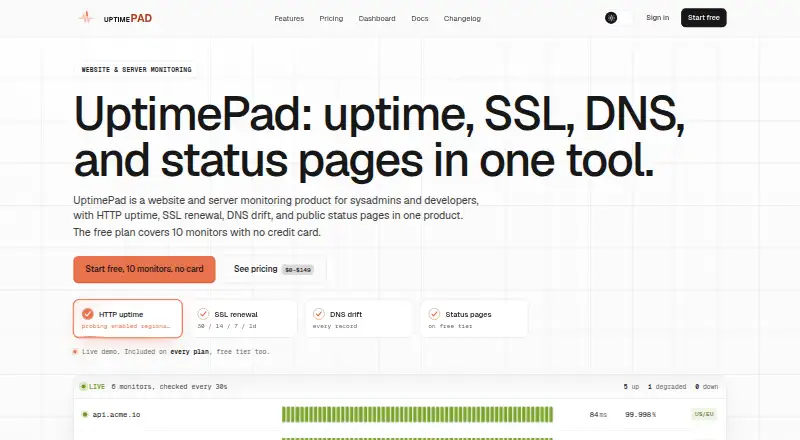
UptimePad is a hosted monitoring product for sysadmins, developers, and teams that need visibility into websites, certificates, DNS records, performance, APIs, and public status pages. Its monitoring covers HTTP uptime with configurable status codes and alert thresholds, SSL expiry and renewal alerts, DNS baseline and drift checks, response-time checks, API assertions, and server monitoring on selected paid plans. The web and API interfaces support both monitoring and automation use cases.
The plan structure gives smaller projects a clear entry point. Free includes 10 monitors, 5-minute checks, one enabled monitoring region, Email and Web Push alerts, SSL and DNS monitoring, and one public status page. Starter costs $12 per month and adds 100 monitors, 1-minute checks, up to two regions, performance checks, a custom-domain status page, and alerts through Slack, Discord, Telegram, and webhooks. Pro is $39 per month with 400 monitors, up to three regions, 15 server monitors, additional incident channels, and API access with response assertions. Scale costs $99 per month and adds 1,000 monitors, 30-second checks, up to four regions, 50 server monitors, consensus checks, and five status pages. White-Label Suite is $149 per month with Scale features plus customized status pages, branding removal, custom domains, custom SMTP, and organization sign-in for private pages.
UptimePad’s main strength is breadth without requiring a paid starting point: the free tier combines core website, SSL, DNS, status-page, and API capabilities. Its ecosystem also reaches common communication, incident-response, and metrics tools, including Microsoft Teams, PagerDuty, Opsgenie, and Prometheus. The tradeoff is tiering: server monitoring, faster intervals, additional regions, and broader operational controls sit above Free. Choose UptimePad for straightforward website monitoring with API access and a gradual path to larger monitor counts. Teams that need server coverage immediately should start at Pro or consider a product whose entry tier includes it.
UptimePad pricing
All 5 UptimePad plans and prices →
UptimePad fact sheet
| Free plan | Yes |
|---|---|
| Paid from | $12/mo |
| Check types | Http |
| SSL monitoring | Yes |
| Latency monitoring | Yes |
| Page health checks | Yes |
| Status page | Yes |
| Maintenance windows | Not verified |
| API access | Yes |
| Deployment | Cloud |
| Platforms | Web |
| Integrations | 10 integrations: Email, Web Push, Slack, Discord, Telegram, Webhook … |
| Pricing | Free plan · paid from $12/mo (source) |
| Website | uptimepad.com |
| Facts checked | 20 Sep 2026 |
UptimePad integrations
UptimePad lists 10 integrations on its own site.
- Web Push
- Slack
- Discord
- Telegram
- Webhook
- Microsoft Teams
- PagerDuty
- Opsgenie
- Prometheus
Alternatives to UptimePad
- HostTrackerA broad monitoring platform with low-cost entry pricing and extensive infrastructure coverage.9.1
- SolidPingBroad website and infrastructure monitoring with self-hosting, hosted plans, and on-call workflows.8.9
- HyperpingBroad monitoring and incident workflows, with a relatively high paid entry price.8.1



See all UptimePad alternatives →
Also listed in
Used UptimePad? Be the first to review it
The editor score above is our own research. What this page doesn't have yet is a reader's view — what you used UptimePad for, what worked and what didn't. No stars are seeded and no review is paid for; an editor reads every one before it appears.
Write a reviewTwo minutes · verified accounts only · read by an editor before it appears
Featured on iTechGuides

UptimePad is listed in our Website Monitoring Software directory. Add the badge to your site — it links back to this page.
<a href="https://www.itechguides.com/products/uptimepad/"><img src="https://www.itechguides.com/best/badge/uptimepad.svg" alt="Featured on iTechGuides" width="230" height="46"></a>
Guides on website monitoring software
- Best Website Monitoring Services Reviewed (2026)Sep 2026
- 11 Best Website Monitoring Tools To Ensure Continuous Uptime in 2026Aug 2026
- Best Website Monitoring Tools for 2022: Uptime, Speed, and Transaction PicksAug 2026
Reviewed by iTechGuides Editors · Editorial team · Updated Sep 2026
Advertiser disclosure: iTechGuides is reader-supported. We may earn a commission when you click some links. How we rank.
Last updated · How we research and update