UnixTree
UnixTree: A focused, open-source terminal file manager with a distinctive three-panel layout. Ranked #24 of 29 in Terminal File Managers by our editors (6.8/10); pricing: Open source; best for basic cross-platform terminal file operations.
At a glance
- Editor score6.8 / 10
- PricingOpen source
- Best forBasic cross-platform terminal file operations
- Paid fromFree
- Dual-pane layoutNo
- Facts checked21 Sep 2026
Where it wins
- Three-panel view combines tree, statistics, and file list
- Keyboard-controlled navigation and file operations
- Packages and build options cover Linux, macOS, and Windows environments
Where it doesn't
- No dual-pane layout
- Remote access is not clearly established
- Archive browsing and preview support are not established
Our verdict on UnixTree
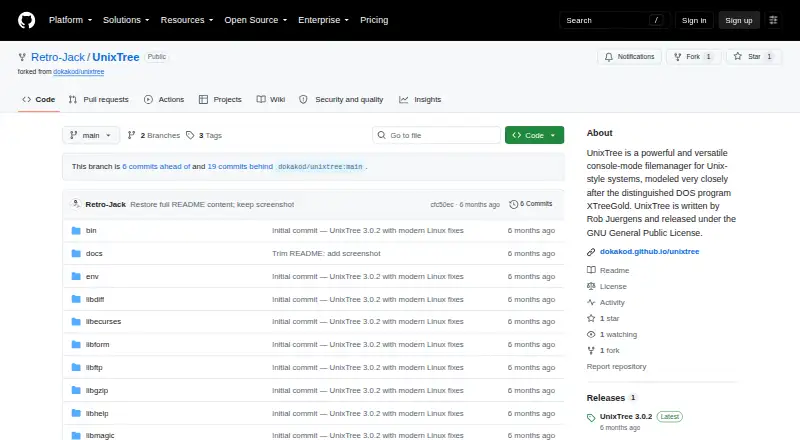
UnixTree is an open-source, curses-based console file manager modeled after the DOS XTreeGold interface. It is designed for keyboard-focused file navigation and operations in Unix-style environments, with support for Linux, macOS, and Windows compatibility environments. Its central interface uses three panels: a directory tree, disk and node statistics, and a file list. The terminal binary is named xt, while an X11 variant is provided as xtx. UnixTree is distributed under the GPL-2.0 license by Retro-Jack.
The three-panel design is the product’s clearest point of distinction. Instead of a dual-pane arrangement, UnixTree places directory structure, storage-related statistics, and file listings together, giving users a compact view of navigation and file information. Keyboard control is central to the workflow, so it suits users who prefer terminal interaction over graphical file browsers. The project also provides pre-built packages for Arch, Debian, Fedora, and generic Linux, reducing the need to build from source on those distributions.
Cross-platform coverage is broad for a terminal file manager, with source-build configurations for multiple Unix systems, macOS, and Windows compatibility environments. That makes UnixTree a practical fit for users who want a consistent, keyboard-driven approach across varied systems. It is less suitable for buyers seeking a modern graphical workflow, a dual-pane layout, or clearly established remote browsing, archive browsing, and preview features. Choose UnixTree for focused local terminal file operations and its XTreeGold-inspired structure; consider an alternative when those broader file-management capabilities are central requirements.
Your product? Our editors can test UnixTree in depth and publish a review, labelled as paid · from $149/mo →
UnixTree pricing
UnixTree fact sheet
| Free plan | Not verified |
|---|---|
| Paid from | Free |
| Dual-pane layout | No |
| Linux support | Yes |
| macOS support | Yes |
| Windows support | Yes |
| Preview pane | Not verified |
| Remote file access | Not verified |
| Archive support | Not verified |
| Deployment | Self-hosted |
| Platforms | Linux, macOS, Windows |
| Support | Docs |
| Built for | Solo, Small business (editorial estimate) |
| Pricing | Open source |
| Website | github.com |
| Facts checked | 21 Sep 2026 |
Alternatives to UnixTree
- NewtA free, open-source file manager for local work, remote sessions, archives, and search.9.4
- Rat CommanderA free, open-source file manager for keyboard-driven work across three desktop platforms.9.2
- FileManagerTUIA Vim-oriented, cross-platform terminal manager with previews, editing, batch actions, and S3 browsing.9.0


See all UnixTree alternatives →
Used UnixTree? Be the first to review it
The editor score above is our own research. What this page doesn't have yet is a reader's view — what you used UnixTree for, what worked and what didn't. No stars are seeded and no review is paid for; an editor reads every one before it appears.
Write a reviewTwo minutes · verified accounts only · read by an editor before it appears
Featured on iTechGuides

UnixTree is listed in our Terminal File Managers directory. Add the badge to your site — it links back to this page.
<a href="https://www.itechguides.com/products/unixtree/"><img src="https://www.itechguides.com/best/badge/unixtree.svg" alt="Featured on iTechGuides" width="230" height="46"></a>
Reviewed by iTechGuides Editors · Editorial team · Updated Oct 2026
Advertiser disclosure: iTechGuides is reader-supported. Vendors can pay for top positions in our rankings and for a place on other products' pages, and we may earn a commission when you click some links. Bought places stand at the number bought; this page and our disclosure say so. Paying vendors may get a fuller, more detailed review from our editors, and that review can change their score. How we rank.
Last updated · How we research and update