
Rat Commander
Rat Commander: A free, open-source file manager for keyboard-driven work across three desktop platforms. Ranked #2 of 29 in Terminal File Managers by our editors (9.2/10); pricing: Free plan; best for power users needing deep file operations.
At a glance
- Editor score9.2 / 10
- PricingFree plan
- Best forPower users needing deep file operations
- Free planYes
- Paid fromFree
- Dual-pane layoutYes
- Facts checked21 Sep 2026
Where it wins
- Dual-pane workflows with vertical or horizontal splits
- Remote filesystems, archives, Git, synchronization, and comparisons
- Free, open-source packages for Linux, macOS, and Windows
Where it doesn't
- Terminal-based workflows may not suit users who prefer graphical file managers
- Linux disk management features are not listed for macOS or Windows
- Its broad toolset may exceed the needs of users seeking basic file browsing
Our verdict on Rat Commander
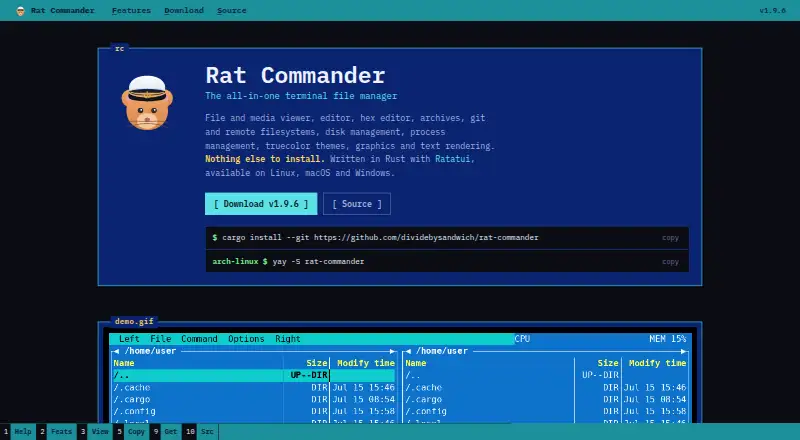
Rat Commander is a terminal-based file manager for Linux, macOS, and Windows. It is designed for users who prefer keyboard-driven navigation and want file operations, viewing, editing, archives, remote filesystems, Git, and disk utilities in one standalone application. Two-panel navigation supports vertical or horizontal splits, while the built-in tools cover text, image, Markdown, and hex files. The overall fit is strongest for power users who want a self-contained workspace rather than a basic file browser.
Its feature depth is the main reason to consider it. Rat Commander can browse and edit ZIP, TAR, 7z, and related archive formats, connect through FTP, FTPS, SFTP, and SCP, and expose Git status, commits, branches, pushes, pulls, and diffs. Directory comparison, synchronization, duplicate detection, merging, and batch renaming with live preview extend the file-operation toolkit. Process and disk usage explorers add system visibility, while Linux users also get tools for mounting, formatting, flashing, and imaging disks.
The pricing model is straightforward: Rat Commander is open source and free, with distribution as a standalone executable or platform-specific package. That makes the full feature set available without a paid tier dividing core tools from advanced functions. The trade-off is its terminal-first design. Users who want a graphical interface or only occasional file browsing may find the scope and keyboard-oriented workflow unnecessary. Choose Rat Commander for deep local and remote file work, archive handling, Git tasks, comparisons, and synchronization across desktop platforms; choose a simpler graphical manager for basic drag-and-drop file organization.
Your product? Our editors can test Rat Commander in depth and publish a review, labelled as paid · from $149/mo →
Rat Commander pricing
Rat Commander fact sheet
| Free plan | Yes |
|---|---|
| Paid from | Free |
| Dual-pane layout | Yes |
| Linux support | Yes |
| macOS support | Yes |
| Windows support | Yes |
| Preview pane | Yes |
| Remote file access | Yes |
| Archive support | Yes |
| Deployment | Desktop |
| Platforms | Windows, macOS, Linux |
| Support | Docs |
| Built for | Solo, Small business, Mid-market, Enterprise (editorial estimate) |
| Pricing | Free plan |
| Website | rat-commander.com |
| Facts checked | 21 Sep 2026 |
Alternatives to Rat Commander
- NewtA free, open-source file manager for local work, remote sessions, archives, and search.9.4
- FileManagerTUIA Vim-oriented, cross-platform terminal manager with previews, editing, batch actions, and S3 browsing.9.0
- YaziA fast, extensible terminal file manager with strong archive and preview support.8.9


See all Rat Commander alternatives →
Rat Commander vs the competition
- Rat Commander vs Newt
- Rat Commander vs FileManagerTUI
- Rat Commander vs Yazi
- Rat Commander vs Vifm
- Rat Commander vs far2l
- Rat Commander vs RTFM

Compare Rat Commander with any tool side by side →
Used Rat Commander? Be the first to review it
The editor score above is our own research. What this page doesn't have yet is a reader's view — what you used Rat Commander for, what worked and what didn't. No stars are seeded and no review is paid for; an editor reads every one before it appears.
Write a reviewTwo minutes · verified accounts only · read by an editor before it appears
Featured on iTechGuides

Rat Commander is listed in our Terminal File Managers directory. Add the badge to your site — it links back to this page.
<a href="https://www.itechguides.com/products/rat-commander/"><img src="https://www.itechguides.com/best/badge/rat-commander.svg" alt="Featured on iTechGuides" width="230" height="46"></a>
Reviewed by iTechGuides Editors · Editorial team · Updated Oct 2026
Advertiser disclosure: iTechGuides is reader-supported. Vendors can pay for top positions in our rankings and for a place on other products' pages, and we may earn a commission when you click some links. Bought places stand at the number bought; this page and our disclosure say so. Paying vendors may get a fuller, more detailed review from our editors, and that review can change their score. How we rank.
Last updated · How we research and update