FileManagerTUI
FileManagerTUI: A Vim-oriented, cross-platform terminal manager with previews, editing, batch actions, and S3 browsing. Ranked #3 of 29 in Terminal File Managers by our editors (9.0/10); pricing: Free plan; best for vim-oriented cross-platform file management.
At a glance
- Editor score9.0 / 10
- PricingFree plan
- Best forVim-oriented cross-platform file management
- Free planYes
- Paid fromFree
- Dual-pane layoutYes
- Facts checked21 Sep 2026
Where it wins
- Dual-pane previews with syntax highlighting and large-file support
- Vim navigation, fuzzy finding, filtering, and batch operations
- Embedded terminal, inline editor, and read-only AWS S3 browsing
Where it doesn't
- AWS S3 access is limited to read-only bucket browsing
- Its terminal interface may not suit users seeking graphical file management
- Remote browsing is tied to AWS S3 and the AWS CLI
Our verdict on FileManagerTUI
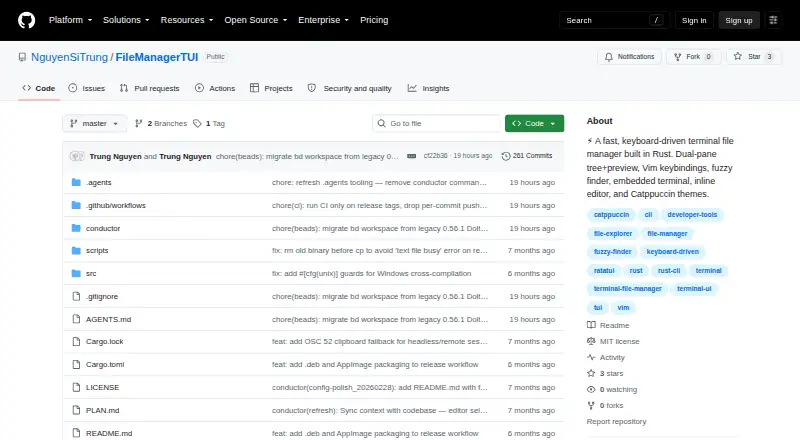
FileManagerTUI, presented in the repository as fm-tui, is a Rust-based terminal file manager for navigating and managing local files. It is aimed at users who prefer keyboard-driven workflows, particularly Vim-style navigation, while still wanting visual context from a dual-pane file tree, live previews, and syntax highlighting. Official binaries are listed for Linux, macOS, and Windows, and the project is distributed under the MIT License. Core file actions include creating, renaming, deleting, copying, cutting, pasting, undoing, multi-selecting, and processing batches of files.
Its strongest area is the concentration of editing and navigation tools inside one terminal interface. A fuzzy finder and inline directory filtering support quick movement, while the preview system covers syntax-highlighted content, Jupyter notebooks, and large files. The embedded PTY terminal uses VT100 emulation, and the inline editor includes syntax highlighting, undo and redo, and find-and-replace. Configurable themes and TOML-based configuration add control for users who want to shape the interface around an established terminal workflow.
The platform and ecosystem fit are broad for a terminal application: FileManagerTUI supports Windows, macOS, and Linux, with AWS S3 and AWS CLI integrations for read-only bucket browsing. That makes it useful for local file management with a defined path into AWS-hosted files, but remote access is narrower than local operations and does not provide the same management scope as its filesystem tools. Choose FileManagerTUI if Vim-style controls, previews, an embedded terminal, and an inline editor matter more than a graphical interface. Users who need writable S3 management or a primarily graphical file manager should choose an alternative.
Your product? Our editors can test FileManagerTUI in depth and publish a review, labelled as paid · from $149/mo →
FileManagerTUI pricing
FileManagerTUI fact sheet
| Free plan | Yes |
|---|---|
| Paid from | Free |
| Dual-pane layout | Yes |
| Linux support | Yes |
| macOS support | Yes |
| Windows support | Yes |
| Preview pane | Yes |
| Remote file access | Yes |
| Archive support | Not verified |
| Deployment | Desktop |
| Platforms | Windows, macOS, Linux |
| Support | Docs |
| Built for | Solo, Small business (editorial estimate) |
| Integrations | 2 integrations: AWS S3, AWS CLI |
| Pricing | Free plan |
| Website | github.com |
| Facts checked | 21 Sep 2026 |
FileManagerTUI integrations
FileManagerTUI lists 2 integrations on its own site.
- AWS S3
- AWS CLI
Alternatives to FileManagerTUI
- NewtA free, open-source file manager for local work, remote sessions, archives, and search.9.4
- Rat CommanderA free, open-source file manager for keyboard-driven work across three desktop platforms.9.2
- YaziA fast, extensible terminal file manager with strong archive and preview support.8.9



See all FileManagerTUI alternatives →
FileManagerTUI vs the competition
- FileManagerTUI vs Newt
- FileManagerTUI vs Rat Commander
- FileManagerTUI vs Yazi
- FileManagerTUI vs Vifm
- FileManagerTUI vs far2l
- FileManagerTUI vs RTFM

Compare FileManagerTUI with any tool side by side →
Used FileManagerTUI? Be the first to review it
The editor score above is our own research. What this page doesn't have yet is a reader's view — what you used FileManagerTUI for, what worked and what didn't. No stars are seeded and no review is paid for; an editor reads every one before it appears.
Write a reviewTwo minutes · verified accounts only · read by an editor before it appears
Featured on iTechGuides

FileManagerTUI is listed in our Terminal File Managers directory. Add the badge to your site — it links back to this page.
<a href="https://www.itechguides.com/products/filemanagertui/"><img src="https://www.itechguides.com/best/badge/filemanagertui.svg" alt="Featured on iTechGuides" width="230" height="46"></a>
Reviewed by iTechGuides Editors · Editorial team · Updated Oct 2026
Advertiser disclosure: iTechGuides is reader-supported. Vendors can pay for top positions in our rankings and for a place on other products' pages, and we may earn a commission when you click some links. Bought places stand at the number bought; this page and our disclosure say so. Paying vendors may get a fuller, more detailed review from our editors, and that review can change their score. How we rank.
Last updated · How we research and update