
UltraSearch
UltraSearch: A capable Windows search tool with broad location support and a focused free edition. Ranked #9 of 57 in Desktop Search Software by our editors (8.0/10); pricing: Free plan · 30-day trial; best for free Windows search across local and cloud locations.
At a glance
- Editor score8.0 / 10
- PricingFree plan · 30-day trial
- Best forFree Windows search across local and cloud locations
- Free planYes
- Content searchYes
- Founded1998 · Trier, Germany
- Facts checked20 Sep 2026
Where it wins
- Searches files and supported content as you type
- Covers local, network, external, SharePoint, and Google Drive locations
- Adds previews, filters, exports, and bulk file operations
Where it doesn't
- Runs on Windows platforms
- Free edition is for private, non-commercial use
- Advanced network and connected-location features require Professional
Our verdict on UltraSearch
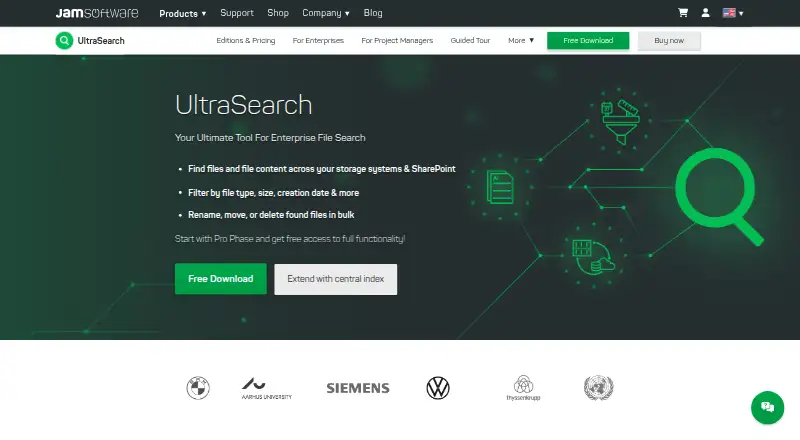
UltraSearch is Windows desktop software for finding files and searching supported file contents across local, network, external, SharePoint, and Google Drive locations. It is aimed at people who need more control than basic filename search, including filters for file type, date, and size; search syntax, wildcards, and regular expressions; and previews with highlighted matches. The free edition supports private, non-commercial use and includes search-as-you-type, content search, previews, and advanced query options.
Its strongest fit is breadth of search locations combined with practical result handling. Depending on the edition, users can search local drives, network drives, external drives, USB sticks, SD cards, SharePoint, and Google Drive paths. Results can be exported to Excel, PDF, HTML, text, or CSV, while bulk operations support copying, moving, deleting, archiving, and renaming files. The Professional plan adds Windows Server support, network-drive search, SharePoint and Google Drive search, ZIP-file search, and an optional centralized search index through SpaceObServer DataCentral.
UltraSearch suits Windows users who want fast filename and content discovery alongside file-management tools. It is particularly appropriate for private users who can work within the free edition’s usage terms, and for organizations that need broader location coverage or centralized indexing. Its main boundary is platform scope: it is built for Windows rather than a cross-platform environment. Buyers should also distinguish the free edition from Professional, since business use and several connected-location capabilities sit in the paid tier. Choose UltraSearch when Windows coverage and detailed file search matter more than broader platform support.
Your product? Our editors can test UltraSearch in depth and publish a review, labelled as paid · from $149/mo →
UltraSearch pricing
All 2 UltraSearch plans and prices →
UltraSearch fact sheet
| Free plan | Yes |
|---|---|
| Paid from | Not verified |
| Supported platforms | Windows |
| Index locations | Local drives; network drives; external drives; USB sticks; SD cards; SharePoint; Google Drive |
| Content search | Yes |
| Email search | Not verified |
| Message search | Not verified |
| OCR search | Not verified |
| Indexed-item limit | Not verified |
| Free trial | 30 days · no card needed |
| Deployment | Desktop, Self-hosted |
| Platforms | Windows |
| Compliance & security | GDPR |
| Support | Email, Live chat, Phone, Tickets, Docs |
| Built for | Solo, Mid-market, Enterprise (editorial estimate) |
| Integrations | 3 integrations: Microsoft SharePoint Online, Google Drive, SpaceObServer DataCentral See all → |
| Pricing | Free plan · 30-day trial (source) |
| Website | jam-software.com |
| Facts checked | 20 Sep 2026 |
UltraSearch integrations
UltraSearch lists 3 integrations on its own site.
- Microsoft SharePoint Online
- Google Drive
- SpaceObServer DataCentral
See all UltraSearch integrations →
Alternatives to UltraSearch
- EverythingA free Windows search utility for instant filename and path discovery.9.3
- Copernic Desktop SearchA Windows search tool for broad local, network, email, and cloud indexing.9.2
- DocFetcherA free, portable full-text search tool for local files, archives, and PST email.9.0



See all UltraSearch alternatives →
Used UltraSearch? Be the first to review it
The editor score above is our own research. What this page doesn't have yet is a reader's view — what you used UltraSearch for, what worked and what didn't. No stars are seeded and no review is paid for; an editor reads every one before it appears.
Write a reviewTwo minutes · verified accounts only · read by an editor before it appears
Featured on iTechGuides

UltraSearch is listed in our Desktop Search Software directory. Add the badge to your site — it links back to this page.
<a href="https://www.itechguides.com/products/ultrasearch/"><img src="https://www.itechguides.com/best/badge/ultrasearch.svg" alt="Featured on iTechGuides" width="230" height="46"></a>
Reviewed by iTechGuides Editors · Editorial team · Updated Oct 2026
Advertiser disclosure: iTechGuides is reader-supported. Vendors can pay for top positions in our rankings and for a place on other products' pages, and we may earn a commission when you click some links. Bought places stand at the number bought; this page and our disclosure say so. Paying vendors may get a fuller, more detailed review from our editors, and that review can change their score. How we rank.
Last updated · How we research and update