
Everything
Everything: A free Windows search utility for instant filename and path discovery. Ranked #1 of 57 in Desktop Search Software by our editors (9.3/10); pricing: Free plan; best for free instant filename search on Windows.
At a glance
- Editor score9.3 / 10
- PricingFree plan
- Best forFree instant filename search on Windows
- Free planYes
- Paid fromFree
- Content searchYes
- Facts checked20 Sep 2026
Where it wins
- Instant filename and path search with operators, wildcards, and regex
- Indexes local, removable, and network folders
- Finds duplicates and exports results to CSV, TXT, or EFU
Where it doesn't
- Windows-only platform limits cross-platform use
- Content search is narrower than filename and path search
- No AI features for semantic or assisted search
Our verdict on Everything
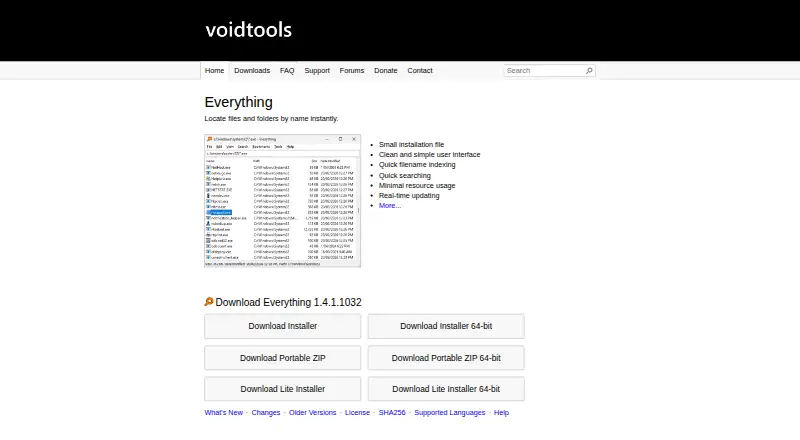
Everything is a Windows desktop file-search utility from voidtools PTY LTD. It indexes file and folder names for instant searching, making it a strong fit for anyone who needs to locate files by filename, path, folder name, or property rather than browse through directory trees. It can index local NTFS volumes, removable volumes, network folders, mapped drives, and offline file lists. Installer and portable downloads are available for Windows.
Its standout strength is search depth around filenames and paths. Operators, wildcards, regular expressions, filters, property searches, saved filters, bookmarks, and search history support both quick lookups and repeatable workflows. Duplicate finding adds a practical cleanup use case, while CSV, TXT, and EFU exports make results easier to preserve or process elsewhere. Optional HTTP, ETP/FTP, and Everything Server plugins extend access beyond the main desktop interface.
Everything is freeware, and the product has no paid tiers to compare. That makes its full filename-search feature set available without a subscription or upgrade path. The main trade-off is scope: content search is handled through the content: function, while broader document-oriented features such as verified email and OCR are outside its stated focus. Buyers who want fast Windows filename and folder search should consider Everything; those seeking a wider content-search system or a cross-platform desktop tool should choose an alternative.
Your product? Our editors can test Everything in depth and publish a review, labelled as paid · from $149/mo →
Everything pricing
Everything fact sheet
| Free plan | Yes |
|---|---|
| Paid from | Free |
| Supported platforms | windows |
| Index locations | local, removable, network |
| Content search | Yes |
| Email search | Not verified |
| Message search | Not verified |
| OCR search | Not verified |
| Indexed-item limit | Not verified |
| Deployment | Desktop |
| Platforms | Windows |
| Support | Email, Community, Docs |
| Built for | Solo, Small business (editorial estimate) |
| Pricing | Free plan |
| Website | voidtools.com |
| Facts checked | 20 Sep 2026 |
Alternatives to Everything
- Copernic Desktop SearchA Windows search tool for broad local, network, email, and cloud indexing.9.2
- DocFetcherA free, portable full-text search tool for local files, archives, and PST email.9.0
- Wise JetSearchA focused, free filename search tool for local and removable Windows drives.8.8



See all Everything alternatives →
Everything vs the competition
- Everything vs Copernic Desktop Search
- Everything vs DocFetcher
- Everything vs Wise JetSearch
- Everything vs Catfish
- Everything vs LocalSearch
- Everything vs KFind


Compare Everything with any tool side by side →
Used Everything? Be the first to review it
The editor score above is our own research. What this page doesn't have yet is a reader's view — what you used Everything for, what worked and what didn't. No stars are seeded and no review is paid for; an editor reads every one before it appears.
Write a reviewTwo minutes · verified accounts only · read by an editor before it appears
Featured on iTechGuides

Everything is listed in our Desktop Search Software directory. Add the badge to your site — it links back to this page.
<a href="https://www.itechguides.com/products/everything/"><img src="https://www.itechguides.com/best/badge/everything.svg" alt="Featured on iTechGuides" width="230" height="46"></a>
Reviewed by iTechGuides Editors · Editorial team · Updated Oct 2026
Advertiser disclosure: iTechGuides is reader-supported. Vendors can pay for top positions in our rankings and for a place on other products' pages, and we may earn a commission when you click some links. Bought places stand at the number bought; this page and our disclosure say so. Paying vendors may get a fuller, more detailed review from our editors, and that review can change their score. How we rank.
Last updated · How we research and update