Tilda
Tilda: A focused, free terminal utility for fast drop-down access and searchable sessions. Ranked #33 of 40 in Terminal Emulators by our editors (6.0/10); pricing: Free plan; best for linux users wanting a searchable drop-down terminal.
At a glance
- Editor score6.0 / 10
- PricingFree plan
- Best forLinux users wanting a searchable drop-down terminal
- Free planYes
- Paid fromFree
- Facts checked20 Sep 2026
Where it wins
- Configurable hotkeys reveal or hide the drop-down terminal
- Search supports case-sensitive and regular-expression queries
- Tabs, multiple instances, D-Bus control, and OSC8 hyperlinks
Where it doesn't
- Linux and Unix focus limits platform coverage
- Does not provide panes, SSH tooling, or session synchronization
- Wayland support runs through Xwayland rather than a native Wayland session
Our verdict on Tilda
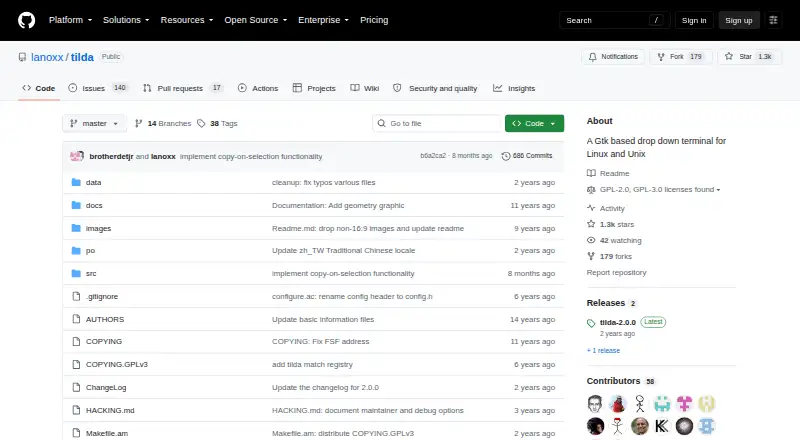
Tilda is an open-source terminal emulator built around a drop-down window rather than a conventional application window. Configurable hotkeys let users show or hide the terminal quickly, making it a practical fit for Linux users who want command-line access without keeping a full terminal window in view. It also supports tabbed sessions, multiple Tilda instances, configurable appearance, and behavior controls.
Its standout feature is searchable terminal output. Tilda provides forward and backward search, with both case-sensitive and regular-expression options, so users can navigate longer command output without relying only on visual scanning. Tabs keep related sessions together, while configurable colors and appearance settings allow the interface to match a preferred desktop setup. OSC8 hyperlink support adds clickable links in terminal output, and D-Bus control provides a way to toggle terminal instances programmatically or integrate them with desktop workflows.
Tilda is free and open source, with Linux and Unix support. It works on Xorg-based desktops and runs on Wayland through Xwayland. D-Bus is its listed integration and scripting interface, which keeps the product useful for desktop automation while maintaining a narrow scope. Users who want a quick, searchable drop-down terminal with tabs should find its feature set well aligned with that workflow. Those seeking built-in pane layouts, SSH tooling, or session synchronization should choose a terminal emulator designed around those capabilities instead.
Your product? Our editors can test Tilda in depth and publish a review, labelled as paid · from $149/mo →
Tilda pricing
Tilda fact sheet
| Free plan | Yes |
|---|---|
| Paid from | Free |
| Supported platforms | Linux |
| Split panes | Not verified |
| Session sync | Not verified |
| GPU acceleration | Not verified |
| Scripting API | Yes |
| SSH support | Not verified |
| Deployment | Desktop |
| Platforms | Linux |
| Integrations | 1 integrations: D-Bus |
| Pricing | Free plan |
| Website | github.com |
| Facts checked | 20 Sep 2026 |
Tilda integrations
Tilda lists 1 integrations on its own site.
- D-Bus
Alternatives to Tilda
- TabbyA versatile open-source terminal for power users who automate across systems.9.4
- Windows TerminalA free, open-source Windows terminal with tabs, panes, profiles, and automation.9.3
- iTerm2A capable Mac terminal with advanced panes, profiles, session restoration, and automation.9.2


Used Tilda? Be the first to review it
The editor score above is our own research. What this page doesn't have yet is a reader's view — what you used Tilda for, what worked and what didn't. No stars are seeded and no review is paid for; an editor reads every one before it appears.
Write a reviewTwo minutes · verified accounts only · read by an editor before it appears
Featured on iTechGuides

Tilda is listed in our Terminal Emulators directory. Add the badge to your site — it links back to this page.
<a href="https://www.itechguides.com/products/tilda-terminal-emulator/"><img src="https://www.itechguides.com/best/badge/tilda-terminal-emulator.svg" alt="Featured on iTechGuides" width="230" height="46"></a>
Reviewed by iTechGuides Editors · Editorial team · Updated Oct 2026
Advertiser disclosure: iTechGuides is reader-supported. Vendors can pay for top positions in our rankings and for a place on other products' pages, and we may earn a commission when you click some links. Bought places stand at the number bought; this page and our disclosure say so. Paying vendors may get a fuller, more detailed review from our editors, and that review can change their score. How we rank.
Last updated · How we research and update