
TeamOrgChart
TeamOrgChart: A Microsoft-focused org chart tool for connected employee and position data. Ranked #7 of 21 in Org Chart Software by our editors (8.2/10); pricing: 30-day trial; best for microsoft-centric organizations with complex data sources.
At a glance
- Editor score8.2 / 10
- Pricing30-day trial
- Best forMicrosoft-centric organizations with complex data sources
- Free planNo
- Paid from$200/yr
- Employee limit200 employees
- Facts checked20 Sep 2026
Where it wins
- Connects Entra ID, Active Directory, SharePoint, SQL, and Azure storage
- Supports vacancies, temporary positions, multiple views, and data analysis
- Publishes through Teams, Outlook, SharePoint, and the web
Where it doesn't
- No permanent free plan; the free offer is a 30-day trial
- Web platform only
- Best suited to organizations centered on Microsoft tools
Our verdict on TeamOrgChart
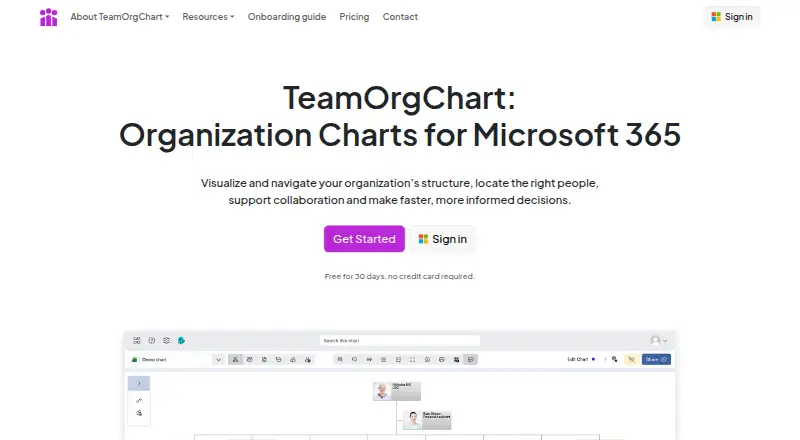
TeamOrgChart creates interactive organization charts from employee and position data. It is designed for Microsoft 365 organizations that need searchable reporting structures connected to sources such as Microsoft Entra ID, Active Directory, SharePoint, Excel, CSV, SQL databases, and Azure Table Storage. Users can search people, roles, and reporting relationships, represent vacant or temporary positions, and create multiple chart views. It fits HR, operations, and IT teams that need organization-wide charts rather than a simple one-time diagram.
The product’s main strength is its data-source breadth within a Microsoft environment. Charts can draw from directory services, business files, SharePoint, SQL databases, and Azure Table Storage. Conditional formatting and styling rules help distinguish information across views, while data analysis can identify incomplete or incorrect employee data. Charts can be exported to PDF, image, or SVG, and published through Microsoft Teams, Outlook, SharePoint, OneDrive, Microsoft Graph, and the web. Organizations using these systems can keep charting closer to existing employee data instead of relying only on manual updates.
Pricing is organization-wide rather than charged per user. The Small plan supports up to 200 employees at $25 per month or $200 per year. Medium supports up to 750 employees at $60 per month or $500 per year, while Large covers over 750 employees at $140 per month or $1,200 per year. A 30-day free trial is available, but there is no permanent free plan. TeamOrgChart is a strong fit for Microsoft-centric organizations with complex data sources, vacancies, and publishing needs. Organizations seeking a standalone web-only charting tool with broader platform independence should consider a different option.
Your product? Our editors can test TeamOrgChart in depth and publish a review, labelled as paid · from $149/mo →
TeamOrgChart pricing
All 3 TeamOrgChart plans and prices →
TeamOrgChart fact sheet
| Free plan | No |
|---|---|
| Paid from | $200/yr |
| Employee limit | 200 employees |
| CSV import | Yes |
| Directory sync | Yes |
| HRIS sync | Not verified |
| API access | Not verified |
| Custom employee fields | Not verified |
| Free trial | 30 days · no card needed |
| Deployment | Cloud |
| Platforms | Web |
| Compliance & security | GDPR |
| Support | Email, Phone, Docs |
| Built for | Small business, Mid-market, Enterprise (editorial estimate) |
| Integrations | 10 integrations: Microsoft Entra ID, Active Directory, Microsoft Teams, Microsoft Outlook, Microsoft SharePoint, OneDrive … |
| Pricing | 30-day trial (source) |
| Website | teamorgchart.com |
| Facts checked | 20 Sep 2026 |
TeamOrgChart integrations
TeamOrgChart lists 10 integrations on its own site.
- Microsoft Entra ID
- Active Directory
- Microsoft Teams
- Microsoft Outlook
- Microsoft SharePoint
- OneDrive
- Excel
- SQL Server
- Azure Table Storage
- Microsoft Graph
Alternatives to TeamOrgChart
- OrganimiA broad org-chart platform with imports, integrations, scenario planning, and a free entry plan.9.4
- OrgChartBuilderA privacy-focused org chart tool with strong scenario planning and limited live integrations.9.2
- FunctionlyA flexible org-planning workspace with a useful free tier and substantial paid jump.9.0


See all TeamOrgChart alternatives →
TeamOrgChart vs the competition
- TeamOrgChart vs Organimi
- TeamOrgChart vs OrgChartBuilder
- TeamOrgChart vs Functionly
- TeamOrgChart vs orgchart.live
- TeamOrgChart vs OrgChart Agile
- TeamOrgChart vs OrgChart



Compare TeamOrgChart with any tool side by side →
Used TeamOrgChart? Be the first to review it
The editor score above is our own research. What this page doesn't have yet is a reader's view — what you used TeamOrgChart for, what worked and what didn't. No stars are seeded and no review is paid for; an editor reads every one before it appears.
Write a reviewTwo minutes · verified accounts only · read by an editor before it appears
Featured on iTechGuides

TeamOrgChart is listed in our Org Chart Software directory. Add the badge to your site — it links back to this page.
<a href="https://www.itechguides.com/products/teamorgchart/"><img src="https://www.itechguides.com/best/badge/teamorgchart.svg" alt="Featured on iTechGuides" width="230" height="46"></a>
Reviewed by iTechGuides Editors · Editorial team · Updated Oct 2026
Advertiser disclosure: iTechGuides is reader-supported. Vendors can pay for top positions in our rankings and for a place on other products' pages, and we may earn a commission when you click some links. Bought places stand at the number bought; this page and our disclosure say so. Paying vendors may get a fuller, more detailed review from our editors, and that review can change their score. How we rank.
Last updated · How we research and update