TaskSpark
TaskSpark: A free task manager with strong focus tools and practical planning features. Ranked #45 of 148 in To-Do List Apps by our editors (4.5/10); pricing: Free plan; best for free task management with focus tools.
At a glance
- Editor score4.5 / 10
- PricingFree plan
- Best forFree task management with focus tools
- Free planYes
- Paid fromFree
- Recurring tasksYes
- Facts checked22 Sep 2026
Where it wins
- Free access includes priorities, reminders, recurring tasks, and subtasks
- Focus timer, Kanban boards, habits, and configurable break reminders
- Works across web, Windows, macOS, and iOS via an installable mobile web view
Where it doesn't
- Google Sheets sync requires Google Drive
- Outlook Calendar synchronization is read-only
- Early-access product with docs as the listed support channel
Our verdict on TaskSpark
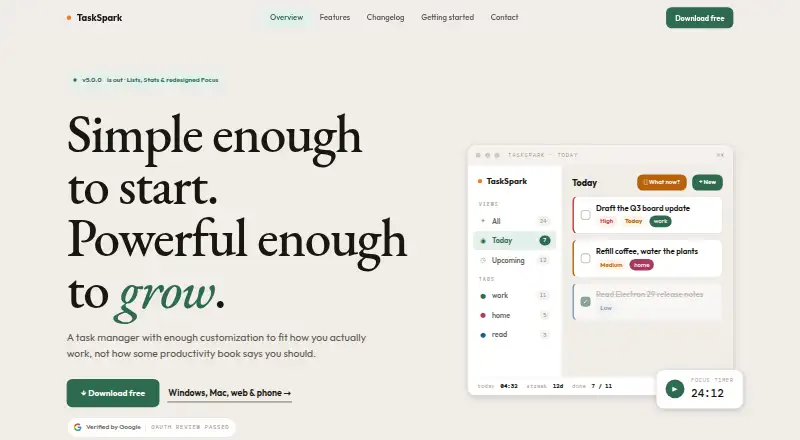
TaskSpark is a free task-management application for personal goals and work. It combines task lists with priorities, due dates, tags, statuses, recurring tasks, habit scheduling, reminders, nested subtasks, and progress features. Kanban views add drag-and-drop status columns, while the focus timer tracks elapsed time and supports configurable break reminders. It suits solo users and small teams that want structured planning without a subscription, particularly when focus routines matter alongside task tracking.
The free offering has broad core coverage for a no-cost product. Calendar synchronization connects to Outlook Calendar in read-only mode, while Google Sheets synchronization works through Google Drive. CSV import and export provide a practical way to move task information. Tasks can be stored locally or synchronized through a Google Sheet in the user’s Google Drive. Access spans the web, native Windows and macOS applications, and an iOS-installable progressive web app. This makes TaskSpark a reasonable fit for users working across desktop and browser environments, though its ecosystem centers on the two listed integrations rather than a wide integration catalog.
TaskSpark is currently free during early access, and current users keep access free forever. Possible paid plans may later apply to new users or optional add-ons, so the present pricing position is strongest for people starting now and using the included feature set. The product has no AI features, and support is provided through documentation. Choose it for free task management with focus tools, recurring planning, Kanban organization, and flexible task movement. Consider another option if you need broad third-party integrations, deeper support channels, or a more established product lifecycle.
Your product? Our editors can test TaskSpark in depth and publish a review, labelled as paid · from $149/mo →
TaskSpark pricing
TaskSpark fact sheet
| Free plan | Yes |
|---|---|
| Paid from | Free |
| Recurring tasks | Yes |
| Task reminders | Yes |
| Calendar sync | Yes |
| Subtasks | Yes |
| Offline access | Not verified |
| Active task limit | Not verified |
| Supported platforms | web, windows, macos, ios |
| Deployment | Cloud, Desktop, Mobile |
| Platforms | Web, Windows, macOS, iOS |
| Support | Docs |
| Built for | Solo, Small business (editorial estimate) |
| Integrations | 2 integrations: Google Drive/Google Sheets, Microsoft Outlook Calendar |
| Pricing | Free plan |
| Website | taskspark.tech |
| Facts checked | 22 Sep 2026 |
TaskSpark integrations
TaskSpark lists 2 integrations on its own site.
- Google Drive/Google Sheets
- Microsoft Outlook Calendar
Alternatives to TaskSpark
- TodoistA complete task manager with broad platform coverage, recurring tasks, and team workspaces.9.2
- TickTickA broad to-do app for users who want tasks, planning, habits, and focus tools together.9.0
- Microsoft To DoA capable free choice for daily planning, shared lists, and Microsoft-connected task management.8.8



See all TaskSpark alternatives →
Used TaskSpark? Be the first to review it
The editor score above is our own research. What this page doesn't have yet is a reader's view — what you used TaskSpark for, what worked and what didn't. No stars are seeded and no review is paid for; an editor reads every one before it appears.
Write a reviewTwo minutes · verified accounts only · read by an editor before it appears
Featured on iTechGuides

TaskSpark is listed in our To-Do List Apps directory. Add the badge to your site — it links back to this page.
<a href="https://www.itechguides.com/products/taskspark/"><img src="https://www.itechguides.com/best/badge/taskspark.svg" alt="Featured on iTechGuides" width="230" height="46"></a>
Reviewed by iTechGuides Editors · Editorial team · Updated Oct 2026
Advertiser disclosure: iTechGuides is reader-supported. Vendors can pay for top positions in our rankings and for a place on other products' pages, and we may earn a commission when you click some links. Bought places stand at the number bought; this page and our disclosure say so. Paying vendors may get a fuller, more detailed review from our editors, and that review can change their score. How we rank.
Last updated · How we research and update